

So here’s something the typical keyword research article won’t tell you. The biggest mistake you can make with Google Ads keyword research in 2026 isn’t picking the wrong keywords. It’s thinking about the whole process the way you did in 2019.
Back then, keyword research was basically a discovery exercise. You’d open Google Keyword Planner, pull a big list, sort by volume, group by match type, build out your ad groups, launch, and hope for the best. That was basically the whole process. Simple, right?
That world is gone. Completely.
Today, Google Ads operates on intent signals, not keyword strings. The platform’s machine learning models match your ads to queries based on what they infer the user wants, not necessarily what you explicitly told them to match. Broad match functions like an autonomous exploration engine.
The exact match isn’t actually exact anymore. And the accounts pulling the best performance aren’t the ones with the biggest keyword lists. They’re the ones with the most disciplined systems for defining intent and controlling what the algorithm does with it.
That’s a fundamentally different discipline, and this guide walks through all of it.
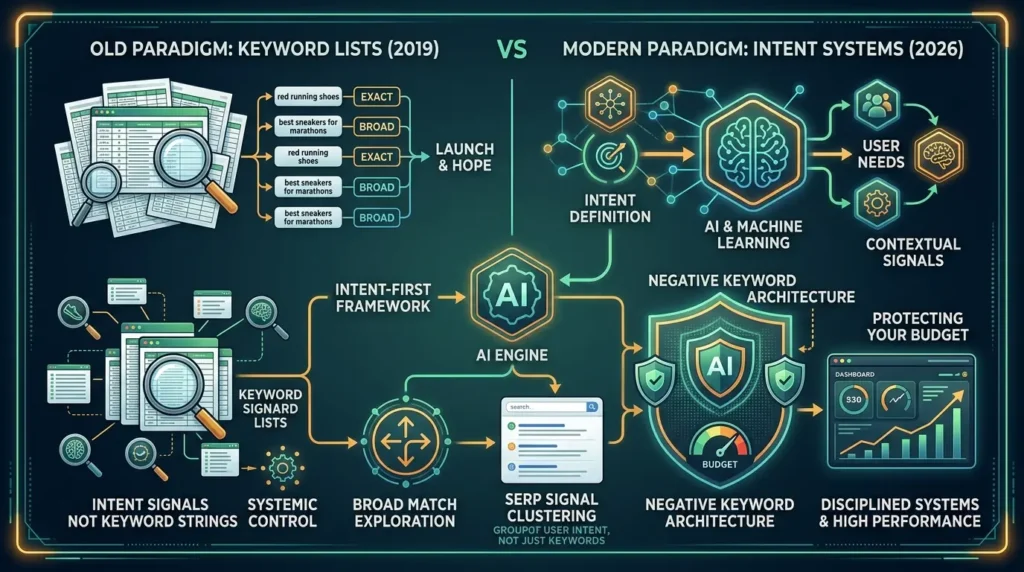
We’ll cover the intent-first framework, how to build a seed list efficiently using specific URLs, how match types actually behave in 2026, how to cluster keywords using SERP signals rather than just word similarity, and, this one gets skipped constantly, how to build a negative keyword architecture that protects your budget and keeps the automation pointed in the right direction.
By the end, you’ll have a complete operating system for paid search keyword strategy. Not a list of tips. An actual system.
- Why “more keywords” is no longer the right goal, and what to optimize for instead
- The Intent Ladder framework for identifying action-ready, high-conversion search queries
- How to build your seed keyword list starting from specific page URLs, not generic terms
- The truth about broad match, exact match, and where each belongs in a 2026 account
- How to cluster keywords using SERP overlap, not just semantic or surface-level similarity
- A three-level negative keyword architecture that protects budget like a moat
- How to navigate Performance Max negative keywords within the strict 100-term cap
- The contrarian insight: modern keyword research is primarily an exclusion problem, not a discovery problem
Why Keyword Research Has Changed, But Still Matters
Some people are now asking whether keyword research is even relevant, given that Performance Max, AI Mode, and keywordless targeting are part of the picture. The answer is yes, but the reason it matters has shifted significantly.
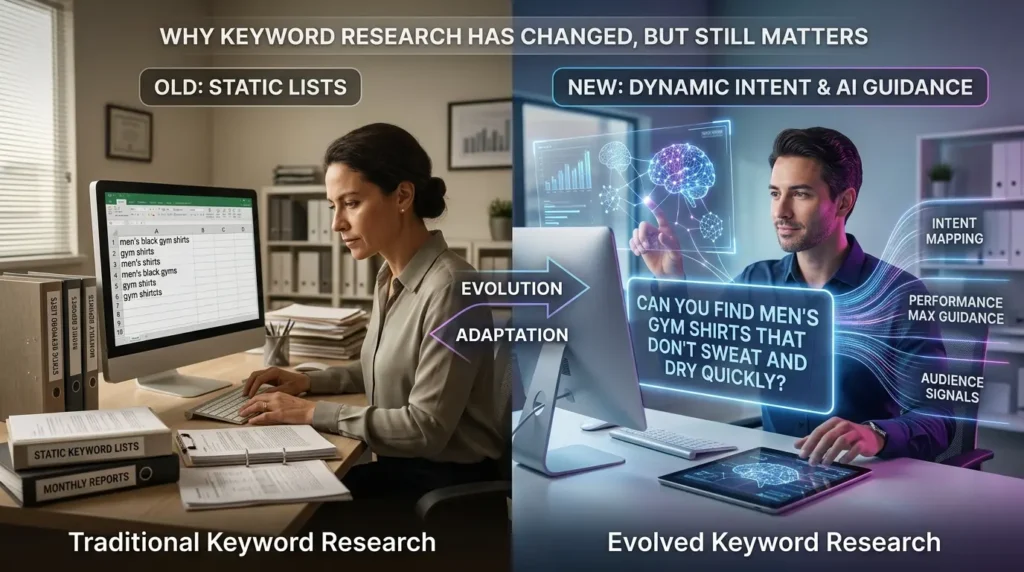
According to Google’s own data, 15% of all searches every single day are brand new, never searched before in Google’s history. As conversational AI and voice search keep growing, that number will only climb. People aren’t searching the way they used to. They’re typing full sentences and asking AI assistants nuanced, layered questions. “Can you find men’s gym shirts that don’t sweat and dry quickly” instead of “men’s black gym shirts.”
So the old model of “research once, launch forever” is finished. You can’t build a static keyword list and expect it to hold up when user behavior is this fluid.
But here’s the other side of that. Because automation now expands your reach far beyond what you explicitly target, your keyword research decisions have more strategic influence than ever, not over what Google matches necessarily, but over how well you’ve defined the intent boundaries within which that matching operates.
Think of it this way. Broad match with Smart Bidding is like giving Google a general job description and asking it to find the best candidates. Your keyword research is the job description. Write it badly and Google hires the wrong people with your money. Write it precisely and the whole system works in your favor.
The broader data still supports why this matters. Research shows that 65% of all online purchase journeys still start on Google Search or YouTube. That’s not a declining channel. It’s an evolving one, and your keyword strategy needs to evolve with it.
The Intent-First Keyword Framework
Here’s the mental model that changes everything about how you approach this.
Stop asking “what keywords should I target?” Start asking “what intent am I trying to capture, and what’s the most efficient way to define that for the algorithm?”
These are different questions. And they lead to very different decisions.
The Intent Ladder: Mapping Queries to Purchase Readiness
Every search query sits somewhere on an intent ladder. The higher you go, the closer the user is to taking action, and the more valuable that traffic is for paid search campaigns.
- Problem-Aware: “why is my water heater making noise”, the user knows something is wrong but isn’t looking for a provider yet. They want information.
- Solution-Aware: “water heater repair options”, starting to explore what’s possible. Some commercial intent, but still in research mode.
- Vendor-Aware: “water heater repair companies near me”, ready to evaluate specific providers. High commercial intent and a clear signal that a purchase decision is coming.
- Action-Ready: “hot water heater repair near me”, wants to book, call, or get a quote right now. This is where paid search delivers its best ROI.
Most campaigns waste money at the first two rungs when the budget should be concentrated at the bottom. Action-ready searches convert. Problem-aware searches educate. If you’re running a paid search for a plumbing company and spending on “why does my water heater leak,” you’re paying for informational traffic when your business needs transactional conversions.
This framework aligns directly with what Google’s official keyword matching documentation describes as the intent-based auction model, where even their own guidance emphasizes being descriptive about what you actually offer, not just what broad topic area you’re in.
“hot water heater repair near me” — Best ROI for paid search. High CPC, high conversion rate. Primary budget zone.
“water heater repair companies near me” — Ready to evaluate. Strong conversion potential. Strong secondary target.
“water heater repair options” — Exploring. Moderate intent. Use tighter match types and monitor CPA carefully.
“why is my water heater making noise” — Informational. Very low conversion rate. Let organic content handle this level — paid spend here is usually wasted.
Concentrate paid search budget at the top two levels. Deploy content strategy for the bottom two.
Key takeaway: The Intent Ladder tells you where to spend money and where to use content instead. Matching keywords to the right rung of that ladder is more valuable than any match type setting.
How to Build Your Seed Keyword List the Right Way
Here’s how most people do this wrong. They open Keyword Planner, type in a broad category term, get 500 keyword ideas, and try to make sense of all of it. The result is a messy list that broadly covers a topic area and specifically converts almost nothing.
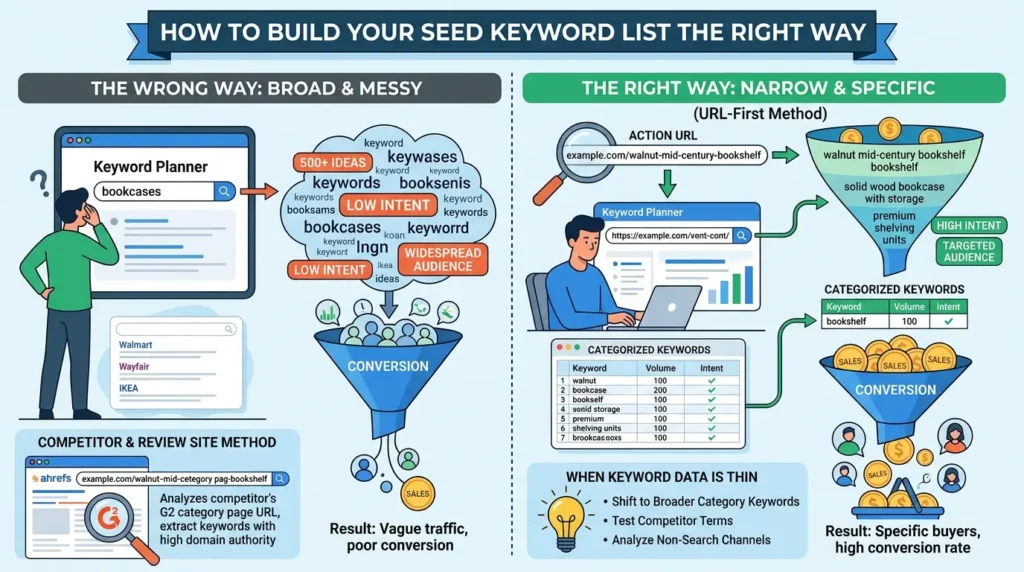
The better approach starts much more narrowly. Begin with specific pages, not general topics.
The URL-First Method – Step by Step
- Step 1: Identify the specific product or service page you’re advertising. One page. One intent. Not the whole website.
- Step 2: Open Google Keyword Planner and choose “Start with a website”, but paste in only that specific page URL, not the full domain.
- Step 3: Review the suggestions that come back. They’ll be dramatically more targeted than a general category search.
- Step 4: Filter by keyword text to narrow further. If you’re working on a bookcase page, filter for terms containing “bookcase,” “bookshelf,” or “shelving” and look for what has both reasonable volume and commercial intent signals.
- Step 5: Export to a spreadsheet and categorize by theme. Use either manual review or an AI tool to group similar intents together before building out ad groups.
The commercial difference this produces is significant. If you’re advertising for a premium furniture brand’s mid-century bookcase category, don’t search “bookcases.” Take that category page URL and run it through Keyword Planner.
You’ll get terms like “walnut mid-century bookshelf,” “solid wood bookcase with storage,” “oak bookcase closed cabinet”, keywords that reflect what the page actually sells and what people who are ready to buy are actually searching.
Before: Targeting “white bookshelves”, the SERP shows Walmart, Wayfair, and IKEA selling $40 units. You’re competing on price with everyone, and the searcher’s intent might be anything from inspiration to DIY to budget shopping.
After: Targeting “walnut mid-century bookshelf”, the SERP shows solid wood furniture priced at $400+, and every search result is a high-intent commercial listing. Same category, completely different commercial reality and conversion rate.
The Competitor and Review Site Method
This approach is especially powerful for SaaS and B2B companies. Pull competitor URLs and G2 or Capterra category pages into a tool like Ahrefs or SEMrush, then filter the results for high-intent phrases, words like “software,” “platform,” “tool,” “solution,” “service.”
Why this works: those review site category pages have extremely high domain authority, and those companies only create category pages when there’s significant search volume for a specific type of product. If your software fits cleanly into a G2 or Capterra category, that page is already telling you exactly which keywords buyers use when they’re ready to evaluate vendors.
The process: filter organic keyword data from those URLs by intent-signaling words, export the results, cross-reference with your direct competitors’ ranking terms, and you end up with a high-intent keyword list that reflects how real buyers actually search, not how your marketing team describes what you do.
When Keyword Data Is Thin or Absent
Occasionally you hit a wall. You’re working with a highly technical B2B product, ultrasonic multi-stage immersion systems for automotive parts cleaning, for example, and Keyword Planner gives you car wash chemicals and Reddit cleaning threads. That’s not a failure. That’s a useful signal.
It means direct, product-specific search traffic may not exist at meaningful volume for that precise term. Your options: shift to broader category keywords (“industrial cleaning services near me,” “contract cleaning manufacturing services”), test competitor terms with tight match control, or accept that paid search may not be the primary acquisition channel for that specific product at this time. Knowing this early saves a significant budget.
Key takeaway: Starting from specific page URLs rather than general category terms is the single most effective change you can make to keyword seed quality. The specificity of the input determines the quality of everything that follows.
Match Types in 2026: What Actually Controls What
A lot of conventional PPC wisdom breaks down here. Let me walk through how match types actually work right now, because the labels don’t tell the whole story anymore.
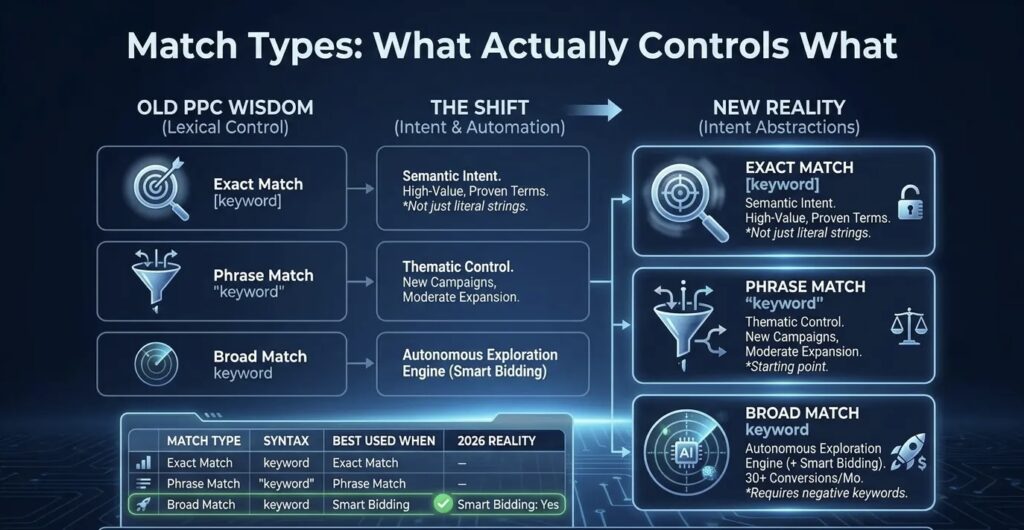
Exact Match Is No Longer Truly Exact
This surprises practitioners who learned keyword research in the pre-2020 era. Google’s current keyword matching behavior documentation confirms that exact match now includes “same meaning and intent”, which means close variants, paraphrased phrasing, and inferred synonyms are all fair game based on what Google infers about the user’s intent in that specific auction.
[water heater repair] might match “hot water heater service,” “boiler repair near me,” or “water heater fix” depending on Google’s contextual inference. You have less lexical control than the name implies.
This doesn’t mean the exact match is bad. It’s still the right choice for high-value, high-conviction terms where you know the behavior and want a concentrated budget. And critically, it’s the only match type that gives standard Search campaigns absolute priority over Performance Max campaigns targeting the same queries. But the assumption that exact match functions as a hard lexical lock belongs in an older playbook.
Broad Match Is an Autonomous Exploration Engine, With Conditions
Here’s the insight that reshapes how you think about broad matches.
When a broad match is paired with Smart Bidding, it doesn’t just match synonyms. It functions as an autonomous query exploration system, running auctions on queries that share inferred intent with your keywords, learning from your conversion signals, and expanding its semantic radius over time based on what it actually converts.
This is genuinely powerful when the conditions are right. According to Google’s internal performance data, campaigns transitioning from phrase match to broad match with Target CPA strategies see an average 25% increase in conversion volume. On Target ROAS strategies, the average improvement in conversion value is 12%.
But, and this is the part that constantly gets skipped, broad match without Smart Bidding remains a budget risk. The algorithm needs a quality conversion signal to understand what “relevant” means. Without that signal, it’s exploring without a compass. And without negative keyword infrastructure, you’re paying for that exploration with no guardrails in place.
Phrase Match: The Right Starting Point for New Campaigns
For new campaigns without significant conversion history, phrase match is the right starting match type. It gives you thematic control with moderate expansion, allowing closely related query variants while preventing full semantic drift. Transition toward broad match as you accumulate 30 or more conversions per month and activate a Smart Bidding strategy.
| Match Type | Syntax | Best Used When | Needs Smart Bidding? | 2026 Reality |
|---|---|---|---|---|
| Exact Match | [keyword] | High-value, proven converting terms. Protecting traffic from PMax. | No | Semantic — matches close variants and inferred intent, not just literal strings. Still highest-control option. |
| Phrase Match | “keyword” | New campaigns. Accounts below 30 conversions/month. Early testing phase. | Recommended | Good transitional match type. Moderate expansion with thematic control intact. |
| Broad Match | keyword | Accounts with 30+ monthly conversions, Smart Bidding active, and negative infrastructure built. | Yes — essential | Autonomous exploration engine. +25% conversions on tCPA and +12% conversion value on tROAS when paired with Smart Bidding. |
Key takeaway: Match types in 2026 are intent abstractions, not lexical controls. Choose based on your current data situation and always build your negative keyword layer before expanding match type breadth.
Keyword Clustering: Group by Intent, Not Just Similarity
Once your seed list is built, the next step is organizing it in a way that maps to how Google interprets queries , not just how the words look related to each other.
Keyword clustering is the process of grouping semantically related search queries into distinct topical hubs that share the same user intent. Done correctly, it prevents keyword cannibalization, where multiple ad groups or landing pages compete for the same search intent, and ensures your ads and landing pages map precisely to the right stage of the user’s purchase journey.
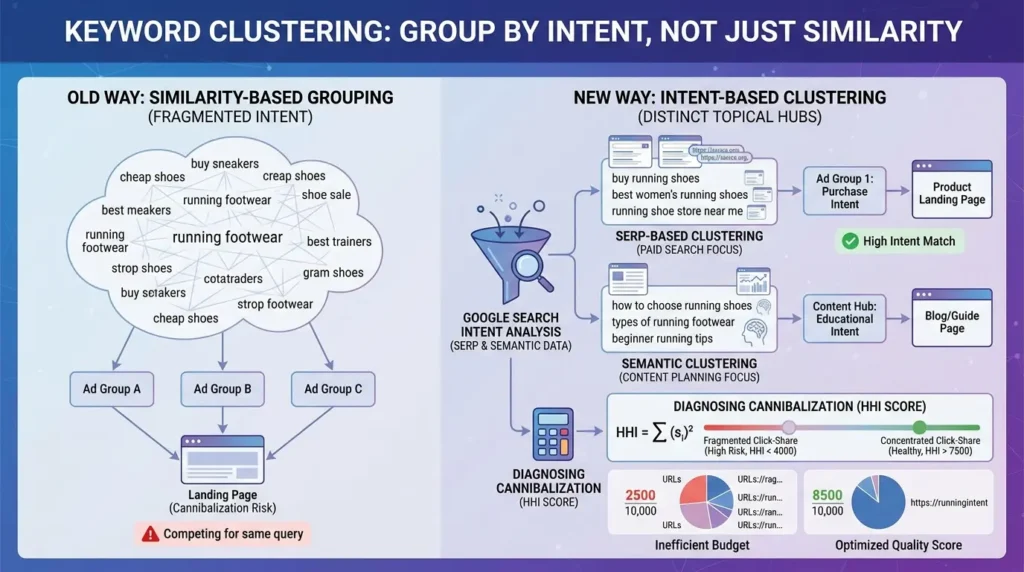
There are two main methodologies, and they serve different purposes.
SERP-Based Clustering (Recommended for Paid Search Decisions)
This method analyzes URL overlap in live search results. If two different keywords produce 30–40% of the same ranking URLs in the top 10 results, Google views those queries as sharing essentially identical user intent. Those keywords belong in the same ad group targeting the same landing page.
This tells you something critically important: don’t rely on how words sound related. Rely on what Google actually ranks when those words are searched. That’s the real intent signal, and it’s the only one that actually reflects platform behavior.
Tools like Keyword Insights (handling up to 200,000 keywords per job using live SERP data) and SEOcluster.ai (which integrates directly with Google Search Console to flag cannibalization by measuring real click-share data) automate this at scale.
Semantic Clustering (Better for Content Planning)
Semantic clustering uses NLP and vector embeddings to group keywords by linguistic similarity. This is genuinely useful for content ideation and broad topic mapping, but less reliable for paid search campaign architecture because it doesn’t account for how the search engine actually responds to those specific queries.
For campaign architecture: use SERP-based clustering. For content calendar planning: semantic clustering works well. Don’t mix up the use cases.
Diagnosing Cannibalization with the HHI Score
When multiple ad groups or pages compete for the same query, you get split traffic, diluted Quality Scores, and inefficient budget allocation. This is keyword cannibalization, and it compounds over time in ways that aren’t always immediately obvious in campaign data.
One advanced diagnostic tool for this is the Herfindahl-Hirschman Index (HHI), originally developed in economics to measure market concentration. In paid search and SEO, it measures how concentrated or fragmented click-share is across URLs competing for the same query.
Score near 10,000 = click-share on one URL (healthy, no cannibalization)
Low, distributed score = clicks fragmented across multiple URLs (cannibalization detected)
Enter the % click-share for each URL competing for the same keyword. Values should ideally add up to 100%.
Key takeaway: Group keywords by SERP overlap, not just topical similarity. Cannibalization detection using click-share data is an advanced but high-value practice that most campaigns skip, and it directly affects Quality Score and budget efficiency.
Negative Keywords: The Most Undervalued Lever in Paid Search
So here’s the insight that most practitioners miss, and it’s probably the most important one in this entire article.
The marginal value of discovering new target keywords is declining. Google’s automation already expands your reach beyond your explicit keyword list. But the marginal value of excluding the wrong traffic is increasing, because the system will expand aggressively into irrelevant territory if you don’t stop it.
Negative keywords are no longer a cleanup task. They are the primary relevance-control mechanism in a broad-match, AI-driven account. This is not a small distinction. It changes how you should allocate research time and operational attention.
The research data here is striking. Accounts without disciplined negative keyword governance have documented cases of 24,000 irrelevant search terms triggered in a single campaign, and thousands in wasted spend accumulating silently before anyone reviewed the search term report.
This is what researchers call query drift: the system slowly expanding its semantic interpretation of your keywords until the traffic profile barely resembles your original intent.
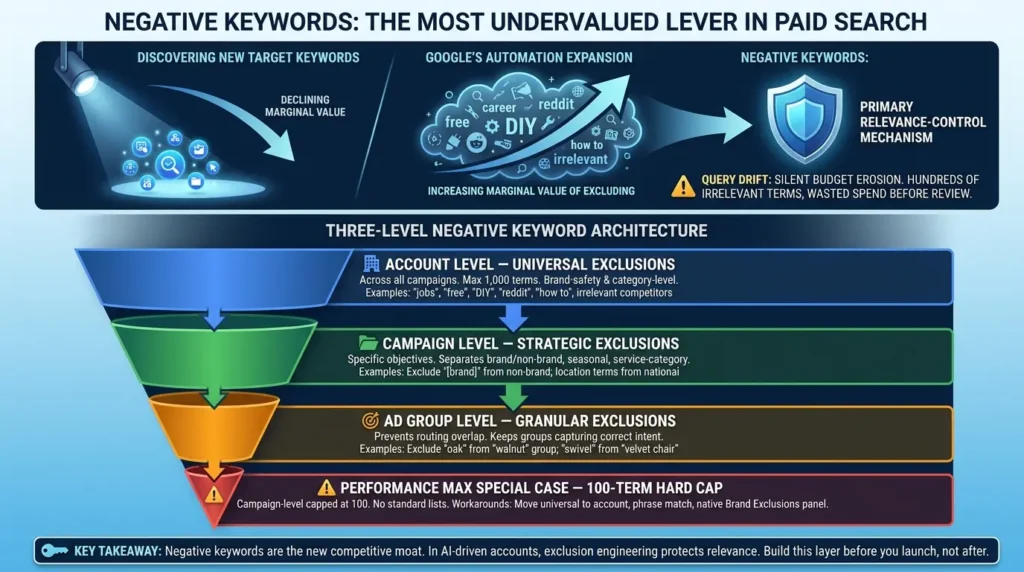
⚠️ Warning: Query drift compounds silently over time. Initial performance can look healthy while relevance slowly erodes. By the time waste becomes obvious in campaign data, a significant budget has already been consumed.
Building the Three-Level Negative Keyword Architecture — Step by Step
- Step 1: Account Level: Start with universal exclusions that should never appear across any campaign in your account. Job-search terms (careers, salary, hiring, internship), research and DIY terms (how to, tutorial, free, Reddit, guide), and any category completely outside your business scope. Limited to 1,000 terms, use this layer for your highest-priority, broadest exclusions.
- Step 2: Campaign Level: Add campaign-specific exclusions that serve individual campaign objectives. Exclude brand terms from non-brand campaigns. Exclude location terms from national campaigns. Exclude seasonal terms outside their relevant window. This layer protects campaign structure from internal budget competition between your own keyword groups.
- Step 3: Ad Group Level: Add granular exclusions to prevent routing overlap between tightly themed ad groups. If your “walnut bookcase” ad group starts capturing queries meant for your “white shelving” ad group, ad group-level negatives correct the routing without disrupting either group’s targeting.
One critical operational detail the platform documentation often buries: Google does not apply close variants to negative keywords. Unlike positive keywords where close variants are automatically included, negative keywords are lexically strict.
Excluding “cheap” does not exclude “cheapest,” “affordably,” or “budget.” You must add these variations manually, every time. This is one of the most common reasons negative keyword strategies fail to actually protect budget.
Examples: “jobs,” “careers,” “free,” “DIY,” “Reddit,” “how to,” irrelevant competitor names
Examples: Exclude “[brand name]” from non-brand campaigns; exclude location terms in national campaigns
Examples: Exclude “oak” from your “walnut” ad group; exclude “swivel” from your “velvet chair” group
Workarounds: Move universal exclusions to account level • Use phrase match negatives (one blocks all containing queries) • Use native Brand Exclusions panel (doesn’t consume campaign-level slots)
Key takeaway: Negative keywords are the new competitive moat. In a broad-match, AI-driven account, exclusion engineering is where relevance gets protected, not in the keyword targeting list itself. Build this layer before you launch, not after.
Performance Max and Search Themes: Targeting Without Traditional Keywords
Performance Max doesn’t use keyword targeting in the traditional sense. Instead, it uses Search Themes, non-binding intent signals that give the algorithm context about your business when it lacks enough conversion history to navigate independently.
Search Themes officially replaced Custom Intent audiences in 2024. Each asset group supports up to 50 themes. The critical distinction: these are directional signals, not constraints. They guide the machine learning system. They do not restrict it.
The operational implication is that your standard Search campaigns and PMax campaigns can step on each other in ways that aren’t always obvious, and if you’re not managing that interaction deliberately, your Search budgets can quietly shift toward PMax.
| Keyword / Signal Type | In Standard Search | vs. PMax Search Themes | Action Required |
|---|---|---|---|
| Exact Match | ✅ Absolute Priority | Search campaign always wins | No conflict — isolate your highest-value terms here with exact match |
| Phrase Match | ⚖️ Equal Eligibility | Competes on Ad Rank — PMax often wins ties | Add exact negatives in PMax or use account-level negatives to keep traffic in Search |
| Broad Match | ⚖️ Equal Eligibility | PMax frequently wins when Ad Rank is similar | Monitor Search Term Insights; use account-level negatives to coordinate intent boundaries |
| Search Themes (PMax) | N/A | Additive intent signal — not a hard constraint | Use specific commercial terms. Avoid broad category terms that cause exploration drift and budget waste |
💡 Tip: Run standard Search campaigns for your highest-value exact match terms. Let PMax handle broader discovery with Search Themes as commercial intent anchors. Use account-level negatives to coordinate both systems without stepping on each other’s traffic.
Key takeaway: PMax and standard Search campaigns need to be actively coordinated, not just launched in parallel. Understanding which campaign type wins each query type is essential for protecting your most valuable traffic.
Common Mistakes That Waste Real Budget
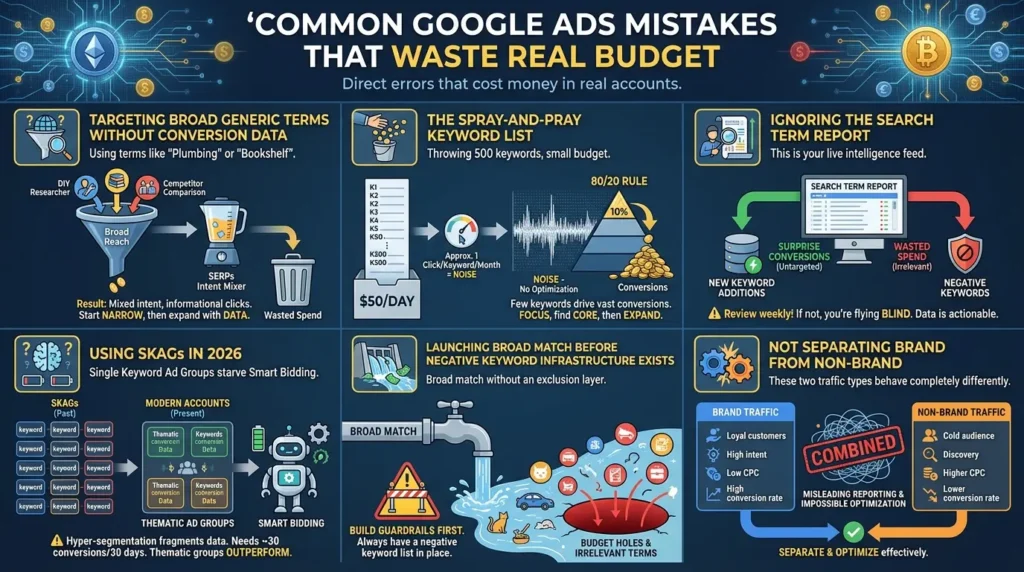
Let’s be direct about the errors that cost real money in real accounts.
Targeting broad generic terms without conversion data
“Plumbing” or “bookshelf” sounds like more reach, but it drops you into SERPs where intent is wildly mixed. You end up paying for informational traffic, DIY researchers, and competitor comparisons. Start narrow and expand only when data tells you to.
The spray-and-pray keyword list
Throwing 500 keywords into a campaign with $50/day means you’re getting approximately one click per keyword per month. That’s not data, that’s noise. You have nothing to optimize from. The 80/20 rule in Google Ads is actually closer to 90/10 in most accounts. One or two keywords drive the vast majority of conversions. Start focused, find your core terms, then expand deliberately.
Ignoring the search term report
This report is a live intelligence feed. It shows exactly what queries are triggering your ads and which ones are actually converting. If you’re not reviewing it at minimum once a week, you’re flying completely blind. The terms that surprise you, the ones converting that you never explicitly targeted, become your next keyword additions. The ones wasted become your next negatives.
Using SKAGs in 2026
Single Keyword Ad Groups were once a legitimate strategy. The core problem now is that hyper-segmentation starves Smart Bidding of the conversion data density it needs to optimize effectively. The minimum threshold for automated bidding to work well is roughly 30 conversions per 30-day period per campaign. SKAGs fragment that signal across too many containers. Thematic ad groups consistently outperform them in modern accounts.
Launching broad match before negative keyword infrastructure exists
Broad match without an exclusion layer in place is how accounts end up with thousands of irrelevant search terms and significant budget holes. Build the guardrails first. Always.
Not separating brand from non-brand
These two traffic types behave completely differently: different CPCs, different conversion rates, different attribution characteristics. Combining them in a single campaign makes it impossible to optimize either one effectively, and your reporting becomes misleading.
The Contrarian Insight: Modern Keyword Research Is an Exclusion Problem
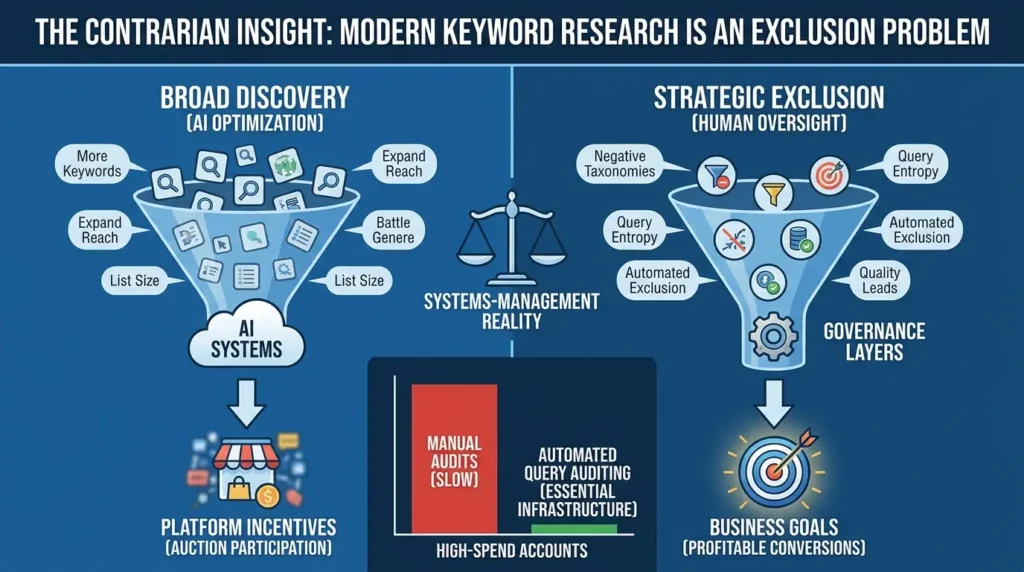
Here’s the frame that, once you see it, changes how you think about this entire discipline.
Most keyword research education treats discovery as the primary objective. Find more keywords, expand your reach, cover more intent territory. The tools, the tutorials, the agency pitch decks, they all implicitly optimize for list size.
But as the NIST AI Risk Management Framework establishes in its guidance on AI governance more broadly, when AI systems are given broad autonomy without structured human oversight constraints, reliability degrades over time in ways that are often gradual and difficult to detect. That same principle applies directly to how broad match and Smart Bidding behave in accounts without active governance layers.
The research finding that consistently gets overlooked: the economic incentives of the advertising platform are not perfectly aligned with your business goals. Google’s auction system benefits from more auction participation, broader matching, and higher spend velocity. Your business benefits from relevant traffic, quality leads, and profitable conversions. These are related, but not identical, objectives.
📝 Note: This isn’t a criticism of Google’s platform. It’s a systems-management reality. Any AI optimization system has objectives that may diverge from your downstream business goals when left without structured human oversight.
The practical implication is significant. Top-performing accounts increasingly succeed not because they found better keywords, but because they built better exclusion systems. Negative keyword taxonomies, query entropy monitoring, automated exclusion workflows, these are the actual competitive advantages in modern paid search, and most competitors aren’t treating them that way.
For high-spend accounts, automated query auditing is becoming essential infrastructure. Tools and scripts that flag high-spend/zero-conversion queries within 24 hours are replacing what used to be a slow, manual review process. Manual audits simply can’t keep pace with the rate of semantic expansion in a broad match account operating at scale.
The Future: AI Overviews, Conversational Search, and the Zero-Click Research Phase
One more piece of context that shapes where all of this is heading.
Google has confirmed that ads are now served directly within AI Overviews in Google Search. The Gemini app itself contains no ads and Google has no current plans to introduce them there. But within the Google Search experience, which still captures 65% of all online purchase journeys, paid search remains active and visible inside those AI-generated summaries.
What this means practically: broad match keywords are one of the three ways your ads can appear in AI Overview placements (alongside Performance Max and AI Max campaigns). As searches become increasingly conversational, the specific keywords you target matter less than the intent parameters you’ve defined and the negative guardrails you’ve built around them.
For B2B advertisers specifically, there’s an added dimension worth understanding. Research shows 83% of the B2B buying journey happens through independent research before a buyer ever contacts a vendor. AI assistants are increasingly generating shortlists and evaluation criteria without the buyer visiting a single vendor website.
This creates a “zero-click research phase” that paid search alone can’t capture, which is why organic search visibility and Answer Engine Optimization now matter alongside paid campaigns, even for advertisers historically focused purely on PPC.
The phrase “keyword research” may eventually be replaced by “intent architecture design.” But the fundamental work of defining what you want to capture, what you want to exclude, and how you want the algorithm to understand your campaign, that work isn’t going anywhere. If anything, it’s becoming more strategically consequential.
A Practical Campaign Launch Checklist
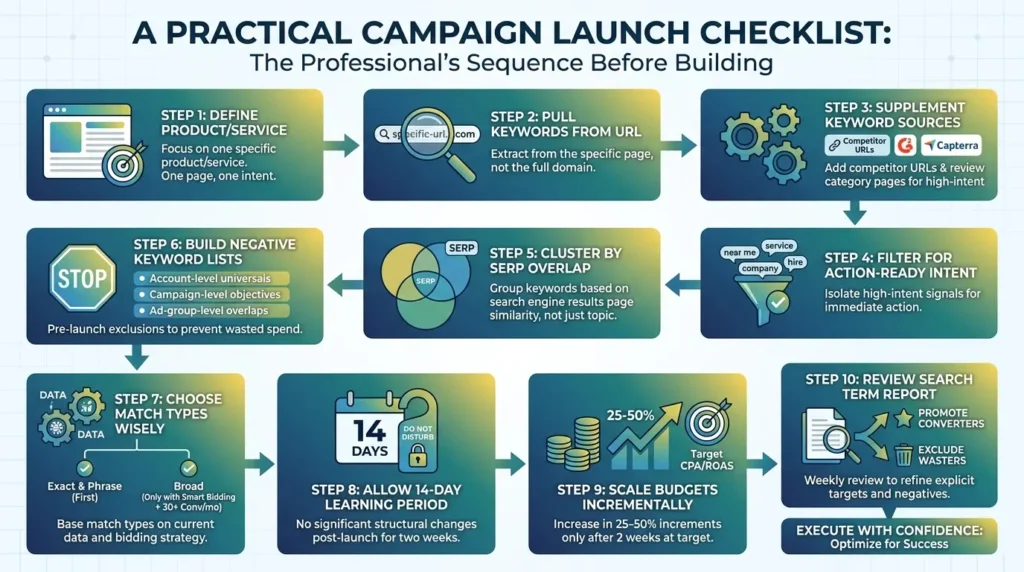
Before you build the next campaign, run through this sequence:
- Define the specific product or service being advertised, one page, one intent
- Pull keywords from that specific URL, not the full domain
- Supplement with competitor URLs and G2/Capterra category pages filtered for high-intent phrases
- Filter for action-ready intent signals: “near me,” “service,” “company,” “pricing,” “hire”
- Cluster by SERP overlap, not just topical word similarity
- Build negative keyword lists before launch: account-level universals, campaign-level objectives, ad-group-level overlaps
- Choose match types based on current data: exact and phrase first, broad only with Smart Bidding active and 30+ monthly conversions
- Allow a 14-day learning period after launch with no significant structural changes
- Scale budgets in 25–50% increments only after two consecutive weeks at target CPA or ROAS
- Review the search term report weekly: promote converters to explicit targets, exclude wasters as negatives
Conclusion
Keyword research in 2026 isn’t dead. It’s doing a different job than it used to.
The goal isn’t to build the biggest list. It’s to define intent clearly enough that automation can work effectively within the boundaries you’ve set.
That means understanding the intent ladder, building a seed list from specific page URLs rather than broad categories, clustering by SERP signal, choosing match types that match your current data situation, and, more than anything else, building a negative keyword architecture that actively protects budget from the platform’s natural tendency toward semantic expansion.
The accounts that win aren’t the ones that found the best keywords. They’re the ones that built the best systems.
Start there.
The future of Google Ads belongs to those who combine data-driven rigor with creative, user-centric strategy. Start implementing these modern keyword research tactics today, and watch your campaigns rise above the competition.





[…] Read the Full Article → […]
[…] Read the Full Article → […]
[…] Read the Full Article → […]