


Here’s something most SEO guides won’t tell you: the difference between ranking on page one and being buried on page three almost never comes down to which tool you paid for.
It comes down to your system.
Most people doing keyword research are doing it backwards. They open a shiny tool, type in a seed term, stare at a list of 500 keywords, and then have absolutely no idea what to do next. They chase high-volume terms they’ll never rank for. They ignore the gold sitting right inside their own Google account. And they treat keyword research like a one-time task instead of an ongoing feedback loop.
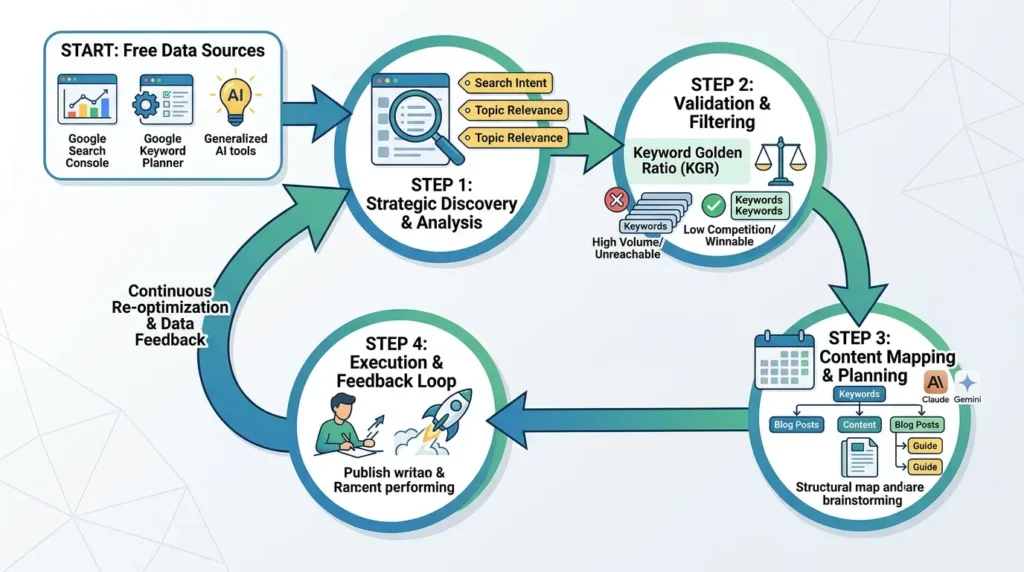
That’s why this guide exists. Not to dump another tool list on you, but to give you an actual workflow. One that stacks free tools in the right order, teaches you how to validate what you find, and shows you exactly what to do with your keywords once you have them.
And yes, everything in here is completely free.
Let’s get into free keyword research tools.
- Your fastest keyword wins are hiding in Google Search Console right now, most people never look
- Google Keyword Planner’s competitor URL trick gives you a rival’s full keyword map for free
- The Keyword Golden Ratio (KGR) formula instantly tells you if a keyword is winnable, no paid tools needed
- AI tools like Claude and Gemini can replace hours of manual brainstorming when prompted correctly
- Stop chasing volume, a 200-search keyword you can dominate beats a 10,000-search keyword you can’t touch
- The four-phase workflow in this guide turns scattered keywords into a repeatable content machine
What Keyword Research Actually Means in 2026
Before we touch a single tool, let’s get the fundamentals straight, because search has changed dramatically, and a lot of the advice floating around online is still teaching tactics from 2018.
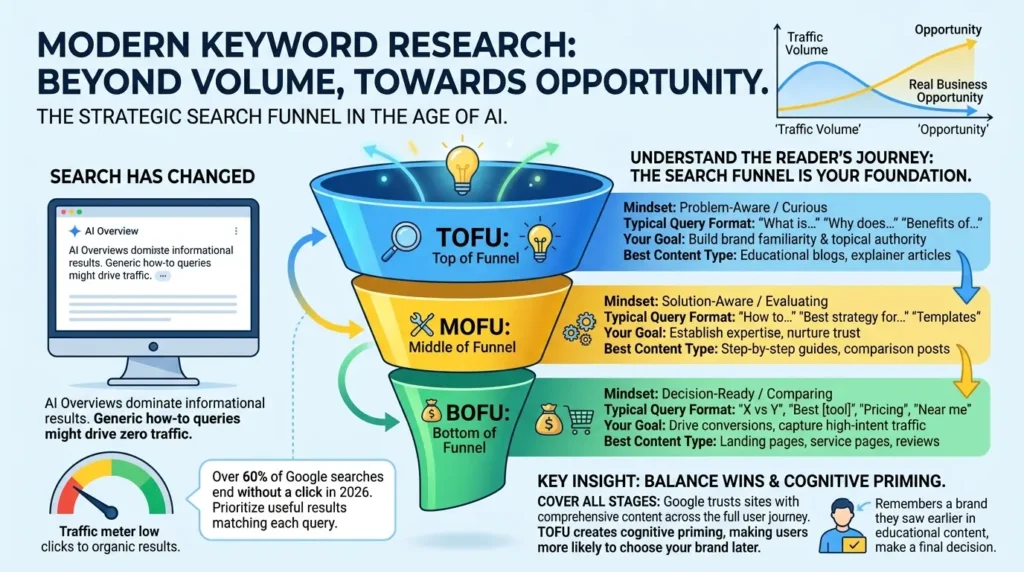
Keyword research is the process of finding the specific words and phrases real people type (or speak) into search engines when they’re looking for something. Simple enough. But here’s what most guides skip over: volume is not the goal. Opportunity is the goal.
In 2026, over 60% of Google searches end without a click. AI Overviews now dominate informational results, meaning ranking number one for a generic how-to question might drive almost no traffic to your site. According to Google’s Search Central documentation, Google’s systems prioritize matching the most useful result to each query, which increasingly means serving the answer directly on the results page.
So the game has shifted. It’s no longer “what do people search for?” It’s “what can I actually win, and what will it do for my business?”
Before picking any keyword, you need to understand the journey your reader is on. This is the search funnel, and it’s the foundation of every smart keyword decision.
| Funnel Stage | Mindset | Typical Query Format | Your Goal | Best Content Type |
|---|---|---|---|---|
| 🔍 TOFU Top of Funnel | Problem-Aware / Curious | “What is…”, “Why does…”, “Benefits of…” | Build brand familiarity & topical authority | Educational blogs, explainer articles |
| 🔧 MOFU Middle of Funnel | Solution-Aware / Evaluating | “How to…”, “Best strategy for…”, “Templates” | Establish expertise, nurture trust | Step-by-step guides, comparison posts |
| 💰 BOFU Bottom of Funnel | Decision-Ready / Comparing | “X vs Y”, “Best [tool]”, “Pricing”, “Near me” | Drive conversions, capture high-intent traffic | Landing pages, service pages, reviews |
Here’s the insight most SEOs miss: you need all three stages covered. Google has repeatedly stated that it trusts websites more when they comprehensively address a topic across the full user journey. A site with only BOFU pages looks thin. A site with only TOFU content rarely converts. Balance wins.
And here’s a counterintuitive fact: TOFU keywords, while they convert slowly, create a cognitive priming effect. When users see your brand repeatedly across educational content, they’re far more likely to choose you when they finally hit the decision stage. That’s why the funnel exists, and why every tier matters.
The Free Keyword Stack: Stop Thinking About Tools, Start Thinking About System
Here’s a mindset shift that changes everything: tools are not strategies. They’re inputs. The question isn’t “which tool is best?”, it’s “which tool does which job?”
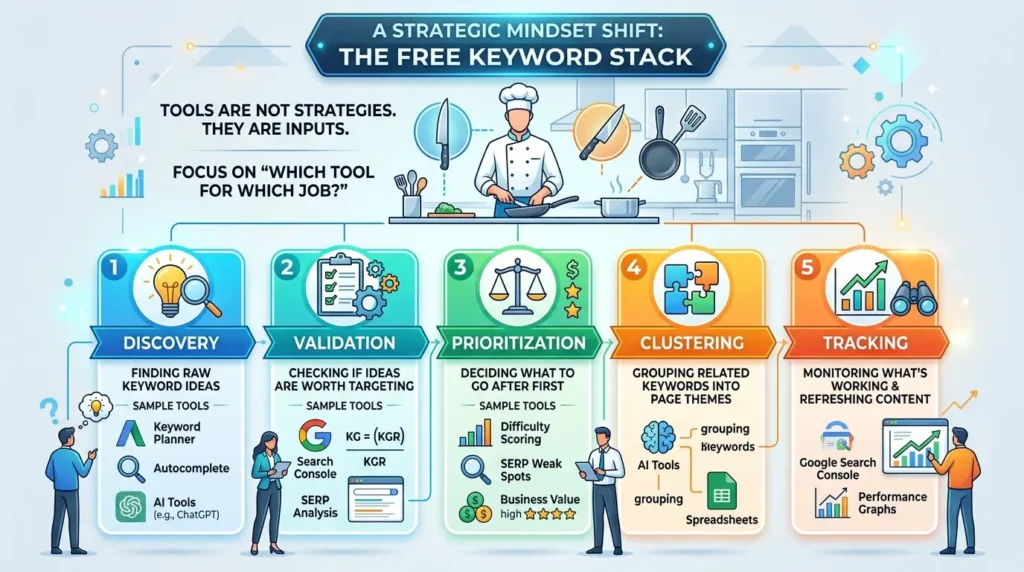
Think of it like a kitchen. You don’t need every appliance on the market. You need the right tool for each step of the cooking process. The same principle applies here.
The free keyword stack operates in five stages:
- Discovery: Finding raw keyword ideas (Keyword Planner, Autocomplete, AI tools)
- Validation: Checking if those ideas are worth targeting (Search Console, KGR, SERP analysis)
- Prioritization: Deciding what to go after first (difficulty scoring, SERP weak spots, business value)
- Clustering: Grouping related keywords into page themes (AI tools, spreadsheets)
- Tracking: Monitoring what’s working and what needs a refresh (Google Search Console)
Each stage has the right free tool for the job. Let’s go through them.
Google’s Own Ecosystem: More Powerful Than You Think
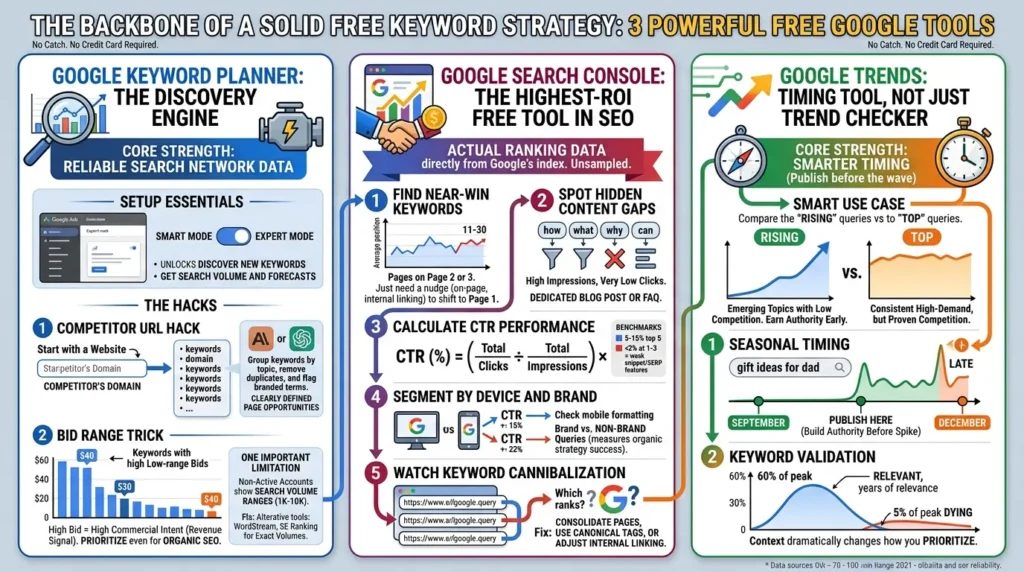
Here’s something worth appreciating upfront. Google gives you three genuinely powerful tools for free, no catch, no credit card required. Google Keyword Planner, Google Search Console, and Google Trends. Together, they form the backbone of any solid free keyword strategy.
Google Keyword Planner: The Discovery Engine
Most people know Keyword Planner exists. Very few people use it well.
Yes, it was built for ad buyers. But it’s powered by Google’s actual search network data, which makes it one of the most reliable sources for understanding what people search for on the world’s biggest search engine.
Here’s how to set it up properly. Create a Google Ads account and immediately switch from Smart Mode to Expert Mode. Without Expert Mode, you get a dumbed-down interface with limited access. Expert Mode unlocks both core features: Discover New Keywords and Get Search Volume and Forecasts.
The Competitor URL Hack
One of the most underrated moves in Keyword Planner is using a competitor’s URL instead of seed keywords. Go to “Discover New Keywords,” select “Start with a Website,” and paste in a competitor’s domain or a specific page. Keyword Planner returns a list of all the keywords it associates with that site.
This gives you an instant map of what’s working in your niche. Export the full list, drop it into Claude or ChatGPT, and say: “Group these keywords by topic, remove duplicates, and flag branded terms.” You’ll go from a messy 150-keyword export to 15 clearly defined page opportunities in minutes.
The Bid Range Trick
Here’s something genuinely useful that most SEOs completely ignore: the low-range bid estimates. When you see what advertisers are willing to pay for clicks on a keyword, it tells you something important about commercial intent.
A keyword with a $40 low-range bid is one that businesses believe drives real revenue. That signal matters for prioritization, even when you’re doing purely organic SEO.
One Important Limitation
Since 2016, Google has shown search volume ranges instead of exact numbers for accounts not running active ad campaigns. So instead of “4,400 monthly searches” you’ll see “1K–10K.” This is annoying but manageable. For exact volumes without paying for ads, tools like WordStream’s free keyword tool or SE Ranking’s free search volume checker pull from Google’s API and display clean, range-free numbers.
Google Search Console: The Highest-ROI Free Tool in SEO
If you have a website with existing content, Google Search Console is the single most valuable keyword tool available to you. Full stop. And most people barely scratch its surface.
Why? Because while every other tool estimates what might rank, Search Console tells you what actually is ranking, with real, unsampled data directly from Google’s search index.
Here’s a five-step approach to extracting keyword gold from it.
Step 1: Find Your Near-Win Keywords
Log in to Google Search Console, go to the Performance report, and set the date range to the last three months. Scroll to the Queries tab. Filter for queries where your average position is between 11 and 30.
These are your near-wins. Pages sitting on page two or three of Google, already indexed, already topically relevant. Google just needs a little more convincing to push them higher. A few on-page improvements, stronger internal linking, or a title tag tweak can shift these onto page one, sometimes within weeks.
Step 2: Spot Hidden Content Gaps
Filter your query report for question-based terms, anything starting with “how,” “what,” “why,” or “can.” Look for queries driving high impressions but very low clicks. That mismatch means Google is already surfacing your page for that search, but searchers aren’t finding it compelling enough to click through.
These queries are direct content gaps. A dedicated blog post targeting that specific question, or a well-structured FAQ section on an existing page, can turn wasted impressions into real traffic.
Step 3: Calculate Your CTR Performance
Click-through rate tells you how compelling your listing looks in search results. Here’s the formula, along with a live calculator to check your own pages.
When a page ranks in positions one through five but shows below-average CTR, that’s a clear signal. Your title tag or meta description isn’t connected with searcher intent, or the SERP is dominated by AI Overviews and local packs that are visually pushing your result down.
Step 4: Segment by Device and Brand vs. Non-Brand
In GSC, filter performance data by device. If a keyword performs well on desktop but has terrible CTR on mobile, you’ve got a formatting or usability issue. Check that page on your phone and see what the experience actually looks like.
Also separate brand queries from non-brand queries. Brand queries show loyalty. Non-brand queries show reach. If 90% of your clicks come from people searching your business name, your organic SEO strategy isn’t pulling in new audiences yet. Non-brand growth is the clearest measure of whether your keyword strategy is actually working.
Step 5: Watch for Keyword Cannibalization
Cannibalization happens when multiple pages on your site compete for the same query. Google gets confused about which one to rank, so both underperform. In GSC, this shows up as a keyword where the “top ranking page” keeps switching between different URLs from month to month.
The fix is usually consolidating similar pages, adding canonical tags pointing to your primary version, or adjusting internal linking to clearly signal which URL you want to rank.
Google Trends: Use It as a Timing Tool, Not Just a Trend Checker
Most people check Google Trends to see if a topic is “popular.” That’s the surface-level use case. The smarter move is using it for timing.
Google Trends shows relative search interest on a scale of 0–100, where 100 represents peak popularity for a term. You can compare up to five terms, filter by country, date range, and even search type (web, YouTube, News, Google Shopping).
The two sections worth your attention are “Rising” and “Top” queries in the Explore tab.
“Top” queries show consistently high-demand terms, proven volume, but also proven competition. “Rising” queries show emerging topics gaining momentum before they hit peak competition. If you publish content targeting a rising keyword before it peaks, you can earn authority while other sites are still sleeping on it.
Here’s a practical timing application: if you’re writing about something seasonal, say, “gift ideas for dad”, Trends will show you exactly when that keyword starts spiking each year (typically late October). Publishing in September gives you time to build authority before the traffic wave hits. Waiting until December means you’re late.
Also use Trends to check whether a keyword you found in Keyword Planner is trending up or fading out. A term at 60% of its historical peak might have years of relevance ahead. A term at 5% of its peak is dying. That context dramatically changes how you should prioritize it.
The Complete Free Tool Breakdown
There are a lot of free and freemium keyword tools out there. Here’s an honest breakdown, what each one actually does well, where it falls short, and when to use it.
| Tool | Best For | Free Limit | Key Strength | Main Weakness |
|---|---|---|---|---|
| Google Keyword Planner | Seed discovery, volume ranges | Unlimited ✅ | Competitor URL spy feature | Volume ranges, not exact numbers |
| Google Search Console | Near-win keywords, CTR tracking | Unlimited ✅ | Real Google data, unsampled | Only works for your own site |
| Google Trends | Timing, seasonality, rising terms | Unlimited ✅ | Spots emerging topics early | Relative interest, no volume data |
| WordStream Free Tool | Exact volume without Ads spend | 10 up front, 1/day after | Bypasses GKP volume ranges | Very limited daily quota |
| AnswerThePublic | Question-based keyword maps | 3 searches/day | Visualizes question formats clearly | CSV capped at 30 keywords free |
| keyword.io | Multi-platform autocomplete mining | 100% free ✅ | Scrapes 11 platforms at once | No volume data on free tier |
| Ahrefs Webmaster Tools | Site audit, ranking keywords | Free for verified sites ✅ | Real crawl data for your domain | Reports limited to 10 rows |
| Ubersuggest | Competitor keyword discovery | 3 searches/day | Competitor-derived content ideas | Very limited without subscription |
| Keywords Everywhere | SERP-level DA and on-page analysis | Free extension ✅ | Overlays Moz DA directly in SERPs | No volume data on free plan |
| Semrush (Free) | Quick keyword validation | 10 reports/day | Keyword difficulty + intent tags | Limited depth without payment |
Pro tip on managing search throttles: Tools like AnswerThePublic, Ubersuggest, and KWFinder all restrict you to 3–5 daily searches. That sounds frustrating, but it’s manageable with a simple workaround. Run your most important broad searches the evening before, immediately download the CSV exports, and organize everything into a central spreadsheet. This turns a limited daily allowance into a cumulative research library over time.
The Alphabet Soup Method (And How to Automate It)
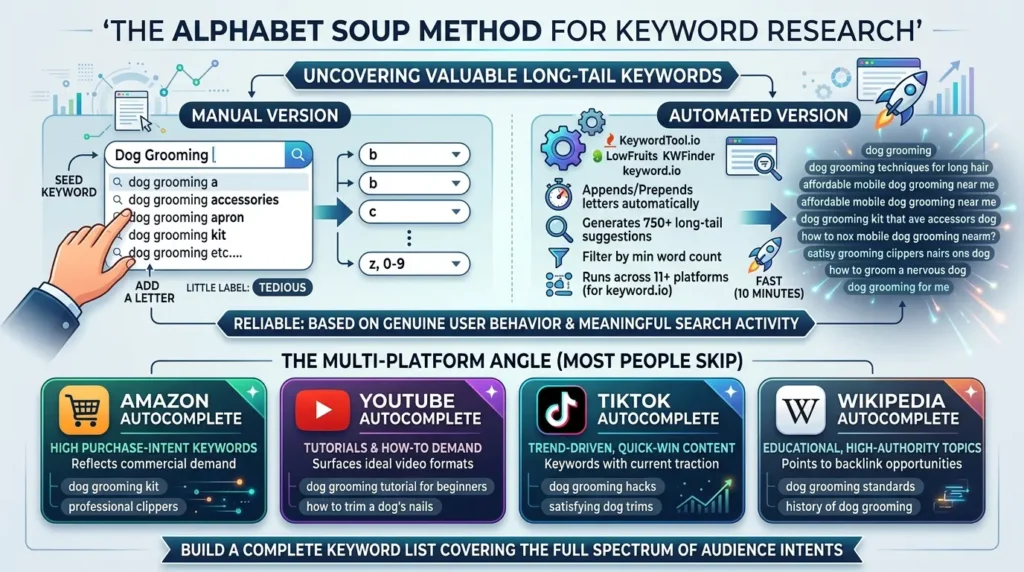
If you haven’t used this yet, here’s the quick version: take a seed keyword, type it into Google, add a letter at the end, and note the autocomplete suggestions. “Dog grooming a,” then “dog grooming b,” then “dog grooming c,” all the way through z, then 0–9.
Every suggestion Google surfaces is a real search term that real people actually type. Google’s autocomplete system is built from genuine user behavior, it only suggests terms with meaningful search activity behind them. That’s what makes this method so reliable.
The manual version is tedious. The automated version takes ten minutes.
KeywordTool.io appends and prepends letters automatically, generating 750+ long-tail suggestions from a single seed term. LowFruits KWFinder does the same but lets you filter by minimum word count, perfect for isolating proper long-tail phrases. keyword.io goes even further, it runs the Alphabet Soup Method across 11 different platforms simultaneously.
The Multi-Platform Angle Most People Skip
Here’s the variation that’s genuinely underused: run the Alphabet Soup Method on platforms beyond Google.
Amazon autocomplete reveals high purchase-intent keywords. When someone types “dog grooming” on Amazon, every suggestion reflects something people are actively trying to buy. That’s pure commercial-intent gold for e-commerce and affiliate content.
YouTube autocomplete shows tutorials and how-to demand. “Dog grooming a” on YouTube surfaces the exact tutorial formats people are searching for, invaluable for video content planning or building supporting blog posts around video topics.
TikTok autocomplete skews toward trend-driven, quick-win content that’s currently getting traction.
Wikipedia autocomplete points to educational, high-authority topics, the kind that earn backlinks naturally.
Each platform is a window into a different type of searcher intent. Use all of them and you build a keyword list that covers the full spectrum of how your audience actually searches.
AI as a Keyword Research Tool (This Changed the Game)
Let’s be honest here: AI tools have quietly become one of the most powerful free resources for keyword research. Not because AI makes up data or has live search volumes, it doesn’t, but because it’s exceptional at generating seed keywords, clustering ideas, and surfacing the hidden questions your audience is actually asking.
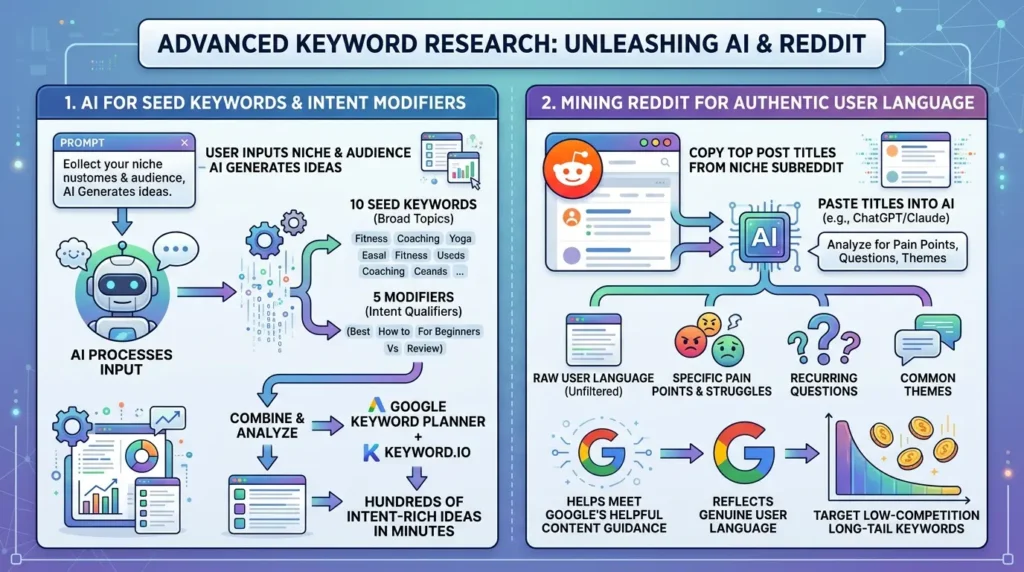
Here’s a prompt structure that works incredibly well:
“I’m doing keyword research for [your niche]. My target audience is [describe them]. Give me 10 seed keywords that are 1–2 words max, and 5 modifiers that will help me surface the specific types of content they’re searching for. The seeds and modifiers should not share the same words.”
What this does is separate your broad topics (seeds) from the intent qualifiers (modifiers), like “best,” “how to,” “for beginners,” “near me,” or “vs.” Then you take that list into Google Keyword Planner or keyword.io and run the combinations. You go from a vague niche to hundreds of real, intent-rich keyword ideas in under ten minutes.
Mining Reddit for Raw User Language
This one’s different from typical keyword research advice, but it’s one of the highest-signal tactics available. Go to a subreddit relevant to your niche. Copy the titles of the top posts from the past month. Paste them into Claude or ChatGPT and ask: “What are the recurring pain points, questions, and themes in this list? Give me the top 10.”
What you get is keyword research in the exact language your audience uses, not polished marketing-speak, but the real words people type when they’re frustrated, confused, or trying to solve a problem. According to Google’s Search Central guidance on helpful content, content that reflects genuine user language and real-world problems is precisely what the algorithm is built to reward.
Reddit-mined keywords are especially valuable for long-tail targeting because they often don’t appear in standard keyword databases, which means competition is much lower.
Keyword Difficulty: Three Free Frameworks That Actually Work
Once you have a keyword list, you need a way to separate the winnable terms from the traps. Here are three frameworks you can implement entirely with free tools.
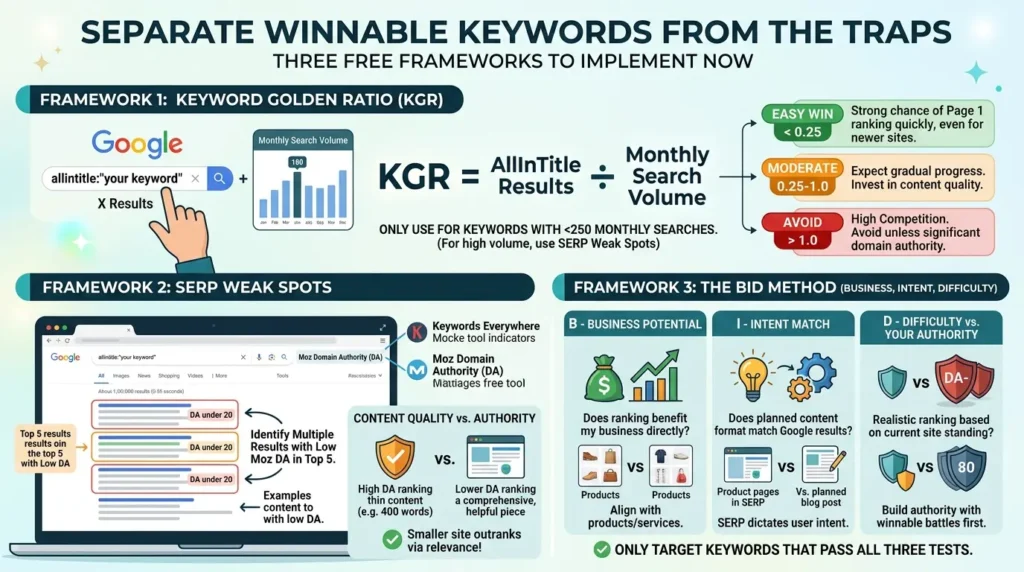
Framework 1: The Keyword Golden Ratio (KGR)
The Keyword Golden Ratio is a data-driven method for spotting low-competition keywords before committing to content creation. It uses the allintitle: operator, a Google search command that returns only pages containing your exact keyword in their title tag.
The logic: if very few pages have optimized their title for a keyword, but people are still searching for it, you have a real opportunity.
Framework 2: SERP Weak Spots
Open Google and search your target keyword. Look at the domains ranking in the top 10. Use the free Keywords Everywhere browser extension to check the Moz Domain Authority (DA) of each result as you browse.
According to Moz’s research on Domain Authority and ranking signals, page-level relevance and content quality often outweigh raw domain strength for specific, long-tail queries. If you see multiple results with DA under 20 in the top five positions, that’s a weak SERP, Google hasn’t found a definitively authoritative answer yet, which means a smaller site can compete.
Also look at content quality independently from authority. Sometimes a DA-80 site ranks with a thin, 400-word page that barely addresses the topic. A comprehensive, well-structured piece targeting the same keyword can realistically outrank it, not through backlinks, but through pure content relevance and helpfulness.
Framework 3: The BID Method (Business, Intent, Difficulty)
This three-part test cuts through the noise quickly. Before targeting any keyword, run it through three questions:
- B – Business Potential. If I rank number one for this, does it benefit my business? A keyword like “what is a spreadsheet” might get enormous volume, but if you sell accounting software for mid-market companies, ranking for it does absolutely nothing for you.
- I – Intent Match. Does my planned content format match what Google is already ranking? If every top result is a product page and you’re planning a blog post, you won’t rank regardless of quality. The SERP format tells you exactly what Google believes the searcher wants.
- D – Difficulty vs. Your Authority. Can you realistically rank given your site’s current standing? A brand-new site shouldn’t be targeting keywords dominated by DA-80 domains. Find the winnable battles first, build authority, then go after harder terms.
Only target keywords that pass all three tests. It sounds simple, but it eliminates probably 60% of the traps that waste content teams’ time and budget.
Before vs. After: What Real Keyword Research Changes
Same industry. Same effort. Completely different results. The only difference is research plus a system for acting on it.
Common Keyword Research Mistakes (And How to Fix Them)
These errors show up repeatedly, even from experienced SEOs.
Mistake 1: Chasing Volume Over Opportunity
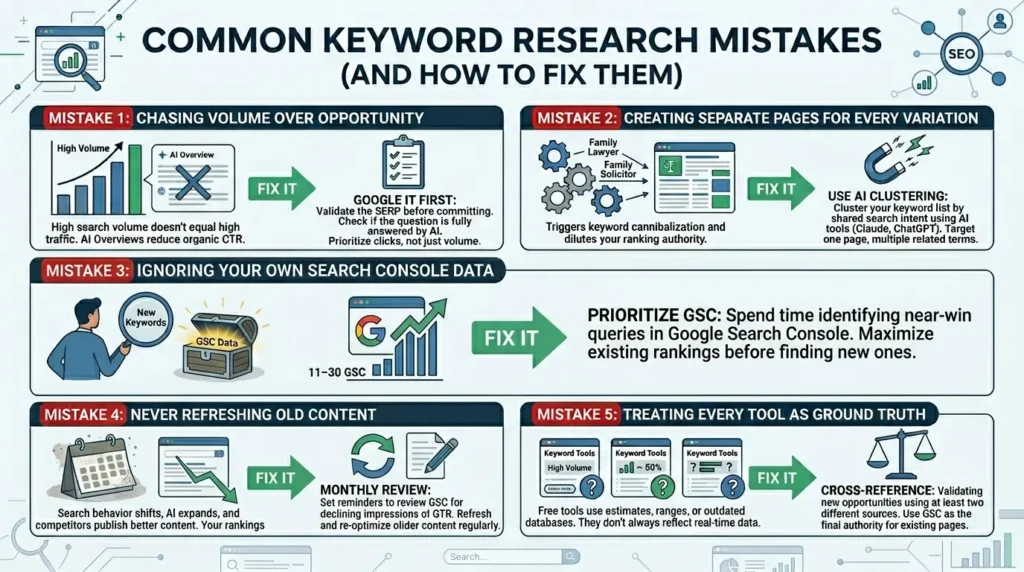
High search volume doesn’t equal high traffic anymore. AI Overviews reduce organic CTR by 35% or more for informational queries. A 500-search keyword with no AI Overview can outperform a 10,000-search keyword dominated by an AI summary.
Fix: Always Google your target keyword before committing. Look at what actually appears in the results. Ask yourself, would a searcher click through to an article, or is their question fully answered on the page?
Mistake 2: Creating Separate Pages for Every Keyword Variation
“Family lawyer,” “family law attorney,” “family law solicitor,” and “family law services” are not four separate pages. They’re one page with four related supporting terms. Creating individual pages for each variation triggers keyword cannibalization and dilutes your ranking authority.
Fix: Use AI tools to cluster your keyword list before building your content plan. Export your keywords, paste them into Claude or ChatGPT, and ask it to group them by shared search intent. One page, multiple related terms, unified authority.
Mistake 3: Ignoring Your Own Search Console Data
The fastest keyword wins are almost always hiding inside GSC already. Pages ranked in positions 11–30 are one good update away from page one. But most people spend time finding new keywords instead of maximizing existing rankings.
Fix: Before any new keyword research session, spend 20 minutes in GSC identifying near-win queries. These are your highest-ROI opportunities. They’re already indexed, already relevant, they just need optimization.
Mistake 4: Never Refreshing Old Content
Keyword research isn’t a one-time event. Search behavior shifts, AI Overviews expand, competitors publish better content. A page that ranked well six months ago might be slipping now.
Fix: Set a monthly reminder to review GSC. Look for pages where impressions are declining or CTR is dropping. Refresh, improve, and re-optimize before rankings fall off page one entirely.
Mistake 5: Treating Every Tool as Ground Truth
Free tools estimate. They model. They scrape databases that may be weeks or months old. Keyword Planner shows volume ranges. Ubersuggest uses a database that doesn’t always reflect real-time Google data. Ahrefs’ traffic estimates often differ from actual Search Console numbers.
Fix: Cross-reference multiple sources. Use Search Console as your ground truth for existing pages. For new keyword opportunities, validate with at least two free tools before making major content decisions.
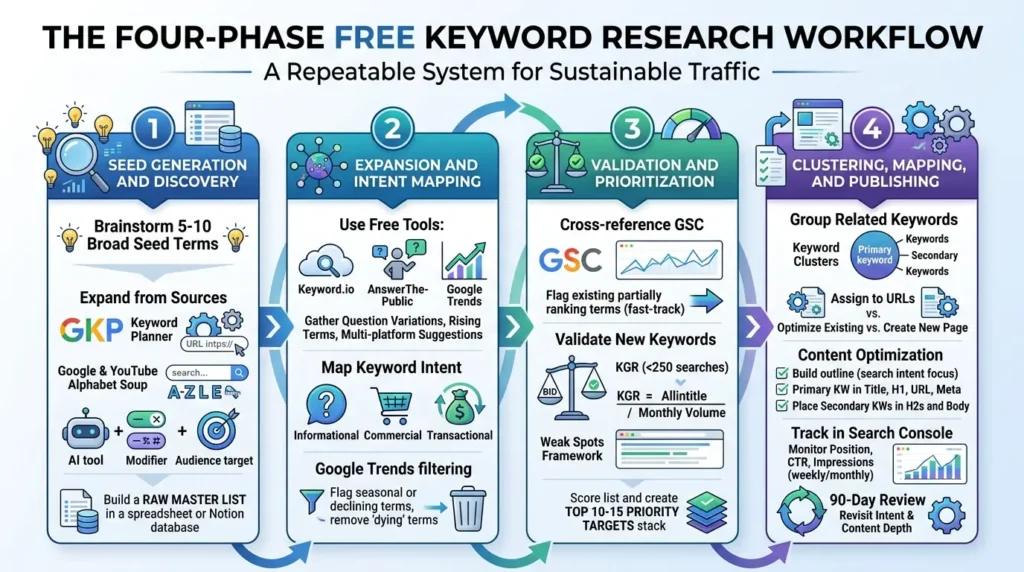
The Four-Phase Free Keyword Research Workflow
Here’s how to put everything together into a repeatable system you can run week after week.
Phase 1: Seed Generation and Discovery
Start with your core business topics. Brainstorm 5–10 broad seed terms that define your niche. Expand from three directions: run seeds through Google Keyword Planner using competitor URLs; apply the Alphabet Soup Method on Google and YouTube; ask an AI tool to generate seed-modifier combinations based on your audience description.
Export everything. Build a raw master list in a spreadsheet or Notion database.
Phase 2: Expansion and Intent Mapping
Take your seed list into keyword.io, AnswerThePublic, and Google Trends. Pull question-based variations, rising terms, and multi-platform autocomplete suggestions. For each keyword, note the intent type: informational, commercial, or transactional.
Use Google Trends to flag seasonally sensitive or clearly declining terms. Remove dying terms from your priority list before you waste content energy on them.
Phase 3: Validation and Prioritization
Cross-reference your expanded list with Google Search Console. Flag any terms your site already partially ranks for, these get fast-tracked. For new keywords, run the BID test. For terms under 250 monthly searches, calculate KGR. For anything you’re unsure about, manually search it and analyze the SERP using the Weak Spots framework.
Score your list and identify your top 10–15 priority targets for the next content sprint.
Phase 4: Clustering, Mapping, and Publishing
Group related keywords into clusters, one primary term per cluster, supported by 3–5 related secondary terms. Assign each cluster to a URL on your site: either an existing page to optimize, or a new page to create.
For new content, build an outline that directly addresses the search intent. Place your primary keyword in the title tag, H1, URL, and meta description. Include secondary keywords naturally in H2 subheadings and body paragraphs. Set up tracking in the Search Console immediately after publishing. Monitor position, CTR, and impressions weekly for the first month, then monthly after that.
If a page isn’t gaining traction after 90 days, revisit intent match and content depth before assuming the keyword is wrong.
Three Advanced Insights Worth Knowing
Insight 1: AI Overviews Aren’t Always the Enemy
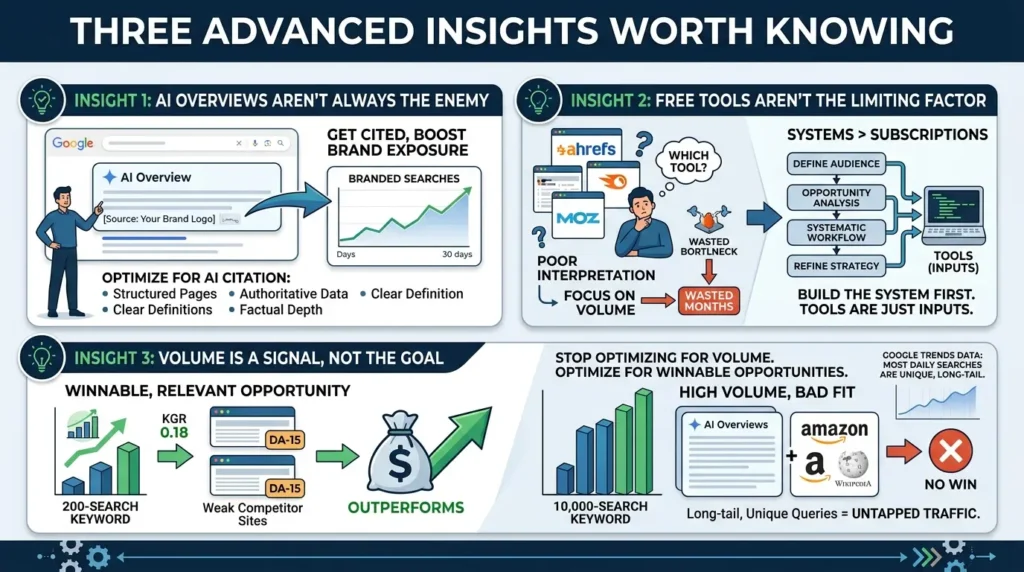
Here’s a contrarian take worth sitting with: not all AI Overviews hurt you. When Google’s AI cites your content as a source, you get brand exposure at the very top of the results page even without a click. Research suggests brands cited in AI Overviews see a measurable lift in branded searches within 30 days, meaning the AI trains users to search for you by name.
That means instead of avoiding AI-heavy SERPs entirely, learn what content Google tends to cite: structured, authoritative, well-organized pages with clear definitions and factual depth. Optimize toward that.
Insight 2: Free Tools Aren’t the Limiting Factor
Here’s the uncomfortable truth most “free tools” articles skip: keyword research failure almost never comes from weak tooling. It comes from poor interpretation and no clear workflow. You can have access to Ahrefs, Semrush, and Moz simultaneously and still waste months targeting wrong keywords, because you’re choosing based on volume instead of opportunity.
The system matters more than the subscription. Build the system first. The tools are just inputs.
Insight 3: Volume Is a Signal, Not the Goal
According to Google Trends data published by Google’s internal research teams, the majority of searches Google processes on any given day have never been searched before. Long-tail, specific, conversational queries represent the largest untapped pool of organic traffic available, and because they’re unique, they face almost no direct competition.
A 200-search keyword with perfect business alignment, a KGR of 0.18, and two DA-15 sites in the top 10 will outperform a 10,000-search keyword crowded with AI Overviews and domain-authority giants. Stop optimizing for volume. Optimize for winnable, business-relevant opportunities.
Conclusion: The System Is the Strategy
Here’s the honest takeaway: you don’t need Ahrefs. You don’t need Semrush. You don’t need a single paid subscription to build a keyword strategy that drives real organic growth in 2026.
What you do need is a system.
Use Google’s own tools as your foundation. Keyword Planner for discovery. Search Console for near-wins and ongoing tracking. Trends for timing and trend validation. Layer in free tools like AnswerThePublic, keyword.io, and Ahrefs Webmaster Tools for depth and cross-referencing. Use AI to generate seeds, cluster keywords, and surface the real language your audience uses. Validate every target with KGR, SERP analysis, and the BID framework.
Then do the one thing most guides never actually tell you: use what you find. Build the pages. Optimize the existing ones. Track what’s working. Refresh what’s fading. Repeat.
Keyword research isn’t a task you finish. It’s a practice you maintain. And with the right system, built entirely on free tools, it’s one that compounds in value the longer you run it.




[…] Read the Full Article → […]