

Most articles about crawl budget will make you panic. They’ll tell you to optimize everything immediately, your robots.txt, your sitemaps, your server. But here’s the truth: Google itself says that most websites can completely ignore crawl budget.
So why are you still reading about it everywhere?
Because fear sells. And because for the sites that do have a problem, mid-size e-commerce stores, publishers scaling with AI content, programmatic SEO platforms, crawl budget issues silently drain rankings for months before anyone spots the cause.
This guide cuts through the noise. You’ll get the real formula, exact size thresholds, a diagnostic framework you can use today, and a clear-eyed look at how AI crawlers have changed the game entirely in 2026.
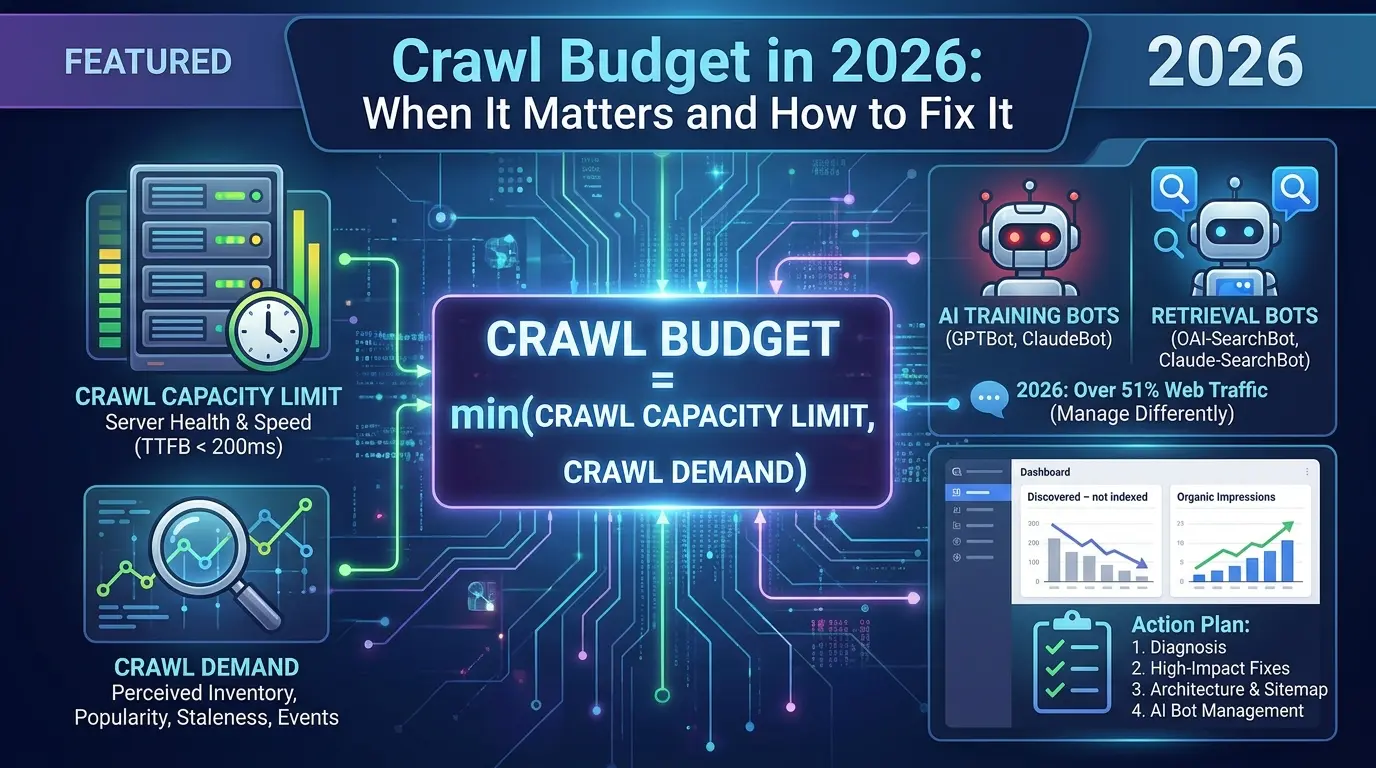
- Crawl budget = min(Crawl Capacity Limit, Crawl Demand), fix demand first, not just server speed
- Sites under ~10,000 pages publishing weekly can safely ignore crawl budget
- The dominant failure mode is demand distortion, not server slowness
- In 2026, AI crawlers now account for over 51% of all web traffic, they consume your budget too
- Canonical tags do not save crawl budget, only
robots.txtstops the crawl - AI training bots (GPTBot, ClaudeBot) vs. retrieval bots (Claude-SearchBot, OAI-SearchBot) must be managed differently
- Blocking training scrapers at the CDN edge is now a server-stability best practice
What Crawl Budget Actually Is (The Formula Everyone Misses)
Let’s start with the definition most articles bury in paragraph four.
Crawl budget is the set of URLs Googlebot can and wants to crawl on your site within a given timeframe. It is not a fixed number. It is not something you can look up in a dashboard. It is the output of two competing forces.
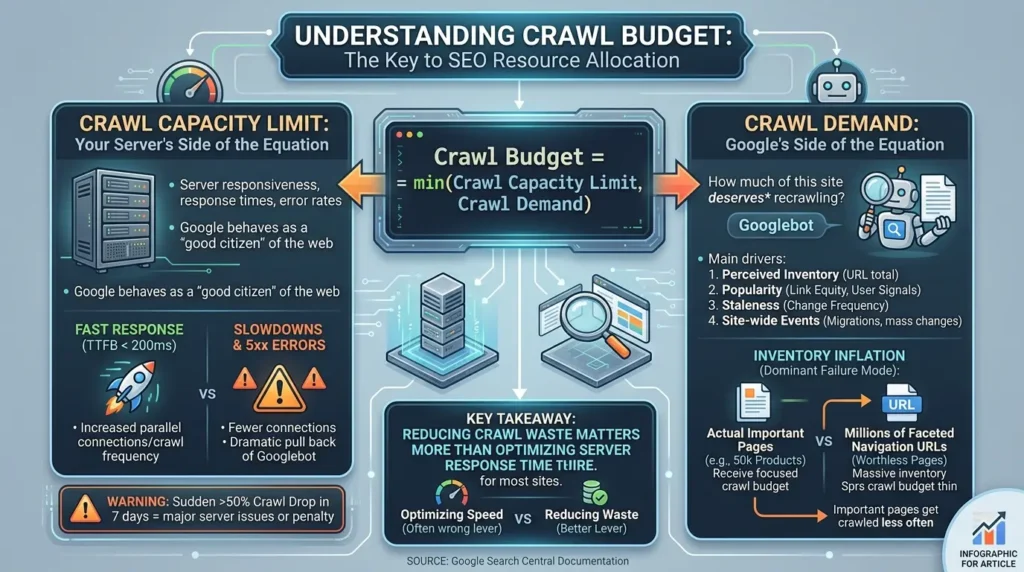
The relationship is expressed as:
That “min” function is the part nobody explains. It means your crawl budget is always capped by whichever side is smaller. If your server is fast but Google has little interest in your content, demand is the bottleneck. If your content is compelling but your server throws 500 errors, capacity is the bottleneck.
Most SEO advice focuses entirely on server speed. That’s often the wrong lever to pull.
Crawl Capacity Limit: Your Server’s Side of the Equation
This is Google behaving as what its own engineer Gary Illyes described as a “good citizen of the web.” Googlebot monitors your server’s responsiveness, response times, error rates, parallel connection handling, and scales its crawl rate accordingly.
Think of a concert ticket website on sale day. Too many simultaneous requests crash the server. Googlebot is designed not to be that problem. If your server responds quickly (target: TTFB under 200ms), Googlebot increases parallel connections and crawl frequency. If it slows down, returns 5xx errors, or hits its capacity, Googlebot pulls back, sometimes dramatically.
According to Google Search Central documentation, a sudden drop of over 50% in total crawl requests over a 7-day period almost always indicates major server performance issues or an indexation penalty.
Crawl Demand: Google’s Side of the Equation
This is where most sites actually bleed. Crawl demand is driven by four factors, as Google’s infrastructure documents describe:
- Perceived inventory, how many URLs Google believes exist on your site
- Popularity, link equity and user engagement signals
- Staleness, how often pages historically change
- Site-wide events, domain migrations, mass URL changes
Here’s the insight that changes how you think about this: Google first asks “How much of this site deserves recrawling?”before it asks “How fast can we crawl it?”
A site with 50,000 product pages and millions of faceted navigation URLs generates a massively inflated perceived inventory. Google allocates its demand budget across all of those URLs, including the worthless ones, meaning your important pages get crawled far less often than they should.
This is what researchers from Google’s own infrastructure papers call inventory inflation, and it’s the dominant failure mode, not server slowness.
Key takeaway: Reducing crawl waste matters more than optimizing server response time for most sites.
When Crawl Budget Actually Matters (Exact Thresholds)
Here’s the honest version of the guidance most articles won’t give you.
| Site Type | Page Count | Update Frequency | Action Required |
|---|---|---|---|
| Local business, portfolio, blog | < 10,000 | Weekly or less | ✅ Ignore it. Keep sitemap clean. |
| Mid-size e-commerce, publisher | 10,000 – 100,000 | Daily updates | ⚠️ Monitor monthly. Fix facets and 404s. |
| Enterprise e-commerce, news sites | 100,000 – 1M+ | Constant | 🚨 Optimize aggressively. Log analysis required. |
| Any site with rising “Discovered – not indexed” | Any size | Any | 🚨 Diagnose immediately. This is a crawl demand issue. |
There’s one important caveat to the “under 10,000 pages” rule. A boutique e-commerce store may think it has 2,000 product pages. But with faceted navigation, filters for color, size, price range, brand, that store might expose 20,000 or 50,000 URLs to Googlebot. Your actual URL count, as Google sees it, is not the number of pages you consciously created.
The Quick Self-Assessment: Do You Actually Have a Problem?
Use this decision tree before spending any time on optimization:
➤ Does your site have fewer than 10,000 pages AND publish weekly or less? → Stop. No action needed.
➤ Is “Discovered – currently not indexed” above 15% of your total pages? → Yes, you have a crawl demand problem. Start here.
➤ Are new articles or products taking more than 7 days to appear in Google? → Potential issue. Check GSC Crawl Stats.
➤ Is your daily crawl request count more than 10x your total indexed pages? → Crawl waste confirmed. Diagnose URL sources.
➤ Are server 5xx errors above 0.1% in your host status? → Fix server health first. Everything else is secondary.
How to Check Your Crawl Budget in Google Search Console
This is the first place to look, and there’s more information here than most SEOs actually use.
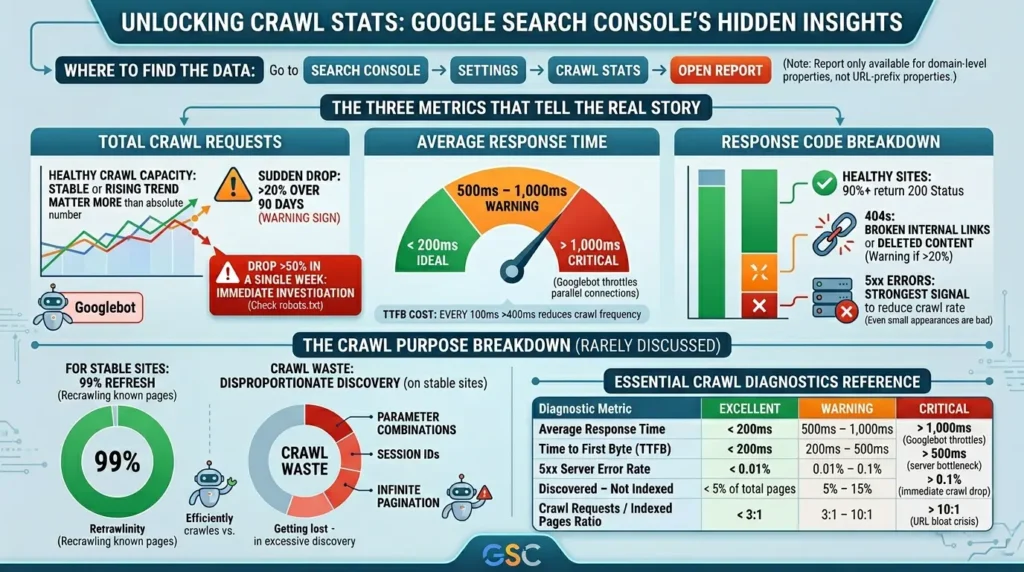
Go to Search Console → Settings → Crawl Stats → Open Report.
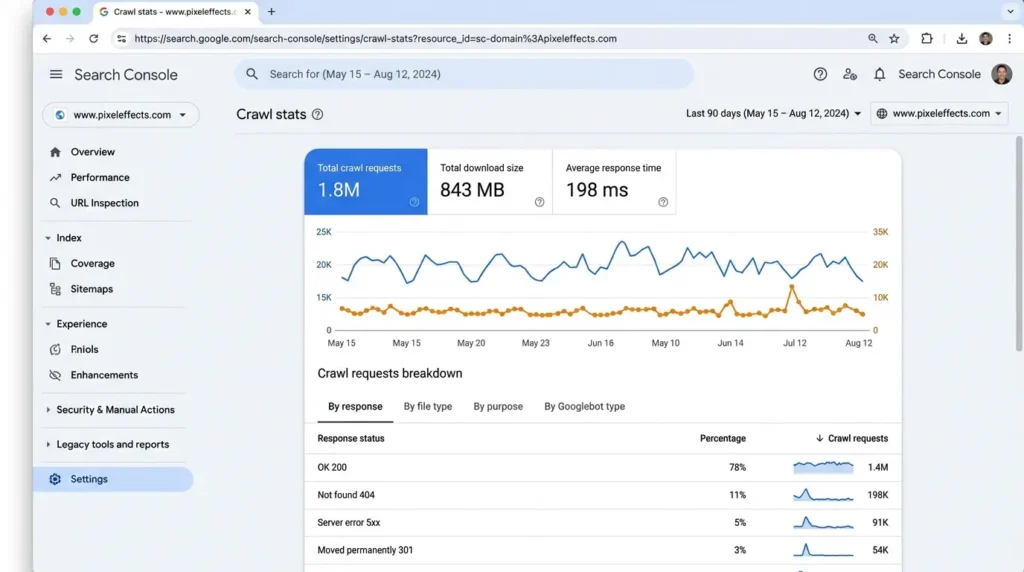
Note: this report is only available for domain-level properties, not URL-prefix properties.
The Three Metrics That Tell the Real Story
- Total Crawl Requests: The number of times Googlebot requested URLs from your site over the last 90 days. The trend matters more than the absolute number. A stable or rising trend means healthy crawl capacity. A sudden drop of more than 20% over 90 days is a warning sign. A drop of over 50% in a single week requires immediate investigation, check your robots.txt first.
- Average Response Time: This should stay below 200ms. Between 500ms and 1,000ms, you’re in warning territory. Above 1,000ms, Googlebot actively throttles its parallel connections, reducing how much it can crawl. Every 100ms of additional TTFB beyond 400ms costs you crawl frequency.
- Response Code Breakdown: Healthy sites see 90%+ of requests return a 200 status. If 404s represent 20% or more of your crawl requests, you have broken internal links or deleted content that hasn’t been cleaned up. If 5xx errors appear at all, they’re Googlebot’s strongest signal to reduce crawl rate.
The Crawl Purpose Breakdown (Rarely Discussed)
Inside the report, you’ll see a “Crawl Purpose” card. It splits requests into “Discovery” (new URLs) and “Refresh” (recrawling known pages).
For stable sites, 99% of crawling should be refreshes. If you see a disproportionately high discovery percentage on a site that isn’t actively publishing hundreds of new pages, something is generating URLs, parameter combinations, session IDs, infinite pagination, and Googlebot is following them.
That’s your crawl waste, right there.
| Diagnostic Metric | ✅ Excellent | ⚠️ Warning | 🚨 Critical |
|---|---|---|---|
| Average Response Time | < 200ms | 500ms – 1,000ms | > 1,000ms (Googlebot throttles) |
| Time to First Byte (TTFB) | < 200ms | 200ms – 500ms | > 500ms (server bottleneck) |
| 5xx Server Error Rate | < 0.01% | 0.01% – 0.1% | > 0.1% (immediate crawl drop) |
| Discovered – Not Indexed | < 5% of total pages | 5% – 15% | > 15% (crawl waste confirmed) |
| Crawl Requests / Indexed Pages Ratio | < 3:1 | 3:1 – 10:1 | > 10:1 (URL bloat crisis) |
The Crawl-to-Index Gap: Why “Crawled” Doesn’t Mean “Indexed”
This is the distinction that trips up even experienced SEOs.
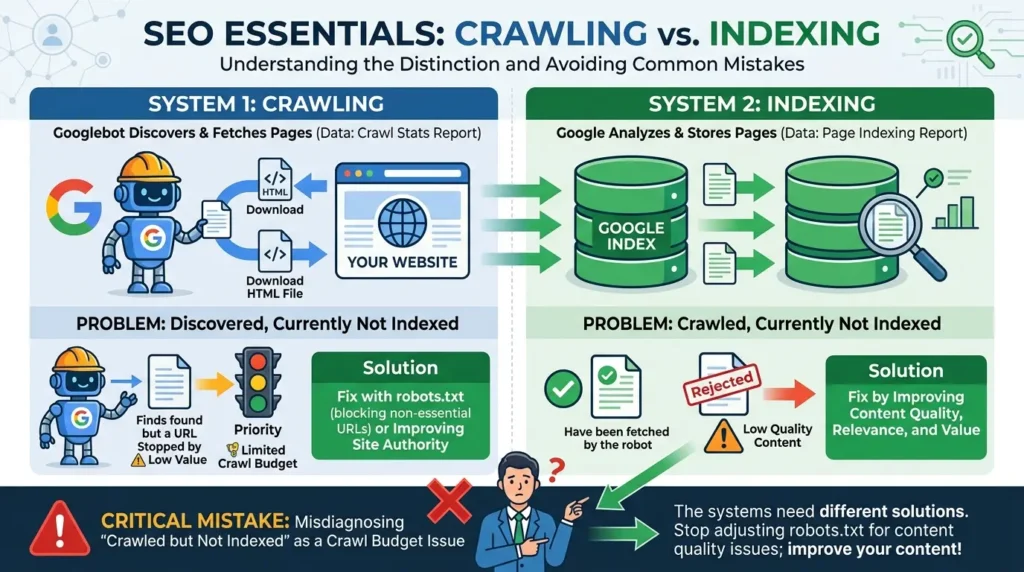
Crawling and indexing are separate systems. Google can crawl a page, download it, parse it, and still decide not to index it. The Crawl Stats report tells you about the first system. The Page Indexing report tells you about the second.
When you see pages in the “Discovered, currently not indexed” bucket, it means Googlebot found the URL but didn’t crawl it yet. Google either doesn’t think the page is valuable enough to fetch, or it ran out of allocated crawl resources before getting to it.
“Crawled, currently not indexed” means Googlebot did visit the page but decided the content wasn’t good enough to add to the index. That’s almost always a content quality problem, not a crawl budget problem.
The distinction matters enormously when choosing a fix. Blocking a URL in robots.txt solves the first. Writing better content solves the second. Mixing them up wastes weeks.
Warning: This is the most common mistake in crawl budget troubleshooting. If your pages are “crawled but not indexed,” stop adjusting robots.txt and start improving content quality. The two systems need two different solutions.
The 7 Biggest Crawl Budget Wasters (Ranked by Impact)
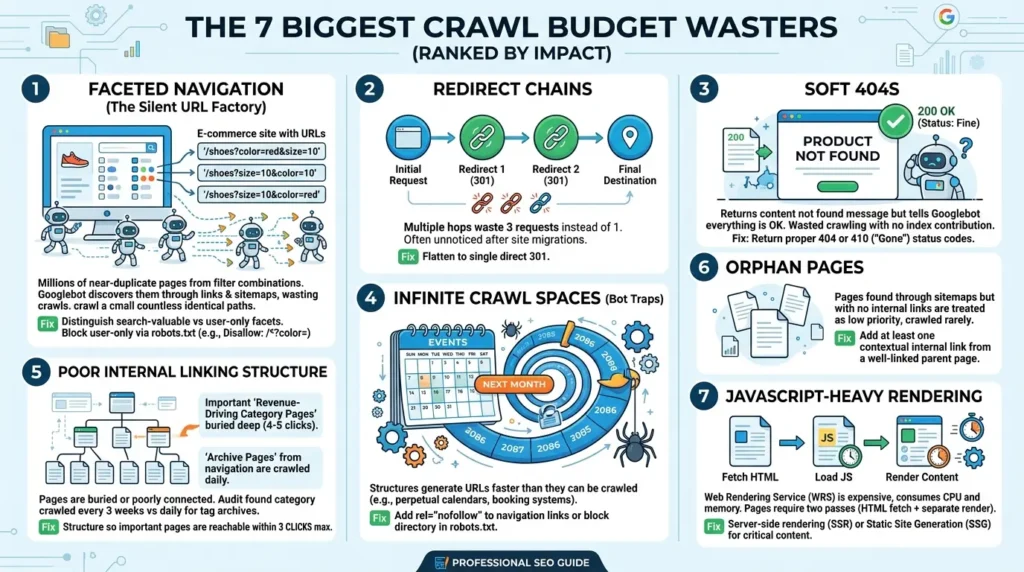
1. Faceted Navigation: The Silent URL Factory
This is where most e-commerce sites hemorrhage crawl budget. A category page for shoes might have filters for color, size, material, and price range. Each combination generates a unique URL:
- /shoes?color=red&size=10
- /shoes?size=10&color=red
- /shoes?color=red&size=10&sort=price
A modest filtering system across 200 category pages can produce tens of thousands of unique URLs, or millions on large platforms. Googlebot discovers them through internal links and sitemaps, and dutifully crawls them. Most return near-identical content.
The fix isn’t to block all filters. Some filter combinations have real search demand (“red leather shoes size 10”) and should be indexable. The principle is to distinguish between search-valuable facets and user-only facets, then block the latter in robots.txt.
User-agent: *

# Block sort/filter parameter combinations that create duplicate content
Disallow: /*?color=
Disallow: /*?size=
Disallow: /*?sort=
Disallow: /*?*page=

# Block session IDs that don't change content
Disallow: /*?sid=
Disallow: /*?sessionid=

# Block internal search results
Disallow: /search/
Disallow: /*?s=

Sitemap: https://www.yourdomain.com/sitemap.xml
2. Redirect Chains
Every hop in a redirect chain costs crawl budget. An internal link pointing to a URL that redirects twice before reaching the final destination wastes three crawl requests for what should cost one. Flatten all redirect chains to a single direct 301. This is especially critical after site migrations, where chains of three or four hops often go unnoticed for months.
3. Soft 404s
A soft 404 is a page that returns a 200 OK status code but displays content like “product not found” or “this page is empty.” Googlebot keeps crawling them because the server says everything is fine. But they contribute nothing to the index. Return proper 404 or 410 status codes for pages that no longer exist. The 410 (“Gone”) signal is particularly useful for permanently deleted content, it tells Googlebot to purge the URL from its crawl stack more quickly than a standard 404.
4. Infinite Crawl Spaces
Events calendars with no end date. Booking systems that generate URLs for every future day. Internal search result pages. These are what technical SEOs call “bot traps”, structures that generate URLs faster than Googlebot can crawl them, pulling it into loops that never resolve.
An events calendar might let users click “next month” indefinitely, generating URLs like /events/december-2086. There are no events planned that far ahead, but Googlebot will follow the links anyway if nothing stops it. Add rel=”nofollow” to those navigation links, or block the directory entirely in robots.txt.
5. Poor Internal Linking Structure
This one is underestimated. Googlebot determines page importance largely from how a site links internally. Revenue-driving category pages buried four or five clicks from the homepage get crawled infrequently. Archive pages linked from the navigation get crawled multiple times weekly.
A crawl log audit at one enterprise site found exactly this: category pages crawled every three weeks, tag archive pages crawled daily. After restructuring internal links, category recrawl frequency improved significantly.
Every important page should be reachable within three clicks of the homepage. No exceptions.
6. Orphan Pages
Pages with no internal links pointing to them. Googlebot can still find them through sitemaps, but without internal links they’re treated as low-priority, crawled rarely, if ever. Every important page needs at least one contextual internal link from a relevant, well-linked parent page.
7. JavaScript-Heavy Rendering
Googlebot handles JavaScript but it’s expensive. The Web Rendering Service (WRS) consumes significantly more processing time and memory than a raw HTML fetch. Pages where all meaningful content loads via client-side JavaScript require two passes, an initial HTML fetch and a separate render pass. This slows crawl velocity and can mean content is indexed with a delay of days or weeks.
For SEO-critical pages, server-side rendering (SSR) or static site generation (SSG) delivers pre-rendered HTML on the first request. This is especially important for product pages, blog posts, and category pages on large sites.
The Crawl Distress Ratio: A Simple Formula Reddit’s Technical SEOs Actually Use
Before investing in a full log analysis, practitioners often use a quick back-of-napkin calculation to determine if there’s a genuine crisis.
A ratio under 3 means no crisis. Between 3 and 10, watch it monthly. Above 10, you have confirmed crawl waste that’s delaying indexing of important content.
You can also calculate your crawl cycle, how long it takes Googlebot to work through your entire indexable page set:
A cycle over 30 days means high-priority pages may sit unrecrawled for a month, long enough for ranking instability on frequently updating content.
Five Myths That Waste Your Time (And Google Confirms They’re Wrong)
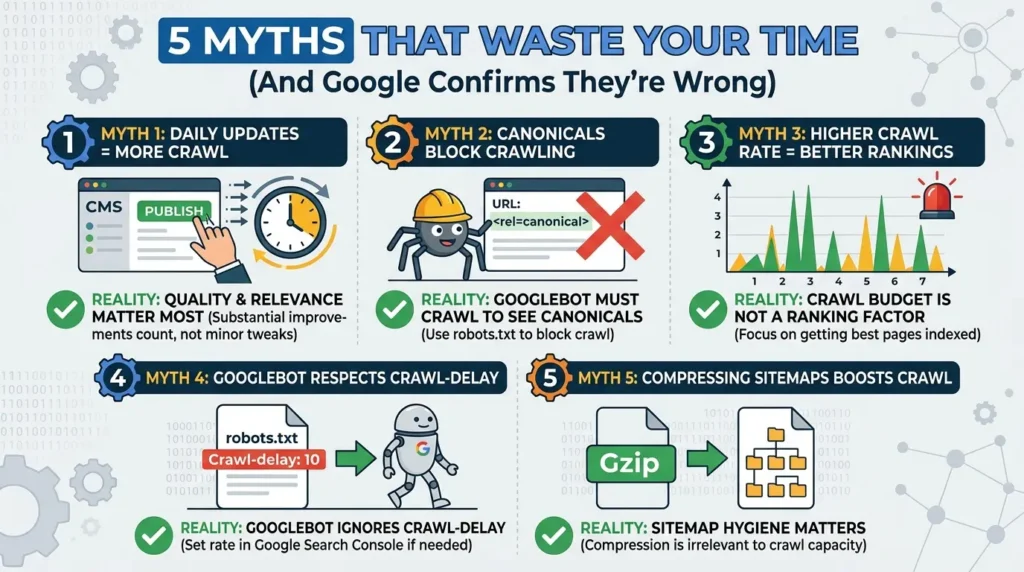
Myth 1: “Updating content daily increases crawl budget.”
Google’s own documentation states that content is evaluated on quality and relevance, not the frequency of minor updates. Changing a published date or adding a sentence to trick freshness signals doesn’t increase crawl demand, it just wastes your time. Substantial improvements to content quality do matter. Superficial tweaks don’t.
Myth 2: “Canonical tags prevent Googlebot from crawling duplicate pages.”
This is the most dangerous myth in crawl budget optimization. Googlebot must crawl a page to discover and read its canonical tag. That means duplicate and parameterized URLs are still crawled even when canonicalized. Canonical tags consolidate indexing signals; they do not save crawl budget. Only robots.txt disallow directives can block the crawl before it happens.
Myth 3: “Higher crawl rate means better rankings.”
Google Search Central explicitly states that crawl budget is not a ranking factor. Pages that are crawled more often don’t rank higher because of the crawl frequency itself. What matters is whether your best pages are crawled and indexed at all, not how many times per day.
Myth 4: “Googlebot respects the Crawl-delay directive in robots.txt.”
It doesn’t. Googlebot completely ignores the Crawl-delay rule, which is not part of the official robots.txt standard. If you need to limit Googlebot’s crawl rate due to server constraints, do it through the crawl rate settings in Google Search Console. Bingbot, however, does respect Crawl-delay, values of 1, 5, or 10 correspond to slow, very slow, and extremely slow rates.
Myth 5: “Compressing your XML sitemap increases crawl budget.”
Gzip-compressed sitemaps still require a full server fetch and decompression on Google’s end. There’s no meaningful reduction in crawl time from sitemap compression. Sitemap hygiene matters, only including canonical, 200-status, indexable URLs, but the compression itself is irrelevant to crawl capacity.
Real Case Studies: What Crawl Budget Optimization Actually Looks Like
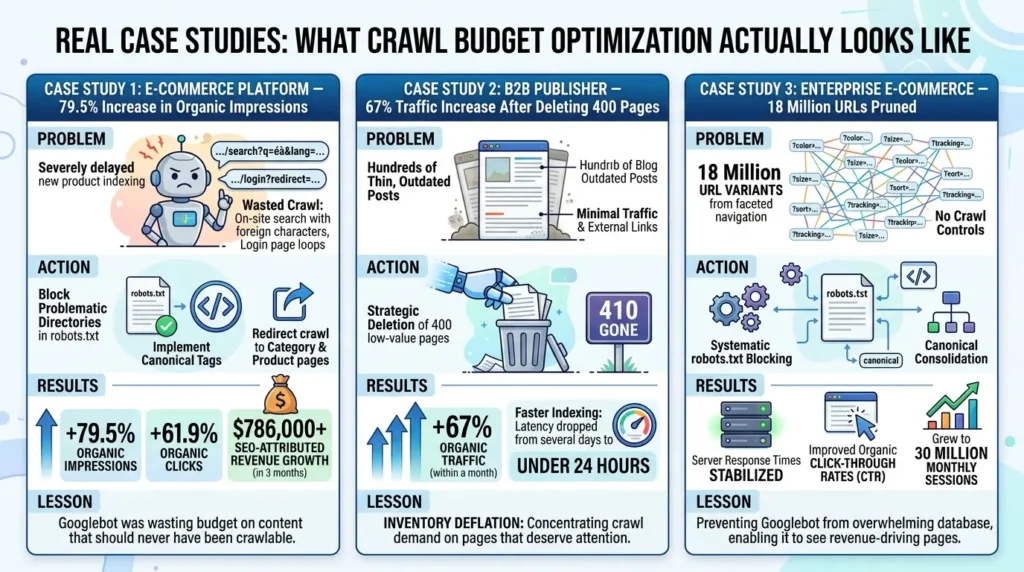
Case Study 1: E-Commerce Platform — 79.5% Increase in Organic Impressions
An enterprise e-commerce platform was experiencing severe indexing delays on new product launches. Server log analysis revealed that the overwhelming majority of Googlebot’s daily crawl requests were going to two unexpected sources: on-site search result pages with foreign character strings in the URLs, and crawl loops created by login page redirects.
Neither category of page had any indexing value. Both were easily discoverable by Googlebot because they were being linked internally and weren’t blocked in robots.txt.
After updating robots.txt to block the problematic directories and implementing canonical tags on remaining duplicate URL variants, the crawl budget was redirected to category and product pages. Within three months: 79.5% increase in organic impressions, 61.9% increase in organic clicks, and over $786,000 in SEO-attributed revenue growth.
The lesson isn’t that robots.txt is magic. The lesson is that Googlebot was spending its entire budget on content that should never have been crawlable in the first place.
Case Study 2: B2B Publisher — 67% Traffic Increase After Deleting 400 Pages
A B2B content site that had been publishing for several years had accumulated hundreds of thin, outdated blog posts that were getting minimal traffic and few external links. Rather than refreshing them, the SEO team made the counterintuitive decision to delete them entirely, returning proper 410 Gone status codes.
Within a month, organic traffic increased 67%. Googlebot was no longer wasting crawl demand across hundreds of low-value URLs, concentrating its attention on the remaining high-quality content. Indexing latency for new posts dropped from several days to under 24 hours.
This is what the research literature describes as inventory deflation, strategically reducing your URL footprint to concentrate crawl demand on pages that actually deserve attention.
Case Study 3: Enterprise E-Commerce — 18 Million URLs Pruned
A large e-commerce site identified through log analysis that approximately 18 million URL variants existed from parameter combinations, colors, sizes, sorting orders, and tracking IDs, none of which had been consciously created. They were the automatic output of a faceted navigation system with no crawl controls.
After implementing systematic robots.txt blocking and canonical consolidation on the remaining filter combinations, server response times stabilized (Googlebot no longer overwhelmed the database with millions of distinct queries), organic click-through rates improved, and the site grew to 30 million monthly sessions, partly because Googlebot could finally see the pages that actually drove revenue.
The 2026 Shift: AI Crawlers Have Changed the Entire Economics of Web Crawling
Here’s the part of crawl budget that virtually no 2024 or early 2025 article addresses.
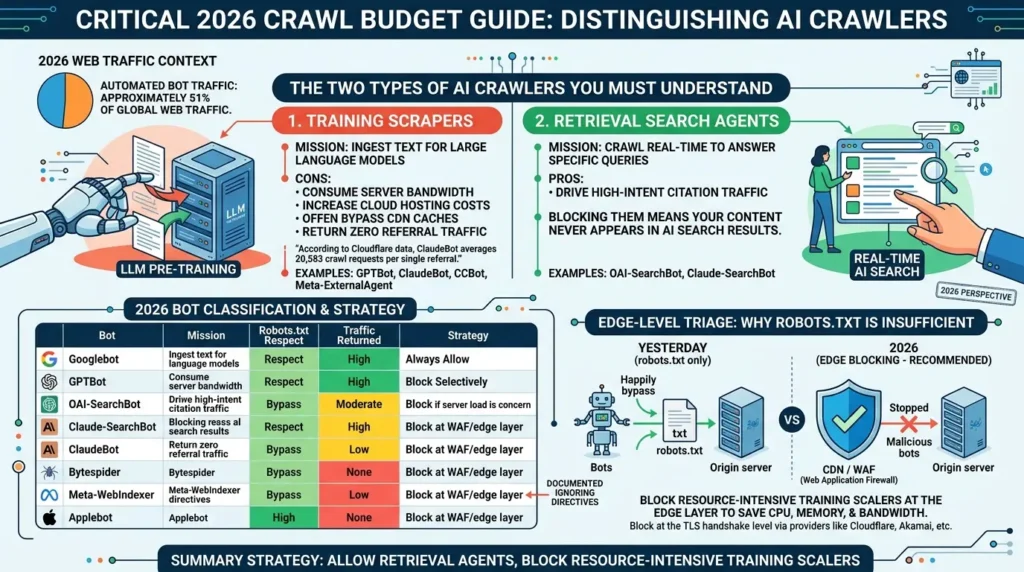
In 2026, automated bot traffic accounts for approximately 51% of all global web traffic. And unlike Googlebot, the fastest-growing segment of that automation doesn’t send referral traffic in return.
The Two Types of AI Crawlers You Need to Understand
Technical SEOs now need to distinguish between fundamentally different classes of AI agents:
- Training scrapers, bots like GPTBot, ClaudeBot, CCBot, and Meta-ExternalAgent, crawl your site to ingest text for large language model pre-training. They consume your server bandwidth and increase your cloud hosting costs. They often bypass CDN caches, requesting content directly from origin servers. And they return zero referral traffic. According to data from Cloudflare’s global network, ClaudeBot averages 20,583 crawl requests for every single referral it sends to a site.
- Retrieval search agents, bots like OAI-SearchBot and Claude-SearchBot, crawl pages in real time to answer specific user queries in AI search interfaces. These bots do drive high-intent citation traffic. Blocking them means your content never appears in ChatGPT or Claude’s real-time search results.
The critical mistake is treating all AI bots as equivalent.
| Bot | Mission | Robots.txt Respect | Traffic Returned | Strategy |
|---|---|---|---|---|
| Googlebot | Search indexing | Yes (ignores Crawl-delay) | High | Always allow |
| GPTBot | Model training | Usually yes | None (model weights only) | Block selectively or allow if you want ChatGPT training inclusion |
| OAI-SearchBot | Real-time search | Yes | High (ChatGPT citations) | Always allow |
| Claude-SearchBot | Real-time search | Yes | High (Claude citations) | Always allow (launched May 2026) |
| ClaudeBot | Model training | Usually yes | Exceptionally low | Block if server load is a concern |
| Bytespider | ByteDance training | Frequently bypasses | None | Block at WAF/edge layer |
| Meta-WebIndexer | Meta training | Bypasses completely | None | Block at server/WAF level only |
| Applebot | Siri & Apple Search | Yes | Moderate (Apple Search) | Allow; note it fully renders pages (47% CSS/JS requests) |
Why robots.txt Alone Is No Longer Sufficient
Bytespider and Meta-WebIndexer have been documented crawling straight through robots.txt blocking, ignoring directives entirely. For these bots, robots.txt is a polite request they’re choosing not to honor.
The 2026 approach for enterprise sites is edge-level triage: blocking resource-intensive training scrapers at the CDN or Web Application Firewall (WAF) layer before they ever hit the origin server. When a request is blocked at the TLS handshake level (via Cloudflare, Akamai, or similar), your CPU, memory, and egress bandwidth are never consumed.
Allow the retrieval agents through. Block the training scrapers that ignore your directives and burn server resources with nothing to show for it.
The robots.txt Configuration That Accounts for Both
# Allow real-time search agents (these drive citation traffic)

User-agent: OAI-SearchBot
Allow: /

User-agent: Claude-SearchBot
Allow: /

User-agent: Applebot
Allow: /

# Allow training bots if you want AI training inclusion
# (comment out to block them — tradeoff is less AI visibility)

User-agent: GPTBot
Allow: /
Disallow: /admin/
Disallow: /customer-portal/

# Block training scrapers that return zero traffic
# (Bytespider and Meta-WebIndexer bypass this anyway — use WAF)

User-agent: ClaudeBot
Disallow: /

User-agent: Bytespider
Disallow: /

User-agent: meta-externalagent
Disallow: /

Sitemap: https://www.yourdomain.com/sitemap.xml
Note: Blocking GPTBot via robots.txt removes your site from ChatGPT’s training data. Studies suggest sites that block GPTBot appear in ChatGPT responses significantly less often. The tradeoff between content protection and AI visibility is a real strategic decision, not a technical one.
Server Log Analysis: The Diagnostic That Actually Reveals the Truth
Google Search Console gives you 90 days of aggregated data. Server logs give you the full picture, every request, every bot, every response code, every URL, with timestamps.
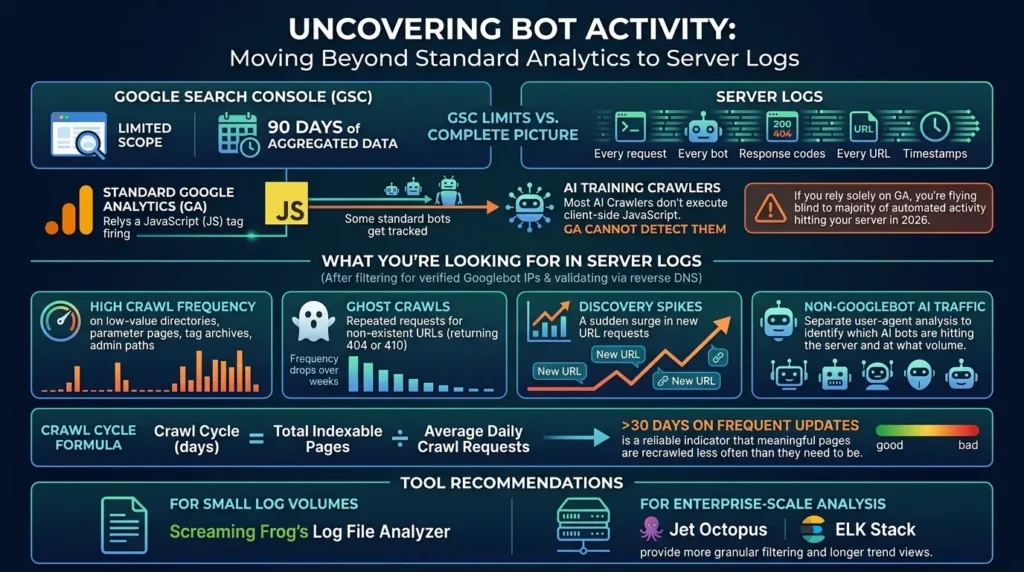
Most AI training crawlers don’t execute client-side JavaScript. That means standard Google Analytics, which depends on a JavaScript tag firing, cannot detect them at all. If you’re relying solely on GA to understand your bot traffic in 2026, you’re flying blind to the majority of automated activity hitting your server.
What You’re Looking For
After filtering log entries for Googlebot’s verified IP ranges (always validate via reverse DNS, many bots spoof user-agent strings), sort by URL and count requests per path. Patterns to flag:
- High crawl frequency on low-value directories, parameter pages, tag archives, admin paths that weren’t blocked
- Ghost crawls, repeated requests for URLs that no longer exist (return 404 or 410, then watch the frequency drop over subsequent weeks)
- Discovery spikes, a sudden surge in new URL requests indicates your site started generating URLs it wasn’t generating before
- Non-Googlebot AI traffic, separate user-agent analysis reveals which AI bots are hitting your server and at what volume
The crawl cycle formula gives you a usable metric:
Crawl Cycle (days) = Total Indexable Pages ÷ Average Daily Crawl Requests
A crawl cycle over 30 days on content you update frequently is a reliable indicator that meaningful pages are being recrawled less often than they need to be.
For tool recommendations: Screaming Frog’s Log File Analyzer handles smaller log volumes effectively. For enterprise-scale analysis, Jet Octopus and ELK Stack provide more granular filtering and longer trend views.
Managing Crawl Budget Across Multiple Search Engines
Google gets most of the attention, but Bing, Yandex, and others consume your server resources too.
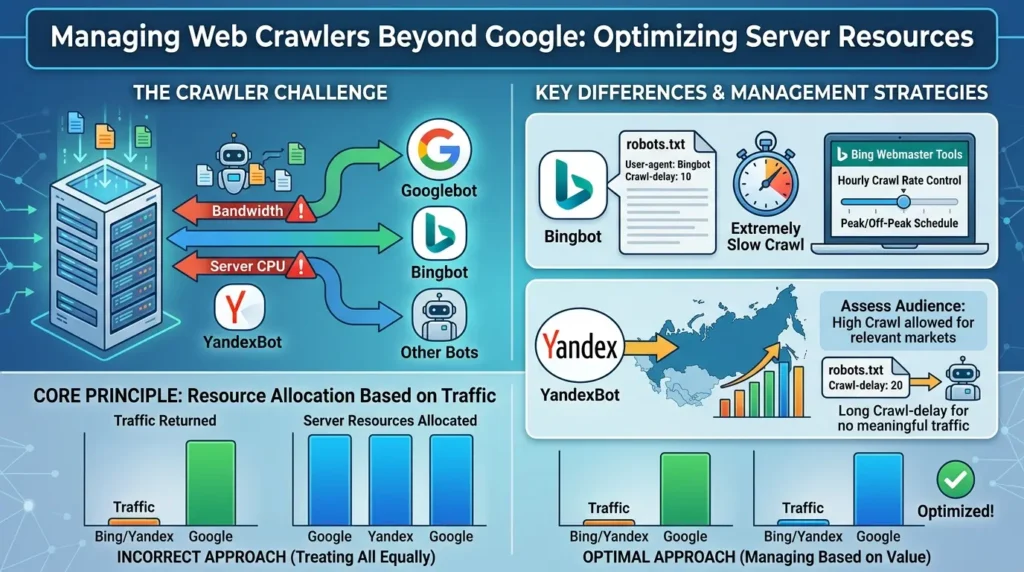
Bingbot is meaningfully different from Googlebot in one key way: it respects the Crawl-delay directive in robots.txt. Values of 1, 5, and 10 correspond to slow, very slow, and extremely slow crawl rates. It also supports direct schedule control through Bing Webmaster Tools, where you can set hourly crawl rate limits, high during off-peak hours, low during peak user traffic periods.
Yandex is worth managing for sites with Eastern European or Russian audiences. It respects Crawl-delay and can crawl aggressively. For sites without meaningful traffic from Yandex’s primary markets, a long Crawl-delay value reduces server overhead with no meaningful downside.
The general principle: manage crawl rate for each engine based on the traffic it actually returns to your site. Don’t give equivalent server resources to a crawler that drives 0.1% of your traffic.
Common Mistakes That Cost Weeks of Work
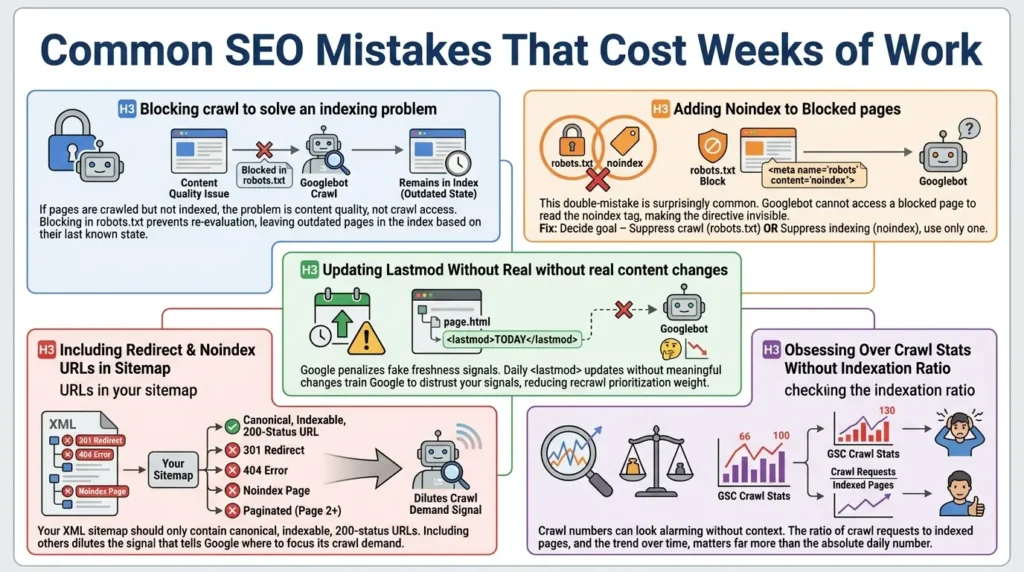
Blocking crawl to solve an indexing problem
If pages are crawled but not indexed, the problem is content quality, not crawl access. Blocking those URLs in robots.txt doesn’t remove them from the index; it just stops Googlebot from re-evaluating them. Pages remain in the index based on their last known state, which may be months old.
Adding noindex to blocked pages
This double-mistake is surprisingly common. If a page is already blocked in robots.txt, Googlebot can’t access it to read the noindex tag. The directive is invisible. Fix: decide whether your goal is suppressing crawl (robots.txt) or suppressing indexing (noindex), and use only one approach per URL.
Updating lastmod timestamps without real content changes
Google explicitly states that it penalizes fake freshness signals. If you update <lastmod> in your sitemap every day to signal freshness but the page content hasn’t meaningfully changed, you’re training Google to distrust your lastmod signals, reducing how much weight it gives them for recrawl prioritization.
Including redirect and noindex URLs in your sitemap
Your XML sitemap should only contain canonical, indexable, 200-status URLs. Sitemaps that include 301s, 404s, noindex pages, or paginated variants beyond page 1 dilute the signal that tells Google where to focus its crawl demand.
Obsessing over crawl stats without checking the indexation ratio
The crawl numbers in GSC look alarming if you don’t know what’s normal. The ratio of crawl requests to indexed pages, and the trend over time, matters far more than the absolute daily number.
Your 30-Day Crawl Budget Action Plan
| Week | Focus | Key Actions |
|---|---|---|
| Week 1 | Diagnosis | Calculate Crawl Distress Ratio · Check GSC Crawl Stats and host status · Identify “Discovered – not indexed” volume · Export and filter server logs |
| Week 2 | High-Impact Fixes | Block faceted navigation parameters in robots.txt · Flatten all redirect chains · Return 410 for permanently deleted content · Fix 5xx errors |
| Week 3 | Architecture & Sitemap | Audit XML sitemap (remove redirects, noindex pages, non-canonical URLs) · Fix orphan pages · Strengthen internal links to key pages · Fix nofollow on bot traps |
| Week 4 | AI Crawler Management | Audit AI bot traffic in logs · Configure robots.txt for training vs. retrieval bots · Set WAF rules for bots bypassing robots.txt · Deploy /llms.txt if relevant |
| Ongoing | Monthly Monitoring | Recalculate Crawl Distress Ratio · Review GSC Crawl Stats trend · Audit new parameter sources · Monitor AI bot volume in server logs |
A Note on the Future: Where Crawl Systems Are Heading
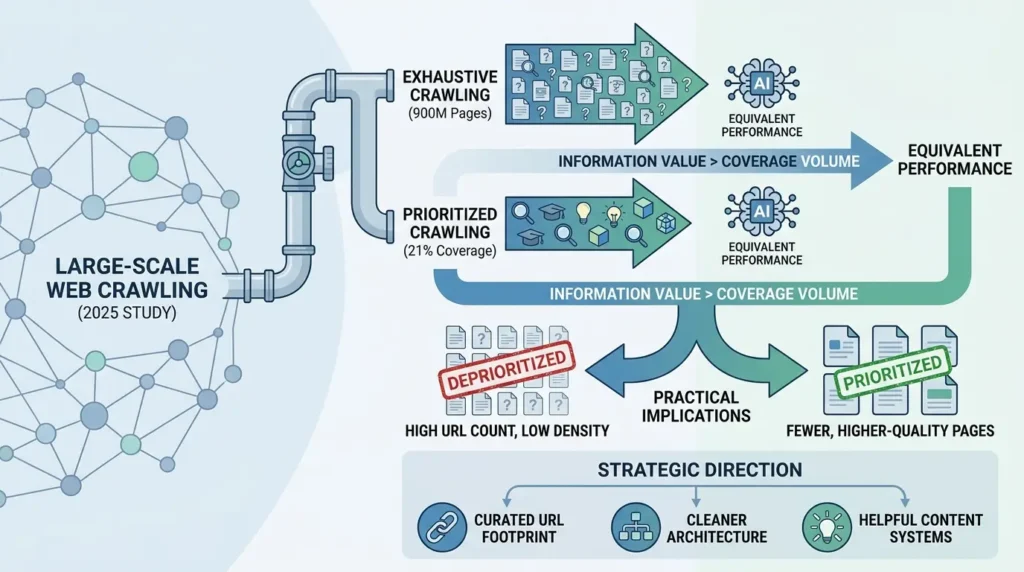
The research literature on large-scale web crawling points toward something interesting. A 2025 study on crawl prioritization for AI data pipelines found that crawling only 21% of a 900-million-page URL graph produced equivalent downstream model performance compared to exhaustive crawling. The implication: future crawl systems, including Google’s, will increasingly prioritize information value over coverage volume.
This has practical implications. Sites with high URL counts but low information density per page will be deprioritized. Sites with fewer, higher-quality pages will get proportionally more crawl attention. The trend toward quality-weighted crawl allocation is already visible in how Google’s helpful content systems interact with indexing decisions.
The strategic direction is clear: fewer URLs, higher quality per URL, cleaner architecture. It’s the opposite of the programmatic SEO playbook that dominated 2022 and 2023. The sites that thrive will be the ones that treat their URL footprint as a resource to be curated, not expanded.
Conclusion
Crawl budget is not a number you’re assigned and can’t change. It’s an allocation decision Google makes, repeatedly, based on signals your site produces, both positive (good content, fast servers, clean architecture) and negative (duplicate URLs, broken pages, bot traps).
Most sites don’t have a crawl budget problem. If you’re under 10,000 pages and publishing weekly, keep your sitemap clean and move on.
But if you run a growing e-commerce platform, a publisher with thousands of posts and tags, or any site scaling with programmatic content, this matters. Not because Googlebot can’t crawl fast enough, but because you may be training it to spend its limited attention on exactly the wrong pages.
Fix the demand distortion first. Eliminate the URL waste. Then optimize the server. The sequence matters.
And in 2026, add one more layer: decide which AI crawlers deserve access to your server. The retrieval agents that drive citation traffic should always get through. The training scrapers consuming bandwidth with nothing returned, that’s a business decision, not a technical default.







[…] Read the Full Article → […]
[…] Read the Full Article → […]