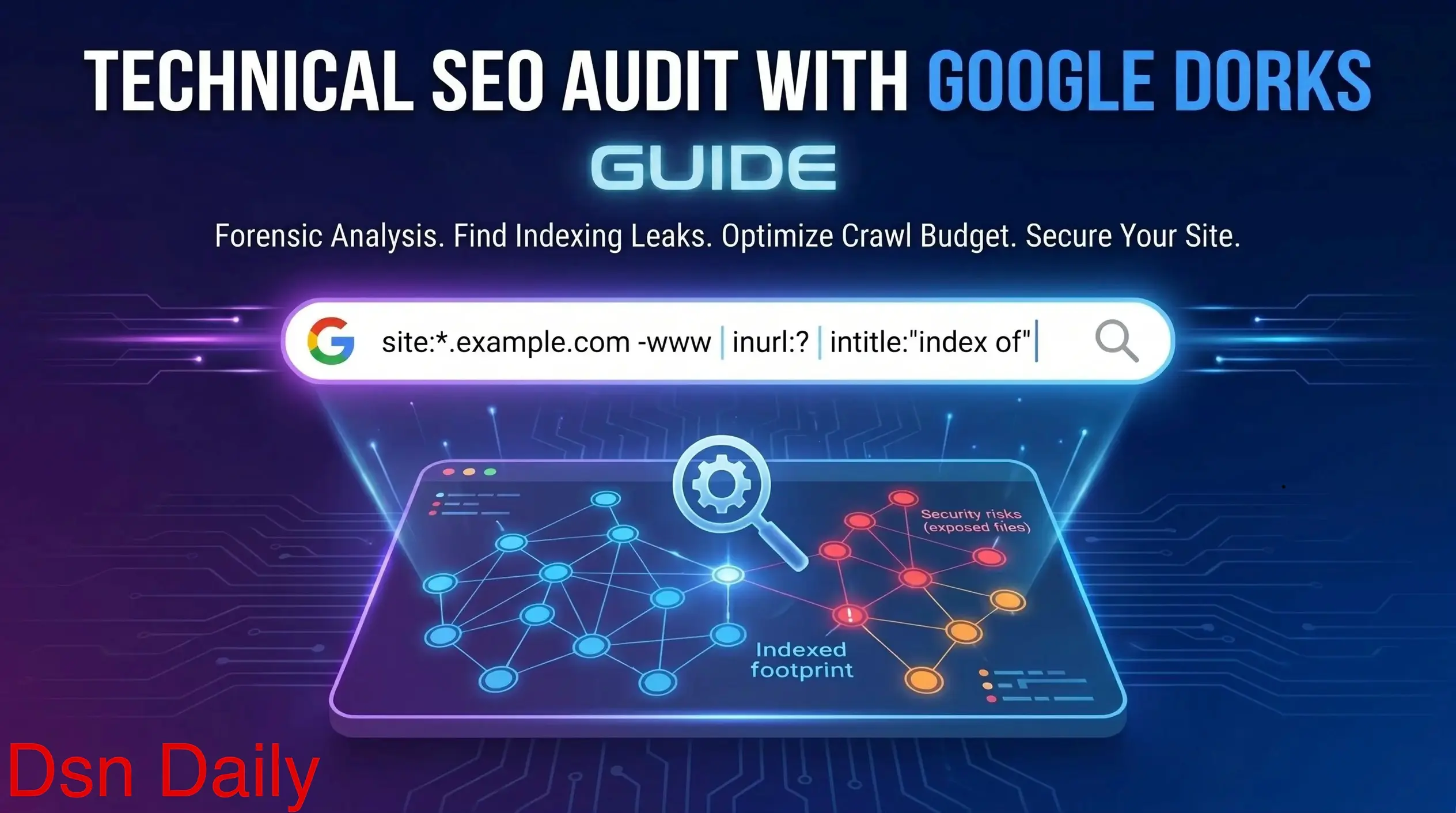

Stop Paying for Audits. Google Already Has All the Data.
So here’s something most technical SEO guides aren’t going to tell you. Google has already crawled your entire website. It’s already made indexing decisions on every page. It already knows about your forgotten staging environment, your parameter-bloated category pages, your exposed config files. And you can interrogate every single one of those decisions using nothing but Google’s own search bar.
That technique is called Google Dorking. And no, despite the name, it’s not a hacker trick. It’s the strategic use of advanced search operators to filter Google’s index with surgical precision, surfacing the exact technical failures that automated crawlers miss, completely free of charge.
Here’s why this matters in 2026 specifically. With AI Overviews reshaping the SERPs, generative search engines making crawl budget decisions more aggressively than ever, and indexing becoming increasingly probabilistic rather than deterministic, a sloppy technical foundation doesn’t just hurt your rankings, it makes you invisible.
According to Google Search Central’s crawling and indexing documentation, even structurally sound sites can suffer persistent indexation failures if foundational technical issues go unaddressed at scale.
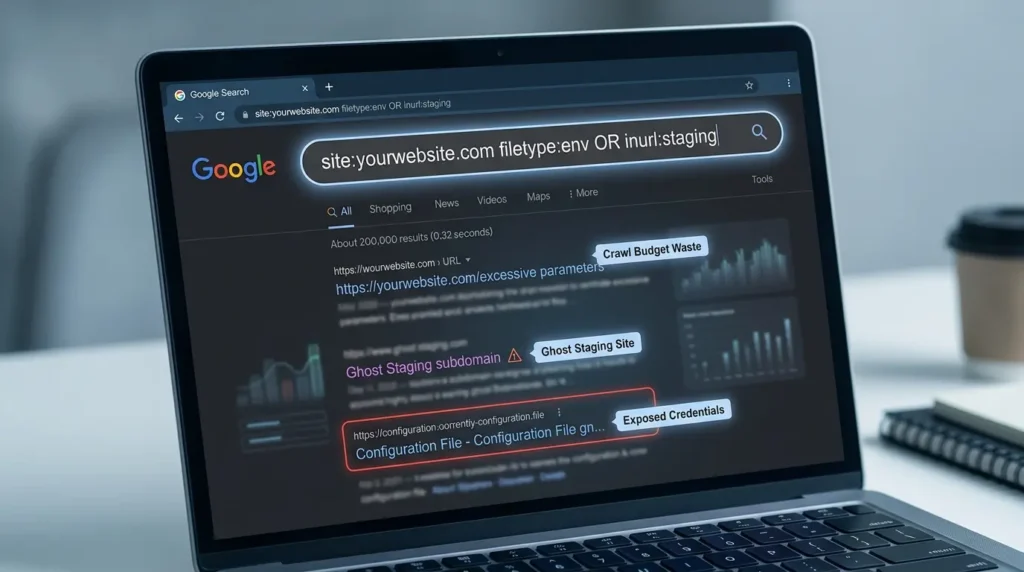
This guide walks you through the exact dorks to run, what every result actually means for your site health, how to cross-reference findings with Google Search Console, how to prioritize fixes based on real business impact, and the AI-readiness layer that almost every audit in 2026 is completely skipping.
No 10,000-item checklists. No tool subscriptions required. Just a forensic, systematic, prioritized audit workflow you can start today.
Let’s get into it.
What You’ll Walk Away With
- The 5 core Google Dorks that surface critical SEO failures in under 10 minutes
- A step-by-step audit workflow you can run for free, right now
- How to detect crawl budget waste, ghost subdomains, and exposed credential files
- A Priority Score formula to rank every finding by actual business impact
- Competitive intelligence techniques using Google’s own search index
- The AI-readiness audit layer that most teams haven’t built yet in 2026
- The 6 most common technical audit mistakes, and how to avoid every one
What Is Google Dorking? (And Why It’s a Legitimate SEO Tool)
Let’s define this properly, because “dorking” sounds sketchy and that puts a lot of people off.
Google Dorking is the strategic use of advanced search operators, specialized commands typed directly into Google’s search bar, to filter and interrogate indexed data with precision that standard searches can’t achieve. Instead of searching broadly for a site’s content, you’re running targeted queries like site:example.com inurl:? to surface every indexed URL on the domain that contains a query string parameter.
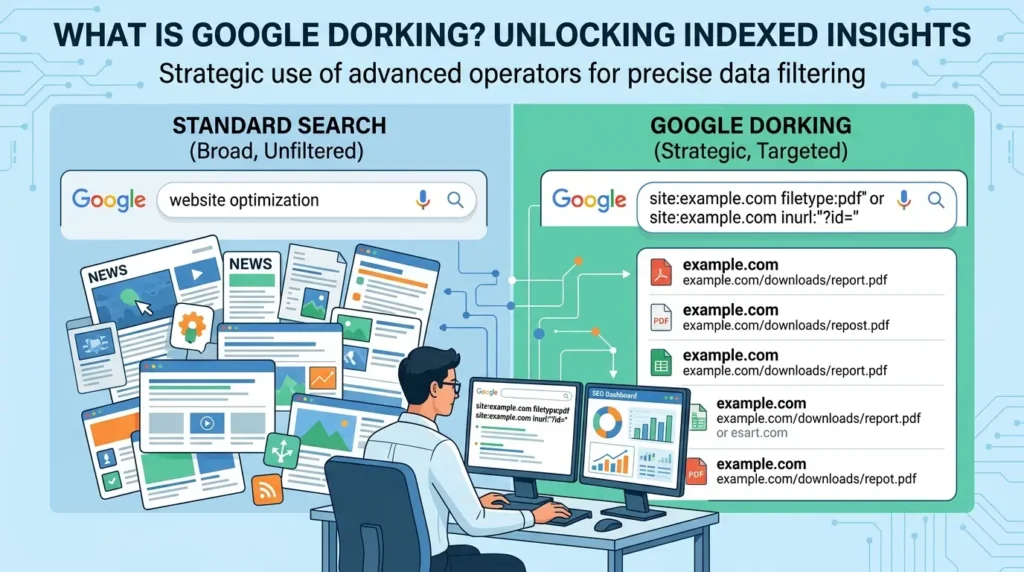
The term traces back to security researcher Johnny Long, who in the early 2000s realized Google’s indiscriminate crawling was capturing sensitive server directories, configuration files, and private documents, all publicly searchable via precise queries.
By 2026, this evolved into a dual-purpose discipline: cybersecurity professionals use it to map attack surfaces, and technical SEO analysts use it to see what Google actually indexed versus what they think it indexed.
That distinction, actual indexed state versus assumed indexed state, is operationally critical and almost universally ignored.
Traditional crawl tools simulate what a search engine might see based on your site’s current state. Google Dorks show you what it actually indexed, cached, and surfaced. That’s a completely different diagnostic layer. And it’s the layer where the most damaging technical failures hide.
On the legality front: using dorks on your own domain is entirely legal and strongly recommended. Using them for competitive research is legal too, you’re organizing publicly indexed information. Where it crosses a legal line is using discovered data (like an exposed password file) to access systems you’re not authorized to enter.
That territory is governed by laws like the Computer Fraud and Abuse Act. Keep your work on the analysis side and you’re completely fine.
The Dork Operator Taxonomy: What Each Command Actually Does
Before running anything, let’s get clear on the building blocks. These aren’t just search tricks, each operator targets a specific layer of your site’s indexed architecture.
| Operator | Targets | SEO Audit Use Case | Severity Level |
|---|---|---|---|
site: | Domain / Subdomain | Assess total indexed footprint | Critical |
site:*. | All Subdomains | Find ghost and staging environments | Critical |
inurl:? | URL Parameters | Detect parameter bloat and crawl waste | High |
intitle: | <title> Tag | Find duplicate or placeholder titles | High |
filetype: | File Extension | Surface exposed docs, SQL, ENV files | Critical |
intitle:"index of" | Open Directories | Detect dangerous directory listings | Critical |
inurl:login | Login / Admin Portals | Find exposed admin interfaces | Critical |
intext: | Body Content | Find placeholder text and soft 404 content | Medium |
cache: | Cached Snapshot | Verify crawl recency and rendering fidelity | Medium |
The real power isn’t using these individually, it’s chaining them. site:example.com -inurl:https immediately shows every non-secure page still indexed after an HTTPS migration. That single query does in five seconds what a manual audit might take hours to surface.
The 5 Google Core Dorks for a Complete Technical SEO Audit
Here’s the thing about most “Google Dorks for SEO” articles, they dump 50 operators on you with zero context on what the results actually mean. So let’s do this differently. Five dorks, deep context, real interpretation. This is the exact sequence you follow.
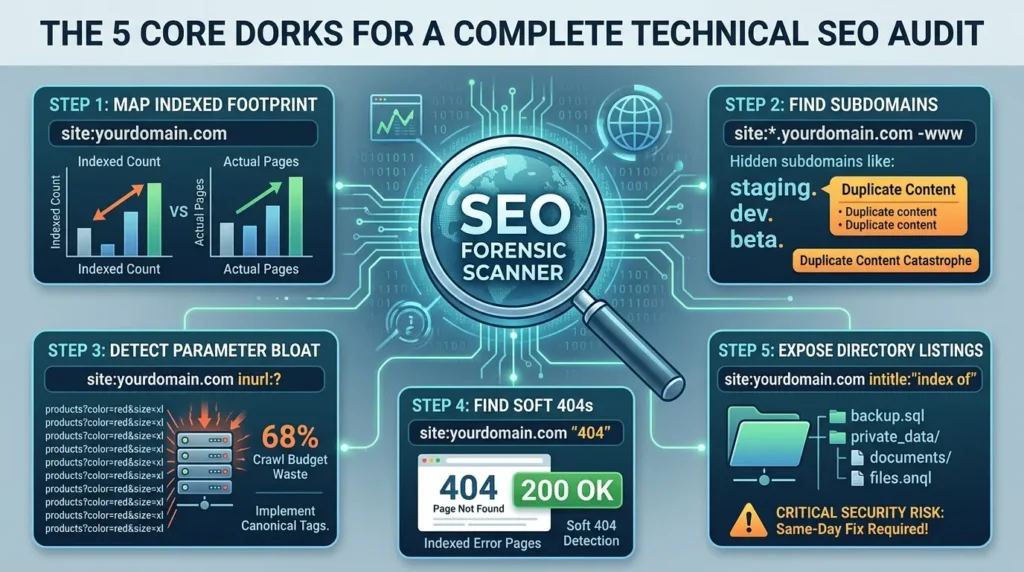
Step 1: Map Your Total Indexed Footprint
site:yourdomain.comThis is where every audit starts. Run it, note the result count, and compare it against your actual page count from your XML sitemap or CMS. The number Google returns isn’t always precise, it fluctuates, but dramatic discrepancies reveal real problems.
If the count is significantly lower than expected: Googlebot is probably being blocked by a misconfigured robots.txt, or your internal linking is so weak that deeper pages are never discovered. Important pages are invisible.
If the count is significantly higher than expected: You’re leaking low-value pages into the index, paginated archives, URL parameter variants, session ID duplicates, filtered views. Google’s crawl budget is being eaten by noise instead of your actual content.
Write down this number. You’re going to cross-reference it with the Index Coverage report in Google Search Console in a few minutes.
Step 2: Find Every Subdomain – Including the Ghost Ones
site:*.yourdomain.com -wwwThis is the one that catches teams completely off guard every single time. What this dork does is tell Google to search across all subdomains of your domain while excluding the primary www version. What you’re looking for is anything that shouldn’t be publicly indexed, staging environments, development servers, legacy microsites.
Run this and you’ll frequently find things like staging.yourdomain.com, dev.yourdomain.com, or beta.yourdomain.com showing up fully indexed in Google with the same content as your production site.
That’s a duplicate content catastrophe. Google’s algorithms seek to surface diverse, unique results. When it finds two versions of your site, production and staging, it gets confused about which one to rank. In worst-case scenarios, it picks the staging version. Or it filters both out as redundant. Either way, organic traffic suffers.
If you have legitimate subdomains that are supposed to be indexed (like blog.yourdomain.com or support.yourdomain.com), just chain minus operators to strip them out: site:*.yourdomain.com -www -blog.yourdomain.com -support.yourdomain.com. What’s left is your exposure layer.
Step 3: Detect Parameter Bloat and Crawl Budget Waste
site:yourdomain.com inurl:?If you run an e-commerce site, a large blog with tag taxonomies, or anything with faceted navigation, filters for color, size, price, brand, this dork is going to show you something alarming.
What it surfaces is every indexed URL on your domain containing a query string parameter. Think yourdomain.com/products?color=blue&size=xl&sort=price_asc. Every filter combination creates a unique URL, and if those are indexable, Googlebot crawls all of them. Every single combination. Research across enterprise sites indicates that over 68% suffer crawl budget waste from exactly this kind of parameter proliferation.
Your crawl budget, the finite number of pages Googlebot will request from your server per day, gets consumed by thin, near-duplicate filter pages instead of crawling your actual new content. New blog posts, new products, updated pages, all waiting in the queue while Google crawls your 47th combination of color=red&size=medium.
The fix is implementing rel=”canonical” on filtered pages pointing back to the clean category URL. Essentially, you’re telling Google: “This filtered page exists for users, but treat it as a copy of this clean URL.” For WordPress sites, plugins like RankMath or Yoast handle this, but you still need to audit it, they don’t always get auto-configured correctly.
The Ultimate Verification: Log File Analysis Integration:
Dorking is incredibly powerful because it shows you exactly what Google indexed. But to see the full financial cost of this parameter bloat, you need Server Log File Analysis to see where Googlebot is spending its time. Combining the inurl:? dork with server logs provides the ultimate 3D map of crawl budget waste. The dork highlights the symptom in the SERPs; the log file shows you how many thousands of times Googlebot hit those useless URLs instead of your money pages.
Step 4: Find Indexed Error Pages and Soft 404s
site:yourdomain.com "404"or
site:yourdomain.com "page not found"Your 404 error page should return a proper 404 HTTP status code and should never be indexed. But a common failure mode, especially on custom-built CMS platforms, is the “Soft 404.” The server sends a 200 OK status code (looks valid to Google) but the page’s visible content says something like “Page Not Found.”
Google crawls it, interprets the 200 status as “this is live content,” and indexes it. Now you have dead ends indexed in your SERPs. Users click through and hit error pages. Domain trust erodes. Crawl budget gets wasted on pages with zero user value.
Running this dork takes ten seconds and immediately shows whether the problem exists. If you find results, add a noindex meta tag to your error template and submit it for recrawl in Google Search Console.
Step 5: Expose Dangerous Directory Listings
site:yourdomain.com intitle:"index of"This is the most critical dork in the entire set, and the one most auditors completely skip because it feels “outside the SEO scope.” It’s not.
Here’s what a directory listing vulnerability actually means: if your web server is misconfigured to allow directory browsing and there’s no index file (like index.php) in a particular folder, the server displays a raw, fully browsable list of every file in that directory, file names, sizes, modification dates, everything.
And Google crawls and indexes that list.
Visitors and attackers can browse and download anything sitting in that folder: backup files, configuration data, private uploads, database exports, internal documents. The NIST Cybersecurity Framework explicitly categorizes unintended public exposure of infrastructure assets through misconfiguration as a critical operational risk requiring immediate remediation.
If this dork returns any results for your domain, stop everything. Contact your hosting provider or web developer today. This is a same-day fix, not a sprint item.
Quick summary of your five-dork triage system: total indexed footprint, ghost subdomain detection, parameter bloat audit, soft 404 exposure, and directory listing vulnerability check. That’s a complete forensic layer in under fifteen minutes using nothing but Google’s search bar.
Infrastructure Mapping: The Ghost Subdomain Problem in Depth
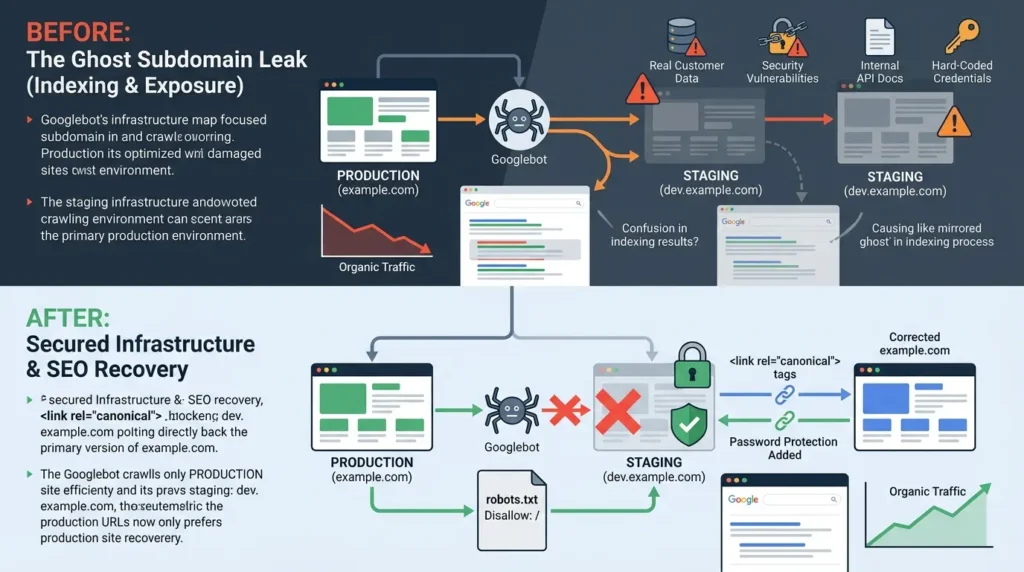
Let’s go deeper on that subdomain finding, because the consequences are more serious than just a duplicate content warning.
When a staging environment like dev.example.com gets indexed alongside example.com, you’re not just dealing with Google confusion. You’re potentially exposing unfinished features with security vulnerabilities, developer credentials hard-coded into test configuration files, real customer data used in test environments, and internal API documentation in code comments.
The staging environment typically has zero security hardening because developers assume it’s private. It’s not. It’s just unlisted. And “unlisted” and “secure” are completely different things once Googlebot finds it.
Here’s a concrete before-and-after that illustrates the real business impact:
- Before fixing the staging leak: Google indexes 900 pages from staging.example.com alongside 1,400 pages from production. The staging content has identical body copy but different URLs and no canonical tags pointing to production. Crawl budget splits between both environments. Google begins preferring some staging URLs over production counterparts. Organic traffic for primary commercial pages drops steadily over 10 weeks.
- After fixing: Robots.txt disallows all crawling on the staging subdomain. Password protection is added as a secondary barrier. Production canonical tags are audited and corrected. Organic traffic recovers fully within 8 weeks, and crawl efficiency improves measurably in Search Console’s Crawl Stats report.
That’s not a theoretical scenario. It’s the standard outcome from real site migration audits where staging hygiene gets skipped.
Content Forensics: Finding the Structural Failures Google Sees
Now let’s talk about the quality layer of the dork audit, the structural content failures that quietly erode your domain authority without showing up in any ranking report.
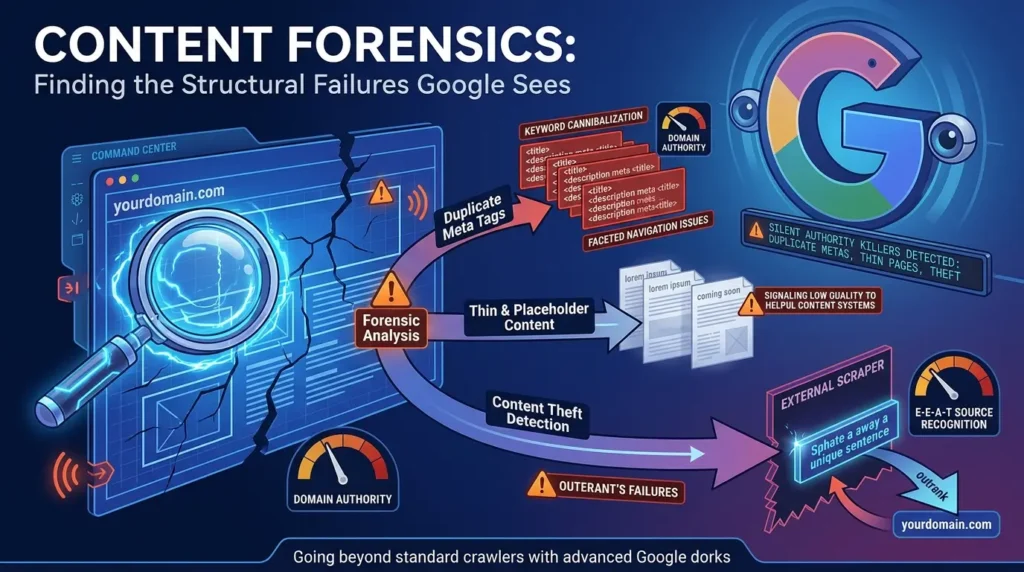
Detecting Duplicate Meta Tags at Scale
site:yourdomain.com intitle:"Product Category"Run this on an e-commerce site and you’ll often find dozens or hundreds of pages all sharing the exact same title tag. That’s keyword cannibalization, your own pages competing against each other for the same query. Google struggles to differentiate between them and picks one, often not the most valuable one.
This happens constantly in faceted navigation setups. The navigation generates unique URLs (good) but all those URLs inherit the parent category’s meta title and description (catastrophic). You need unique, descriptive metadata on every indexable URL.
Surfacing Placeholder Text and Thin Content
site:yourdomain.com "lorem ipsum"or
site:yourdomain.com "coming soon"These two dorks find pages published accidentally during development. Placeholder copy, blank service pages, staging content that slipped into production. All of them indexed, all of them signaling low quality to Google’s Helpful Content systems. A cluster of thin pages can suppress your entire domain’s visibility, not just the individual pages.
Detecting Content Theft
Here’s a forensic technique most teams don’t know about. Take a unique, specific sentence from one of your strongest performing pages, something distinctive, not a common phrase, and search for it in quotation marks while excluding your own domain: “your unique sentence here” -site:yourdomain.com.
If another domain has scraped your content and Google indexed their version first (which happens when they have higher crawl priority), they may be outranking you for your own material. According to Google’s guidance on helpful, reliable, people-first content, being recognized as the original source is a core E-E-A-T signal. Losing that recognition to scrapers has measurable ranking consequences on competitive terms.
Section takeaway: Content forensics via dorks surfaces duplicate meta tags, thin or placeholder pages, and external content theft, three silent authority killers that standard crawlers rarely flag with enough context to act on.
The Security-SEO Nexus: Where the Audit Gets Serious
This is where most technical SEO audits are dangerously incomplete. Because here’s the thing, anything Google can crawl, anyone can find. And that includes files most site owners think are completely private.
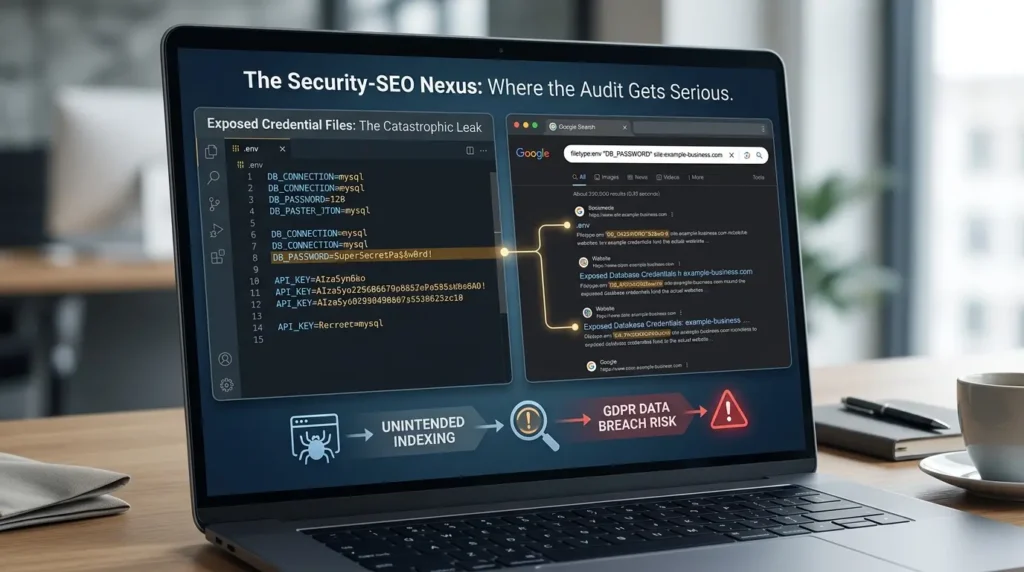
Exposed Credential Files: The Catastrophic Leak
Try these on your own domain:
filetype:env "DB_PASSWORD" site:yourdomain.comfiletype:sql "backup" site:yourdomain.comIf either of these returns results, stop everything and remediate immediately. .env files contain database credentials, API keys, encryption secrets, and payment gateway tokens. .sql files are often entire database dumps containing user records, transaction data, and business intelligence.
In the GDPR era, having these files publicly indexed isn’t just a technical failure, it’s a reportable data breach incident. The General Data Protection Regulation imposes penalties of up to 4% of global annual turnover for organizations that fail to maintain reasonable security over personal data. A misconfigured Vercel deployment or an accidentally public S3 bucket can create this exact exposure in seconds.
Exposed Admin Portals
site:yourdomain.com inurl:loginor
site:yourdomain.com inurl:wp-adminManagement interfaces discoverable via Google are direct targets for brute-force attacks. They should be restricted to specific IP ranges, protected by two-factor authentication, and excluded from Google’s index via noindex meta tags or X-Robots-Tag HTTP headers. If a dork can find them, an attacker already has.
The Priority Score Formula: Stop Fixing the Wrong Things First
Okay, so you’ve run your dorks and you’ve got a list of issues. Here’s where most audit processes completely break down, they surface hundreds of findings with no clear framework for deciding what to actually work on first.
Not all technical problems carry the same weight. A missing H1 tag on a low-traffic archive page is not in the same universe as an exposed .env file or a robots.txt that’s blocking your entire production site. You need a formula.
Audit Prioritization Formula
Traffic Weight: 1–10 based on monthly page visits or section importance. Issue Severity: 1=Negligible, 2=Low, 3=Medium, 4=High, 5=Critical.
Use the calculator below to score every issue you find. Scores 40–50 mean fix today. Scores 25–39 mean to schedule it this sprint. Below that, batch it or deprioritize.
🧮 Priority Score Calculator
How important is this page or section to your traffic? 1=Negligible · 2=Low · 3=Medium · 4=High · 5=CriticalThe 5-Pillar Technical Audit Workflow (Step by Step)
Now let’s tie everything together into a systematic process. This is the full workflow, start to finish.
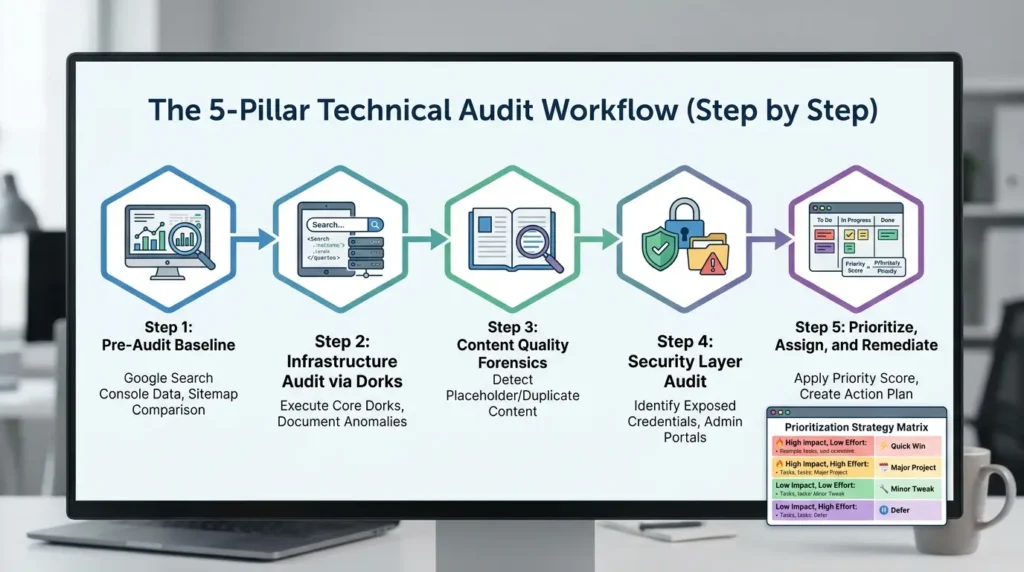
Step 1: Pre-Audit Baseline
Before running a single dork, pull data from Google Search Console. Export the Index Coverage report. Note total indexed pages, excluded pages, and the “Crawled – currently not indexed” count (that third category is increasingly important in 2026, more on that shortly). Download your XML sitemap and count URLs. This gives you your expected vs. actual comparison baseline.
Step 2: Infrastructure Audit via Dorks
Run your five core dorks in sequence. Document every anomalous result with the exact query, the result count, and a screenshot. Don’t act yet, just inventory.
Step 3: Content Quality Forensics
Run dorks for placeholder text (“lorem ipsum”, “coming soon”), duplicate title patterns, and content theft detection. Cross-reference with your crawl tool to understand which pages are genuinely thin vs. intentionally brief.
Step 4: Security Layer Audit
Check for exposed credential files, open directories, admin portals, and any filetype: dorks that surface documents that shouldn’t be public. This is non-negotiable and non-deferrable.
Step 5: Prioritize, Assign, and Remediate
Apply the Priority Score formula to every finding. Create a tiered action plan with owners and deadlines. Schedule a 30-day follow-up dork audit to verify fixes took effect in Google’s index.
| Impact | Effort | Strategy | Real Examples |
|---|---|---|---|
| High | Low | Quick Win — Fix today | Remove noindex from key pages; fix canonical mismatches on high-traffic pages; add H1 to top landing pages |
| High | High | Major Project — Schedule this sprint | Full HTTPS migration; Core Web Vitals optimization; restructure faceted navigation with proper canonicals |
| Low | Low | Minor Tweak — Batch and ship | Fix alt text on low-traffic images; add optional schema properties; clean up minor redirect chains |
| Low | High | Defer — Re-evaluate next quarter | Migrating a low-traffic legacy section; advanced pagination refinement; deep internationalization restructuring |
Section takeaway: The audit workflow is only as good as your prioritization. Surface findings systematically, score them by traffic weight and severity, and work the highest-impact items first, always.
Competitor Forensic Auditing: Using Dorks for Strategic Intelligence
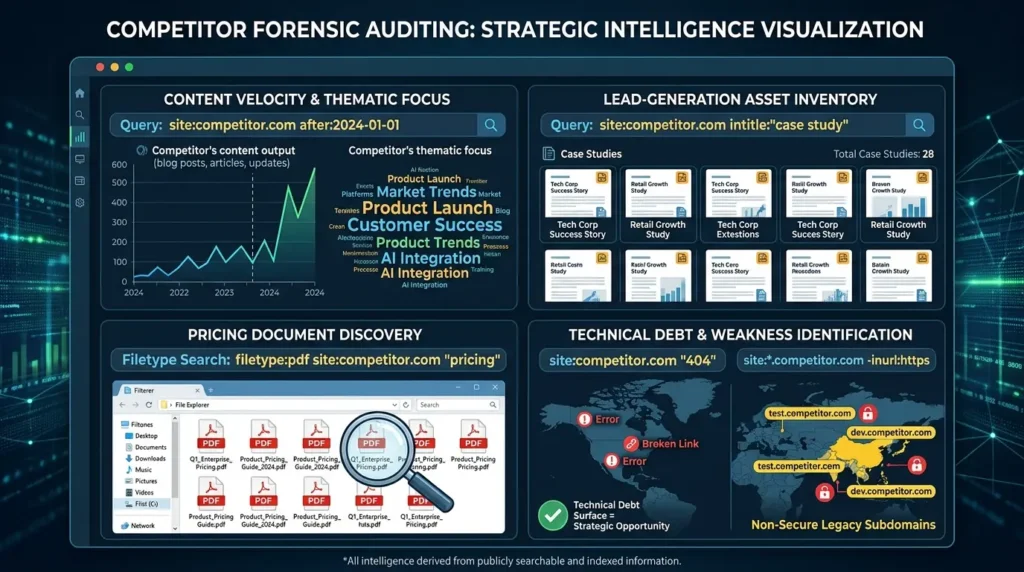
Here’s a use case that’s massively underutilized, running dorks against competitor domains to map their strategy and identify their weaknesses.
site:competitor.com after:2024-01-01 shows every piece of content they’ve published in the past year. Reveals their content velocity and thematic focus.
site:competitor.com intitle:"case study" gives you a complete inventory of their lead-generation assets.
filetype:pdf site:competitor.com "pricing", if they’ve uploaded pricing documents to an indexed directory, you can access them directly. Surprising how often this works.
site:competitor.com "404" finds their indexed error pages. If they’re mid-migration, this is where their technical debt surfaces, and that’s a strategic opportunity. Their temporary traffic losses are your ranking gains.
site:*.competitor.com -inurl:https exposes non-secure legacy subdomains. These represent their technical debt and weak points in domains they’re not actively defending.
None of this involves accessing anything they haven’t already made publicly searchable. You’re just organizing publicly indexed information with precision. That’s the whole point.
Common Mistakes in Technical SEO Audits (Avoid These)
Let’s run through the errors that derail real audits and waste real hours.
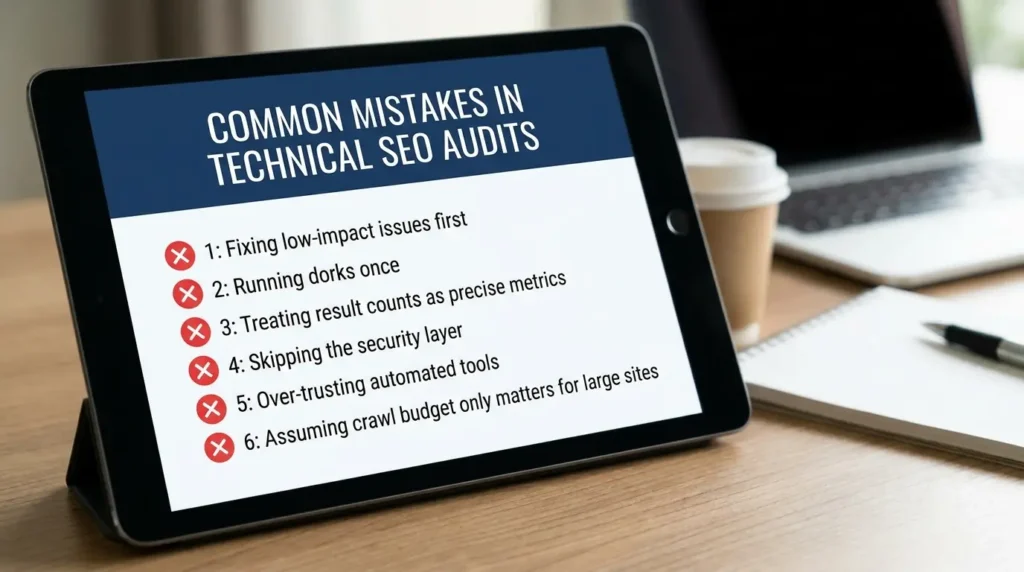
Mistake #1: Fixing low-impact issues first
The most common failure. You see 600 “missing alt text” warnings and spend three days on image descriptions for pages with zero organic traffic. Meanwhile, your checkout page is blocked in robots.txt. Always apply the Priority Score before touching anything.
Mistake #2: Running dorks once and treating it as done
Technical infrastructure changes constantly. New deployments happen. Developers push staging environments live accidentally. Parameters get added by platform updates. You need dork-based monitoring on at least a monthly cadence.
Mistake #3: Treating dork result counts as precise metrics
The site:domain.com count fluctuates. Google’s index estimates aren’t exact figures. Use them as diagnostic signals and cross-reference everything with Google Search Console data.
Mistake #4: Skipping the security layer
Most SEO auditors skip filetype: and intitle:”index of” checks because they feel outside the scope. They’re not. An exposed .env file is simultaneously a technical SEO failure and a critical security incident. You can’t audit one without the other in 2026.
Mistake #5: Over-trusting automated audit tools
This one’s important. Research from NIST on AI-assisted systems explicitly identifies automation bias as a growing operational risk, tools that prioritize detectable pattern violations while under-detecting contextual business logic. A spike in 404 responses after a planned content pruning initiative is healthy and expected. An AI audit tool might flag it as critical. Always apply human judgment to automated findings.
Mistake #6: Assuming crawl budget only matters for large sites
It doesn’t. Parameter proliferation, JavaScript rendering overhead, and poorly configured tag taxonomies create crawl inefficiency at any scale. If you have more than a few hundred indexed pages and any kind of filtering or sorting functionality, this affects you.
The Contrarian Truth About Technical SEO in 2026
Here’s something you genuinely won’t hear in most guides, but the evidence strongly supports it: the biggest SEO failures right now are not ranking failures. They’re indexing governance failures.
At scale, organizations lose control over what Google crawls, what becomes indexable, what leaks publicly, and which canonical versions dominate. And the rise of AI-generated content has dramatically accelerated this problem. Every low-value AI-generated page that earns an index spot potentially reduces crawl allocation efficiency for your high-value pages, creating what researchers are calling “semantic index pollution.”
Real-world Google Search Console data from enterprise sites shows hundreds of thousands of “Crawled, currently not indexed” pages persisting despite technically valid setups. Google is increasingly behaving like an economic resource allocator, rationing its crawl and indexing resources based on perceived value, not a passive indexer that captures everything it finds.
This means your technical audit in 2026 isn’t just about fixing broken links. It’s about actively curating what Google sees, ensuring every indexed URL serves a clear semantic purpose, and treating your indexed footprint as an asset to be governed, not passively accumulated. The teams that understand this shift are the ones that maintain indexing stability when competitors are oscillating.
AI Readiness: The New Technical Audit Layer
The rise of AI-powered search, Google’s AI Overviews, Perplexity, ChatGPT search, has added a new requirement to technical audits that barely existed two years ago. Your site now needs to be interpretable not just by traditional Googlebot but by large language models making citation and answer decisions.
Practically, this means auditing for a few specific things most teams haven’t built into their workflow yet:
First, ensure AI bots (GPTBot, ClaudeBot, PerplexityBot) are not accidentally blocked in your robots.txt. A lot of legacy robots.txt configurations were written before these bots existed and use blanket wildcard blocks that catch them.
Second, implement high-fidelity schema markup that clearly defines your entities and their relationships. According to Google’s structured data documentation, schema markup not only enables rich results in traditional search, it improves how AI systems understand and represent your content in generative search responses. If your brand, products, and content types aren’t structured for AI extraction, you’re losing citation opportunities.
Third, structure content with clear Q&A formats, tables, and numbered lists. AI systems parse and extract these more reliably than dense prose paragraphs.
You can use a dork to audit your schema gaps too: site:yourdomain.com “your brand name” and then check whether Google’s Knowledge Panel accurately reflects your entity information. If it doesn’t, your entity signals are incomplete.
Fourth, run Negative E-E-A-T Checks for LLM ingest. AI search engines build their answers based on consensus. You need to know what that consensus is. Use dorks for reputation management: site:trustpilot.com "your brand name" "scam"or search specific industry forum footprints (e.g., site:reddit.com intitle:"your brand name"). This surfaces the exact negative sentiment and unmanaged entity associations that LLMs are currently ingesting and might use to form an AI Overview about your brand’s trustworthiness.
yourdomain.com/robots.txt and search for GPTBot, ClaudeBot, and PerplexityBot. If they’re missing, they’re following your wildcard rules — which may or may not be what you want. Conclusion: Build the Audit Habit, Not Just the Audit
Technical SEO in 2026 is not invisible plumbing. It’s the foundation of AI visibility, crawl efficiency, domain trust, and organic revenue. And the most powerful free diagnostic tool available to you isn’t any crawl platform, it’s the search engine itself.
Here’s your immediate action plan:
Run your five core dorks today. Map your indexed footprint, surface any ghost subdomains, detect parameter bloat, identify indexed error pages, and check for dangerous directory listings. It takes fifteen minutes.
Cross-reference every finding with Google Search Console. Real indexed state beats simulated crawling every time.
Apply the Priority Score formula before acting on anything. Not all issues are equal. Focus on the fixes that move real traffic and protect real revenue.
Add monthly dork-based monitoring to your workflow. Technical debt accumulates silently. Don’t wait for a traffic drop to find out it existed.
And remember the shift: the goal isn’t a perfect audit score. The goal is a site that Google can crawl efficiently, understand structurally, and trust completely, and that AI systems can parse, cite, and surface confidently. That’s what drives rankings, AI citations, and sustainable organic growth.
You’ve got the tools and the framework. Go run your first dork.
Technical SEO is no longer invisible plumbing, it’s the engine of modern search success. Audit smarter, act faster, and own your organic future.






[…] Read the Full Article → […]
[…] Read the Full Article → […]
[…] Read the Full Article → […]
[…] Read the Full Article → […]