

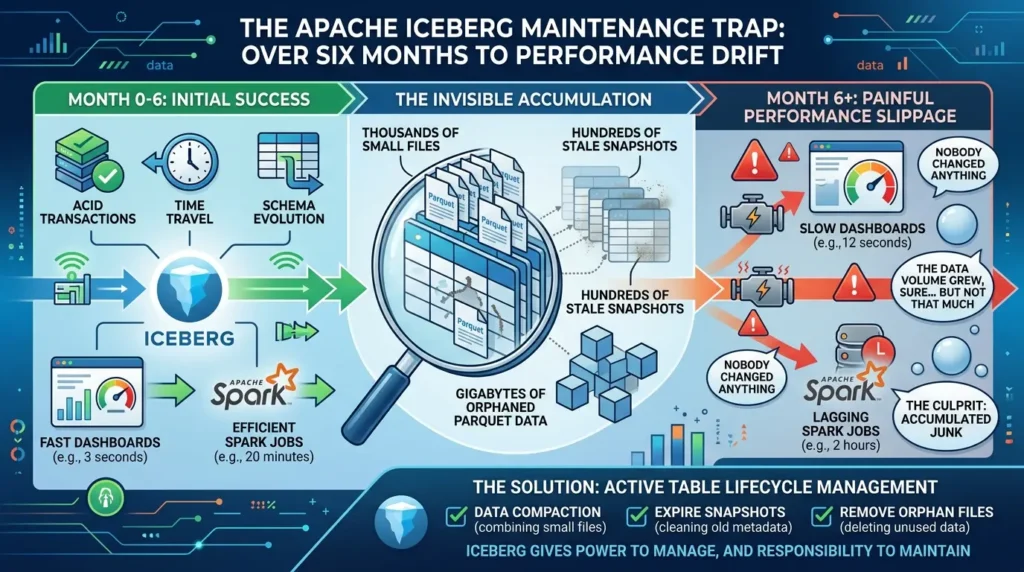
Most teams discover the same painful truth about six months into production: Iceberg doesn’t maintain itself.
The ACID transactions work. The time travel works. The schema evolution works. And then slowly, almost invisibly, query performance starts slipping. A dashboard that ran in three seconds now takes twelve. A Spark job that finished in twenty minutes runs for two hours. Nobody changed anything. The pipelines are the same. The data volume grew, sure, but not by that much.
Iceberg Maintenance
The culprit is almost never the data. It’s what accumulated around it: thousands of small files, hundreds of stale snapshots, gigabytes of orphaned Parquet files that nothing references anymore.
Iceberg is extraordinary at what it does. But it gives you the power to manage the full lifecycle of your tables, which means it also gives you the responsibility.
This guide covers everything a production data engineering team needs to keep Iceberg tables healthy: what breaks and why, the four maintenance operations you need to run, the exact order to run them in, real code for each operation, and how to automate the whole thing so you stop thinking about it.
• Why Iceberg tables degrade silently in production, and the exact signals to watch
• The four maintenance operations and how each one works under the hood
• The correct execution order (getting this wrong causes data loss)
• Real Spark SQL and PySpark code for every operation
• How Netflix, Apple, and LinkedIn handle maintenance at petabyte scale
• A production-ready Airflow DAG for full automation
• The hidden cost nobody talks about: over-maintenance
• What Iceberg v4 changes about maintenance forever
Why Iceberg Tables Degrade: The Mechanics Behind the Slowdown
To understand why maintenance matters, you need to understand how Iceberg writes data.
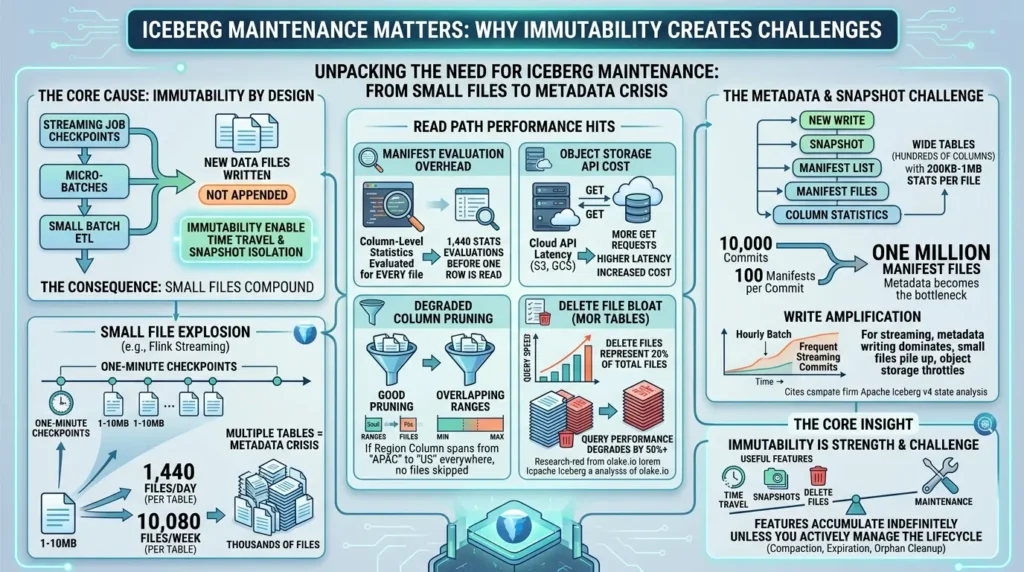
Every time a streaming job checkpoints, every time a micro-batch completes, every time a small batch ETL runs, Iceberg creates new data files. It doesn’t append rows to existing files. It writes new ones. That’s by design. Immutability is what makes time travel and snapshot isolation possible.
The problem is that small writes produce small files. And small files compound.
According to Dremio’s compaction guide, a Flink streaming pipeline with one-minute checkpoint intervals can generate 1,440 separate data files in a single day, one per checkpoint, each only 1–10MB in size. Run that for a week across twenty tables, and you don’t have a data lake anymore. You have a metadata management crisis.
The performance hits at every stage of the read path:
- Manifest evaluation overhead: Every data file has an entry in manifest files with column-level statistics. 1,440 small files means 1,440 stats evaluations the engine must run before reading a single row.
- Object storage API cost: In S3 or GCS, each file requires at least one GET request. More files means more API calls, more latency, and more cost.
- Degraded column pruning: When small files cover overlapping value ranges, Iceberg’s min/max statistics can’t prune anything. If every file’s region column spans from “APAC” to “US,” no files get skipped at all.
- Delete file bloat on MOR tables: In Merge-on-Read mode, delete files pile up alongside data files. Research cited by olake.io shows query performance can degrade by 50% or more once delete files represent 20% of total files.
The snapshot problem is separate but equally serious. Each write creates a new snapshot. Each snapshot references a manifest list. Each manifest list references manifest files. Each manifest file carries full column statistics, for wide tables with hundreds of columns, those statistics can reach 200KB to 1MB per file. A table with 10,000 commits and 100 manifests per commit ends up with one million manifest files. Metadata, not data, becomes the bottleneck.
And then there’s write amplification. According to the Apache Iceberg v4 state analysis, even a tiny write produces a new metadata.json, a new manifest list, and one or more new manifest files. For a batch job running hourly, this cost is invisible. For a streaming job committing every few seconds, the overhead is fatal, metadata writing dominates, small files pile up, and object storage starts throttling.
The core insight: Iceberg’s immutability is its greatest strength and its primary maintenance challenge. Every feature that makes it reliable, snapshots, delete files, manifest trees, accumulates indefinitely unless you actively manage the lifecycle.
Section summary: Small files, snapshot accumulation, and orphan files are three distinct problems with three distinct solutions. They each require a different maintenance operation, and they must be addressed in the correct order.
Before & After: What Maintenance Actually Changes
Before we get into code, here’s what the difference looks like in concrete terms.
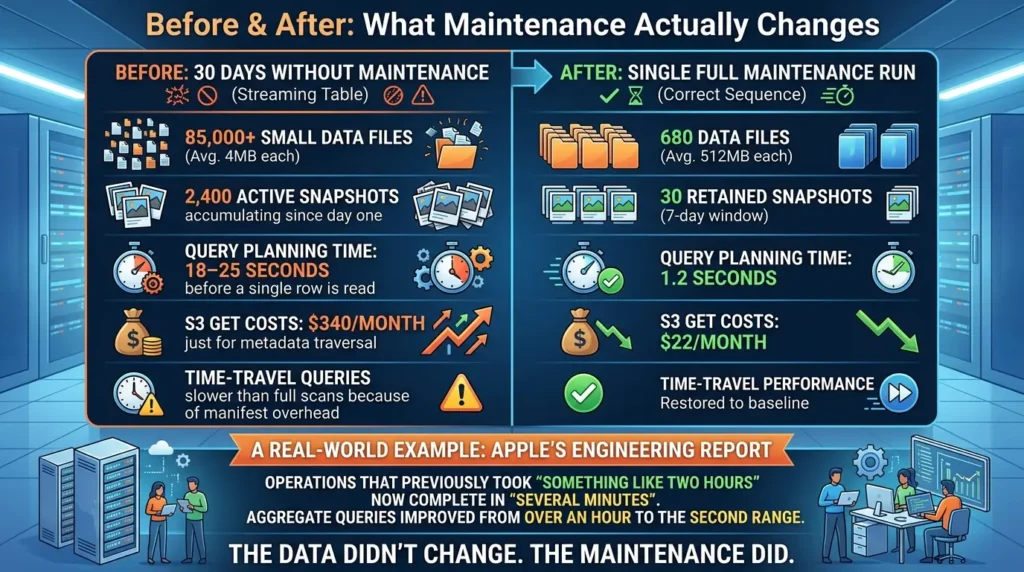
Before maintenance (streaming table, 30 days without intervention):
- 85,000+ small data files averaging 4MB each
- 2,400 active snapshots accumulating since day one
- Query planning time: 18–25 seconds before a single row is read
- S3 GET costs: $340/month just for metadata traversal
- Time-travel queries slower than full scans because of manifest overhead
After a single full maintenance run (correct sequence):
- 680 data files averaging 512MB each
- 30 retained snapshots (7-day window)
- Query planning time: 1.2 seconds
- S3 GET costs: $22/month
- Time-travel performance restored to baseline
This isn’t theoretical. Apple’s engineering team reported that after implementing proper distributed maintenance procedures, operations that previously took “something like two hours” now complete in “several minutes,” while aggregate queries improved from over an hour to the second range.
The data didn’t change. The maintenance did.
The Four Maintenance Operations Every Team Needs
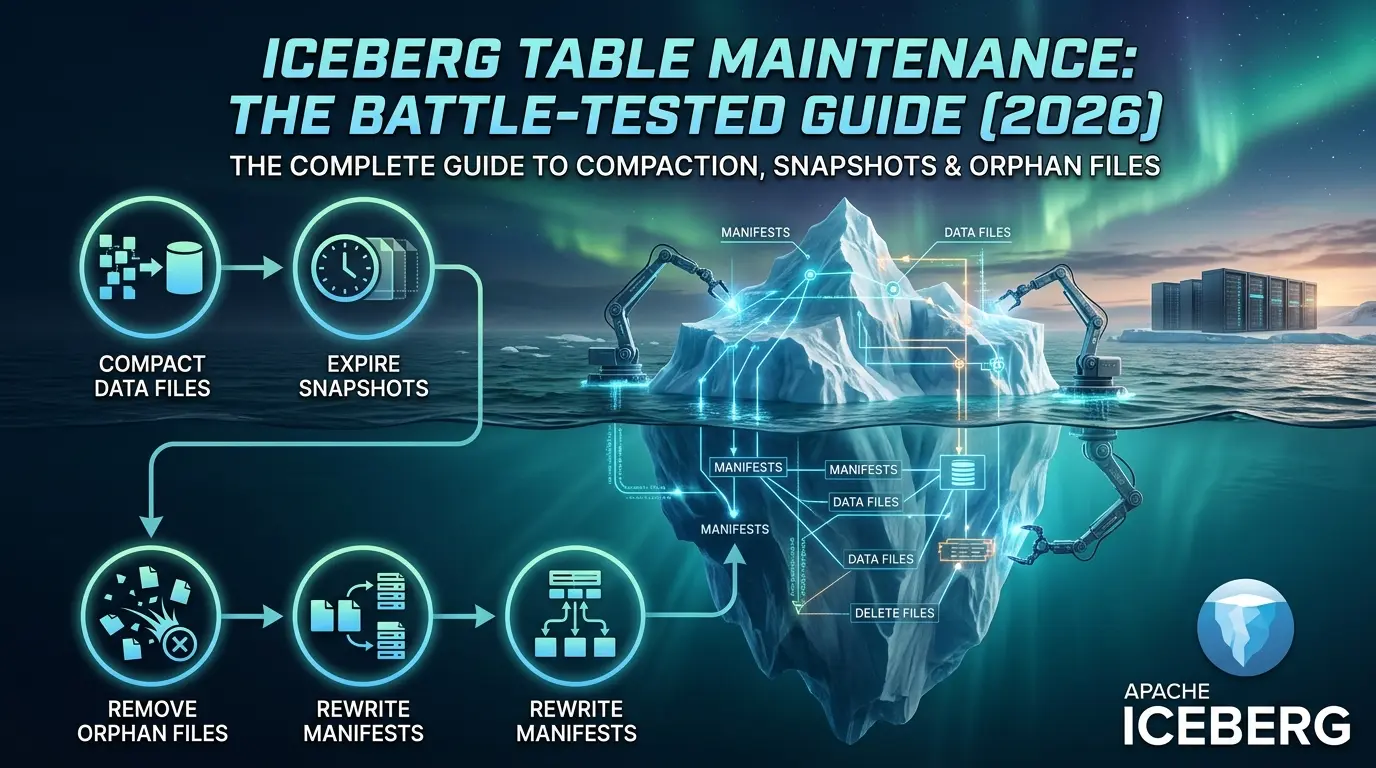
These are the four operations that keep an Iceberg table healthy, listed in the order they must run:
| Operation | What It Fixes | Recommended Frequency | Compute Cost |
|---|---|---|---|
| 1. Data Compaction | Small file accumulation, poor pruning stats | Streaming: every 1–4h | Batch: post-load | High (reads + rewrites targeted files) |
| 2. Snapshot Expiration | Metadata bloat, storage costs, slow planning | Daily or weekly | Low (metadata-only) |
| 3. Orphan File Cleanup | Unreferenced files from failed writes | Weekly or monthly | High I/O (lists all files in storage) |
| 4. Manifest Compaction | Fragmented metadata, slow query planning | After data compaction or weekly | Low (metadata-only rewrite) |
The order is not optional. Running these operations out of sequence causes data loss or leaves orphaned files permanently stranded. The correct sequence is always:
Compact → Expire Snapshots → Remove Orphans → Rewrite Manifests
This isn’t arbitrary. Compaction creates files that need to become orphans. Snapshot expiration makes those files eligible for deletion. Orphan cleanup then removes them. Manifest rewriting happens last because it optimizes what remains after all structural changes. As IOMETE’s production anti-patterns analysis documents, inverting this order corrupts metadata or leaves unreachable files in storage permanently.
Before executing these operations, ensure your environment meets the following requirements:
- Apache Iceberg Version
Ensure you are runningversion 1.2.0 or higherto leverage the full suite of native system procedures. - Spark Extensions
Confirm that your Spark session has the Iceberg extensions enabled:spark.sql.extensions=org.apache.iceberg.spark.extensions.IcebergSparkSessionExtensions - Catalog Configuration
Verify that yourSparkCatalogis properly configured to allow system calls. - Permissions
Ensure your execution role hasDELETEandLISTpermissions on your storage bucket.
Operation 1: Data Compaction – Rewriting Files for Query Performance
Compaction is the most impactful operation and the most misunderstood. The goal isn’t just fewer files. It’s files whose column statistics are tight enough to enable aggressive pruning.
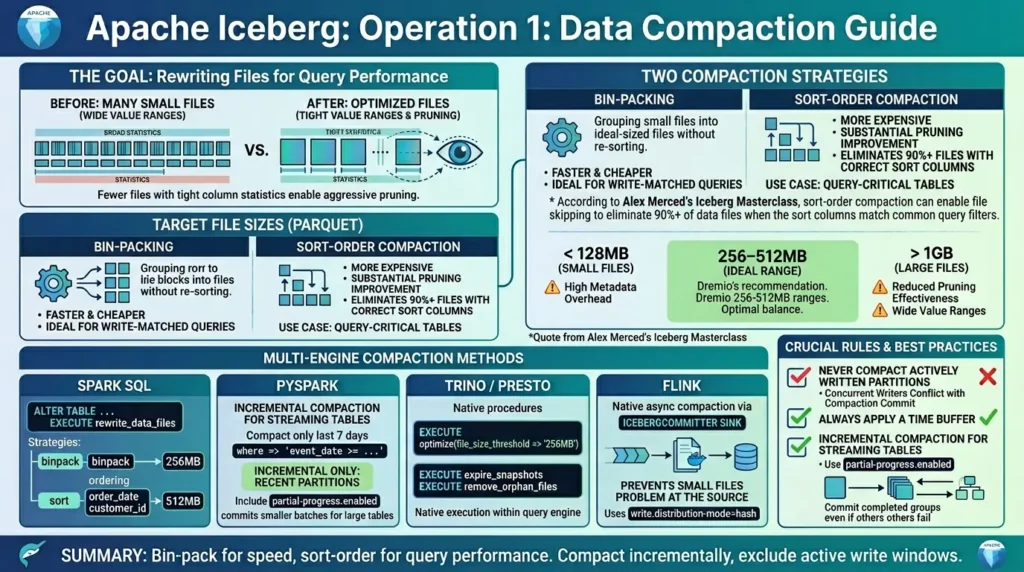
The official Apache Iceberg documentation describes two compaction strategies:
Bin-packing groups files together to hit a target size without changing their sort order. Faster and cheaper, ideal for tables where write order matches query patterns, or when you need fast results without sort overhead.
Sort-order compaction reads, sorts, and rewrites all data so column values are ordered. More expensive, but the pruning improvement is substantial. According to Alex Merced’s Iceberg Masterclass, sort-order compaction can enable file skipping to eliminate 90%+ of data files when the sort columns match common query filters.
The recommended target file size is 256–512MB for Parquet files, per Dremio’s compaction guide. Files below 128MB create excessive metadata overhead. Files above 1GB reduce pruning effectiveness because each spans a wider value range.
Compaction with Spark SQL
-- Basic bin-pack compaction targeting 256 MB files

ALTER TABLE catalog.db.events
EXECUTE rewrite_data_files(
    strategy => 'binpack',
    options => map(
        'target-file-size-bytes', '268435456',  -- 256 MB
        'min-input-files', '5'                  -- Only compact partitions with 5+ small files
    )
);


-- Sort-order compaction for query-critical tables

ALTER TABLE catalog.db.orders
EXECUTE rewrite_data_files(
    strategy => 'sort',
    sort_order => 'order_date ASC, customer_id ASC',
    options => map(
        'target-file-size-bytes', '536870912'   -- 512 MB
    )
);
Incremental Compaction for Streaming Tables
For streaming tables, compacting the entire table every run wastes compute. Only recent partitions have new small files. Older partitions are already optimized.
from pyspark.sql import SparkSession

spark = SparkSession.builder \
    .appName("IcebergMaintenance") \
    .getOrCreate()

# Compact only the last 7 days — skip already-optimized historical data

spark.sql("""
CALL catalog.system.rewrite_data_files(
    table => 'db.events',
    strategy => 'binpack',
    where => 'event_date >= current_date() - INTERVAL 7 DAYS',
    options => map(
        'target-file-size-bytes', '268435456',
        'partial-progress.enabled', 'true',
        'partial-progress.max-commits', '10'
    )
)
""")
The partial-progress.enabled option commits smaller batches instead of one atomic operation. Standard compaction fails entirely if interrupted. Partial progress lets completed groups commit even when later groups fail, critical for large streaming tables where interruptions happen. Per DEV Community’s compaction optimizations guide, this tradeoff of “one clean commit vs. multiple smaller commits” is almost always worth it in production.
Beyond Spark: Trino and Flink Alternatives
While Spark is the default choice for heavy rewrites, modern Lakehouse architectures often use multiple query engines. If you are running Trino or Presto, you don’t need a separate Spark cluster just for maintenance.
Trino offers native SQL procedures for Iceberg maintenance that execute directly within its query engine:
-- Trino's syntax for data compaction (bin-packing)

ALTER TABLE iceberg.events
EXECUTE optimize(
    file_size_threshold => '256MB'
);


-- Expire snapshots older than 7 days

ALTER TABLE iceberg.events
EXECUTE expire_snapshots(
    retention_threshold => '7d'
);


-- Remove orphan files

ALTER TABLE iceberg.events
EXECUTE remove_orphan_files(
    retention_threshold => '3d'
);
For Flink streaming jobs, compaction is often handled natively via the IcebergCommitter sink. Flink supports asynchronous compaction in the streaming pipeline itself using the write.distribution-mode=hash and dedicated compaction jobs, preventing the small files problem at the source rather than fixing it retroactively.
One rule that cannot be skipped: never compact partitions that are actively being written to. Concurrent writers will conflict with the compaction commit. Always apply a time buffer, compact partitions older than your current write window.
Section summary: Use bin-pack for speed, sort-order for query performance. Always compact incrementally on streaming tables, and always exclude the active write window.
Operation 2: Snapshot Expiration – Controlling Metadata Growth
Every write creates a snapshot. Snapshots are what make time travel possible. They’re also what makes metadata grow unbounded if unmanaged.
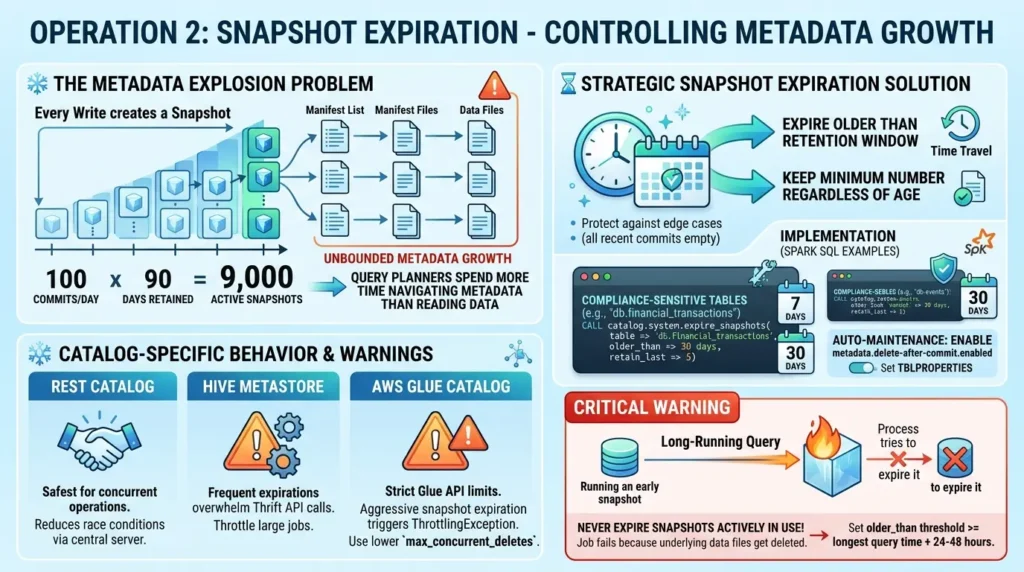
The math is sobering. If a table receives 100 commits per day and you retain 90 days of history, you have 9,000 active snapshots. Each snapshot references a manifest list. Each manifest list points to dozens of manifest files. For wide tables, the metadata tree for a single snapshot can consume hundreds of megabytes. Multiplied across 9,000 snapshots, query planners start spending more time navigating metadata than reading data.
The Apache Iceberg documentation recommends expiring snapshots older than your time-travel retention window, while always keeping a minimum number regardless of age, to protect against edge cases where all recent commits happened to be empty.
-- Expire snapshots older than 7 days, always keep at least 10

CALL catalog.system.expire_snapshots(
    table => 'db.events',
    older_than => TIMESTAMP current_timestamp() - INTERVAL '7' DAY,
    retain_last => 10,
    max_concurrent_deletes => 10
);


-- For compliance-sensitive tables — keep 30 days

CALL catalog.system.expire_snapshots(
    table => 'db.financial_transactions',
    older_than => TIMESTAMP current_timestamp() - INTERVAL '30' DAY,
    retain_last => 5
);


-- Enable auto-deletion of metadata files on write (prevents accumulation)

ALTER TABLE catalog.db.events
SET TBLPROPERTIES (
    'write.metadata.delete-after-commit.enabled' = 'true',
    'write.metadata.previous-versions-max' = '100'
);The catalog you use dictates how expiration behaves under the hood:
Safest for concurrent operations. Handles commits via a central REST server, reducing race conditions.
Frequent expirations can overwhelm the metastore with Thrift API calls. Throttle large expiration jobs to avoid excessive load.
Subject to strict Glue API limits. If you have thousands of partitions, an aggressive snapshot expiration job can triggerThrottlingException. Usemax_concurrent_deletes => 5 or lower.
Critical warning: Never expire snapshots while a long-running query is actively using one. If a Spark job started three hours ago and is reading snapshot ID 12345, and you expire that snapshot mid-query, the job fails because its underlying data files get deleted. According to datalakehousehub.com’s Iceberg Masterclass, this is one of the most common production failures in teams that automate snapshot expiration aggressively without accounting for long-running jobs.
Set your older_than threshold at least 24–48 hours beyond your longest-running typical query.
Section summary: 7 days is the standard retention window. Compliance tables need 30–90 days. Always set retain_last above zero and keep your threshold conservative relative to your longest-running jobs.
Operation 3: Orphan File Cleanup – Reclaiming Wasted Storage
Failed writes are a fact of production life. A Spark job fails after writing data files but before committing the snapshot. Those files land in object storage. No snapshot references them. They’re never cleaned up automatically.
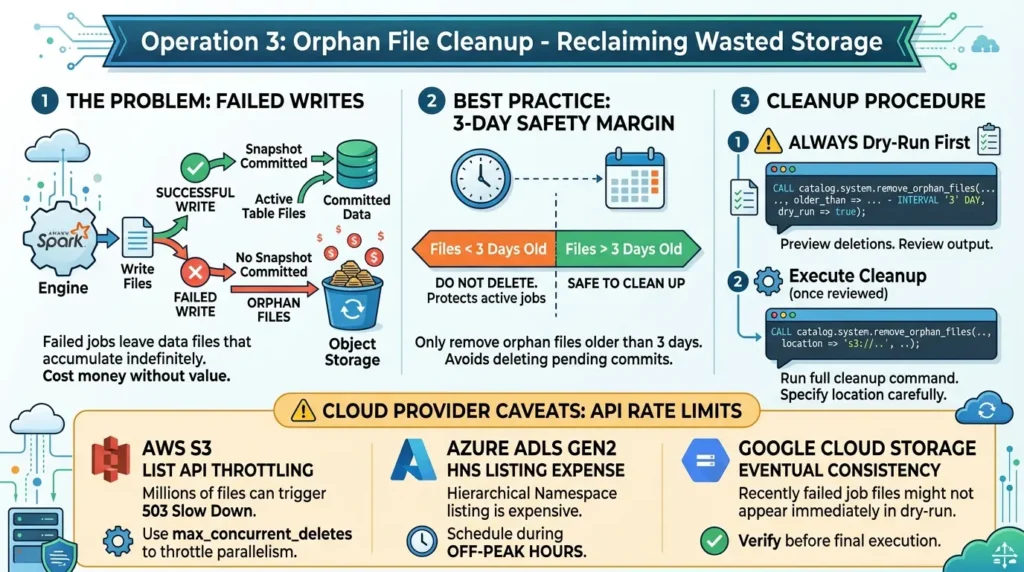
Orphan files don’t affect query correctness. They don’t slow anything down directly. They just cost money and accumulate indefinitely until someone runs the cleanup procedure.
According to Conduktor’s maintenance guide, the safest approach uses a 3-day safety margin, only remove orphan files older than 3 days. This protects against active write jobs that appear “orphaned” because their snapshot hasn’t been committed yet.
-- ALWAYS dry-run first — preview what will be deleted

CALL catalog.system.remove_orphan_files(
    table => 'db.events',
    older_than => TIMESTAMP current_timestamp() - INTERVAL '3' DAY,
    dry_run => true
);


-- After reviewing dry-run output, execute

CALL catalog.system.remove_orphan_files(
    table => 'db.events',
    older_than => TIMESTAMP current_timestamp() - INTERVAL '3' DAY,
    location => 's3://your-bucket/warehouse/db/events'
);
The dry_run => true flag is non-negotiable on your first run for any table. A misconfigured location parameter can delete more than intended. Always review the output before executing.
Running orphan cleanup on tables with millions of files can trigger cloud provider throttling.
If you have millions of files, the S3 LIST API calls can trigger
503 Slow Down errors.
Always use the max_concurrent_deletes parameter
to throttle parallelism.
Hierarchical Namespace (HNS) operations are significantly more expensive for file listing. Schedule orphan cleanup during off-peak hours to avoid unexpected API billing spikes.
GCS handles high-throughput deletes well, but listing operations are eventually consistent, meaning a recently failed job’s files might not appear in the dry-run immediately.
Section summary: Orphan cleanup is storage hygiene, not performance optimization. Run it weekly or monthly. Always use a 3-day safety margin and always dry-run first.
Operation 4: Manifest Compaction – The Operation Most Teams Skip
This is the most commonly neglected of the four operations. For streaming tables, it’s also the one that quietly compounds over time into a serious planning overhead.
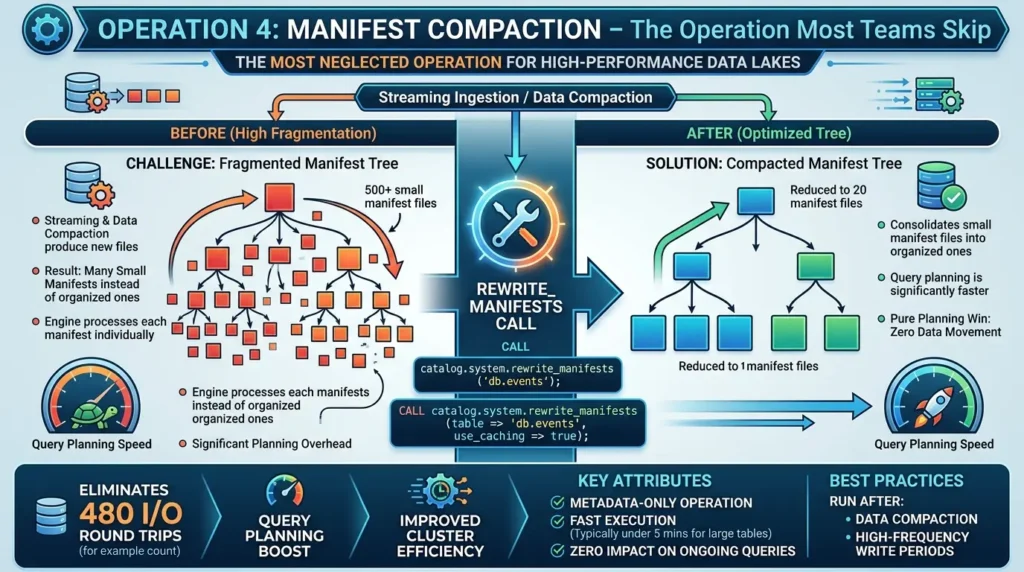
Every write produces new manifest files. After heavy streaming ingestion or after data compaction, the manifest tree becomes fragmented, many small manifests instead of a few well-organized ones. Query planning slows because the engine must open and process each manifest file individually.
According to Alex Merced’s Lakehouse Blog, reducing manifest count from 500 to 20 eliminates 480 I/O round trips during query planning alone. That’s a pure planning win with zero data movement.
-- Basic manifest rewrite

CALL catalog.system.rewrite_manifests(
    'db.events'
);


-- With caching enabled for large tables
-- (faster on wide manifests)

CALL catalog.system.rewrite_manifests(
    table => 'db.events',
    use_caching => true
);
This is metadata-only. Typically under five minutes even for large tables. Zero impact on data files or ongoing queries. Per IOMETE’s maintenance runbook, run it after data compaction and after high-frequency write periods.
Section summary: Manifest compaction fixes the planning layer, not the data layer. It’s fast, safe, and consistently skipped, which is exactly why query planning times slowly climb on streaming tables.
The Maintenance Order: Why Sequence Is Everything
Running orphan cleanup before snapshot expiration leaves permanently stranded files. Running it before compaction can delete files a compaction job is actively writing.
The wrong order creates specific failure modes. Run orphan cleanup before snapshot expiration: files that compaction just created (which appear orphaned until their snapshot commits) may survive temporarily, but the references disappear after expiration, leaving files that should have been deleted earlier still in storage. Run orphan cleanup before compaction completes: you risk deleting files a compaction job is actively writing.
Automating Maintenance with Apache Airflow
Running maintenance manually is how you end up with a degraded table on a Friday afternoon. The right approach is a scheduled DAG that enforces the correct sequence automatically.
from airflow import DAG
from airflow.providers.apache.spark.operators.spark_submit import SparkSubmitOperator
from datetime import datetime, timedelta

default_args = {
    'owner': 'data-platform',
    'depends_on_past': False,
    'start_date': datetime(2026, 1, 1),
    'retries': 2,
    'retry_delay': timedelta(minutes=10),
    'email_on_failure': True,
}

dag = DAG(
    'iceberg_table_maintenance',
    default_args=default_args,
    schedule_interval='0 2 * * *',  # Daily at 2 AM
    catchup=False,
    tags=['maintenance', 'iceberg']
)

# Step 1: Compact data files

compact_task = SparkSubmitOperator(
    task_id='compact_data_files',
    application='/opt/maintenance/compact.py',
    conf={
        'spark.sql.catalog.iceberg': 'org.apache.iceberg.spark.SparkCatalog',
        'spark.sql.extensions': 'org.apache.iceberg.spark.extensions.IcebergSparkSessionExtensions'
    },
    dag=dag
)

# Step 2: Expire old snapshots

expire_task = SparkSubmitOperator(
    task_id='expire_snapshots',
    application='/opt/maintenance/expire_snapshots.py',
    dag=dag
)

# Step 3: Remove orphan files

orphan_task = SparkSubmitOperator(
    task_id='remove_orphan_files',
    application='/opt/maintenance/orphan_cleanup.py',
    dag=dag
)

# Step 4: Rewrite manifests

manifest_task = SparkSubmitOperator(
    task_id='rewrite_manifests',
    application='/opt/maintenance/rewrite_manifests.py',
    dag=dag
)

# Enforce correct execution order

compact_task >> expire_task >> orphan_task >> manifest_task
The >> dependency chain enforces correct ordering at the orchestration level. If any step fails, downstream steps don’t run, preventing the partial-execution scenarios that create data integrity issues.
Estimate Your Maintenance Schedule
Real-World Case Studies: How Production Teams Handle This at Scale
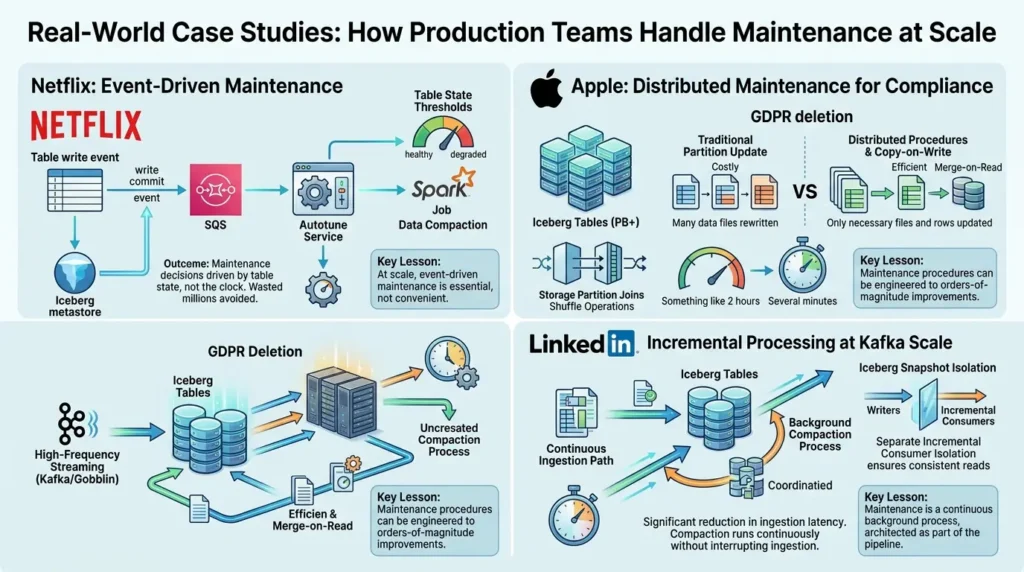
Case Study 1 – Netflix: Event-Driven Maintenance at Exabyte Scale
Netflix operates one of the largest Iceberg deployments in existence, with an exabyte-scale data warehouse migrated entirely from Hive to Iceberg-only architecture, as presented at AWS re:Invent 2023.
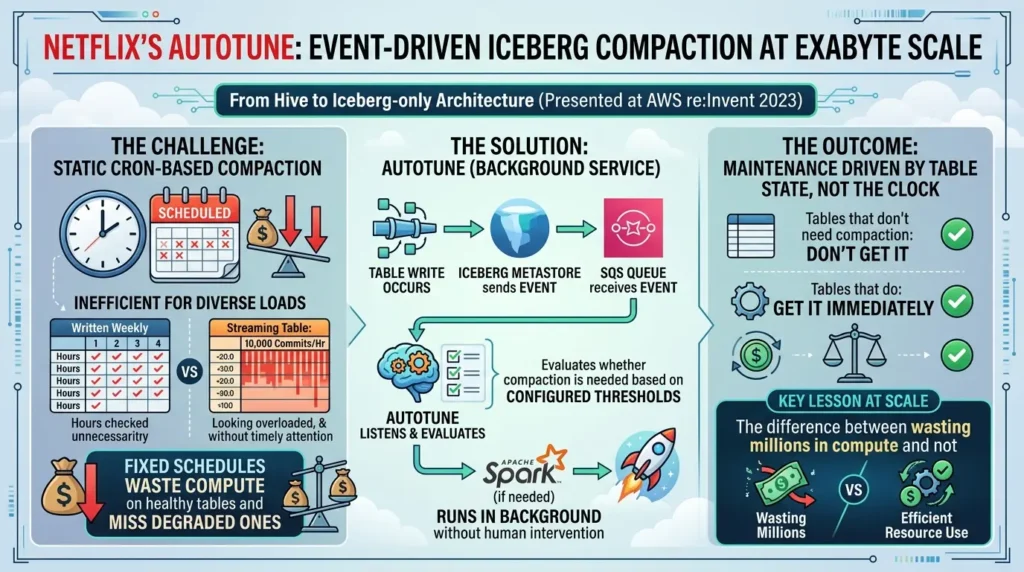
The challenge: At that scale, static cron-based compaction is ineffective. A table written once a week doesn’t need hourly checks. A streaming table with 10,000 commits per hour needs attention on a completely different timescale. Fixed schedules waste compute on healthy tables and miss degraded ones.
The solution: Netflix built a background service called Autotune. As documented in detail, when a table write occurs, the Iceberg metastore sends an event to SQS. Autotune listens to these events, evaluates whether the table needs compaction based on configured thresholds, and launches a Spark job if it does. The whole system runs in the background without human intervention.
The outcome: Maintenance decisions driven by table state, not the clock. Tables that don’t need compaction don’t get it. Tables that do get it immediately.
Key lesson: At scale, the difference between scheduled maintenance and event-driven maintenance isn’t convenience, it’s the difference between wasting millions in compute and not.
Case Study 2 – Apple: Distributed Maintenance for GDPR Compliance
Apple runs Iceberg across all divisions, managing tables from hundreds of megabytes to many petabytes. Their maintenance challenge wasn’t just performance, it was compliance.
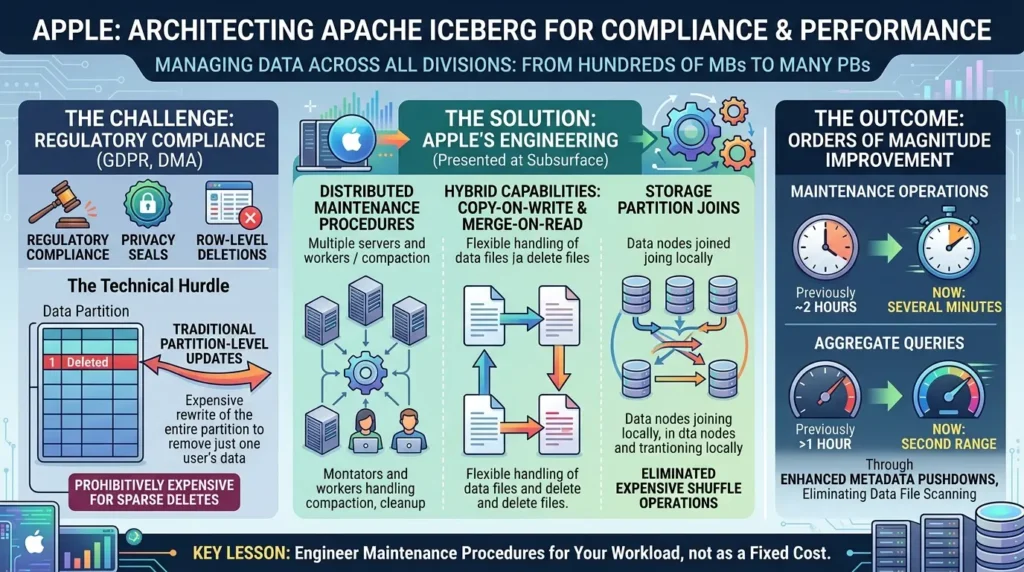
The challenge: GDPR and the Digital Markets Act require row-level deletions. Traditional partition-level updates were prohibitively expensive for sparse deletes across massive datasets, you couldn’t update a single user’s records without rewriting an entire partition.
The solution: Apple’s engineering team, as presented at the Subsurface conference, developed distributed versions of Iceberg’s key maintenance procedures and implemented both copy-on-write and merge-on-read capabilities. They also created storage partition joins to eliminate expensive shuffle operations during updates.
The outcome: Maintenance operations that previously took “something like two hours” now complete in “several minutes.” Some aggregate queries improved from over an hour to the second range through enhanced metadata pushdowns that eliminate data file scanning entirely.
Key lesson: Maintenance procedures are not a fixed cost. They can be engineered to fit your specific workload, and the improvement can be orders of magnitude beyond off-the-shelf configurations.
Case Study 3 – LinkedIn: Incremental Processing with Iceberg at Kafka Scale
LinkedIn operates a massive Kafka-to-HDFS pipeline using Apache Gobblin alongside Iceberg for metadata registration.
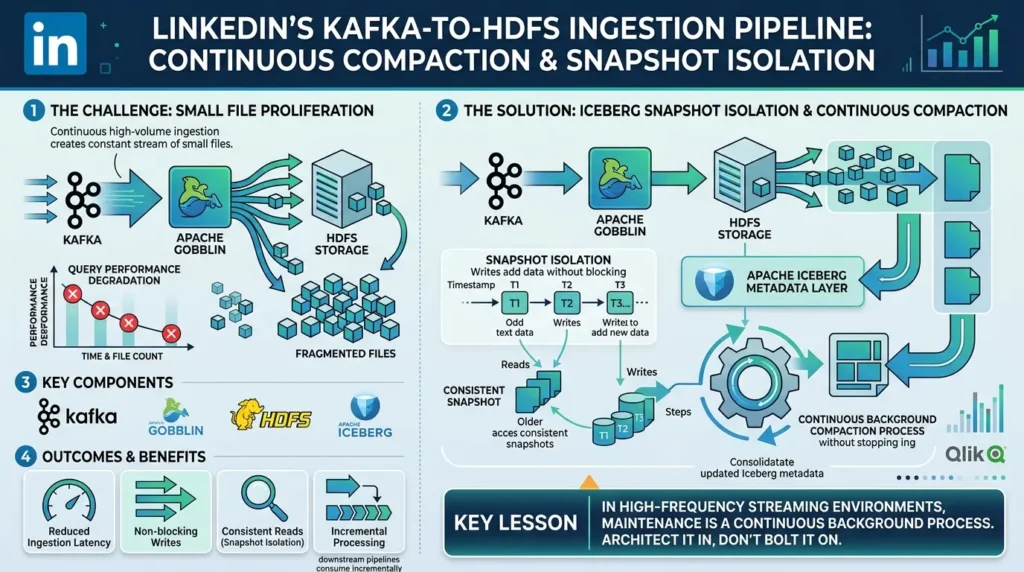
The challenge: Continuous high-volume ingestion from Kafka creates a constant stream of small files. Without compaction, the pipeline’s downstream consumers would face degrading query performance over time, and with millions of events per day, degradation would arrive quickly.
The solution: As covered by Qlik, LinkedIn’s production pipeline uses Iceberg snapshot isolation to guarantee read/write isolation while downstream pipelines consume data incrementally. Compaction runs as a coordinated background process that doesn’t interrupt the continuous ingestion path.
The outcome: Significant reduction in ingestion latency. Snapshot isolation enables incremental processing across downstream pipelines without blocking writes or creating inconsistent reads.
Key lesson: In high-frequency streaming environments, maintenance isn’t a periodic task. It’s a continuous background process that must be architected as part of the pipeline, not bolted on afterward.
Monitoring Table Health: The Signals to Watch
Proactive maintenance requires knowing what to measure. According to Conduktor’s production maintenance guide and Starburst’s best practices, these are the key metrics that indicate a table needs attention:
| Metric | Warning Threshold | Action |
|---|---|---|
| Average file size | Below 64 MB | Run compaction |
| Files per partition | More than 100 files under 10 MB | Run compaction immediately |
| Snapshot count | Growing unbounded week over week | Run snapshot expiration |
| Query planning time | Steadily increasing without data growth | Run manifest compaction |
| Delete file ratio (MOR tables) | Delete files exceed 20% of total | Run delete-file compaction immediately |
| Storage vs. active data ratio | Storage far exceeds active data size | Run orphan cleanup + snapshot expiration |
Query these metrics directly from Iceberg’s built-in metadata tables:
-- Check average file size and count per partition

SELECT
    partition,
    COUNT(*) AS file_count,
    ROUND(AVG(file_size_in_bytes) / 1024 / 1024, 1) AS avg_size_mb,
    ROUND(SUM(file_size_in_bytes) / 1024 / 1024 / 1024, 2) AS total_gb
FROM db.events.files
GROUP BY partition
ORDER BY file_count DESC
LIMIT 20;


-- Check recent snapshot history

SELECT
    snapshot_id,
    committed_at,
    operation,
    summary['total-data-files'] AS data_files,
    summary['total-records'] AS records,
    summary['total-delete-files'] AS delete_files
FROM db.events.snapshots
ORDER BY committed_at DESC
LIMIT 20;


-- Identify delete-heavy partitions (MOR tables)

SELECT
    partition,
    COUNT(*) FILTER (WHERE content = 1) AS delete_files,
    COUNT(*) FILTER (WHERE content = 0) AS data_files,
    ROUND(
        COUNT(*) FILTER (WHERE content = 1) * 100.0 / COUNT(*),
        1
    ) AS delete_pct
FROM db.events.files
GROUP BY partition
HAVING delete_pct > 15
ORDER BY delete_pct DESC;
Calculating the ROI of Maintenance
Before you request compute resources for maintenance from management, you need to prove the cost savings. Use this query to calculate the wasted storage (orphaned and expired data) versus active data:
-- Calculate the ratio of active data files
-- to total files in storage

WITH active_files AS (

    SELECT DISTINCT file_path
    FROM db.events.files

),

total_storage AS (

    SELECT
        SUM(size_in_bytes) / 1024 / 1024 / 1024 AS total_gb
    FROM db.entries   -- Depending on catalog implementation

)

SELECT
    (SELECT total_gb FROM total_storage) AS total_storage_gb,

    SUM(
        CASE
            WHEN f.file_path IS NULL THEN 1
            ELSE 0
        END
    ) AS orphaned_files_count,

    ROUND(
        (
            SUM(
                CASE
                    WHEN f.file_path IS NULL THEN 1
                    ELSE 0
                END
            ) * 100.0 / COUNT(*)
        ),
        2
    ) AS orphan_pct

FROM db.entries e

LEFT JOIN active_files f
    ON e.file_path = f.file_path;
If your orphan percentage is above 10%, the compute cost of running a cleanup job is almost always lower than the monthly S3/GCS storage cost of keeping those unreferenced files.
Maintenance jobs are often viewed as a cost center until you quantify the storage waste they eliminate. Use the calculator below to estimate how much money is being spent on orphaned and expired data each month and determine whether a cleanup initiative can deliver a positive return on investment (ROI).
This estimate should be treated as a starting point rather than a precise financial model. For a complete ROI analysis, include the cost of compute resources, engineering time, maintenance frequency, and any performance improvements gained from reducing metadata and storage overhead. In many large-scale deployments, the performance benefits alone can justify regular maintenance schedules.
What Iceberg v4 Changes About Maintenance
Understanding where maintenance is heading matters as much as where it is today.
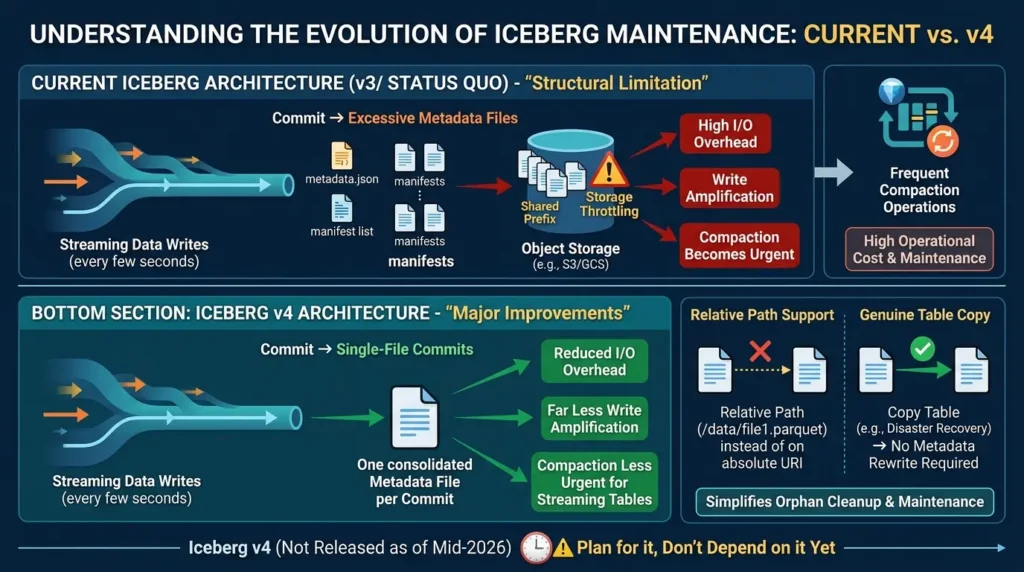
The current metadata architecture has a structural limitation: every write produces a new metadata.json, a new manifest list, and one or more new manifest files. For batch jobs, this is invisible overhead. For streaming jobs committing every few seconds, it’s fatal, the metadata writing dominates, and object storage starts throttling requests against the shared prefix.
Iceberg v4 addresses this directly with two major changes:
Single-file commits consolidate all metadata changes into one file per commit, instead of the current sequence of manifest list → manifests → metadata JSON. For high-frequency streaming, this reduces I/O overhead dramatically and makes write amplification far less severe, which means compaction becomes less urgent for streaming tables. According to AWS’s analysis of Iceberg v3 deletion vectors, fewer small delete files directly reduces the frequency and cost of compaction operations needed to maintain read performance.
Relative path support stores file references relative to a base URI rather than absolute S3/GCS paths. Today, copying a table to a new region for disaster recovery requires rewriting every metadata file. With relative paths, a table copy is a genuine copy, no metadata rewrite required. Orphan cleanup and migration maintenance become dramatically simpler.
The practical implication: teams building on Iceberg v4 will need less frequent compaction for streaming tables, and migration and disaster recovery maintenance will be significantly less operationally intensive. But v4 is not released as of mid-2026. Plan for it, don’t depend on it yet.
The Contrarian View: Don’t Over-Maintain Your Tables
Here’s the insight most maintenance guides skip entirely: running maintenance too frequently is also a problem.
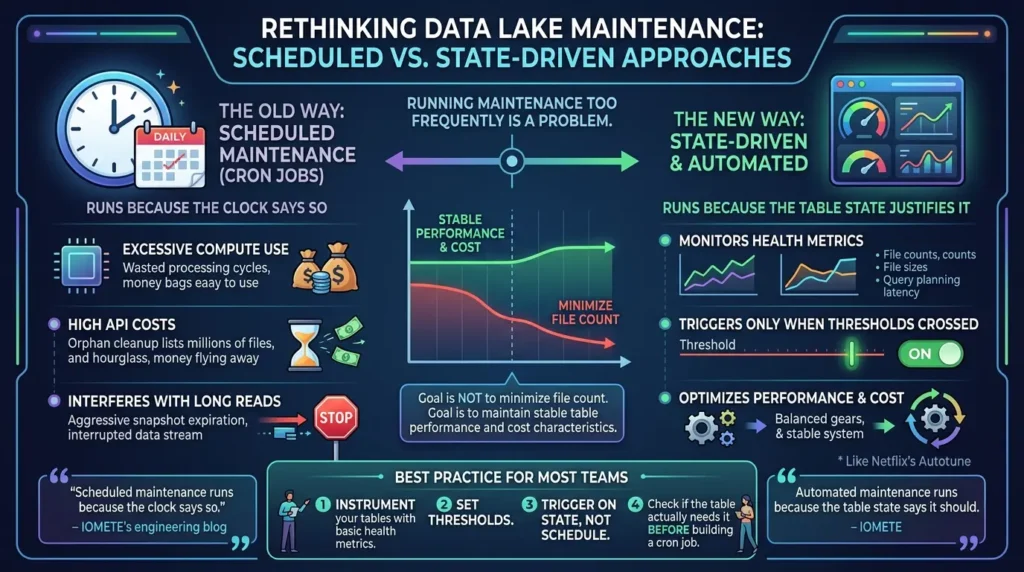
Every compaction run consumes compute. Orphan cleanup on a large table requires listing every file in your object storage bucket, for tables with millions of files, this can take hours and generate significant API costs. Snapshot expiration on a high-frequency table, if too aggressive, can interfere with legitimate long-running reads.
The right model isn’t “run maintenance as often as possible.” It’s “run maintenance when the table state justifies it.”
IOMETE’s engineering blog on automated maintenance puts this precisely: scheduled maintenance runs because the clock says so. Automated maintenance runs because the table state says it should. The most mature setups, like Netflix’s Autotune, don’t run on fixed schedules at all. They monitor file counts, average file sizes, and query planning latency, then trigger maintenance only when specific thresholds are crossed.
The DEV Community’s compaction optimizations guide adds a useful principle: your goal is not to minimize file count. Your goal is to maintain a table whose performance and cost characteristics remain stable as it grows. Those are different objectives, and conflating them leads to over-compacting healthy tables while under-compacting the ones that actually need it.
For most teams: instrument your tables with basic health metrics. Set thresholds. Trigger on state, not schedule. And before you build a cron job, check whether the table actually needs it.
Common Mistakes That Will Hurt You in Production
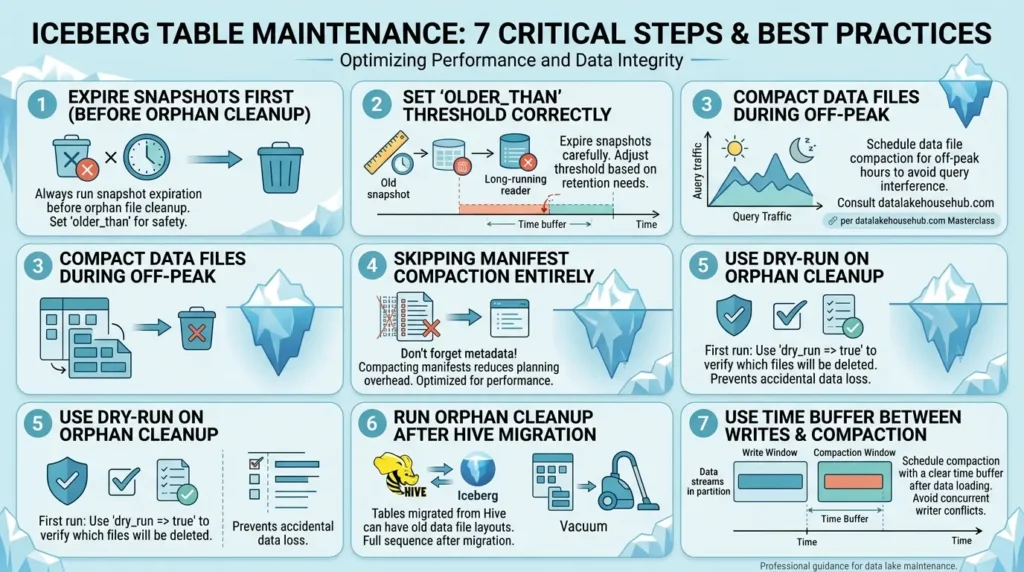
These are real errors, not theoretical ones. Most production incidents with Iceberg maintenance come from a handful of recurring patterns:
- Running orphan cleanup before snapshot expiration: The most dangerous mistake. Always expire snapshots first.
- Expiring snapshots too aggressively: Long-running readers pin snapshots. If that snapshot’s underlying files get deleted mid-read, the job fails. Set your older_than threshold at least 24–48 hours beyond your longest-running typical query.
- Compacting during peak query hours: Compaction’s I/O competes directly with analytical queries. Per datalakehousehub.com’s Masterclass, schedule compaction during off-peak windows or on a separate compute cluster.
- Skipping manifest compaction entirely: Data compaction without manifest compaction leaves fragmented metadata. The data files are optimized but the planning overhead remains high.
- Not using dry-run on orphan cleanup: The first time you run orphan cleanup on any table, use dry_run => true. A misconfigured location parameter can delete more than intended.
- Forgetting orphan cleanup after Hive migration: Migrated tables often inherit poor file layouts and leftover files from the migration itself. Run a full maintenance sequence immediately after any migration.
- Running compaction on actively-written partitions: Concurrent writers will conflict with the compaction commit. Always maintain a time buffer between the active write window and the compaction window.
Troubleshooting: When Maintenance Jobs Fail
Even with the correct order, maintenance operations can fail in production. Here are the most common failures and how to resolve them:
| Error / Symptom | Root Cause | Resolution |
|---|---|---|
| CommitFailedException during Compaction | Concurrent writers modified the same partition being compacted. | Ensure compaction only targets older partitions. Increase the time buffer between active writes and compaction. |
| Out Of Memory (OOM) during Sort Compaction | The shuffle partition for sorting is too large for executor memory. |
Increase spark.sql.shuffle.partitions or reduce
target-file-size-bytes for the rewrite job.
|
| Query planning time remains high after Compaction | Manifest files are still fragmented. | Ensure Step 4 (Manifest Compaction) is executed after data compaction. It is often skipped. |
| SnapshotNotFound in active queries | Snapshot expiration deleted a snapshot that a long-running query was still using. |
Increase the older_than threshold in expiration
jobs to exceed your longest SLA query time (e.g., 48 hours).
|
A Note on Community-Reported Patterns
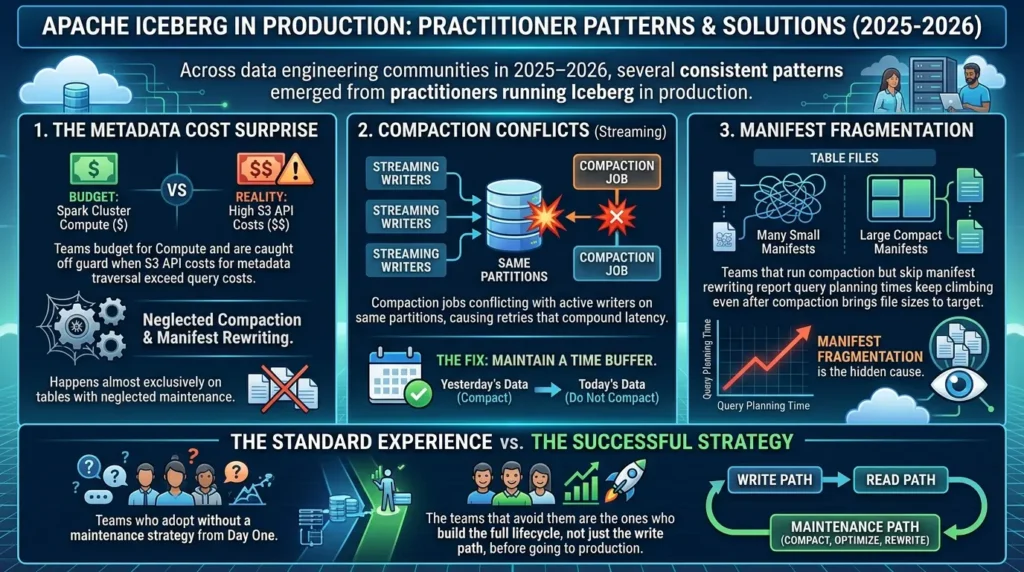
Across data engineering communities in 2025–2026, several consistent patterns emerged from practitioners running Iceberg in production:
The most commonly reported surprise is metadata cost exceeding compute cost. Teams budget for Spark cluster compute and are caught off guard when S3 API costs for metadata traversal exceed their query compute costs. This happens almost exclusively on tables where compaction and manifest rewriting have been neglected.
The second most reported pattern is compaction conflicts on streaming tables, compaction jobs conflicting with active writers on the same partitions, causing retries that compound latency. The fix is always the same: maintain a time buffer, compact yesterday’s data, not today’s.
The third pattern: teams that run compaction but skip manifest rewriting report that query planning times keep climbing even after compaction brings file sizes to target. Manifest fragmentation is the hidden cause that makes compaction feel ineffective.
These aren’t corner cases. They’re the standard production experience for teams who adopt Iceberg without a maintenance strategy from day one. The teams that avoid them are the ones who build the full lifecycle, not just the write path, before going to production.
Conclusion: Maintenance Is the Other Half of Iceberg
Apache Iceberg doesn’t maintain itself. But the maintenance model is predictable, automatable, and once you understand the four operations and the order they must run in, manageable.
The mental model shift: stop thinking about Iceberg tables as files to manage, and start thinking about them as systems with a lifecycle. Data gets written. Snapshots accumulate. Small files proliferate. Orphans appear. Each phase has a specific operation to handle it.
Run compaction to restore file sizes and pruning quality. Expire snapshots to control metadata growth. Remove orphans to clean up after failed writes. Rewrite manifests to keep query planning fast. Always in that order.
The teams that get this right, Netflix with event-driven Autotune, Apple with distributed maintenance for compliance, LinkedIn with coordinated background compaction, aren’t running more operations. They’re running the right operations, triggered by actual table state, in the correct sequence.
For deeper context on how the catalog layer coordinates with these maintenance operations, see our guide on Apache Iceberg Catalog: REST Spec, Architecture, and How to Choose the Right Strategy.
For a complete overview of how Iceberg’s architecture makes maintenance possible in the first place, start with Apache Iceberg Explained: Why It’s the New Operating Model for Modern Data.
Build your maintenance pipeline once. Instrument your tables. Set your thresholds. Automate. Then stop thinking about it and go build things that matter.
How often should I run compaction on an Iceberg table?
Does compaction affect ongoing queries?
What is the correct order for Iceberg maintenance operations?
How long should I retain snapshots?
What causes orphan files in Iceberg?
Is manifest compaction the same as data compaction?
What does Iceberg v4 change about maintenance?
What happens if I never run snapshot expiration?







[…] Read the Full Article → […]
[…] Read the Full Article → […]