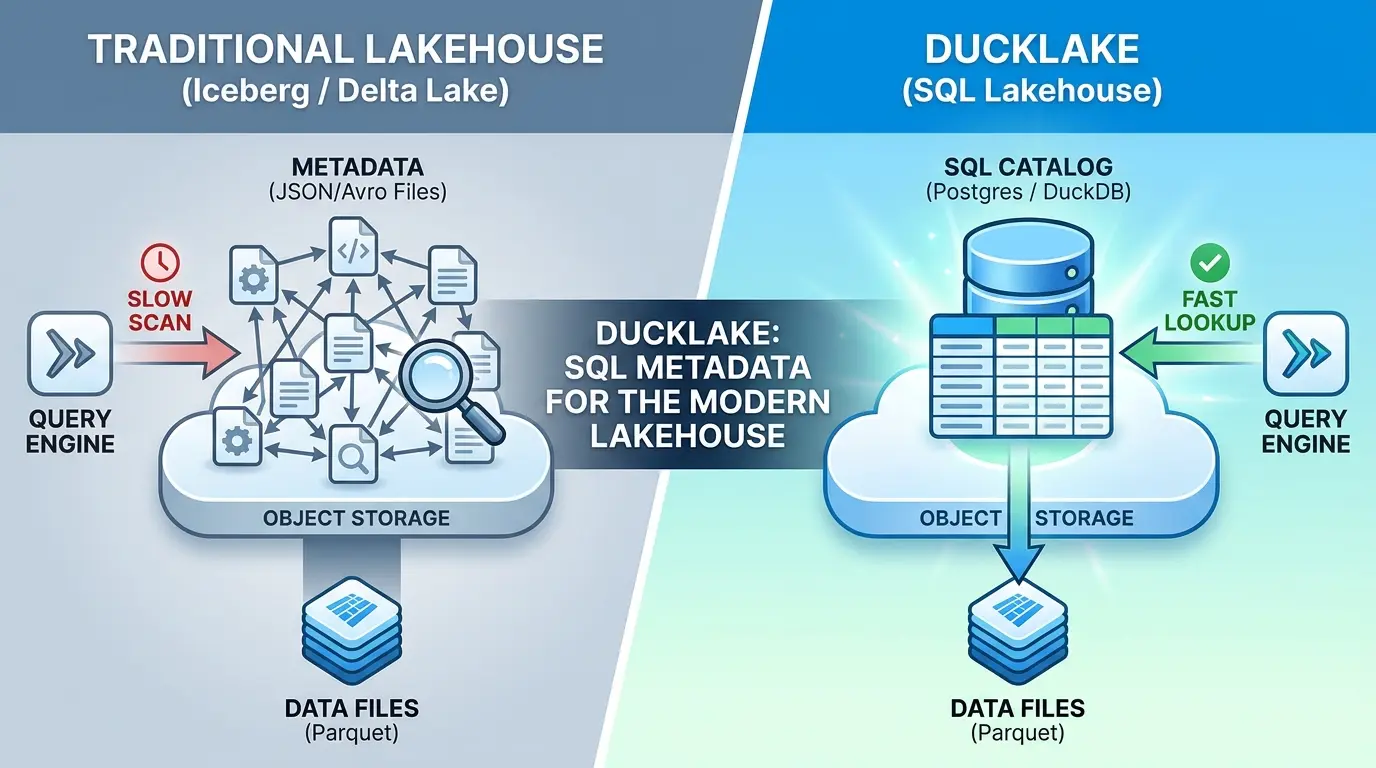

A modern data lakehouse is supposed to feel simple: your data sits in Parquet files, and a “table” is just a clean, queryable view over those files. In practice, that simplicity is an illusion. Open one of these systems up and you’ll find the actual data is a handful of tidy Parquet files, but the bookkeeping that turns those files into a table is a sprawling tree of JSON and Avro manifests, nested several directories deep, that has to be read and reconciled before a single query can run.
DuckLake Guide
DuckDB Labs looked at that pattern and asked a pointed question: why invent a brand-new file format to track metadata, when relational databases have been the best tool in computing for managing exactly that kind of bookkeeping for 50 years? Their answer is DuckLake, a lakehouse format that keeps your data in Parquet, like everyone else, but stores the metadata in actual SQL tables instead of a tree of manifest files.
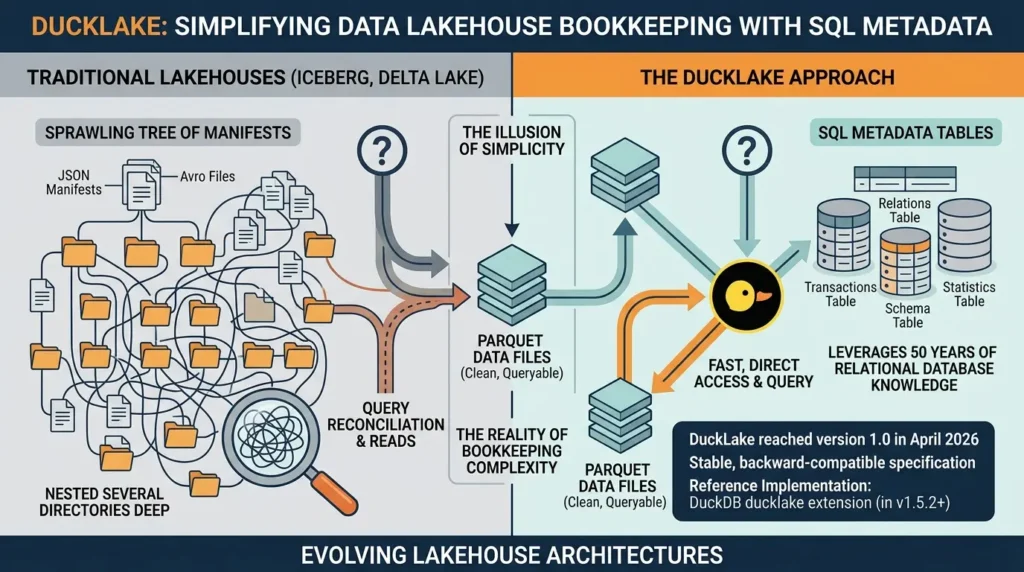
DuckLake reached version 1.0 in April 2026, meaning it now ships a stable, backward-compatible specification rather than an experimental preview. Its reference implementation is the DuckDB ducklake extension, included as of DuckDB v1.5.2. This article walks through what that architecture actually changes, where it genuinely wins, where it doesn’t, and how to evaluate it against Apache Iceberg or Delta Lake for your own workload.
- A plain-language breakdown of why file-based metadata became a bottleneck
- How DuckLake’s SQL-catalog architecture actually works, with a runnable example
- A real cost and concurrency comparison against Iceberg and Snowflake
- When DuckLake is the right call — and when it isn’t
- Common mistakes teams make when adopting it
The Core Problem: Metadata Became Its Own Distributed System
To see why DuckLake exists, it helps to understand what Iceberg and Delta Lake were actually solving, and what they accidentally created in the process.
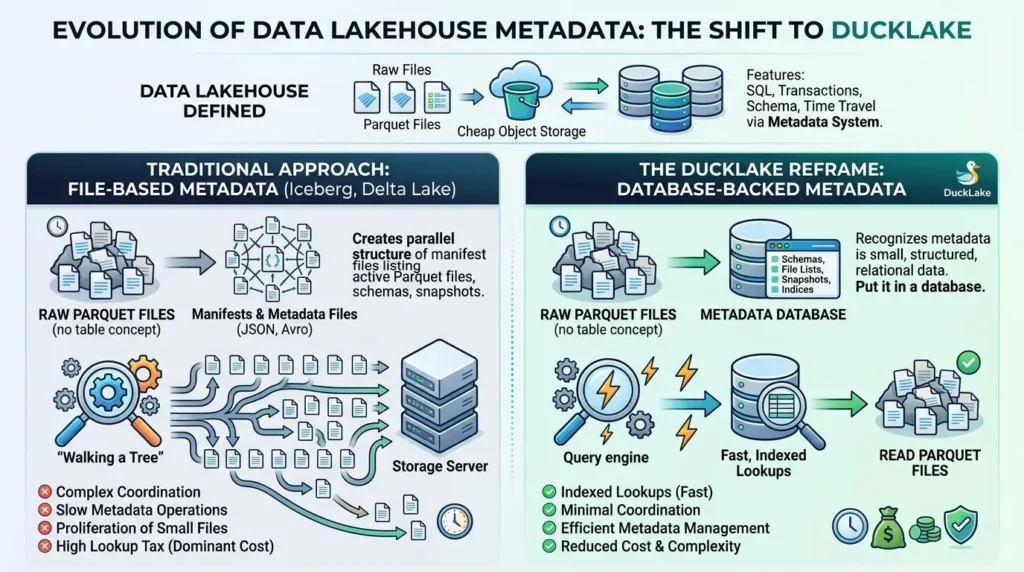
A raw folder of Parquet files has no concept of “table.” There’s no record of which files belong together, what the schema is, or what changed between yesterday and today. Iceberg and Delta Lake solved this by writing a parallel structure of manifest files: JSON or Avro documents that list which Parquet files are active, what schema applies, and which snapshot you’re looking at.
That works. But it means every query has to walk a tree of small metadata files on object storage before it can even start reading data. Engineering teams have noted that file-based metadata management leads to complex coordination, slow metadata operations, and a proliferation of small files, and on systems with millions of files, that lookup tax becomes the dominant cost of running a query.
DuckLake’s reframe is simple: the metadata itself is small, structured, relational data. So put it in a database, where indexed lookups replace recursive directory scans.
Quick definition: A data lakehouse is an architecture that stores raw data as open files (usually Parquet) on cheap object storage, while layering database-like features, transactions, schema enforcement, time travel, on top through a separate metadata system.
How DuckLake’s Architecture Actually Works
In DuckLake, metadata is stored in SQL tables, on DuckDB or SQLite for single-user setups, or realistically Postgres or MySQL for shared, multi-user environments, while the data itself stays in Parquet on whatever blob storage you choose. That’s the entire architectural shift in one sentence: two systems, each doing the job it’s actually good at.
Attaching a DuckLake instance takes one SQL statement:
INSTALL ducklake;

-- Local catalog: a DuckDB file holds metadata,
-- while a folder stores the Parquet data files

ATTACH 'ducklake:my_lakehouse.ducklake' AS my_lakehouse
(
  DATA_PATH 'lakehouse_data/'
);

USE my_lakehouse;

CREATE TABLE customers (
  id INTEGER,
  name VARCHAR,
  tier VARCHAR
);

INSERT INTO customers
VALUES (1, 'Alice', 'bronze');
That single ATTACH statement creates a metadata catalog file and, once data is inserted, a matching storage folder. For a true multi-user setup with remote clients, you’d point the catalog at PostgreSQL instead of a local file, SQLite is recommended for local, multi-client warehousing, while Postgres handles the remote, concurrent case.
Every CREATE, INSERT, UPDATE, or schema change becomes a row in a catalog table, not a new JSON file. That single design decision is what makes the rest of DuckLake’s feature set, time travel, schema evolution, multi-table transactions, fall out almost for free, because you’re no longer building those features on top of a filesystem. You’re building them on top of a database that already does this well.
Takeaway: DuckLake doesn’t reinvent lakehouse features, it relocates where the bookkeeping lives, from scattered files to indexed SQL tables, and inherits decades of database engineering for free.
Time Travel: Querying History Without Backups
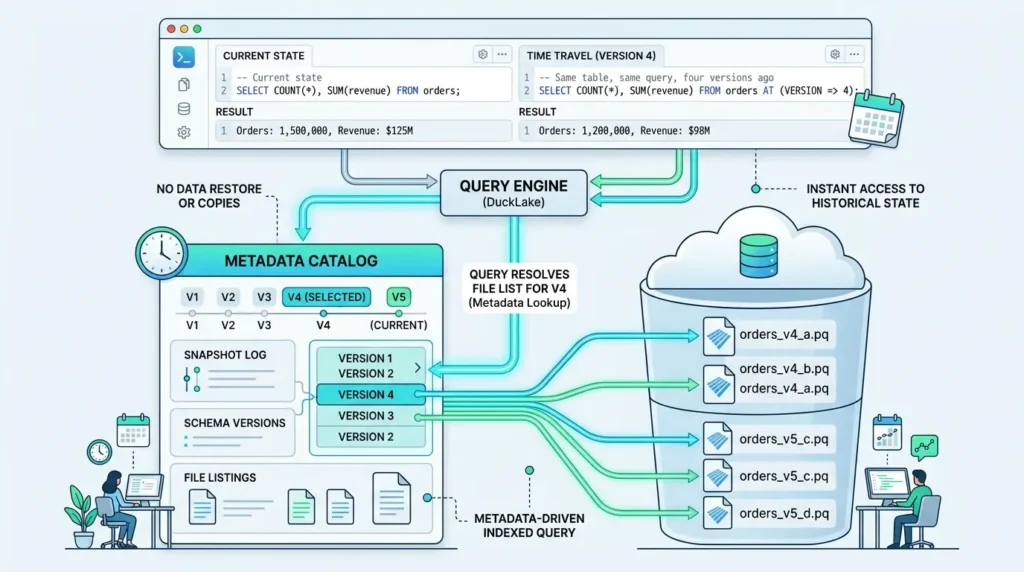
Time travel, querying a table as it existed at a previous point, is one of the headline lakehouse features, and DuckLake gets it from the snapshot log it already keeps.
-- Current state
SELECT COUNT(*), SUM(revenue) FROM orders;

-- Same table, same query, four versions ago
SELECT COUNT(*), SUM(revenue) FROM orders AT (VERSION => 4);
There’s no restore operation, no separate audit copy, no second table to maintain. The catalog already knows which Parquet files were active at version 4, so the engine just resolves a different file list and runs the identical query. DuckLake’s metadata tables explicitly track snapshots, schema versions, and the data files associated with each one, which is what makes this lookup a simple indexed query rather than a storage crawl.
Schema Evolution: Changes That Touch Zero Bytes of Data
This is arguably DuckLake’s most underrated feature, and it directly follows from putting schema definitions in a database instead of baking them into file structure.
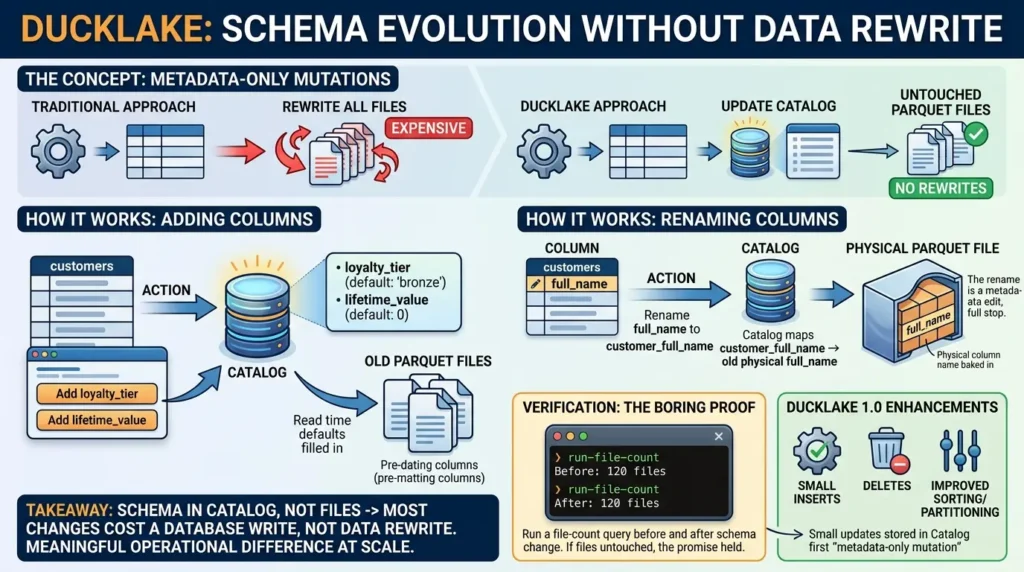
Say you add two columns to a customers table, a loyalty tier defaulting to “bronze” and a lifetime-value figure defaulting to zero. Existing rows didn’t have these values; the default gets filled in at read time from the catalog. The old Parquet files that predate the columns are never touched, never rewritten.
Renaming a column works the same way. The physical Parquet file still has the old column name baked into its internal structure, but the catalog records that the name the world now calls full_name maps to that physical column. The rename is a metadata edit, full stop. DuckLake 1.0 builds on this with catalog-stored small updates and improved sorting and partitioning support, which extends the same “metadata-only mutation” idea to deletes and small inserts.
Takeaway: Because schema lives in the catalog, not the files, most schema changes cost a database write instead of a data rewrite, a meaningful operational difference at scale.
Multi-Table Transactions: The Feature File-Based Catalogs Struggle With
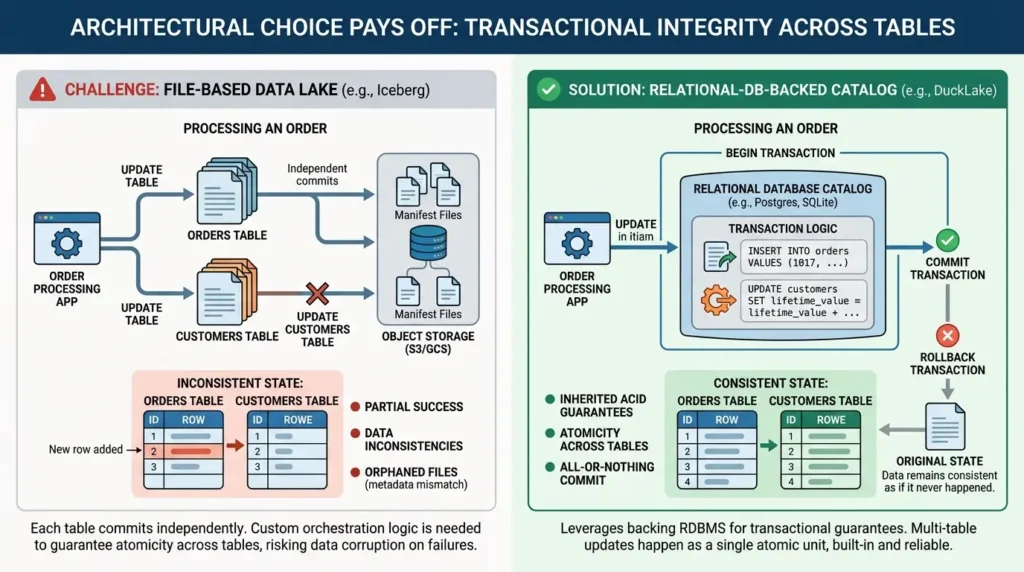
This is where the architectural choice pays off most clearly. Imagine processing a real order: you need to insert the order row and update the customer’s running total, and you need both to happen or neither.
BEGIN TRANSACTION;

INSERT INTO orders
VALUES (1017, 3, 88.00, CURRENT_DATE);

UPDATE customers
SET tier = 'gold',
    lifetime_value = lifetime_value + 88.00
WHERE id = 3;

COMMIT;
In a file-based catalog like Iceberg, each table commits its own manifest independently, there’s no native primitive for “these two table updates either both land or neither does.” Coordinating that cleanly across tables requires custom orchestration logic on top of the format.
DuckLake instead inherits transactional guarantees directly from whichever relational database backs its catalog. Because the catalog is a real database, a BEGIN/COMMIT block spanning multiple tables is something Postgres or SQLite already knows how to do correctly, DuckLake doesn’t have to build it from scratch. Roll the transaction back instead of committing, and it’s as if it never happened: no partial state, no orphaned files.
Querying the Metadata Layer Directly
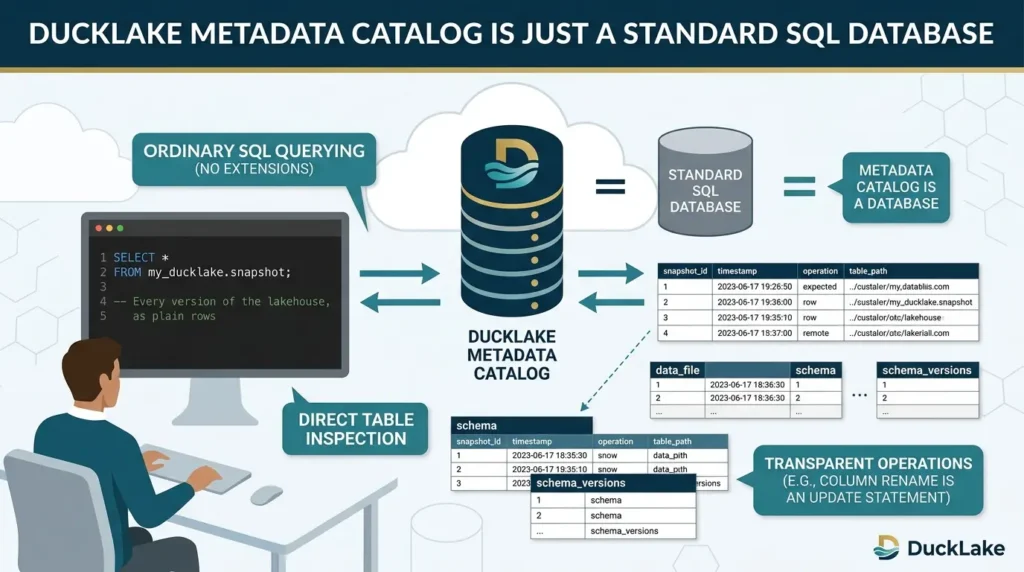
The feature that best demonstrates DuckLake’s whole thesis is that the metadata catalog is just a database, so you can query it with ordinary SQL, with no DuckLake extension involved at all.
-- Every version of the lakehouse, as plain rows
SELECT * FROM my_ducklake.snapshot;

-- Every physical Parquet file behind every logical table
SELECT * FROM my_ducklake.data_file;

-- Current live schema for every column
SELECT * FROM my_ducklake.metadata
WHERE end_snapshot IS NULL;
These are real, documented catalog tables, metadata, schema, schema_versions, snapshot, table, and others, that you’re free to query directly. A column rename isn’t some opaque format-internal operation; it’s a row you could have written yourself with an UPDATE statement. That transparency is the practical payoff of choosing a database over a custom file format: you already know how to inspect it.
DuckLake vs. Apache Iceberg vs. Delta Lake
| Aspect | Iceberg / Delta Lake | DuckLake |
|---|---|---|
| Metadata storage | JSON/Avro manifest files on object storage | SQL tables (Postgres, MySQL, SQLite, or DuckDB) |
| Metadata lookup | Sequential file listing + parsing | Indexed database query |
| Multi-table transactions | Not natively supported across tables | Native, via the catalog database’s own transactions |
| Concurrency model | Optimistic concurrency; conflicting writers retry | Inherits catalog DB’s native concurrency control |
| Infrastructure | Often needs a dedicated catalog service | A standard transactional database |
| Engine support | Spark, Flink, Trino, Snowflake, and more | DuckDB-centric; growing but narrower |
This isn’t a story of one format being strictly better. DuckLake is currently supported primarily by DuckDB, which is built for simplicity and local-first analytics, while Iceberg and Delta are backed by large-scale distributed engines like Spark, Flink, and Trino. If your organization is already standardized on Spark across a multi-engine platform team, DuckLake’s narrower engine support is a real cost, not a footnote.
The Concurrency Conflict, Concretely
The optimistic-concurrency-vs-database-transaction distinction above isn’t academic, it shows up the moment two processes try to write at the same time.
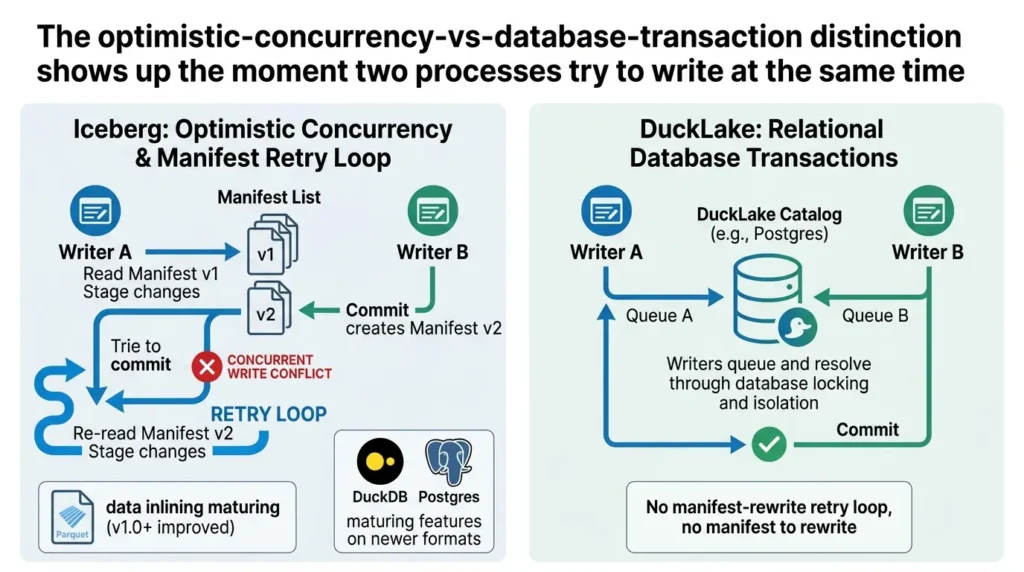
In Iceberg’s model, a writer reads the current manifest, stages its changes, and tries to commit a new manifest version. If another writer commits first, the first writer’s commit is rejected and it must re-read the new state and retry. Community discussion around DuckLake has flagged a related rough edge: data inlining, flushing small staged writes into Parquet, was still maturing as of late 2025, and that inlining feature was initially limited to DuckDB-backed catalogs rather than working uniformly across Postgres catalogs too.
That’s improved with the 1.0 release, but it’s a reminder that newer formats accumulate production hardening over time, worth checking the current release notes for your specific catalog choice before committing to a workload.
Because DuckLake’s catalog is a relational database, conflicting writers queue and resolve through the database’s own locking and isolation mechanisms, the same machinery Postgres uses for any other application. There’s no manifest-rewrite retry loop, because there’s no manifest to rewrite.
The Real Cost Math: DuckDB/DuckLake vs. Managed Warehouses
Cost is where this architecture shift becomes a budget conversation, not just an engineering one. The data-engineering company Definite migrated its entire analytics stack from Snowflake to a self-hosted DuckDB and DuckLake architecture and published the results.
Definite reported an infrastructure cost reduction of more than 70% after the migration, along with roughly 5–10x faster performance on typical analytical queries and a doubling of engineering velocity. The company explicitly credits DuckLake with solving DuckDB’s historical single-writer limitation by moving write coordination to PostgreSQL, which is the concurrency story above, playing out in production.
For context on typical mid-market numbers: a mid-market company running roughly 1TB of analytical data with 10–20 analysts would typically spend $3,500 to $10,000 per month on a Snowflake-plus-BI-tool stack, against an estimated $250–$500 per month for an equivalent DuckDB-based setup using a flat-rate VM and cheap object storage. That’s a directional estimate from a single analysis, not a universal benchmark, your number depends heavily on data volume, concurrency needs, and whether you already have the engineering capacity to self-host.
Illustrative only — based on the Snowflake-vs-DuckDB cost ranges reported above. Your actual costs will vary by data volume, region, and usage pattern.
Use the calculator above to estimate your monthly cost savings when migrating from Snowflake to a self-hosted DuckDB and DuckLake architecture
Takeaway: The cost gap is real and has been documented by at least one company in detail, but it assumes you have the engineering capacity to self-host, managed-warehouse pricing partly buys you not needing that capacity.
Case Study: Definite’s Full Production Migration
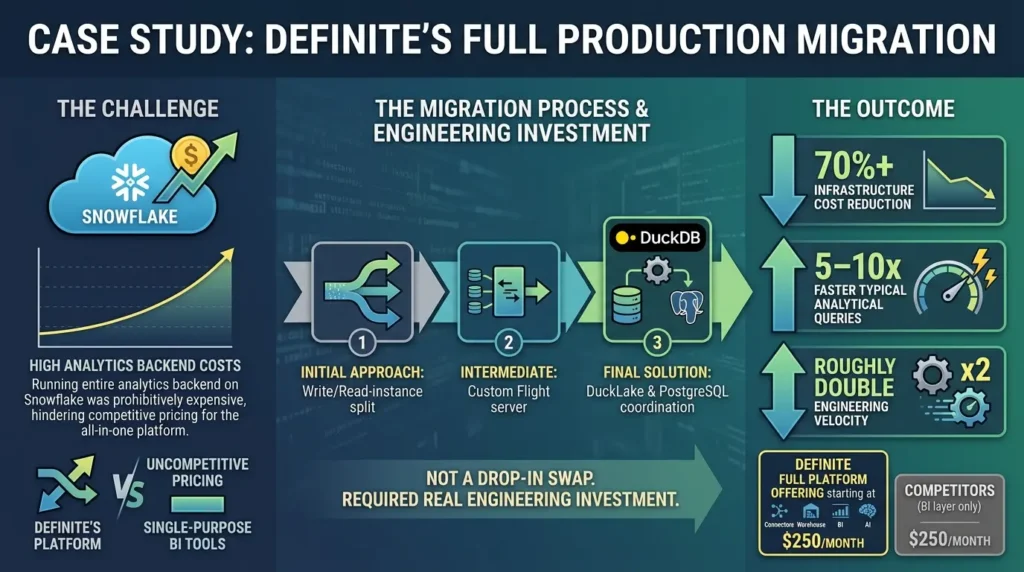
- The challenge: Definite, a SaaS analytics platform offering connectors, a warehouse layer, BI, and an AI assistant, was running its entire analytics backend on Snowflake. Costs scaled with usage in a way that made an all-in-one platform difficult to price competitively against single-purpose BI tools.
- The decision: Definite rebuilt its data layer around DuckDB, storing all data as Parquet on Google Cloud Storage, and addressed DuckDB’s single-writer limitation first with a write/read-instance split, then a custom Flight server, and finally DuckLake itself once it became available, moving write coordination to PostgreSQL.
- The outcome: More than 70% infrastructure cost reduction, 5–10x faster typical analytical queries, and roughly double the engineering velocity, which let the company offer its full platform starting at $250 a month, a price point competitors charge for the BI layer alone.
- The lesson: The migration wasn’t trivial, Definite built and discarded two intermediate concurrency solutions before DuckLake existed to solve the problem natively. Teams considering this path should expect real engineering investment, not a drop-in swap.
Case Study: Okta’s Serverless Log Processing
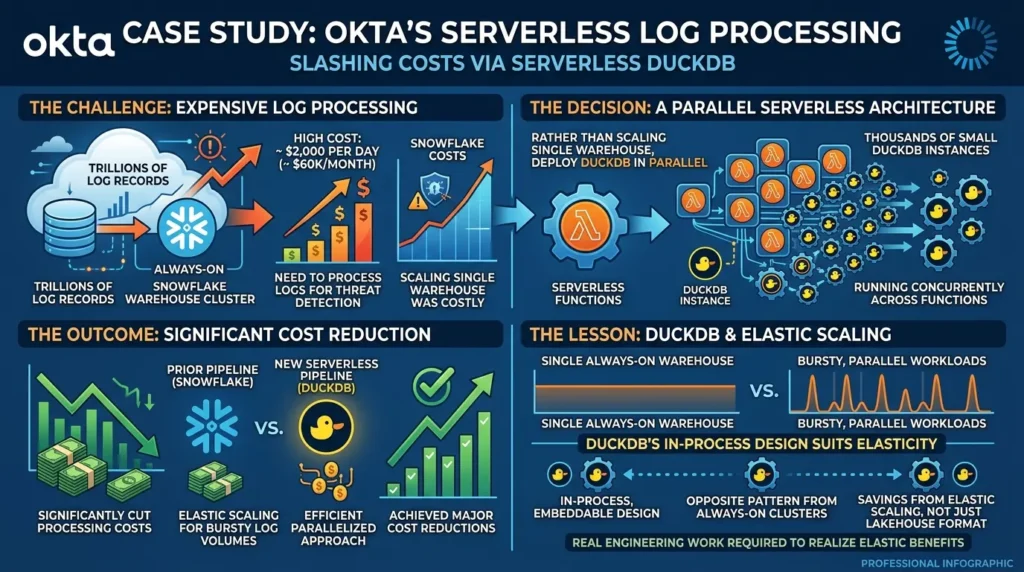
- The challenge: Okta’s security engineering team needed to process trillions of log records for threat detection, with Snowflake costs running approximately $2,000 per day, about $60,000 a month.
- The decision: Rather than continuing to scale a single warehouse, the team built a system using thousands of small DuckDB instances running in parallel across serverless functions.
- The outcome: The parallelized serverless approach significantly cut processing costs versus the prior Snowflake-based pipeline.
- The lesson: DuckDB’s in-process, embeddable design makes it well suited to bursty, parallelizable workloads, the opposite pattern from a single always-on warehouse cluster, and a case where the cost savings come from elastic scaling rather than the lakehouse format itself.
A Contrarian Take: DuckLake Isn’t Trying to Win the Format War
Most coverage frames DuckLake as Iceberg’s next competitor, racing for the same enterprise petabyte-scale workloads. That framing misses the more interesting claim DuckLake’s creators are actually making.
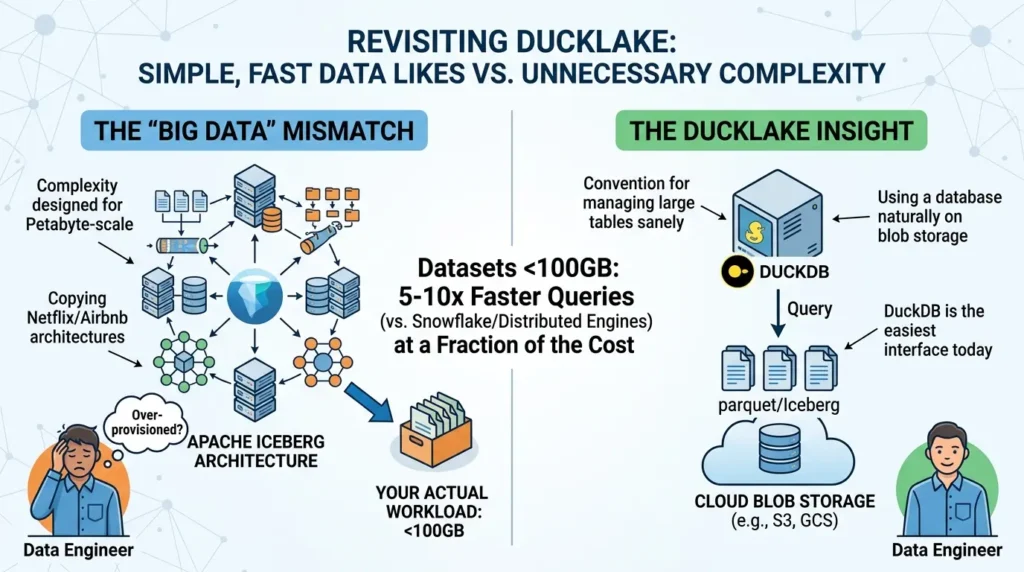
Hannes Mühleisen, DuckDB’s co-creator, has said DuckLake is not a DuckDB-specific format at all, it’s a convention for managing large tables on blob storage sanely, using a database, and DuckDB just happens to be the easiest way to use it today. Read literally, that’s a claim that DuckLake isn’t competing with Iceberg for the same market, it’s targeting the much larger population of teams who never needed Iceberg’s distributed-engine complexity in the first place.
That population is bigger than the “big data” narrative suggests. On datasets up to roughly 100GB, DuckDB-based analytics regularly complete queries 5 to 10 times faster than Snowflake at a fraction of the cost, and a large share of companies that bought into petabyte-scale tooling are actually operating well under that threshold. The contrarian insight: most teams running Iceberg don’t have an Iceberg-shaped problem. They have a “we copied what Netflix and Airbnb use” problem.
When to Choose DuckLake vs. Iceberg
- Data is in the gigabytes-to-low-terabytes range
- A small team wants simplicity over a platform org
- Your workflows are already DuckDB-centric
- You want metadata you can inspect with plain SQL
- You’re operating at genuine petabyte scale
- Multiple engines (Spark, Flink, Trino) must share tables
- You already run a dedicated data platform team
- Your tooling ecosystem assumes Iceberg/Delta natively
Common Mistakes Teams Make Adopting DuckLake
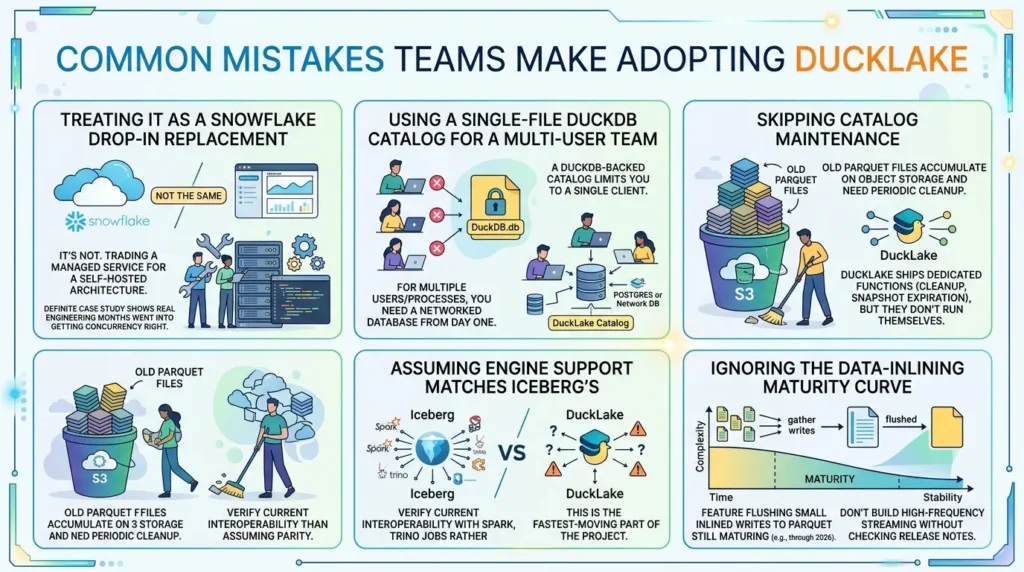
Treating it as a Snowflake drop-in replacement
It isn’t. You’re trading a managed service for a self-hosted architecture, Definite’s case study shows real engineering months went into getting concurrency right before DuckLake existed to solve it natively.
Using a single-file DuckDB catalog for a multi-user team
A DuckDB-backed catalog limits you to a single client. If more than one person or process needs to write concurrently, you need Postgres or another networked database as the catalog from day one.
Skipping catalog maintenance
Even with metadata in a database, old Parquet files from superseded versions still accumulate on object storage and need periodic cleanup, DuckLake ships dedicated maintenance functions for this, including cleaning up old files and expiring old snapshots, but they don’t run themselves.
Assuming engine support matches Iceberg’s
If your stack includes Spark or Trino jobs that need to read the same tables, verify current interoperability rather than assuming parity, this is the fastest-moving part of the project.
Ignoring the data-inlining maturity curve
As one practitioner noted, the feature that flushes small inlined writes back out to Parquet files was still maturing through 2026. Don’t build a high-frequency streaming pipeline around inlining without checking the current release notes for your catalog type.
Where This Leaves You
DuckLake’s bet is narrow and specific: most teams adopting Iceberg-style lakehouse architecture never needed distributed-engine complexity in the first place, and a well-indexed SQL database handles metadata better than a tree of JSON files ever could. For at least one company that bet it fully, the result was a >70% cost cut and roughly double the engineering velocity, but that came after real engineering investment, not a configuration flag.
If you’re running a small-to-mid-size analytical workload, already lean on DuckDB, and you’re tired of debugging manifest-tree edge cases, DuckLake is worth a serious trial. If you’re coordinating petabytes across Spark, Flink, and a dedicated platform team, Iceberg’s broader engine support still earns its complexity. The honest move is to size your actual data and team against the two columns in the comparison table above, not against whichever one is trending this quarter.
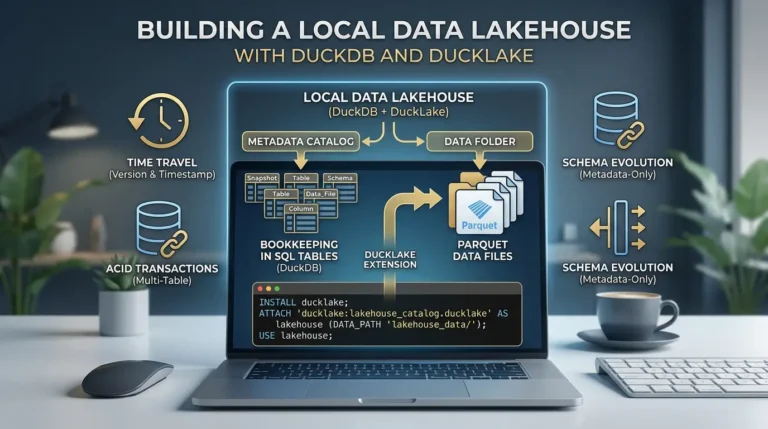
Ready to try it yourself? Our hands-on guide to building a local data lakehouse with DuckDB and DuckLake walks through every step, install, time travel, schema evolution, multi-table transactions, entirely on your laptop, no cloud account required.



[…] Read the Full Article → […]
[…] deciding whether DuckLake is the right fit before you commit time to building one? Our DuckLake vs. Apache Iceberg comparison covers the architecture trade-offs, cost differences, and when each format actually wins, worth a […]