
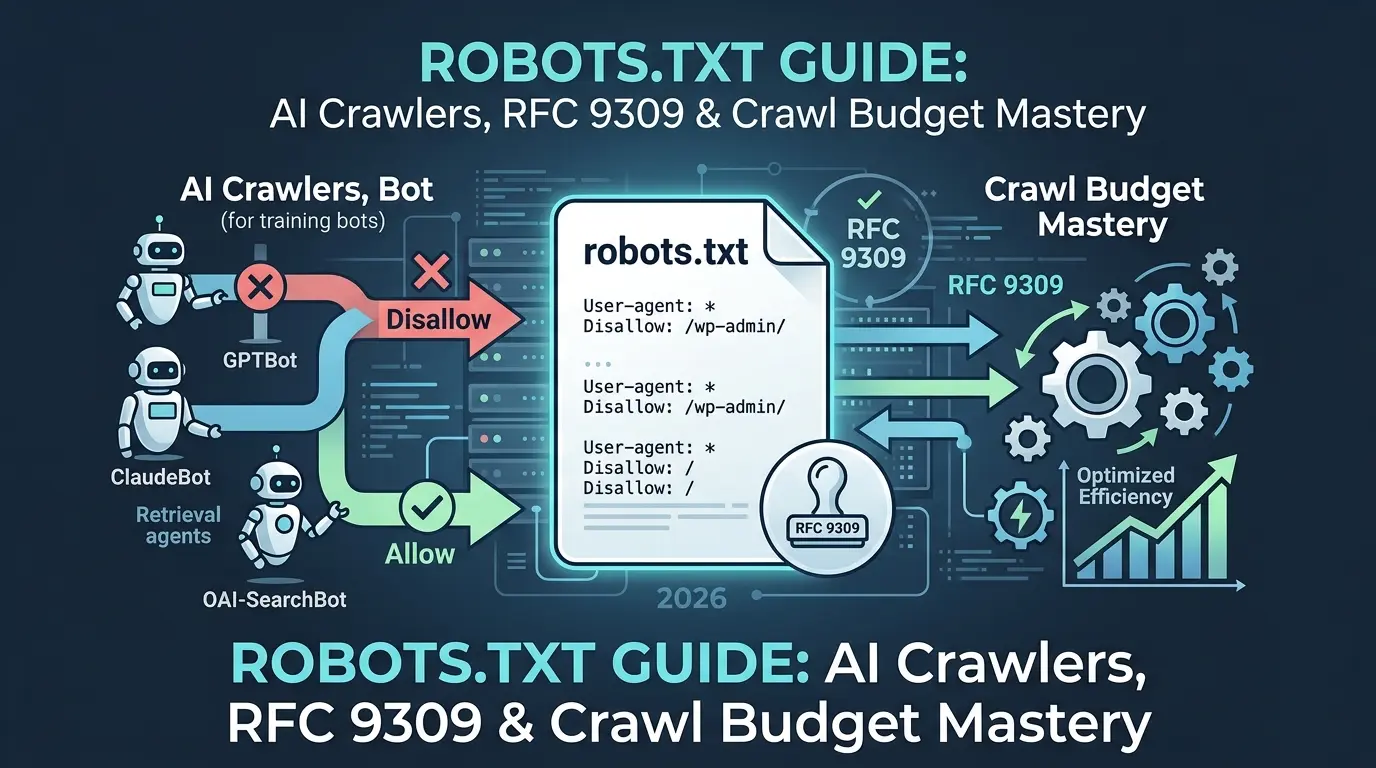

Here’s something that keeps SEO teams up at night.
A developer pushes what looks like a routine update. Two lines of code. Those two lines tell every search engine on the planet to stop crawling the entire site. By morning, traffic is down 90%. The culprit? A staging robots.txt file accidentally deployed to production, User-agent: * followed by Disallow: /.
Years of SEO work. Gone overnight. Because of a plain text file smaller than a grocery list.
That’s the raw power of robots.txt. And in 2026, that power has grown way beyond basic search engine crawling. Today, this tiny file sits at the center of a massive fight over AI training data, intellectual property rights, and who gets to decide what ends up inside the next generation of large language models.
Most robots.txt guides online are either outdated, shallow, or flat-out wrong about what the file can and can’t do. They recycle the same basic syntax without explaining the real risks. They completely miss the AI crawler explosion. And they skip the nuances that separate a professionally maintained file from a ticking time bomb.

This guide changes that.
You’ll learn exactly how robots.txt works under the hood per the official RFC 9309 standard, how to manage the new wave of AI crawlers intelligently, how to avoid the mistakes that silently kill your crawl budget, and how to test everything before it breaks in production.
Let’s get into it.
- Robots.txt controls crawling, not indexing, combining it with noindex breaks both
- RFC 9309 (2022) is the official standard, many legacy directives like
noindexin robots.txt no longer work - Block AI training bots (GPTBot, ClaudeBot) but allow AI search/retrieval agents (OAI-SearchBot, Claude-SearchBot)
- The longest-match rule wins conflicts, and equal-length ties go to Allow, not Disallow
- 60% of reputable publishers block AI crawlers; only 9.1% of misinformation sites do, creating a hidden dataset quality crisis
- llms.txt does NOT boost rankings in ChatGPT or Google, its real value is for AI coding agents
- Never test only in production, use the 5-layer validation protocol before deploying changes
What Robots.txt Actually Does (And What It Doesn’t)
Hey, let’s nail this definition before anything else, because the misunderstanding here is responsible for more SEO damage than almost any other technical mistake.
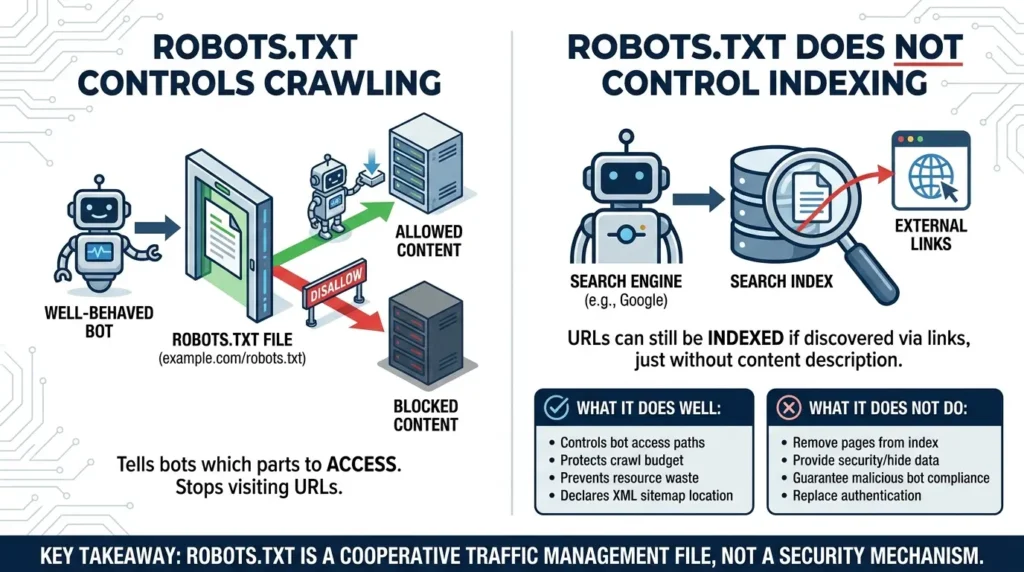
Robots.txt is a plain text file placed at the root of your domain, example.com/robots.txt that tells well-behaved web crawlers which parts of your site they’re allowed to access.
That’s the job on paper. But here’s what most people get fundamentally wrong.
Robots.txt controls crawling. Not indexing. These are completely different actions.
Crawling is the act of a bot visiting a URL and downloading its content. Indexing is a search engine deciding to store that page and show it in search results. Block a URL in robots.txt and you stop bots from visiting it. But if that URL has external links pointing to it from other sites, Google can still discover the URL exists and list it in the index, just without any description, because it was never allowed to read the page content.
This single misunderstanding causes more “why is my page still showing in Google” support tickets than anything else.
Robots.txt genuinely does these things well:
- Controls which bot user agents can access which URL paths
- Protects crawl budget by directing bots away from low-value or duplicate pages
- Prevents crawlers from wasting server resources on filter pages, internal search results, and staging environments
- Declares the location of your XML sitemap for universal crawler discovery
Robots.txt does NOT do these things, no matter how many guides tell you otherwise:
- Remove pages from Google’s index (you need noindex for that)
- Provide security or hide sensitive data (it’s publicly readable by anyone)
- Guarantee that malicious bots will obey it (they frequently don’t)
- Replace server-side authentication or access controls
Now here’s the subtle but critical point from the official standard: because robots.txt is publicly accessible, any paths you list under Disallow rules are fully visible to every user and automated tool on the internet. Listing /admin/ or /backup/ in your robots.txt doesn’t hide those directories. It advertises them.
Key takeaway: Robots.txt is a cooperative traffic management file, not a security mechanism. Treating it as one is one of the most dangerous misconceptions in web security.
The RFC 9309 Standard: What Actually Changed in 2022
For almost 30 years, robots.txt was an informal handshake agreement with no official rulebook. When Martijn Koster invented it in 1994 as “RobotsNotWanted.txt,” the goal was simple, stop early, unoptimized search engine crawlers from hitting servers so hard they caused outages.
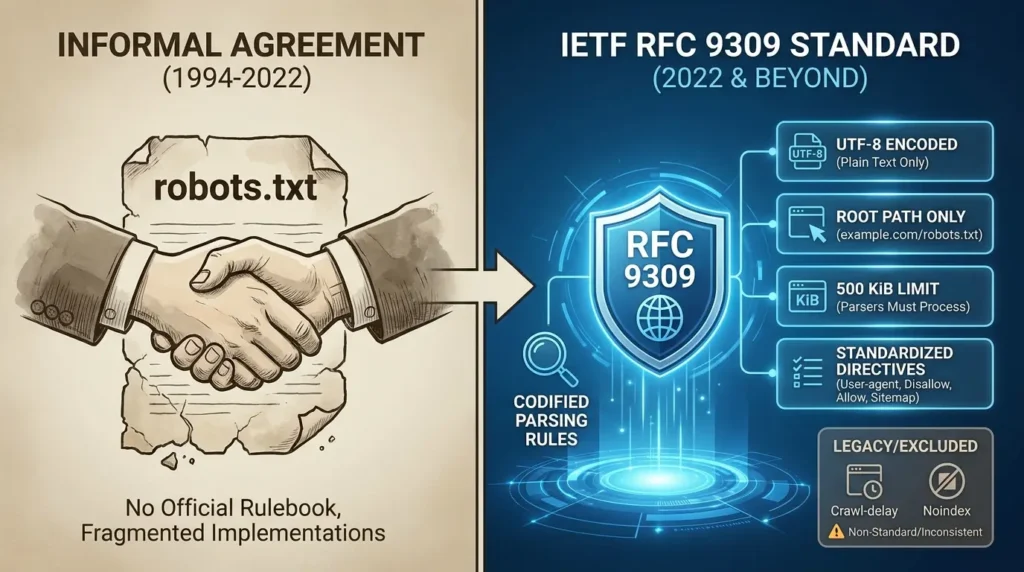
For nearly three decades, everyone kind of agreed to follow it. Just differently. The result was fragmented, inconsistent implementations across every major crawler.
That era officially ended in September 2022 when the Internet Engineering Task Force published the RFC 9309 specification, making robots.txt a formal internet standard with specific, codified parsing rules.
Here’s what RFC 9309 actually locked down:
File requirements:
- Must live at the root of the host, example.com/robots.txt only, not in subdirectories
- Must be plain text encoded in UTF-8, Google’s parser explicitly discards non-UTF-8 characters, which can silently invalidate rules
- Maximum size limit: parsers must process at least 500 KiB, and anything beyond that is completely ignored, rules at the end of a large file may never be read
- Rules do not transfer across subdomains, protocols (HTTP vs HTTPS), or non-standard ports
Directives officially recognized by RFC 9309:
- User-agent: – field names are case-insensitive
- Disallow: – URL path matching is case-sensitive
- Allow: – overrides Disallow for more specific paths
- Sitemap: – requires an absolute URL, not a relative path
What’s officially excluded from the standard:
Both Crawl-delay and Noindex were left out of RFC 9309’s core syntax. They exist as legacy extensions with inconsistent cross-platform behavior.
Now, about Crawl-delay specifically, this is worth understanding clearly. Google completely ignores it. Googlebot manages its own crawl rate through internal algorithms and Google Search Console configuration. If you’re trying to slow down Googlebot, the Crawl-delay directive does absolutely nothing.
Bingbot, YandexBot, and Yahoo Slurp do honor it, though. The math behind it is simple: the delay value specifies seconds between requests, meaning you can calculate the maximum URLs crawled per day directly.
Note: Google ignores Crawl-delay entirely. Use Google Search Console to manage Googlebot’s crawl rate instead.
Crucial distinction: The Sitemap: directive in robots.txt is an advisory hint to crawlers. It is not the only way to submit a sitemap. You should also always submit your sitemap directly via Google Search Console and Bing Webmaster Tools. If your robots.txt file is ever mistakenly deleted or corrupted, having the sitemap registered directly in the search engines ensures that discovery isn't completely interrupted.
How Parsers Actually Make Decisions: The Three Logic Gates
Now here's where it gets genuinely interesting, and where most guides skip the important stuff entirely.
When a crawler opens your robots.txt, it doesn't just read from top to bottom and apply everything it finds. It processes three distinct decision stages to determine whether it can access any specific URL.
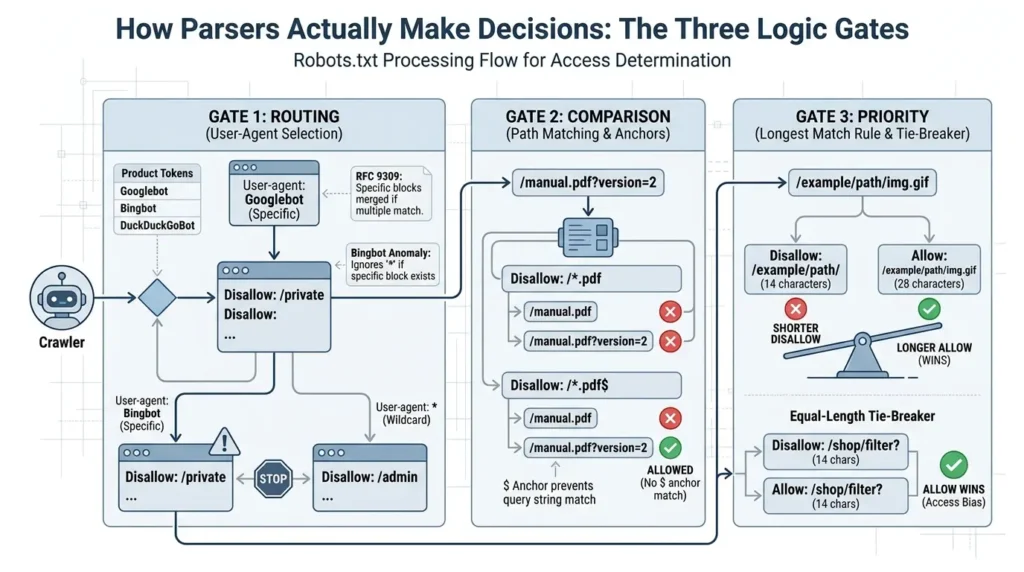
Gate 1: Routing: Which rule block applies to me?
The crawler scans the file for a User-agent: block matching its own product token. If a specific block exists, say User-agent: Googlebot, the crawler uses only that block and completely ignores User-agent: *. Rules from different blocks are never merged.
Here's a critical non-standard exception you need to know. Bingbot, upon finding any rules specifically written for it, ignores the wildcard * block entirely. This means if you have general rules under User-agent: *, Bingbot won't see them. You must duplicate all relevant general directives inside the Bingbot-specific block, otherwise Bingbot may freely crawl areas you intended to restrict.
Googlebot and RFC 9309 handle this opposite: if multiple specific groups match the same user agent, rules must be combined into a single group before evaluation.
The Bingbot Anomaly: A Critical Testing Requirement: While RFC 9309 provides a clear path for rule parsing, Bingbot historically behaves differently regarding wildcard blocks (*) than Googlebot. If you have specific rules for Bingbot in your file, it may ignore the global User-agent: * block entirely. This means if you rely on the global block to hide sensitive directories, those areas could be completely exposed to Bingbot.
Action: Always audit your file with Bing’s specific parser logic in mind. Never assume that a global Disallow rule covers Bingbot if you have also defined a User-agent: Bingbot block elsewhere in the file. Explicitly duplicate all necessary Disallow rules within the Bingbot-specific block to ensure consistent coverage.
Gate 2: Comparison: Does this URL match any rule?
Path matching goes character by character (technically octet by octet) from the start of the path. The * wildcard represents any sequence of characters. The $ anchor marks the absolute end of the URL.
This distinction between *.pdf and *.pdf$ is subtle but important. Without the $ anchor, Disallow: /*.pdf blocks both /manual.pdf AND /manual.pdf?version=2. Add the $ anchor and only /manual.pdf is blocked, /manual.pdf?version=2 gets through. For gated content and lead magnets, this matters a lot.
Gate 3: Priority: When Allow and Disallow conflict, who wins?
RFC 9309 enforces the Longest Match Rule. When both an Allow and a Disallow pattern match a URL, the longer pattern, the more specific one, wins, regardless of where it appears in the file.
Here's the statistic that surprises almost everyone: 89% of SEO practitioners incorrectly assume Disallow wins when two rules are the same length. The opposite is true. When an Allow and a Disallow rule are identical in length, the Allow directive wins. Access bias is built right into the standard.
# Equal-length tie-breaker example

User-agent: *

Disallow: /shop/filter?    # 14 characters

Allow: /shop/filter?       # 14 characters

# Result for /shop/filter?color=red: ALLOWED| Rule Pattern | Target URL | Verdict | Why |
|---|---|---|---|
Disallow: /blog | /blog.html | ❌ Blocked | Prefix match — no trailing slash |
Disallow: /blog/ | /blog | ✅ Allowed | Trailing slash limits to subdirectory |
Disallow: /*.pdf$ | /manual.pdf?id=1 | ✅ Allowed | $ anchor prevents query string match |
Allow: / + Disallow: / | /anything | ✅ Allowed | Equal-length tie — Allow wins |
Disallow: /example/path/ + Allow: /example/path/img.gif | /example/path/img.gif | ✅ Allowed | Allow is longer match (28 vs 14 chars) |
AI Crawlers in 2026: The New Robots.txt Battleground
Here's where robots.txt gets genuinely complex in 2026, and where most guides completely fall apart.
The web crawler ecosystem has split into two distinct worlds. In the old world, you wanted Google to crawl everything so people could find you. In the new world, AI companies are sending crawlers to harvest your content for model training, often without sending any meaningful traffic back in return.
By mid-2026, Googlebot still leads all crawler traffic at 27.26%, but it's down from its historical dominance. Meta-ExternalAgent now commands 13.23%, GPTBot (OpenAI training) holds 11.48%, and Bytespider from ByteDance has nearly tripled to 10.25%. ClaudeBot from Anthropic sits at 9.73%. The crawler landscape is more fragmented and more aggressive than at any point in the web's history.
Cloudflare's own data covering roughly 20% of the public web showed 416 billion AI bot requests in the second half of 2025 alone. GPTBot traffic grew 147% year over year. Meta's crawler exploded 843%.
Now here's the key strategic insight most people miss entirely. Not all AI bots are doing the same job.
Training Crawlers harvest content to feed large language models. They consume significant bandwidth, ingest intellectual property, and typically don't drive referral traffic back to your site. The bots to know: GPTBot (OpenAI), ClaudeBot (Anthropic), CCBot (Common Crawl), Bytespider (ByteDance), Meta-ExternalAgent.
Search and Retrieval Agents fetch real-time data to answer specific user queries in AI-powered search tools. They cite sources with clickable links and can drive high-intent referral traffic. The bots to allow: OAI-SearchBot (OpenAI), Claude-SearchBot (Anthropic), PerplexityBot.
User-Triggered Fetchers activate when a real user asks an AI assistant to visit a specific URL during a live conversation. Blocking these prevents AI assistants from helping users with your content in real time. The bots to allow: ChatGPT-User, Claude-User.
Opt-Out Policy Tokens aren't active crawlers at all. They're directive tokens parsed by existing search bots to opt out of AI training while remaining in standard search results. Key tokens: Google-Extended, Applebot-Extended.
The strategic move is to block training crawlers and allow retrieval agents simultaneously. Most publishers and brands should be implementing exactly that distinction.
| Operator | User-Agent Token | Type | Recommended Action | Why |
|---|---|---|---|---|
| OpenAI | GPTBot | Model Training | Block | Ingests IP with no traffic return |
| OpenAI | OAI-SearchBot | Live Search | Allow | Citations + high-intent traffic |
| OpenAI | ChatGPT-User | User-Triggered | Allow | Blocks user conversations about your content |
| Anthropic | ClaudeBot | Model Training | Block | Deep training crawls, no traffic return |
| Anthropic | Claude-SearchBot | Live Search | Allow | Maintains Claude search citations |
Google-Extended | Training Opt-Out Token | Disallow (to opt out) | Opts out of Gemini AI training only — does NOT affect search rankings | |
| ByteDance | Bytespider | Model Training | Block | Aggressive high-frequency scraping |
| Common Crawl | CCBot | Open Dataset Training | Block | Feeds open-source model training pipelines |
The Contrarian Insight: Blocking AI Crawlers May Be Making AI Worse

Here's something almost nobody is willing to say out loud.
Research from 2025 found something striking: 60% of reputable news publishers were blocking at least one major AI crawler, while only 9.1% of misinformation sites were doing the same. On average, reputable publishers blocked 15.5 different AI agents. Misinformation sites blocked fewer than one.
Think about what that means for the training datasets going into the next generation of AI models.
High-quality, credible content is exiting the corpus. Low-quality and misinformation-heavy content is staying. The act of protecting legitimate intellectual property, which is entirely reasonable, may be inadvertently making AI systems less accurate and more exposed to junk information over time.
This isn't an argument against blocking training crawlers. It's an argument that robots.txt was never designed to serve as an AI data governance layer, and the voluntary, unenforceable nature of the protocol is creating structural problems that extend far beyond any individual publisher's decision.
The research is also clear that crawler compliance isn't a binary. It's incentive-sensitive. A 2025 empirical study tracking 130 self-declared bots over 40 days found that AI crawlers were significantly less likely to comply with restrictions as those restrictions became more stringent. Traditional search engines historically show high compliance. Some AI crawlers, particularly search retrieval bots, frequently failed to even check robots.txt before making requests.
The stronger your restrictions, the less reliable voluntary enforcement becomes. The protocol was built for a cooperative web. The current web is competitive.
Key takeaway: Robots.txt has become an accidental AI governance mechanism that was never designed for rights management. It signals intent but cannot enforce compliance, and the gap between intent and enforcement is growing.
The robots.txt + noindex Conflict That Quietly Kills Rankings
Now let's talk about one of the most common and most damaging configuration conflicts in all of technical SEO.
Some webmasters try to both block a page in robots.txt AND add a noindex meta tag to the same page. The instinct makes sense, double protection, right?
Wrong. It actively breaks things.
Here's what actually happens when you do both. When you add Disallow: /example-page/ to robots.txt, search engine bots can't visit that page at all. Because they can't visit it, they can never read the noindex meta tag inside the HTML. If that page has any external links pointing to it from other websites, Google discovers the URL exists and may list it in the index anyway, just without any description, because the page content was never readable.
The Google Search Central documentation on robots.txt is explicit: blocking a page in robots.txt while expecting noindex to work simply doesn't function as intended.
To properly remove a page from search results, the process is a deliberate two-step sequence.
- Step 1: Keep the page crawlable in robots.txt. Remove any Disallow rule for it.
- Step 2: Add a noindex meta robots tag or an X-Robots-Tag HTTP response header directly on the page.
- Step 3: Wait for crawlers to visit the page, read the noindex directive, and remove the URL from their index. Verify de-indexation in Google Search Console.
- Step 4: Only after confirmed de-indexation — if you want to conserve crawl budget — can you then add the Disallow rule.
in robots.txt?
→ Remove Disallow first
→ Let crawler fetch page
→ Then noindex takes effect
in robots.txt?
X-Robots-Tag header
→ Confirm in Search Console
→ Optional: then add Disallow
The robots.txt Security Problem Nobody Tells You About
Here's something that makes security teams uncomfortable when they hear it.
Robots.txt is publicly accessible to literally anyone on the internet. When you list /admin/, /backup/, or /staging/ under Disallow rules, you're not hiding those directories, you're handing attackers a map.
Cybersecurity reconnaissance tools like dirb and gobuster automatically parse robots.txt as one of their first moves when mapping a target. Your carefully maintained Disallow list becomes a curated shortlist of high-value attack surfaces.
There's also a secondary vulnerability that pairs with this. If you disallow a directory like /uploads/ but fail to configure an index page, a redirect, or a proper 404 response at that directory level, your server may display a default directory listing, showing every file inside that folder to anyone who visits the URL directly. The robots.txt Disallow rule does nothing to prevent this.
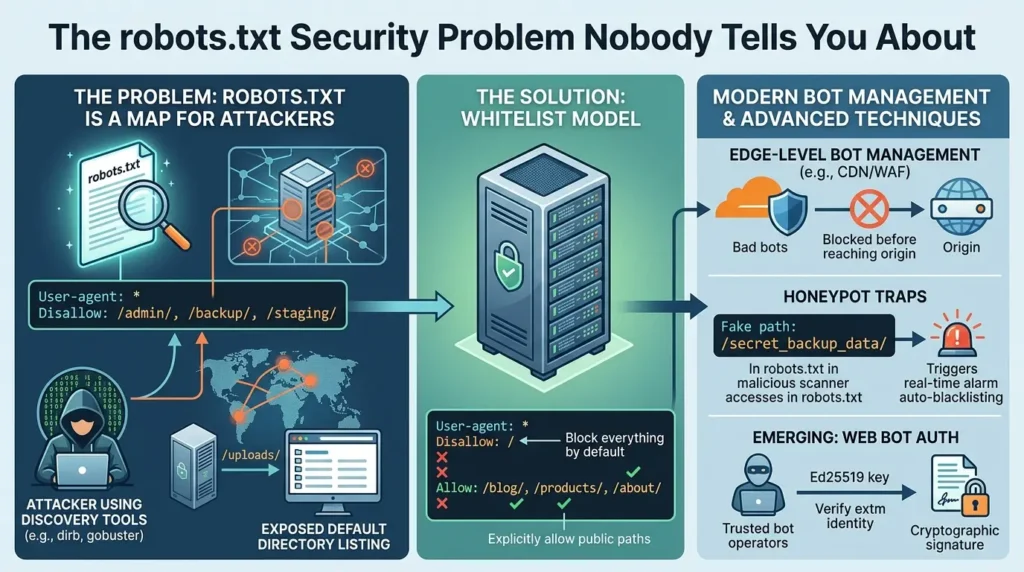
For high-security environments, the better approach is to flip the model entirely: block everything by default and explicitly allow only your public-facing content. This is the whitelist model.
User-agent: *

Disallow: /          # Block everything by default

Allow: /blog/        # Explicitly allow public paths

Allow: /products/

Allow: /about/
You can go further and set up honeypots, fake paths listed under Disallow that contain no real content but trigger real-time monitoring when accessed. Since compliant crawlers respect Disallow rules, any request to a honeypot path is immediately flagged as a malicious scanner and automatically blacklisted at the WAF or CDN edge layer.
A Note on Edge-Level Bot Management
As robots.txt is voluntary and increasingly ignored by malicious actors, shifting bot management to your CDN (e.g., Cloudflare’s Managed Bot Rules) is the industry standard for 2026. This allows you to block scrapers at the infrastructure layer before they even hit your server.
Warning: Be cautious with aggressive, default-block policies at the edge. Because these tools operate on behavioral signatures, they can occasionally trigger "false positives," blocking legitimate third-party tools, API monitors, or niche crawlers your developers may have set up months ago. Always perform a "log-analysis-first" audit of your traffic before enabling strict edge-level blocking to ensure you aren't inadvertently breaking your own internal services or partner integrations.
The most sophisticated approach on the horizon is an emerging IETF experimental standard called Web Bot Auth. Under this protocol, trusted bot operators use asymmetric cryptography, specifically Ed25519 key pairs, to sign their HTTP requests. The server or CDN verifies the cryptographic signature in real time, confirming bot identity without relying on easily spoofed User-Agent strings. It's still experimental, but it represents where verifiable bot authentication is heading.
llms.txt and GEO: Optimizing for How AI Actually Reads Your Site
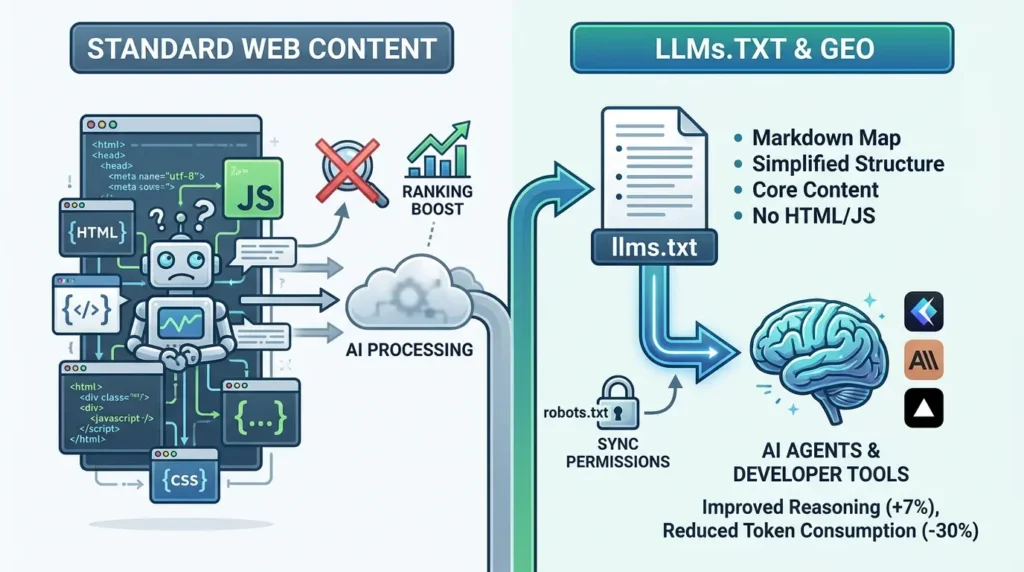
While robots.txt controls who can access your content, it doesn't do anything to help AI systems understand or accurately represent what your content means.
That's the problem that /llms.txt was designed to solve.
Proposed by AI researcher Jeremy Howard in September 2024 and documented at llmstxt.org, llms.txt is a lightweight Markdown file at your domain root. It gives AI agents a clean, structured map of your most important content, stripping away HTML complexity, JavaScript, and visual styling so AI tools can efficiently process what actually matters.
Research suggests that clean Markdown formats improve LLM reasoning accuracy by over 7% and reduce token consumption by nearly 30%. That efficiency gain matters when AI tools are deciding which sources to pull from and reference in answers.
Now and this is important, here's what most blog posts and SEO influencers get completely wrong about llms.txt.
It does not boost your rankings in ChatGPT, Perplexity, or Google. Full stop. Gary Illyes from Google publicly confirmed Google has no plans to use it as a ranking input. A study of over 300,000 domains found roughly 10% adoption and zero measurable citation lift in AI search results from having the file.
The real audience for llms.txt is AI coding agents, tools like Cursor, Claude Code, and similar developer environments that load documentation into their working context. The companies genuinely benefiting from it are developer platforms: Anthropic, Cloudflare, Vercel, Supabase. Their documentation gets loaded into AI coding tools constantly throughout the workday. For them, llms.txt meaningfully reduces how hard those tools have to work to understand their APIs and features.
If you're running a developer documentation platform or an open-source library, llms.txt is worth implementing. If you're running a marketing site or a content blog, skip it, it won't do what the hype claims.
One critical alignment requirement: if you publish an llms.txt that links to pages or Markdown files, but your robots.txt blocks the retrieval agents that need to access those files (OAI-SearchBot, Claude-SearchBot), the file becomes useless. Always sync your robots.txt permissions with your llms.txt strategy.
The 12 Common robots.txt Mistakes That Silently Destroy Traffic
Let's get practical. These are the mistakes that show up most frequently in technical SEO audits, and some of them are genuinely easy to make without realizing it.
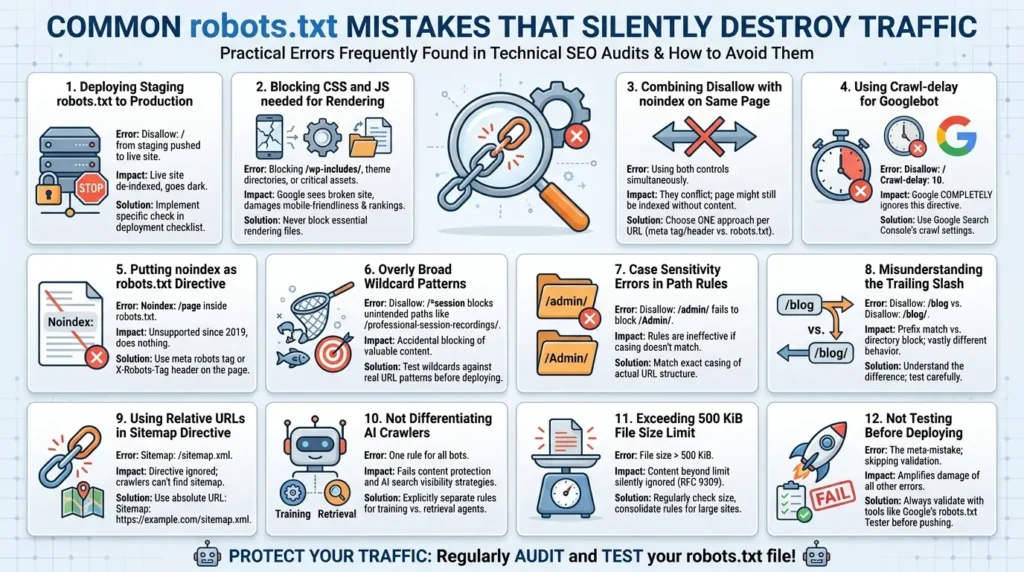
Deploying a staging robots.txt to production
The most catastrophic and surprisingly common failure mode. Staging environments typically have Disallow: / to prevent indexing. One copy-paste error during deployment and your live site goes dark. Always add a specific check for this in your deployment checklist.
Blocking CSS and JavaScript files needed for rendering
Google needs to render your pages to properly understand them. Block the CSS and JS files used for rendering and Google sees a broken version of your site, damaging mobile-friendliness assessments and potentially core rankings. Never block /wp-includes/, theme directories, or critical asset paths.
Combining robots.txt Disallow with noindex on the same page
Covered in full above. These two controls work against each other when applied to the same page. Pick one approach per URL.
Using Crawl-delay to manage Googlebot
Google completely ignores this directive. Use Google Search Console's crawl settings instead.
Putting noindex as a robots.txt directive
Google stopped supporting Noindex: inside robots.txt files in 2019. It does nothing. Use meta robots tags or X-Robots-Tag HTTP headers on the actual page.
Overly broad wildcard patterns
Disallow: /*session looks targeted, but it also blocks /professional-session-recordings/, /obsession/, and any other path containing the string "session." Always test wildcards against real URL patterns on your site before deploying.
Case sensitivity errors in path rules
URL paths in robots.txt are case-sensitive. A rule for /admin/ does nothing to block /Admin/ or /ADMIN/. Match the exact casing of your actual URL structure.
Misunderstanding the trailing slash
Disallow: /blog blocks /blog, /blog.html, and /blog/post-1 as prefix matches. Disallow: /blog/ only blocks the directory and its contents, not /blog itself. The presence or absence of that trailing slash changes behavior significantly.
Using relative URLs in the Sitemap directive
The Sitemap directive requires an absolute URL. Sitemap: /sitemap.xml is incorrect. It must be Sitemap: https://example.com/sitemap.xml.
Not differentiating AI crawlers
One rule for all bots is no longer acceptable strategy. You need to explicitly separate training crawlers from retrieval agents for both content protection and AI search visibility.
Exceeding the 500 KiB file size limit
Content beyond the 500 KiB mark is silently ignored by RFC 9309-compliant parsers. If you're managing a large enterprise site with many granular rules, regularly check file size and consolidate rules where possible.
Not testing before deploying
This is the meta-mistake. Every other mistake on this list becomes significantly more damaging if you don't have a validation step before pushing to production.
Break Glass in Case of Emergency
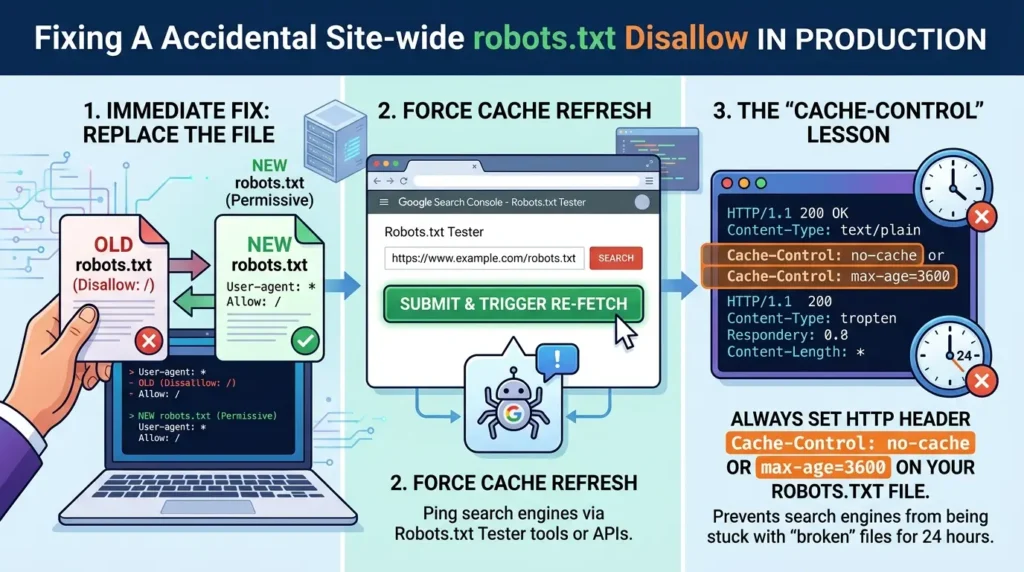
"If you have accidentally pushed Disallow: / to production, do not immediately delete the file or revert to a blank state if your CMS has specific requirements.
- Immediate fix: Replace the file with a permissive version (User-agent: *\nAllow: /).
- Force Cache Refresh: Ping the major search engines via their 'Robots.txt Tester' tools in Search Console (or their equivalent APIs) to trigger an immediate re-fetch.
- The 'Cache-Control' Lesson:Always set an HTTP header of Cache-Control: no-cache or max-age=3600 on your robots.txt file. This prevents search engines from being stuck with your 'broken' file for the full 24-hour window."
Before and After: What a Professional robots.txt Actually Looks Like
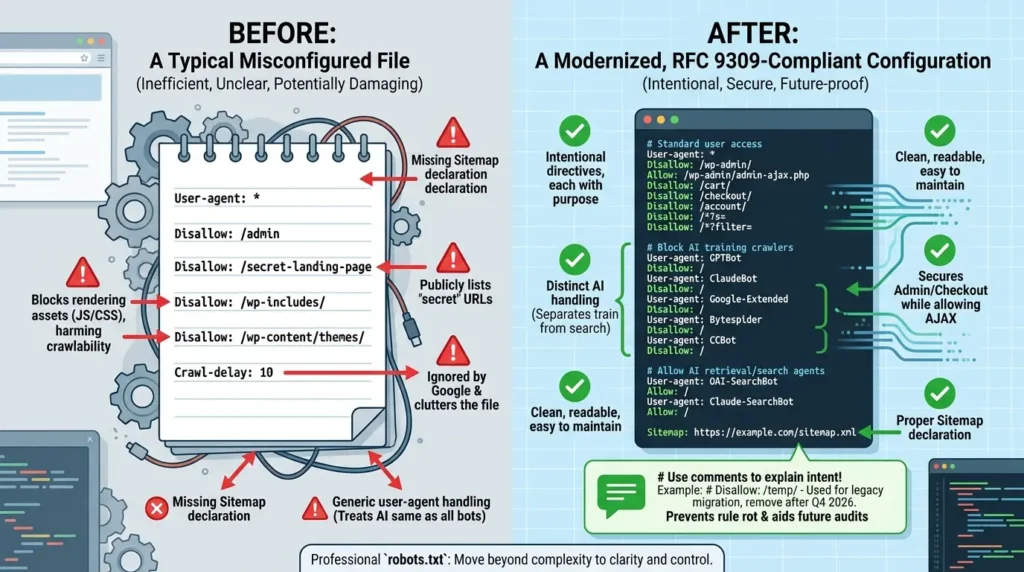
Before: a typical misconfigured file you'd find in the wild
User-agent: *

Disallow: /admin

Disallow: /secret-landing-page

Disallow: /wp-includes/

Disallow: /wp-content/themes/

Crawl-delay: 10
Problems packed into those six lines: rendering assets are blocked so Google can't render the site properly; the "secret" landing page is now publicly listed; Crawl-delay is ignored by Google and clutters the file; no sitemap is declared; and AI crawlers are handled identically to all other bots.
After: a modernized, RFC 9309-compliant configuration
Standard user access:
User-agent: *

Disallow: /wp-admin/

Allow: /wp-admin/admin-ajax.php

Disallow: /cart/

Disallow: /checkout/

Disallow: /account/

Disallow: /*?s=

Disallow: /*?filter=
Block AI training crawlers:
User-agent: GPTBot

Disallow: /

User-agent: ClaudeBot

Disallow: /

User-agent: Google-Extended

Disallow: /

User-agent: Bytespider

Disallow: /

User-agent: CCBot

Disallow: /
Allow AI retrieval/search agents:
User-agent: OAI-SearchBot

Allow: /

User-agent: Claude-SearchBot

Allow: /

Sitemap: https://example.com/sitemap.xml
The difference isn't complexity, it's intentionality. Every directive in the second version has a specific, understood purpose. Rendering assets are protected. Admin is blocked correctly. AI crawlers are split by function. Sitemap is declared properly.
Encourage the use of comments to explain the intent behind the blocks.
- Example: Instead of just Disallow: /temp/, use:
# Disallow: /temp/ - Used for legacy migration, remove after Q4 2026. - Reasoning: This allows future auditors to know why a rule exists, preventing the "it's been there for years, I'm scared to remove it" phenomenon that leads to bloated, inefficient files.
Testing robots.txt: The 5-Layer Validation Protocol
So you've built your robots.txt. Now how do you actually know it works the way you think it does?
This is the systematic approach used by professional technical SEO teams, and it's significantly more thorough than "check it in Search Console."
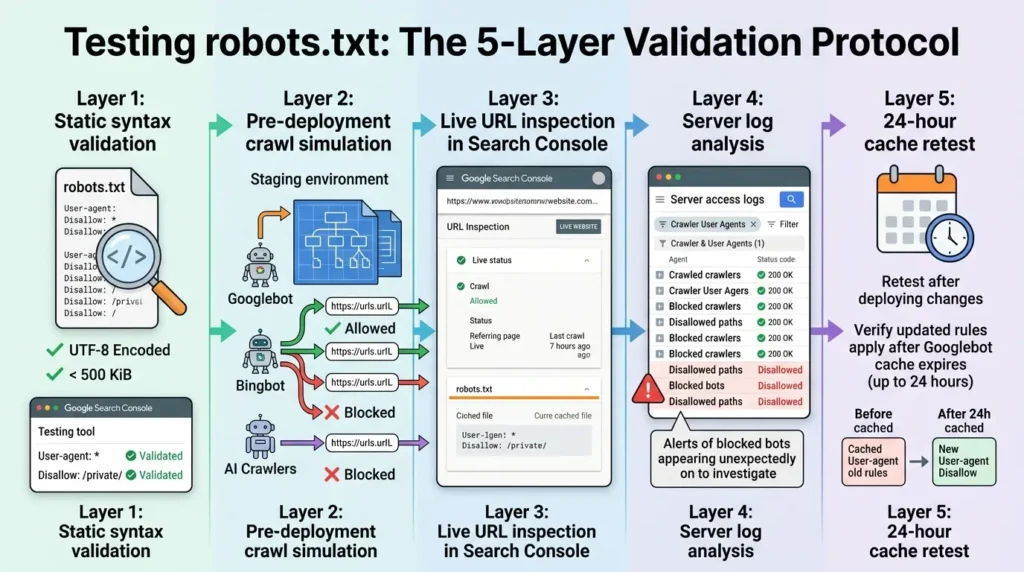
Layer 1: Static syntax validation
Before anything else, confirm the file is UTF-8 encoded and under 500 KiB. Use the robots.txt testing tool available through Google Search Console to catch syntax errors, invalid directives, and obvious misconfigurations against your actual URL structure.
Layer 2: Pre-deployment crawl simulation
In your staging environment, use a crawler configured with different user agent strings to simulate how Googlebot, Bingbot, and specific AI crawlers would navigate under the new rules. Catch unintended blocks before they go anywhere near production.
Layer 3: Live URL inspection in Search Console
After deploying to production, use Search Console's URL Inspection tool against specific URLs. It shows exactly which rule, if any, is blocking or allowing each path, and reflects Google's current cached version of your robots.txt file.
Layer 4: Server log analysis
Filter your server access logs by crawler user agents. Allowed bots should be successfully fetching pages with 200 status codes. Blocked scrapers should show no successful hits on Disallowed paths, or be rejected at CDN/WAF level. Any blocked bot appearing in logs for a Disallowed path is a compliance problem worth investigating.
Layer 5: 24-hour cache retest
Googlebot caches your robots.txt file for up to 24 hours (modifiable via max-age in HTTP response headers). After deploying changes, retest the following day to confirm updated rules are being applied rather than cached earlier rules. This is especially critical for emergency fixes.
For teams integrating robots.txt validation into CI/CD pipelines, Google's open-source C++ and Java parser engines match Googlebot's internal logic precisely. Running these parsers against key URLs as part of automated deployment checks catches misconfigurations before they ever touch production. For Python environments, the robotspy library provides full RFC 9309 compliance for validation testing.
Critical note: Treat robots.txt as code, not content. Never edit this file directly on the web server via FTP or a dashboard. Store it in your Git repository. Every change should have a pull request, a justification for the change, and a link to the corresponding JIRA ticket or audit requirement. This creates an audit trail that is critical for debugging when a traffic dip occurs three months down the line.
Your 2026 robots.txt Action Plan: Strategic Recommendations
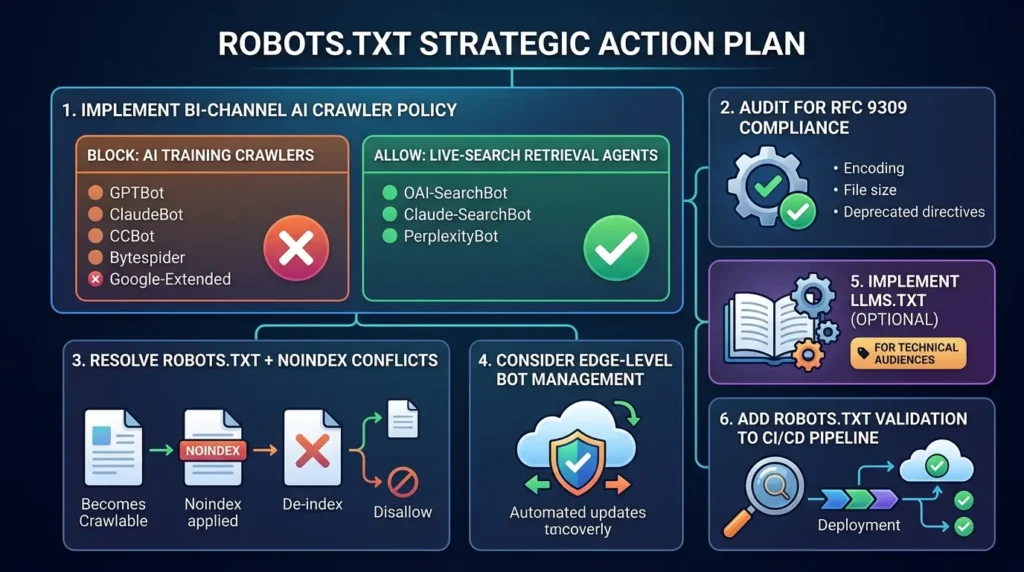
Here's the practical summary, concrete actions organized by priority.
Implement a bi-channel AI crawler policy
Stop treating all bots as a single category. Block training crawlers (GPTBot, ClaudeBot, CCBot, Bytespider, Google-Extended). Explicitly allow live-search retrieval agents (OAI-SearchBot, Claude-SearchBot, PerplexityBot). This single distinction is the most important change most sites haven't made yet.
Audit for RFC 9309 compliance
Check encoding, file size, deprecated directives (noindex, crawl-delay for Google), and any rules potentially blocking CSS or JS rendering assets. Fix Bingbot's non-standard block merging behavior if you have Bingbot-specific rules.
Resolve any robots.txt + noindex conflicts
If pages need removing from search results, make them crawlable first, apply noindex, confirm de-indexation, then Disallow if needed for crawl budget management.
Consider edge-level bot management
Cloudflare's managed bot blocking feature, now on by default for new domains, maintains a constantly updated list of AI crawler user agents so you don't have to hand-maintain every new token that emerges. If you're on Cloudflare, this is worth configuring once and letting the infrastructure layer handle ongoing maintenance.
Implement llms.txt only if you have a technical documentation audience
If developers use AI coding assistants to work with your APIs or platform, a well-structured llms.txt file at your domain root provides genuine value. Skip it if you're primarily a content or marketing site.
Add robots.txt validation to your CI/CD pipeline.
Use compliant parser libraries to automatically test your rules against critical site URLs before any production deployment. This one investment prevents the entire category of staging-file-deployed-to-production disasters.
Conclusion: The Smallest File With the Biggest Job
Robots.txt started as a polite note to early search engine bots asking them not to break servers. Thirty years later, it's evolved into something far more consequential, a de facto governance layer for how AI systems access the web, despite never being designed for that role.
The protocol is voluntary. Enforcement is inconsistent. Some crawlers ignore it strategically. And yet it remains the single most direct lever site operators have over automated access to their content.
In 2026, mastering robots.txt means understanding all three of its modern roles simultaneously: a crawl management tool, an AI data governance signal, and an intellectual property boundary marker. Handle it carelessly and you lose search visibility, bleed bandwidth to training crawlers, and potentially expose sensitive infrastructure. Handle it well and you protect your content, optimize how search engines and AI systems index and cite your work, and keep your site running efficiently.
The key insights to carry forward:
- Robots.txt controls crawling, not indexing, never combine it with noindex on the same page
- RFC 9309 is the official standard, legacy directives like noindex in robots.txt are dead
- Block training crawlers, allow retrieval agents, this is the fundamental AI-era distinction
- Equal-length rule conflicts go to Allow, not Disallow, test your assumptions
- 60% of quality publishers block AI crawlers, 9.1% of misinformation sites do, the gap has consequences
- llms.txt is for developer documentation audiences, not general SEO rankings
- Validate everything before deploying, the five-layer protocol exists for good reason
The file is small. The stakes are not. Make every line count.





[…] Read the Full Article → […]
[…] Read the Full Article → […]
[…] Read the Full Article → […]