
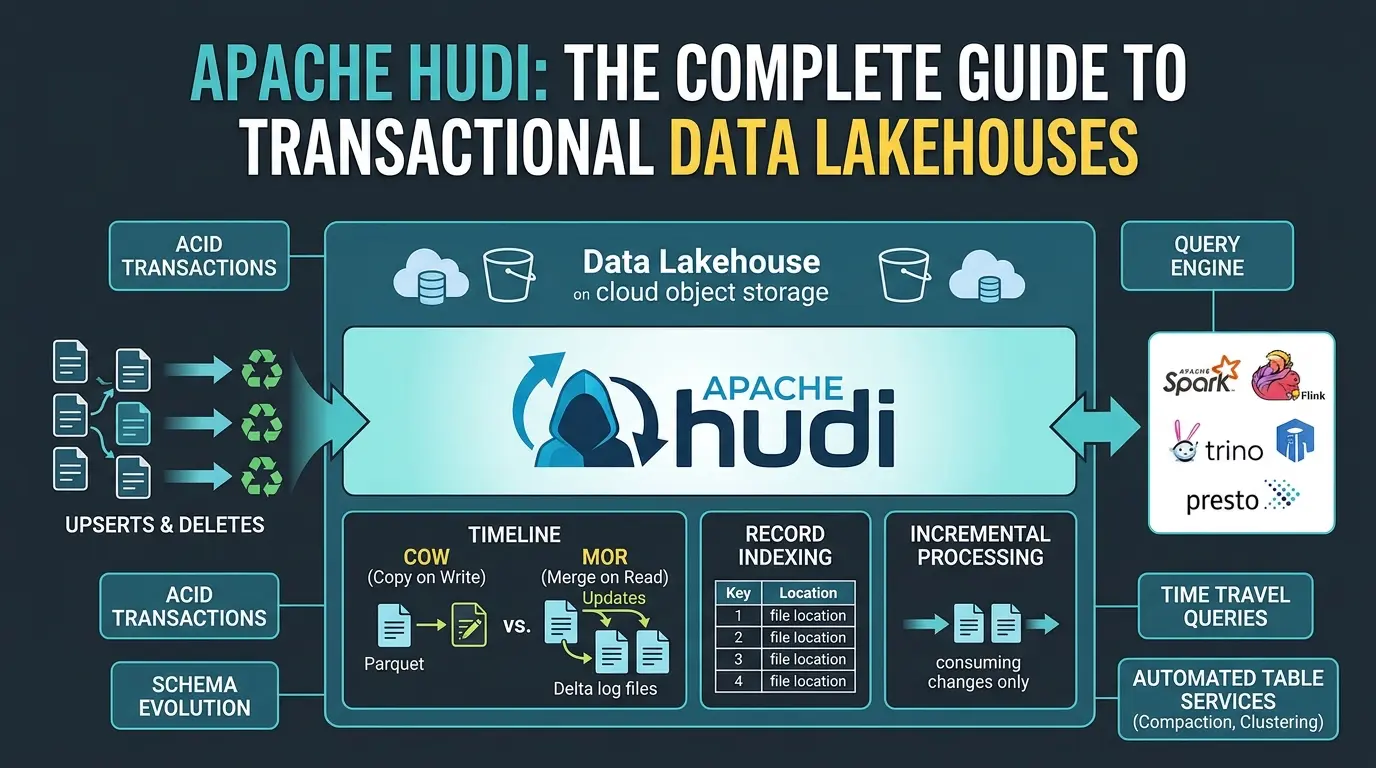

So here’s a thought experiment that should make every data engineer mildly uncomfortable.
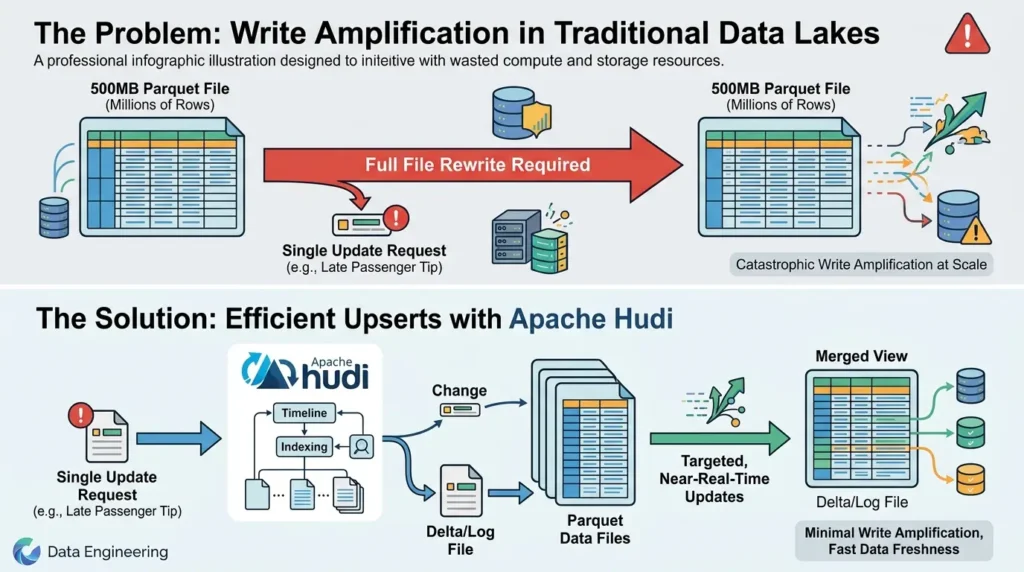
Imagine you’ve got a massive Parquet file sitting in Amazon S3. Five hundred megabytes. Millions of rows. And then one single record needs to change, say, a passenger tip that arrived six hours after the trip closed. One row. One field. One tiny update.
You know what you have to do? Rewrite the entire file.
Every byte. All 500 megabytes. Just to change one value.
That is, uh, not ideal. And it’s not just a minor inconvenience, at Uber’s scale, dealing with millions of driver and trip records updating continuously, this kind of write amplification was genuinely catastrophic. It burned compute, wasted storage, and made near-real-time data freshness basically impossible without an army of batch jobs.
That’s the exact problem Apache Hudi was built to solve. And honestly, the solution is a lot more elegant, and a lot more architecturally interesting, than most explainers give it credit for.
This guide goes deep. Not just “what is Hudi” but why it’s designed the way it is, how its core abstractions actually work, where it fits in modern data platforms, and crucially, when you should and shouldn’t use it. By the end, you’ll have a clear mental model that lets you make real architectural decisions, not just regurgitate feature lists.
Here’s what we’re covering:
H2: What Apache Hudi Is Really Optimizing For
Most articles introduce Hudi as “a table format.” And technically, yeah, that’s accurate. But it’s a little like describing a Formula 1 car as “a vehicle.” True, deeply undersells the point.
The more useful mental model is this: Hudi is a storage engine for change. It’s a system that treats your data lake not as a static archive of files, but as a live, mutable, transactionally consistent database that happens to sit on top of object storage.
According to the Apache Hudi official documentation, the project stands for Hadoop Upserts Deletes and Incrementals, and that acronym isn’t just cute naming. It tells you exactly what Hudi was designed to do well. Upserts. Deletes. Incremental consumption. These are the operations that traditional Parquet-on-S3 lakes handle badly, and they’re the operations that Hudi was purpose-built to handle well.
The origin story matters here. Back in 2016, engineers at Uber were drowning in a specific kind of pain. They had petabytes of trip and driver data. They had high-velocity streams of updates, tips, corrections, late-arriving events. And their existing Hadoop-based pipeline required full partition rewrites every time anything changed. As detailed in the original Uber Engineering post introducing Hoodie, the team needed a way to handle record-level mutations without rewriting the world.
The solution wasn’t to rebuild the entire stack. It was to add a transactional layer on top of existing open file formats, Parquet, ORC, Avro, and manage all the complexity of change tracking in a metadata system that lives alongside the data.
That’s Hudi’s core design insight. Don’t fight the immutability of object storage. Work with it, by managing versions of data and tracking which version is current.
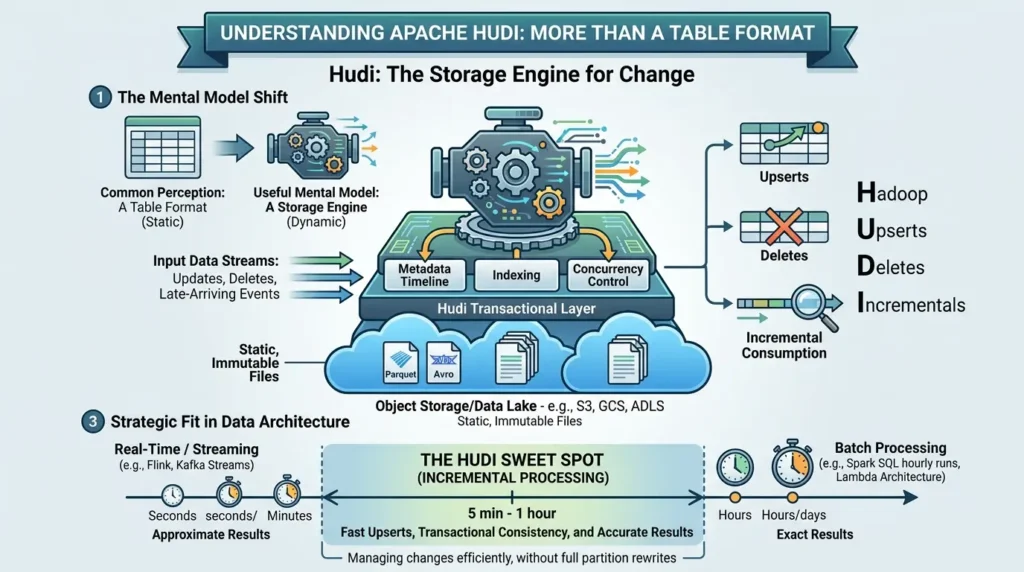
One more important framing point before we get into the mechanics. Hudi isn’t trying to replace stream processors like Apache Flink or batch engines like Spark. It’s filling a gap in between. The original engineer’s framing was brilliant: instead of choosing between streaming (sub-minute latency, approximate results) and batch (hourly runs, exact results, Lambda architecture pain), Hudi targets a sweet spot of 5-minute to 1-hour micro-batches, incremental writes that are fast enough to be useful and complete enough to be accurate.
Not every real-time problem needs a stream processor. Some need incremental storage. That distinction matters a lot when you’re choosing your architecture.
The Catastrophic Cost of Updating One Record
Let’s unpack that single-record update problem more concretely, because it explains every design decision Hudi makes downstream.
Traditional columnar formats like Apache Parquet and Apache ORC are phenomenal for analytical reads. They’re column-oriented, which means if your query only touches three columns out of fifty, the engine literally doesn’t read the other 47. Fantastic scan performance. But this design optimizes entirely for reads, and it makes writes, especially random updates, brutally expensive.
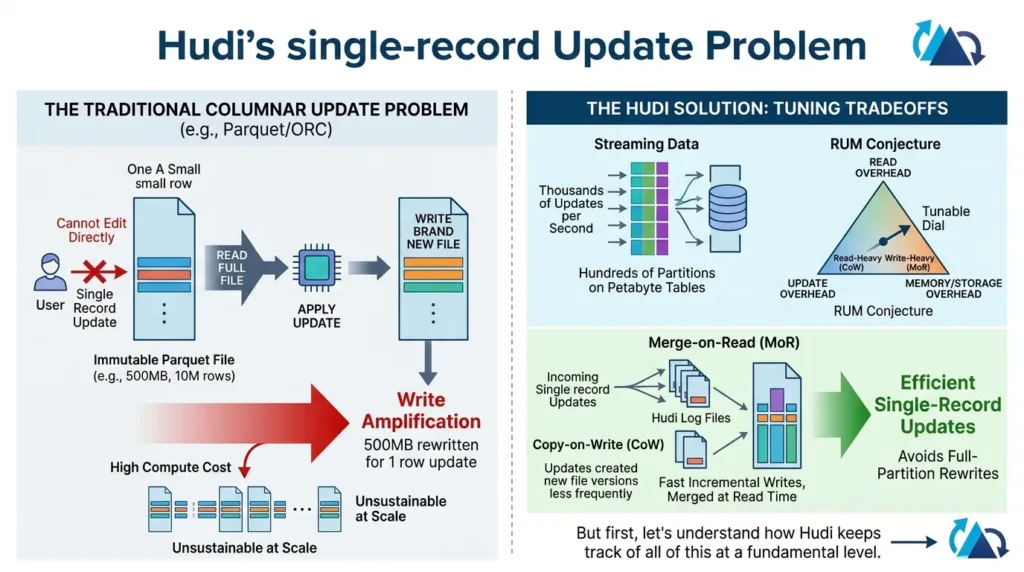
Here’s why. A Parquet file is immutable by design. You can’t just open it and change byte 47,293. You have to read the entire file into memory, apply your change, and write a brand new file back to storage. For a 500MB file with 10 million rows, updating one row means rewriting all 10 million. That’s write amplification in its worst form.
Now scale that to Uber’s reality: thousands of updates per second, across hundreds of partitions, on tables measured in petabytes. The compute cost of full-partition rewrites becomes unsustainable within weeks.
Database theorists have a framework for thinking about this tradeoff called the RUM Conjecture, which essentially states that any storage system must make tradeoffs between Read overhead, Update overhead, and Memory/storage overhead. You can optimize for two, but the third always suffers. Hudi’s genius is that it gives you a dial to tune this tradeoff explicitly, depending on whether your workload is read-heavy or write-heavy. We’ll see exactly how that dial works when we get to Copy-on-Write vs Merge-on-Read.
But first, let’s understand how Hudi keeps track of all of this at a fundamental level.
The Timeline: Hudi’s Brain and Source of Truth
Every architectural decision in Hudi flows from one central concept: the Timeline.
Think of the Timeline as Hudi’s commit log. It’s an ordered, append-only record of every operation ever performed on a table, every write, every compaction, every cleanup, every schema change. It lives in a hidden .hoodie directory alongside your data files on storage.
Here’s the key thing: in Hudi, a write isn’t “done” when the data files hit S3. It’s done when the commit is recorded on the Timeline. And reads only see data from commits that are fully completed on the Timeline. This is how Hudi achieves snapshot isolation, readers and writers are always looking at consistent versions of the table, never a partially written mess.
Each entry on the Timeline is called an Instant, and every Instant passes through three states. REQUESTED means the operation has been planned. INFLIGHT means it’s currently executing. COMPLETED means it’s done and visible. If something crashes mid-write? The incomplete INFLIGHT entry sits there, and Hudi can either resume or roll it back safely on the next run.
The Timeline also solves a subtle distributed systems problem: ordering. When you’ve got multiple writers across a distributed cluster, how do you know which write happened “first”? Hudi uses TrueTime semantics, a concept first introduced in Google’s Spanner paper, to generate monotonically increasing timestamps with bounded clock uncertainty.
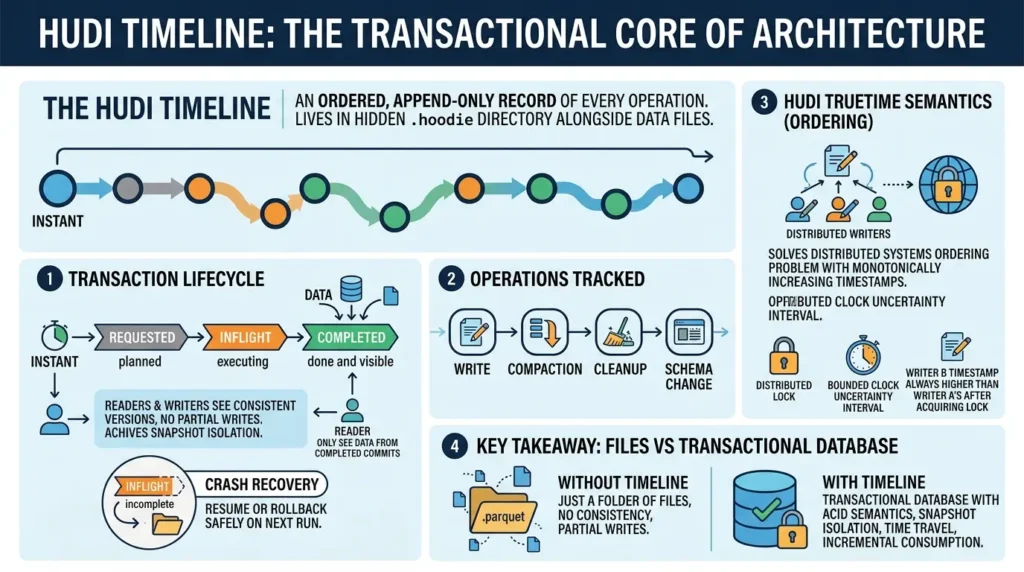
Writers must hold a distributed lock while generating their timestamp, and they must wait out the uncertainty interval before releasing it. This guarantees that if writer B grabs the lock after writer A releases it, writer B will always get a higher timestamp, no exceptions. Clean global ordering on eventually consistent storage. Pretty elegant.
Key takeaway: The Timeline is what turns a folder of Parquet files into a transactional database. Without it, you just have files. With it, you have ACID semantics, snapshot isolation, time travel, and incremental consumption.
File Groups and File Slices — The Unit of Mutable State
OK so now we know Hudi tracks changes on the Timeline. But where does the actual data live, and how does Hudi manage multiple versions without duplicating your entire dataset?
This is where the File Group mental model comes in, and honestly, this is the concept that makes everything else click.
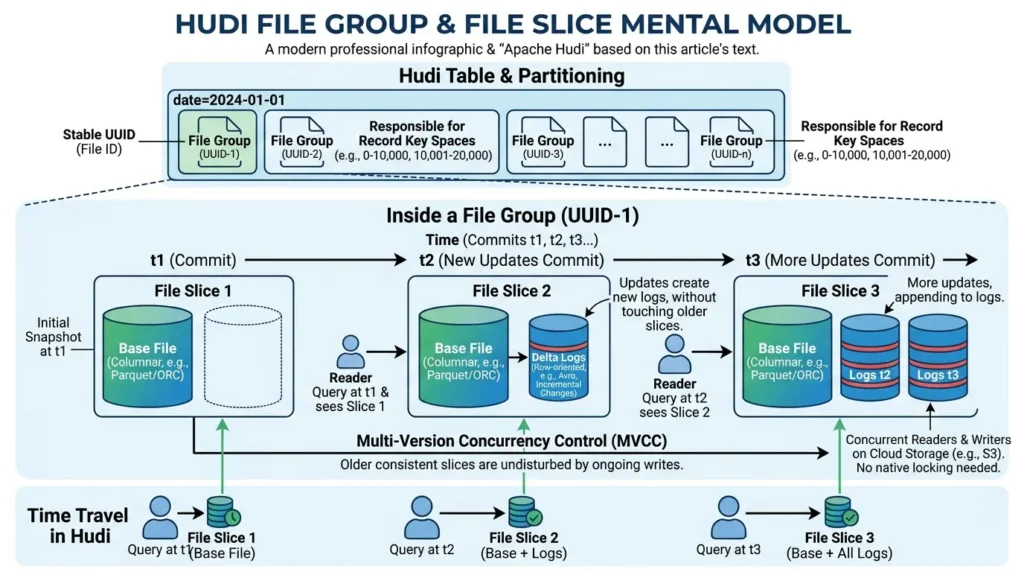
A File Group is a collection of all the data files associated with a specific set of records, identified by a stable UUID called the File ID. Within a partition of your Hudi table, you might have dozens of File Groups, each one responsible for a slice of your record key space.
Within a File Group, you have File Slices. A File Slice is a snapshot of that File Group at a specific point in time. Each File Slice consists of a Base File (your familiar Parquet or ORC columnar file) and optionally one or more Delta Log Files (row-oriented Avro files containing incremental changes).
Here’s the beautiful part: Hudi uses Multi-Version Concurrency Control (MVCC) to manage these slices. When new updates arrive, Hudi either creates a new File Slice or appends to the existing log files, without touching older slices. Readers querying an older commit can still access the older consistent slice, completely undisturbed by ongoing writes. That’s how Hudi supports concurrent readers and writers on S3, which has no native locking primitives.
So when someone asks “how does Hudi handle time travel?”, this is the answer. It’s not magic. You just read an older File Slice. The data is still there. The Timeline tells you which slice corresponds to which point in time.
Copy-on-Write vs Merge-on-Read: A Freshness vs. Simplicity Decision
This is the big one. The design choice that most affects your pipeline’s behavior, your operational complexity, and your query performance.
Most articles present Copy-on-Write (COW) and Merge-on-Read (MOR) as two table types with different features. That’s accurate but not very useful. The better frame is: these are two different answers to two specific questions.
- Question one: How frequently is your data being updated?
- Question two: How fresh must your reads be, and how much merge complexity can you afford at read time?
Your answers determine which model fits.
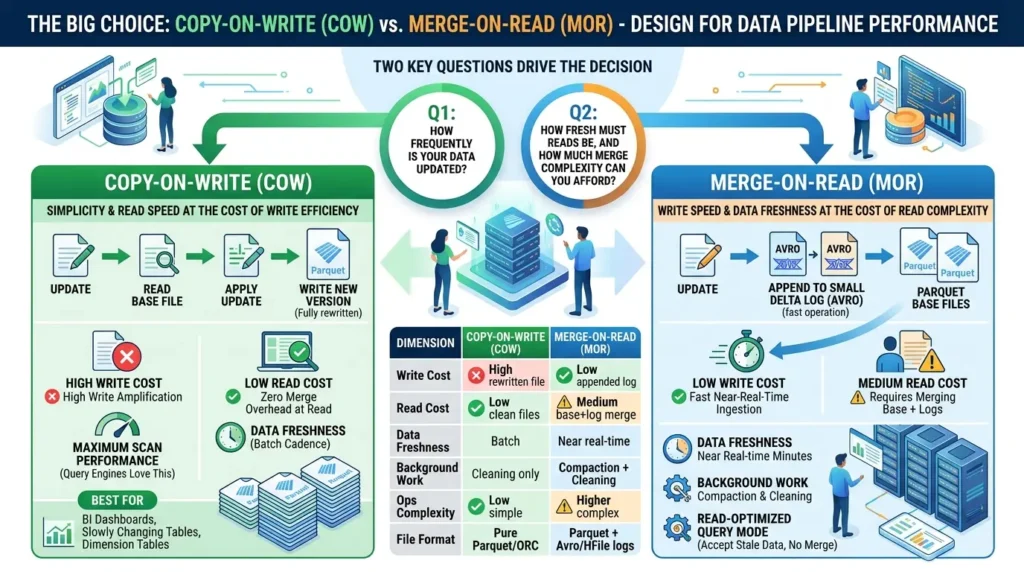
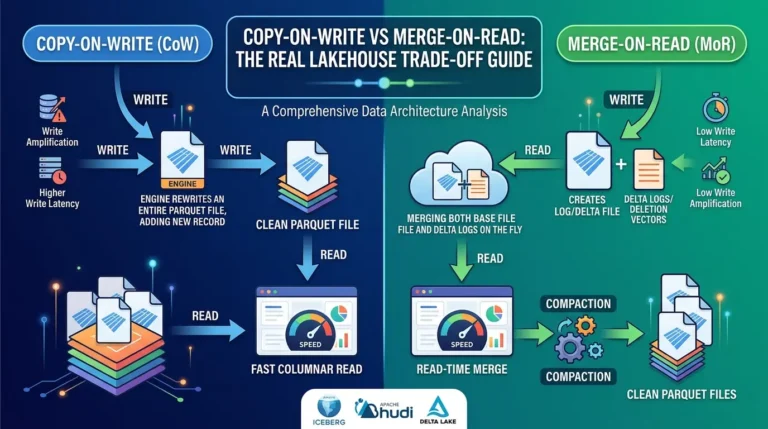
COW tables take the simple approach. When a record is updated, Hudi reads the entire base file containing that record, applies the update, and writes a brand new version of the file. Every file on disk is always a clean, fully merged Parquet file. Query engines love this, zero merge overhead at read time, maximum scan performance.
The catch? High write amplification. Every update rewrites an entire file, even if only one row changed. For slowly changing tables, reference data, dimension tables, BI-facing datasets that update a few times a day, this is totally fine. The write cost is manageable, and the read performance is excellent.
MOR tables flip the equation. When a record is updated, Hudi doesn’t rewrite the base file. Instead, it appends the update to a small Delta Log file in Avro format, a very fast operation. This is great for write-heavy workloads, streaming CDC pipelines, or any scenario where you need near-real-time ingestion.
The tradeoff: reads now require a merge. When a query engine reads an MOR table, it has to combine the base file and all the delta logs to reconstruct the latest state of each record. Over time, as delta logs accumulate, this merge cost grows. That’s why Hudi runs background compaction jobs to periodically merge the logs back into clean base files.
MOR also offers a “Read-Optimized” query mode where you read only the base file, no merge, but you accept that you might be seeing slightly stale data. This is useful for analytical queries that don’t need the absolute latest state.
| Dimension | Copy-on-Write (COW) | Merge-on-Read (MOR) |
|---|---|---|
| Write Cost | ❌ High — rewrites entire base file | ✅ Low — appends to delta log |
| Read Cost | ✅ Low — clean columnar files | ⚠️ Medium — requires base + log merge |
| Data Freshness | Batch refresh cadence | Near real-time (minutes) |
| Background Work | Cleaning only | Compaction + Cleaning |
| Operational Complexity | ✅ Low — simpler to operate | ⚠️ Higher — manage compaction scheduling |
| Best For | BI dashboards, dim tables, slow SCD | Kafka CDC, streaming ingest, event corrections |
| File Format on Disk | Pure Parquet / ORC | Parquet base + Avro/HFile delta logs |
There’s also a practical nuance around file sizing worth calling out. In COW, you generally want files that aren’t too large, because you’re rewriting them on every update. In MOR, the base files can be larger because you’re not touching them on every write, you’re only appending to small delta logs. The compaction service eventually merges them back down to the right size.
Key takeaway: COW is simplicity and read speed at the cost of write efficiency. MOR is write speed and data freshness at the cost of read complexity and background maintenance overhead. Neither is universally better, it depends on your workload shape.
The Indexing Subsystem — Why Record Location Is Everything
Here’s something that most Hudi explainers glosses over: the indexing system is not an optional performance enhancement. It’s central to how Hudi makes writes tractable at scale.
Think about what happens when an update record arrives in your pipeline. You’ve got a record key and a new value. To apply the update correctly, Hudi needs to know: which File Group does this record key live in? Without that knowledge, Hudi would have to scan the entire table for every write, O(N) complexity relative to table size. For a petabyte-scale table, that’s completely infeasible.
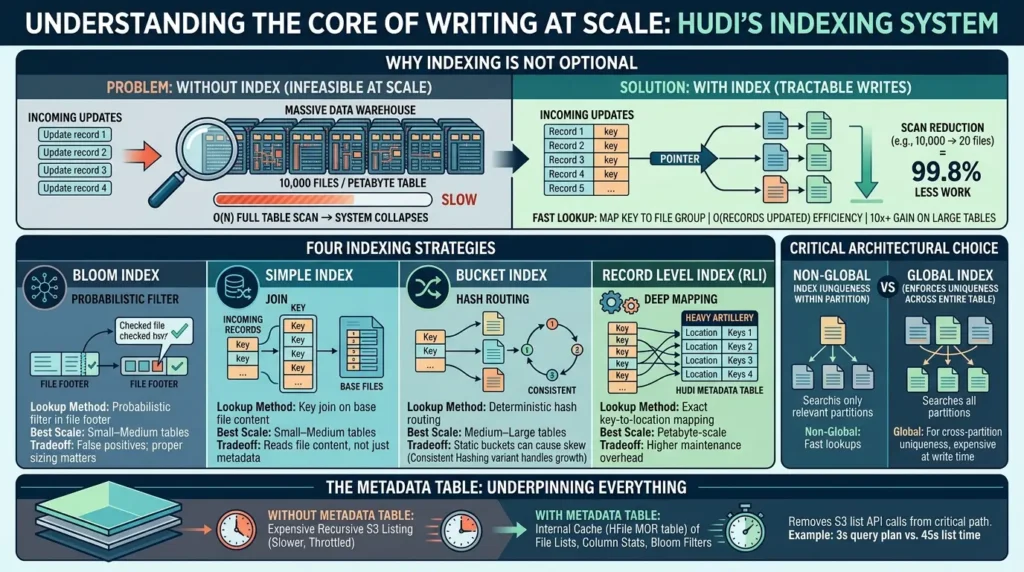
Hudi’s indexing subsystem maps record keys to File Group locations. This is what allows writes to be O(records updated) relative to the affected partitions, rather than O(table size). The efficiency gain can be 10x or more on large tables.
The simplest way to quantify this: if your table has 10,000 files and your index can narrow an update to 20 candidate files, you’ve reduced your scan work by 99.8%. That’s not a marginal improvement, that’s the difference between a viable system and one that collapses under production load.
Hudi offers several indexing strategies, each with different tradeoffs:
Bloom Index stores probabilistic Bloom filters in the footers of base Parquet files. When a writer arrives, Hudi checks the Bloom filter first. If the filter says “definitely not in this file,” Hudi skips it entirely. Fast, but probabilistic, false positives mean Hudi occasionally reads files that don’t actually contain the target key. Needs proper sizing to stay useful.
Simple Index is the default for Spark. It does a lightweight join between incoming record keys and keys extracted from existing base files. Straightforward and reliable, though it reads file content rather than just metadata.
Bucket Index uses consistent hashing to assign record keys to specific File Groups. This is deterministic and fast, you know exactly which File Group owns a given key without any scanning. The Consistent Hashing variant even supports dynamic resizing as data grows, avoiding the skew problems of fixed bucketing.
Record Level Index (RLI) is the heavy artillery. It stores a complete mapping of every record key to its exact file location in a dedicated partition of the Hudi Metadata Table. At petabyte scale, this provides lookup speeds that leave Bloom and Simple indexes in the dust. The cost is the overhead of maintaining this mapping as data changes.
| Index Type | Lookup Method | Best Scale | Tradeoff |
|---|---|---|---|
| Bloom Index | Probabilistic filter in file footer | Small–Medium tables | False positives; sizing matters |
| Simple Index | Key join on base file content | Small–Medium tables | Reads file content, not just metadata |
| Bucket Index | Deterministic hash routing | Medium–Large tables | Static buckets can cause skew |
| Record Level Index | Exact key-to-location mapping | Petabyte-scale | Higher maintenance overhead |
There’s also a critical architectural choice between global and non-global indexes. A non-global index enforces key uniqueness only within a partition, lookup is fast because you only search partitions relevant to the incoming records. A global index enforces uniqueness across the entire table, which is necessary if the same record key can exist in multiple partitions (say, a customer moving from one region to another). Global indexes are more powerful but significantly more expensive at write time. Use them only when your use case genuinely requires cross-partition uniqueness.
The Metadata Table underpins all of this. Instead of making expensive recursive file listing calls against S3, which cloud providers throttle aggressively at scale, Hudi maintains an internal Metadata Table (itself a MOR table using HFile format) that caches file lists, column statistics, and Bloom filters. This removes S3 list API calls from the critical path entirely, which on tables with millions of files can mean the difference between a 3-second query plan and a 45-second one.
Now let’s look at a quick way to estimate how much your index is actually saving you.
Key takeaway: Hudi’s indexing is what makes record-level writes tractable on a data lake. The right index strategy can reduce write-side scan work by 99%+. Choosing the wrong one, or ignoring it entirely, is one of the most common performance mistakes in Hudi deployments.
Incremental Processing: The Pipeline Design Changer
Here’s the underrated argument for Hudi that most articles bury: incremental processing doesn’t just improve write performance. It changes how you design entire pipeline architectures.
Let me explain what I mean. In a traditional batch pipeline, every downstream job has to ask: “What is the current state of the upstream table?” And the answer usually involves either reading the whole table or relying on partition filters that only work cleanly if your data arrives on time and partitioned correctly. Late-arriving data? Corrections? Events that span multiple partitions? These scenarios force expensive full re-scans or partial rewrites of large partition sets.
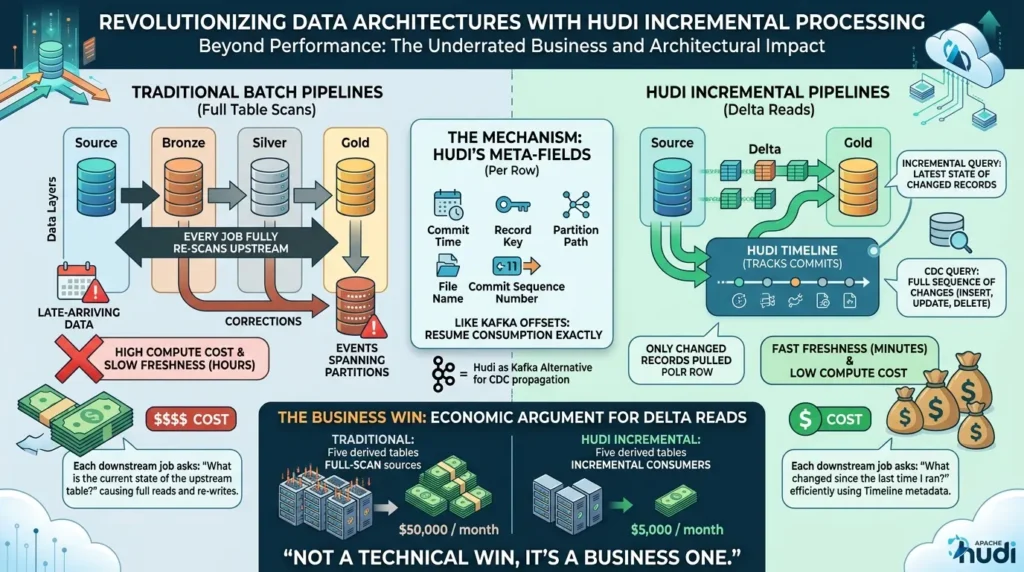
With Hudi’s incremental query model, every downstream job can instead ask: “What changed since the last time I ran?” And Hudi can answer that question efficiently, without scanning the whole table, because the Timeline tracks exactly which records were modified in every commit.
There are two flavors of incremental consumption in Hudi. Incremental Queries return the latest state of every record that changed in a given time window. If a record was updated five times in the window, you get the final state. CDC Queries go further,they return the full sequence of changes, including before and after images for each operation, tagged with operation type (INSERT, UPDATE, DELETE). Both are powered by the same Timeline metadata.
This matters enormously when you’re building a multi-layered data platform. Think about the Medallion Architecture, Bronze, Silver, Gold layers. In a naive implementation, each layer fully re-scans the layer above it on every run. For a large platform, Bronze-to-Silver alone might process hundreds of gigabytes per run, even if only 0.1% of records actually changed.
With Hudi incremental pipelines, Bronze writes new records. Silver pulls only the changed records from Bronze using an incremental query. Gold aggregates only the deltas pushed from Silver. The result: end-to-end data freshness measured in minutes, not hours, with a fraction of the compute cost.
To support this at the record level, Hudi embeds five meta-fields in every row: commit time, sequence number within the commit, record key, partition path, and file name. The commit sequence number is particularly useful, it lets stream consumers resume from an exact position in the changelog, similar to Kafka offsets. This makes Hudi-based CDC a surprisingly viable alternative to maintaining a full Kafka cluster for change propagation, at significantly lower infrastructure cost.
The real economic argument for incremental processing is in the downstream chain. When you have five derived tables all re-scanning their sources every hour, you’re paying for five full scans. When all five are incremental consumers, you’re paying for five tiny delta reads. At scale, this is the difference between a $50K/month compute bill and a $5K/month one. That’s not a technical win,it’s a business one.
Concurrency Control: From Locks to Non-Blocking
Multi-writer scenarios on a data lake are genuinely hard, and it’s an area where Hudi has made some of the most interesting engineering decisions.
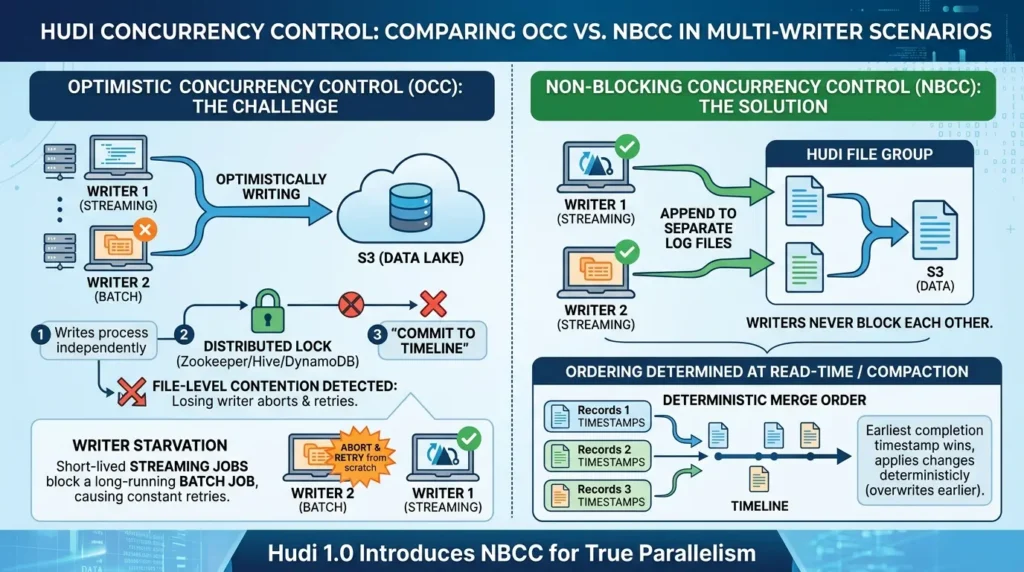
By default, Hudi supports Optimistic Concurrency Control (OCC) for multi-writer scenarios. Under OCC, each writer optimistically proceeds with its write, reading data files, processing updates, writing new files to S3, without holding any lock. Only at the very end, right before committing to the Timeline, does a writer acquire a distributed lock (backed by Zookeeper, Hive Metastore, or DynamoDB) and check: did anyone else modify the same File Groups I just touched? If yes, the losing writer aborts and retries from scratch. If not, it commits successfully.
This works well for moderate concurrency. But it has a real problem called writer starvation. Imagine a long-running batch job that takes 45 minutes to process and then tries to commit, only to find that a series of 5-minute streaming jobs have been modifying the same File Groups throughout that window. The batch job has to retry. And probably retry again. This is expensive and frustrating.
Hudi 1.0 introduces Non-Blocking Concurrency Control (NBCC), which is architecturally quite different. Under NBCC, multiple writers can append to separate log files within the same File Group simultaneously, there’s no file-level contention, so writers never block each other.
The ordering question (which write “wins” when two writers touch the same record?) is deferred to read time or compaction time, where Hudi uses the write completion timestamps from the Timeline to determine a deterministic merge order. The writer that completed first, per the Timeline, has its changes applied last (overwrites the earlier one) in a deterministic way.
| Mode | Lock Required | Conflict Resolution | Best For |
|---|---|---|---|
| Single Writer | Local only | N/A | Dedicated ETL pipelines |
| OCC | Distributed (at commit) | First-committer wins; loser aborts | Moderate write concurrency |
| NBCC (Hudi 1.0) | TrueTime gen only | Deterministic merge by completion time | High-frequency streaming, CDC pipelines |
Key takeaway: If you’re running a single writer with background table services, you don’t need a distributed lock at all, Hudi handles it locally. If you’re running multiple concurrent writers at high frequency, NBCC in Hudi 1.0 eliminates the retry storms that OCC can cause in heavy streaming scenarios.
Background Services Are Architecture, Not Maintenance
Here’s a perspective shift that changes how you should think about Hudi in production: Compaction, Clustering, and Cleaning are not maintenance tasks. They are first-class architectural components that determine whether your system stays healthy at scale.
Compaction is the heartbeat of MOR tables. It merges row-based delta log files back into columnar base files, restoring fast read performance that degrades as logs accumulate. You can run it synchronously (after every write, which basically turns MOR into COW), asynchronously (in a background Spark job, the normal production mode), or incrementally (only compacting the portions of the table that received new writes). Getting the compaction schedule right is one of the most important operational decisions in a Hudi deployment, because too infrequent means degrading read performance, and too frequent means unnecessary compute cost.
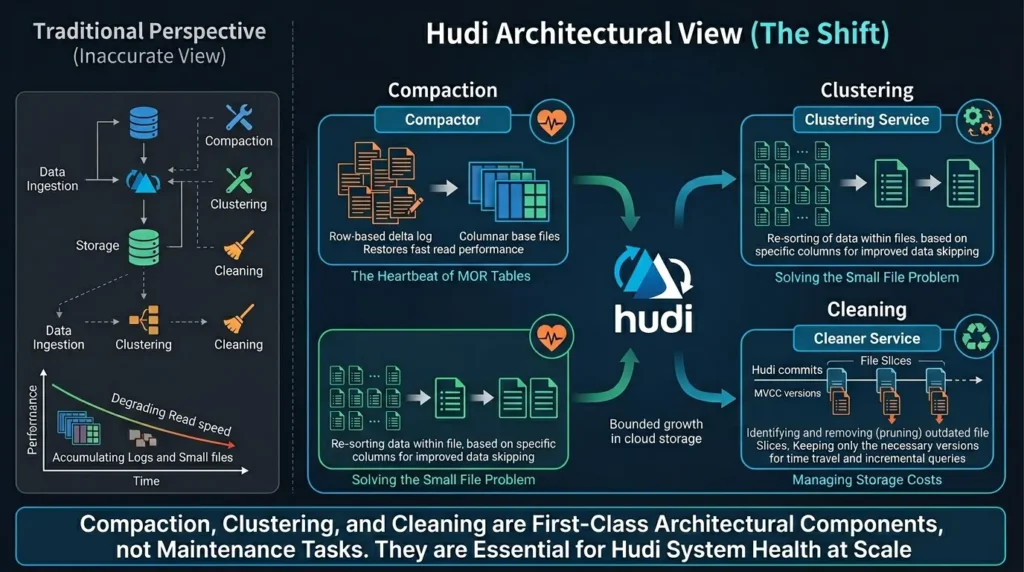
Clustering is Hudi’s answer to the small file problem. When you’re writing every 5 minutes in MOR mode, you inevitably accumulate many small files. Small files are bad for two reasons: they hurt analytical scan performance (more file open/close overhead), and they increase the metadata overhead in the Metadata Table. Clustering merges small files into properly sized ones, and can also re-sort data within files based on specific columns, which dramatically improves data skipping on those columns during query execution.
Cleaning removes outdated File Slices from storage. Remember, MVCC keeps old slices around so readers can access consistent historical versions. But you don’t want to keep them forever, storage isn’t free. The Cleaner service determines the minimum number of commits to retain (for time travel and incremental query support) and deletes everything older than that. This is how Hudi keeps cloud storage costs from growing unboundedly.
The Archiver works alongside the Cleaner to manage Timeline metadata. As the Timeline grows, old instant metadata is compacted into an LSM-tree-structured archive, so the active .hoodie directory stays small and fast to read, important because every write operation consults the Timeline.
The bottom line: if you’re not actively monitoring and scheduling these background services, your Hudi deployment will degrade over time. Read performance will suffer, storage costs will grow, and write latency will creep up. Build these services into your architecture from day one.
Common Mistakes Engineers Make with Apache Hudi
Let’s talk about the errors that show up repeatedly in real Hudi deployments. These are the things that don’t bite you in development but hurt badly in production.
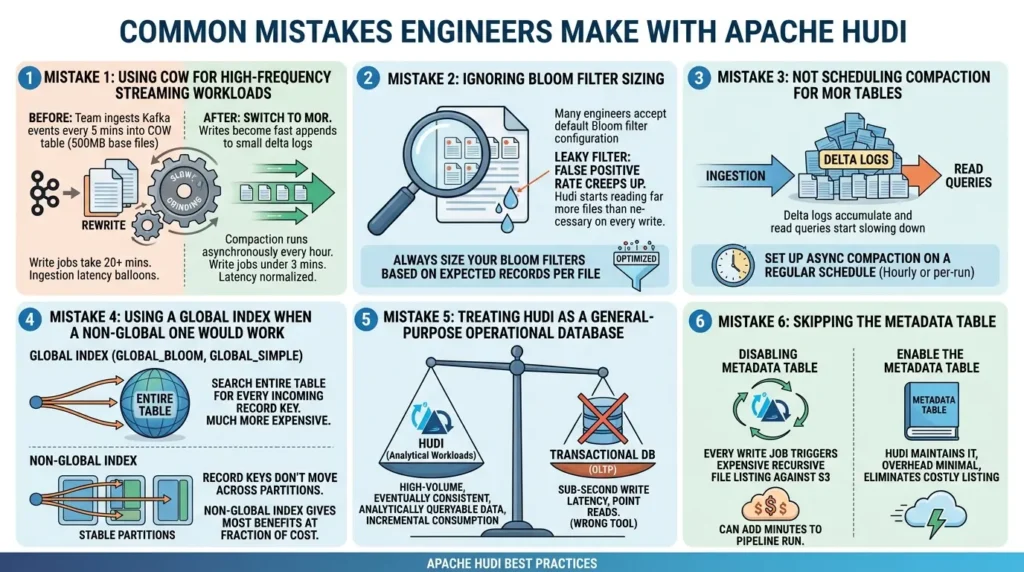
Mistake 1: Using COW for high-frequency streaming workloads.
Before: Team ingests Kafka events every 5 minutes into a COW table with 500MB base files. Write jobs take 20+ minutes because every run rewrites dozens of large files. Ingestion latency balloons.
After: Switch to MOR. Writes become fast appends to small delta logs. Compaction runs asynchronously every hour. Write jobs complete in under 3 minutes. Latency normalized.
Mistake 2: Ignoring Bloom filter sizing.
Many engineers accept the default Bloom filter configuration. On large tables with many records per file, the false positive rate creeps up, and Hudi starts reading far more files than necessary on every write. Always size your Bloom filters based on the expected number of records per file.
Mistake 3: Not scheduling compaction for MOR tables.
This is the most common production issue. Engineers set up MOR ingestion, everything looks great in dev, and then three weeks into production the read queries start slowing down. Because delta logs have been accumulating and nobody scheduled compaction. Set up async compaction on a regular schedule, hourly or per-run, depending on write frequency.
Mistake 4: Using a global index when a non-global one would work.
Global indexes (GLOBAL_BLOOM, GLOBAL_SIMPLE) are much more expensive at write time because they have to search the entire table for every incoming record key. If your data partitioning is stable and record keys don’t move across partitions, a non-global index gives you most of the benefits at a fraction of the cost.
Mistake 5: Treating Hudi as a general-purpose operational database.
Hudi is optimized for large-scale analytical workloads with batch or micro-batch write patterns. It’s not a transactional database for OLTP workloads. If you need sub-second write latency with point reads, you’re looking at the wrong tool. Use Hudi for what it’s built for: high-volume, eventually consistent, analytically queryable data with efficient incremental consumption.
Mistake 6: Skipping the Metadata Table.
On large tables with many partitions, disabling or ignoring the Metadata Table means every write job triggers expensive recursive file listing against S3. At scale, this alone can add minutes to every pipeline run. Enable the Metadata Table and let Hudi maintain it, the overhead is minimal compared to the listing cost it eliminates.
Apache Hudi vs Apache Iceberg: A Workload-Centric Comparison
The honest answer to “Hudi vs Iceberg” is: it depends on your workload shape, not on a feature checklist.
Both are excellent table formats. Both support ACID transactions, schema evolution, time travel, and multi-engine compatibility. The differences emerge at the edges of their respective design priorities.
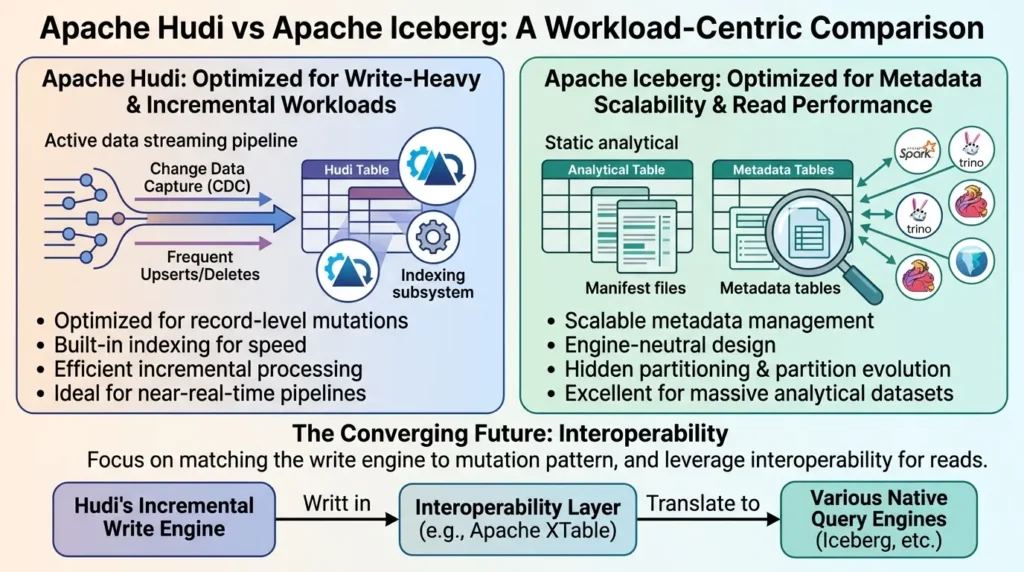
Hudi is optimized for write-heavy workloads with frequent record-level mutations. Its indexing subsystem, MOR table type, and CDC support are all purpose-built for pipelines where data changes a lot and downstream consumers need to know about those changes efficiently. If you’re running a high-velocity event correction pipeline, a CDC propagation chain, or a near-real-time dimension table, Hudi’s incremental architecture is a natural fit.
Iceberg is optimized for metadata scalability and engine neutrality. Its hidden partitioning, partition evolution, and catalog-centric design make it excellent for very large analytical tables that are written infrequently but queried by many different engines. If you’re running a data mesh with many engines querying shared tables, Iceberg’s catalog abstraction is cleaner.
The emerging consensus, supported by projects like Apache XTable (formerly OneTable), is that these formats are converging on interoperability, you can write with Hudi’s incremental engine and read with Iceberg-native tools. This suggests the future isn’t “pick one forever” but rather “pick the right write engine for your mutation pattern, and translate for your read engines.”
Real-World Impact: Lessons from Uber at Petabyte Scale
The most instructive case study for Hudi is, unsurprisingly, the one it was born from.
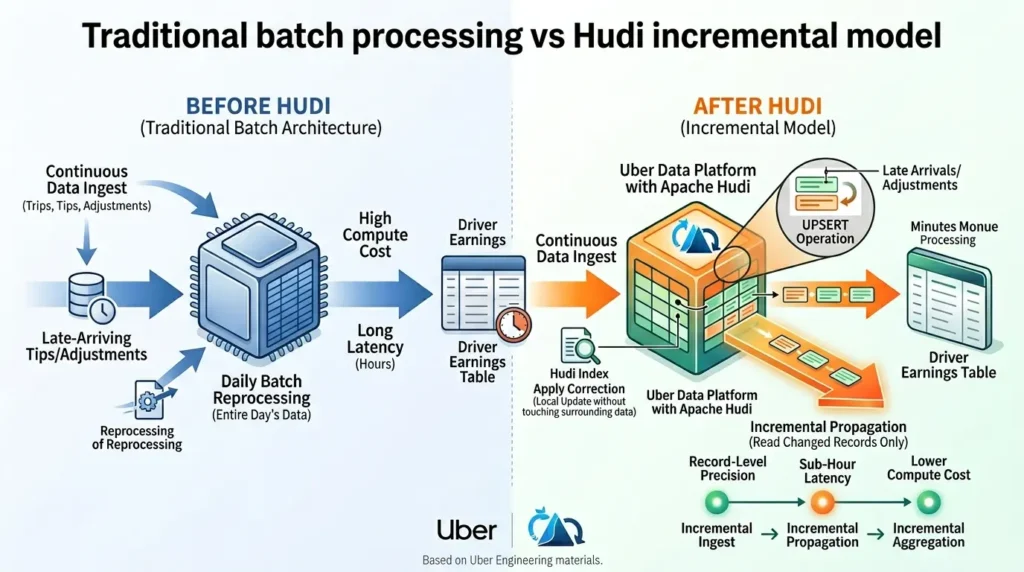
Uber’s data platform manages trillions of records across thousands of tables, with a particular challenge in driver earnings computation. Trip data arrives continuously, but tip amounts and fare adjustments can arrive hours or even days after a trip closes. In a traditional batch architecture, these late arrivals require reprocessing entire days of data, expensive both in compute and in data freshness terms.
With Hudi’s incremental model, Uber’s earnings pipeline operates differently. The raw trip table accepts late-arriving updates via UPSERT operations, Hudi’s index locates the existing record and applies the correction without touching surrounding data. A downstream incremental pipeline then reads only the changed trip records, updates the driver earnings table with record-level precision, and completes in minutes rather than hours.
The result: driver earnings data that reflects corrections with sub-hour latency, a pipeline that costs a fraction of the previous batch approach, and a system that doesn’t require complex Lambda architecture maintenance. This pattern, incremental ingest, incremental propagation, incremental aggregation, is the template for modern high-scale data platforms.
As documented in Uber Engineering materials, similar patterns have been applied across Uber’s broader data infrastructure to reduce long pipeline runtimes, cut compute costs significantly, and support incremental workflows for complex downstream data products. The Uber Engineering Blog remains one of the best primary sources for understanding how these patterns work at production scale.
Conclusion: Change Management Is the New Data Engineering
Here’s the thread that ties everything in this guide together.
Traditional data engineering was about moving data, get it from source, land it in a lake, make it queryable. That model is complete. Every cloud provider has commodity solutions for it.
Modern data engineering is about managing change, tracking how data evolves, propagating mutations efficiently, giving downstream consumers the minimal signal they need to stay current. This is genuinely hard. It requires transactional semantics on eventually consistent storage, record-level indexing at scale, incremental consumption APIs, and sophisticated background maintenance services.
Apache Hudi, built from first principles to solve exactly these problems at Uber’s scale, is the most battle-tested open-source answer to this challenge. It’s not perfect for every workload, COW’s write amplification is real, NBCC is still maturing, and operating background services adds complexity. But for pipelines where the shape of change matters more than raw scan throughput, Hudi is remarkably well designed.
The key ideas to carry forward: think of Hudi as a storage engine for change, not just a table format. Choose COW vs MOR based on your workload’s freshness requirements, not just feature familiarity. Invest in your indexing strategy, it’s not an optimization, it’s foundational. And treat background services as first-class architecture, not afterthoughts.
If you’re building data pipelines that need to stay fresh without burning your compute budget, Hudi is worth understanding deeply. The investment pays back quickly.
❓ Frequently Asked Questions — Apache Hudi
What is Apache Hudi and what problem does it solve?
Apache Hudi (Hadoop Upserts Deletes and Incrementals) is an open-source table format and storage management layer that brings database-style transactions, record-level updates, and incremental data consumption to data lakes on object storage. It solves the fundamental problem of write amplification in columnar formats like Parquet — without Hudi, updating even a single record requires rewriting the entire file. Hudi manages versioned File Groups, a transactional Timeline, and an indexing subsystem that make record-level writes tractable at petabyte scale.
What is the difference between Copy-on-Write and Merge-on-Read in Hudi?
Copy-on-Write (COW) rewrites the entire base file on every update, ensuring files on disk are always clean, merged Parquet — ideal for read-heavy workloads. Merge-on-Read (MOR) appends updates to small delta log files instead of rewriting base files, offering much faster writes at the cost of a merge overhead at read time. COW suits BI dashboards and slowly changing tables; MOR suits streaming CDC pipelines and near-real-time ingestion where low-latency writes matter most.
How does Hudi’s incremental processing differ from batch processing?
In batch processing, every pipeline run scans the full upstream dataset regardless of what changed. Hudi’s incremental queries allow downstream jobs to consume only records that changed since the last checkpoint — using the Timeline to diff table states without scanning entire partitions. This reduces compute cost dramatically for chained pipeline architectures and enables end-to-end data freshness measured in minutes rather than hours, without requiring a full streaming infrastructure.
When should I use Hudi instead of Apache Iceberg?
Choose Hudi when your workload involves high-frequency record-level mutations, CDC propagation, late-arriving event corrections, or when you need efficient incremental consumption by downstream pipelines. Iceberg tends to be the better choice for large analytical tables that change infrequently but are queried by many different engines, or when catalog-centric metadata management and partition evolution are priorities. The decision should be driven by your write pattern and downstream freshness requirements, not feature checklists.
What is the Hudi Timeline and why is it important?
The Timeline is Hudi’s ordered, append-only commit log stored in the .hoodie directory alongside your data. It records every operation on a table — writes, compactions, clustering, cleaning — as timestamped instants. A write is not visible to readers until its commit is marked COMPLETED on the Timeline. This is how Hudi achieves snapshot isolation: readers only see fully committed states, even while writers are actively pushing new data. The Timeline is also the foundation for time travel, incremental queries, and TrueTime-based ordering across distributed writers.
What is Non-Blocking Concurrency Control (NBCC) in Hudi 1.0?
NBCC is a concurrency model introduced in Hudi 1.0 that allows multiple writers to append data simultaneously to the same File Group without file-level contention. Under the older Optimistic Concurrency Control (OCC), a writer that conflicts with a concurrent writer must abort and retry — which is expensive for long-running batch jobs. NBCC eliminates this problem by deferring conflict resolution to read time or compaction, where Hudi uses completion timestamps from the Timeline to deterministically order overlapping writes. This significantly increases write throughput in high-frequency streaming deployments.
Does Apache Hudi support multiple query engines like Spark, Flink, and Trino?
Yes. Hudi is designed for multi-engine interoperability. It provides native integrations with Apache Spark (via Hudi Streamer and DataSource APIs), Apache Flink (via DataStream and SQL APIs with exactly-once semantics), and read support for engines like Trino, Presto, and Hive via standard catalog integrations. The Metadata Table and file-format standardization ensure that all engines get a consistent view of the table regardless of which engine wrote the data. Apache XTable extends this further by enabling format translation between Hudi, Iceberg, and Delta Lake for even broader engine compatibility.





[…] Read the Full Article → […]
[…] Read the Full Article → […]