
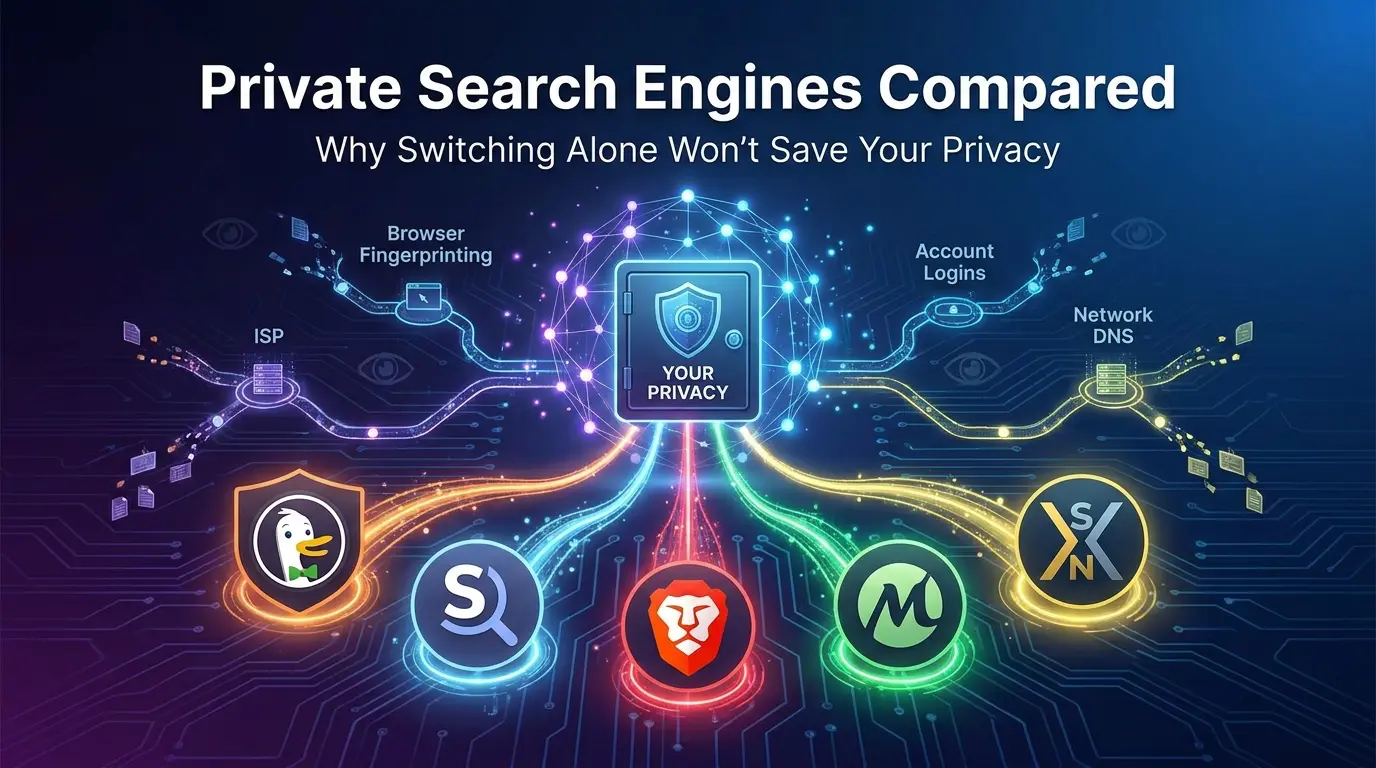

You switched from Google to DuckDuckGo. You feel safer now. You’re wrong, or at least, you’re only half right.
Here’s the uncomfortable truth nobody tells you when they recommend “just use a private search engine”: the search engine is only one link in a chain. Your ISP still sees every query. Your browser still leaks data through fingerprinting. And some of the “private” engines you’ve heard recommended a hundred times have business relationships that complicate the privacy promise on the label.
This isn’t another listicle of five search engines with one-line descriptions. This is a breakdown of how each major private search engine actually works under the hood, what each one trades away to give you privacy, and which one fits your specific threat model, because “private” isn’t one thing. It’s a spectrum, and where you land on it depends on what you’re actually trying to protect yourself from.
By the end of this guide, you’ll understand the real architecture behind DuckDuckGo, Startpage, Brave Search, Mojeek, and SearXNG, not just what their marketing pages say, but what independent researchers and long-term users have found after putting them through real-world use. You’ll also get a practical framework for choosing the right one, plus the mistakes most people make when they “switch to private search” and think the job is done.
- How “private search” actually works, proxy model vs. independent index vs. metasearch
- The real story behind DuckDuckGo’s Microsoft tracker controversy (and what changed)
- Why Startpage’s privacy depends entirely on trusting a company you’ve never heard of
- The real index-size gap behind Mojeek’s independence (and why it’s still worth it)
- Why AI search tools are repeating the same privacy mistakes traditional engines made
- A decision framework based on your actual threat model, not generic advice
- The 6 mistakes that quietly undo your privacy gains after switching
What a Private Search Engine Actually Means (Most People Get This Wrong)
Here’s the contrarian point most privacy guides skip: a private search engine doesn’t mean an anonymous one. Every search engine on this list still sees your IP address the moment you send a query, unless you’re routing through Tor or a VPN. What changes is what happens after that moment: whether your query gets stored, linked to a profile, sold to advertisers, or used to build a behavioral fingerprint over time.
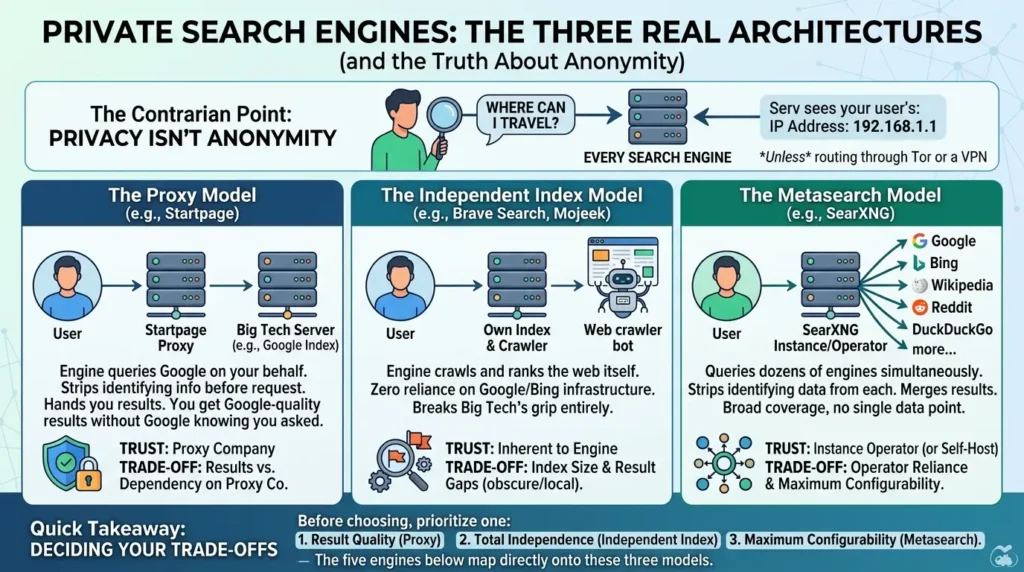
There are three fundamentally different architectures hiding behind the label “private search engine,” and confusing them is the single biggest reason people pick the wrong tool.
The Proxy Model (Startpage) The engine queries Google on your behalf, strips your identifying information before the request goes out, and hands you the results. You get Google-quality results without Google knowing who asked. The catch: you’re trusting the proxy company itself not to log anything, which means your privacy now depends on a company most people couldn’t name two years ago.
The Independent Index Model (Brave Search, Mojeek) The engine crawls and ranks the web itself, with its own bot and its own algorithm, with zero reliance on Google or Bing’s infrastructure. This is the only model that breaks Big Tech’s grip on what you see, entirely. The trade-off is index size, building a web-scale crawler from scratch takes years and enormous infrastructure, so results can have gaps, especially for obscure or hyper-local queries.
The Metasearch Model (SearXNG) Instead of picking one source, the engine queries dozens of other engines simultaneously, Google, Bing, Wikipedia, Reddit, and more, strips identifying data from each request, then merges the results. You get the broadest possible coverage with no single point of data collection. The trade-off: you’re relying on the operator of whichever instance you use, unless you self-host it yourself.
Quick takeaway: Before you pick a tool, decide which trade-off matters more to you, result quality, total independence from Big Tech, or maximum configurability. The five engines below map directly onto these three models.
DuckDuckGo Search Engine Privacy: The Default Recommendation, and Why That’s Both Right and Incomplete
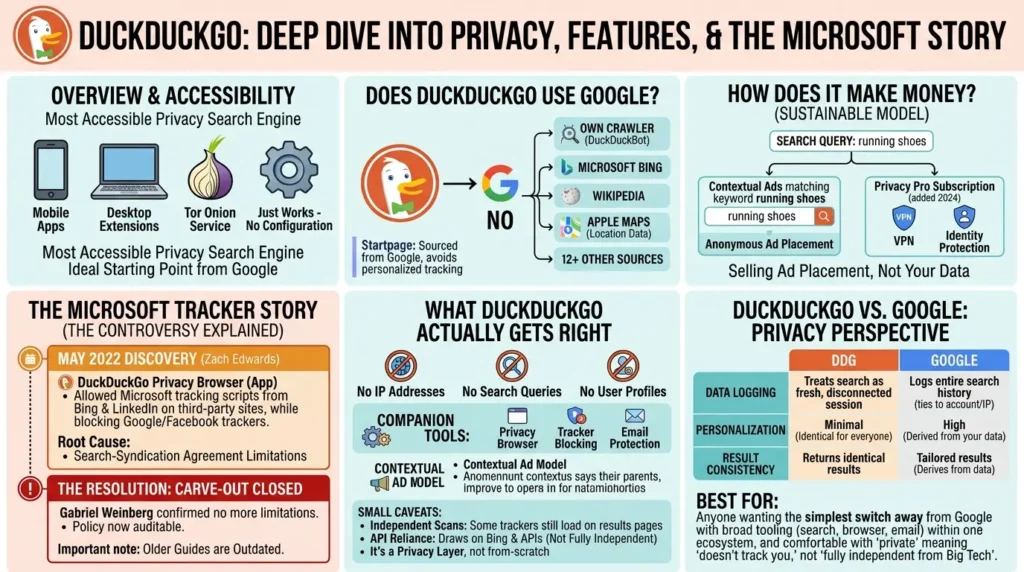
DuckDuckGo is the name everyone throws out first, and there’s a real reason for that. It’s the most accessible privacy search engine that exists, mobile apps, desktop browser extensions, a Tor onion service, and a default that “just works” without configuration. For most people moving away from Google for the first time, it’s still the most sensible starting point.
Does DuckDuckGo Use Google?
No. This is one of the most common misunderstandings about DuckDuckGo, and it’s worth clearing up directly: DuckDuckGo has no relationship with Google’s search index at all. Its results come primarily from its own crawler (DuckDuckBot) combined with Microsoft’s Bing and more than a dozen other sources, including Wikipedia and Apple Maps for location data. If you want results sourced from Google specifically while still avoiding personalized tracking, that’s the use case Startpage solves instead, covered in the next section.
How Does DuckDuckGo Make Money If It’s Free?
DuckDuckGo runs entirely on contextual advertising and, since 2024, a paid Privacy Pro subscription that bundles a VPN and identity protection tools. The contextual model means an ad is matched to the keyword in your current search, search “running shoes” and you’ll see a shoe ad, without DuckDuckGo building a profile of who you are or what you’ve searched before. This is the structural answer to “how can a free privacy tool be sustainable”: it’s not selling your data, it’s selling ad placement next to a single, anonymous query.
But there’s a chapter in DuckDuckGo’s history that most “best privacy tools” listicles either skip entirely or bury in a footnote, and it’s exactly the kind of thing that separates a surface-level recommendation from one that actually informs you.
The Microsoft Tracker Story Nobody Tells You
In May 2022, a security researcher named Zach Edwards discovered something that didn’t match DuckDuckGo’s marketing. The DuckDuckGo Privacy Browser, the mobile app, not the search website, was actively allowingMicrosoft tracking scripts from Bing and LinkedIn to load on third-party websites, while it was blocking equivalent scripts from Google and Facebook. BleepingComputer’s original investigation documented the DuckDuckGo Privacy Browser allowing Microsoft tracking scripts from Bing and LinkedIn to run on third-party websites while it blocked equivalent trackers from Google and Facebook.
DuckDuckGo’s CEO didn’t deny it. He confirmed the search-syndication agreement with Microsoft limited how the browser could apply its tracker-blocking protections to Microsoft-owned scripts, framing the partnership as related to ad placements and search results rather than tracking by design. In plain terms: DuckDuckGo’s contract with Microsoft, the company supplying part of its search results through Bing, came with strings attached, and one of those strings meant Microsoft got a tracking exception that Google and Facebook didn’t.
This matters for one specific reason that almost never gets mentioned: it’s proof that “we don’t track you” and “we have zero business entanglements with Big Tech” are two completely different promises. DuckDuckGo kept the first one. The second one had an asterisk nobody disclosed until an outside researcher found it.
The good news, and this is the part that’s important to get right, because plenty of outdated articles still treat this as an active problem, is that DuckDuckGo fixed it. In DuckDuckGo’s own follow-up announcement, founder Gabriel Weinberg confirmed the company was no longer limited in applying third-party tracker loading protection to Microsoft’s scripts, stating they had not had, and did not have, any similar limitation with any other company. The change rolled out to DuckDuckGo’s mobile apps and browser extensions, and the company now documents its full approach on its web tracking protections help page, making the policy auditable going forward.
What DuckDuckGo Actually Gets Right
Strip away the controversy and DuckDuckGo’s core privacy mechanics hold up well. It does not record IP addresses, search queries, or build user profiles, and it complements its search engine with a privacy-focused browser, tracker-blocking tools, and an email protection service. Its ad model is contextual rather than behavioral, meaning it shows you ads based on what you searched for in that single moment, not a profile built from your history.
The honest caveat, separate from the Microsoft episode: independent scans have reported that some trackers still load on DuckDuckGo’s result pages, and the engine draws on Bing and other APIs for part of its results, meaning it isn’t a fully independent search engine. That doesn’t make it untrustworthy, it makes it a privacy layer, not a from-scratch alternative.
DuckDuckGo vs. Google: Which Is Actually Safer?
DuckDuckGo, by a clear margin, when the comparison is about tracking and profiling specifically. Google logs your entire search history and ties it to your account and IP address by default, which is what makes its autofill and personalized results possible, and what makes its advertising business work. DuckDuckGo treats every search as a fresh, disconnected session with no history saved and no profile built, so the same query returns identical results for every user regardless of who’s asking. The trade-off is exactly that personalization: Google’s results often feel more tailored to you, precisely because it knows more about you than DuckDuckGo ever will.
Best for: Anyone who wants the simplest possible switch away from Google with the broadest tooling, search, browser, and email protection in one ecosystem, and is comfortable with the fact that “private” here means “doesn’t track you,” not “fully independent from Big Tech.”
Startpage Private Search: Google’s Search Quality, Minus Google Knowing It’s You
If DuckDuckGo is the “easy switch,” Startpage is the “I refuse to give up Google’s result quality” switch. Startpage submits your query to Google on your behalf, strips identifying information from the request, retrieves the results, and delivers them to you, so you get Google’s ranking algorithm, widely considered the most refined in the industry, without Google ever seeing who made the search.
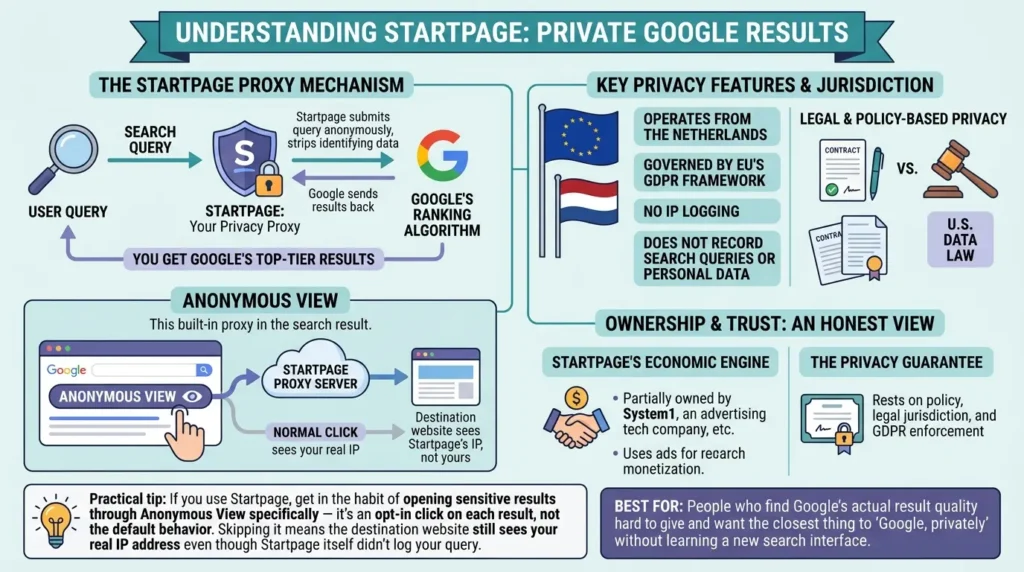
The mechanism that makes this work is called Anonymous View, a built-in proxy that lets you open a result link without revealing your IP address or identity to the destination website. Startpage also says it does not record IP addresses, search queries, or other personal data, and it operates from the Netherlands, which means it’s governed by the EU’s GDPR framework rather than U.S. data law.
Here’s the part most comparison articles gloss over because it doesn’t fit neatly into a checklist: using Startpage doesn’t eliminate the need to trust a company with your search data, it just changes which company you’re trusting.
Is Startpage Owned by an Advertising Company? Can You Trust It?
This is the question that comes up in nearly every Startpage thread, and the honest answer is yes, and it’s worth understanding what that does and doesn’t mean. Startpage is partially owned by System1, an advertising technology company, and the service’s business model still depends on serving ads alongside the anonymized results.
The privacy proposition is real and verifiable through its no-log policy and jurisdiction, but it’s worth being honest about the structural reality: an ad-funded proxy is monetized by advertising, the same economic engine that makes profiling profitable everywhere else online. The privacy guarantee here rests on policy and legal jurisdiction, not on the kind of architectural independence Mojeek or Brave Search offer.
That’s not a reason to avoid Startpage. GDPR enforcement carries real legal weight, and a no-log policy backed by EU jurisdiction is meaningfully different from a U.S. company under a far looser regulatory regime. It’s simply a different kind of privacy guarantee, a legal and contractual one, not a structural one where the company physically cannot link your query to you because it never had your identity to begin with.
Best for: People who find Google’s actual result quality hard to give up and want the closest thing to “Google, privately” without learning a new search interface.
Brave Search: An Independent Search Engine Alternative to Google and Bing
Brave Search takes a different bet entirely: instead of privatizing Google’s results, it built its own independent index, derived from the Tailcat search technology, and positions itself as genuinely separate from both Google and Bing’s infrastructure. This independence is what reduces reliance on Big Tech for result generation, and by design it avoids the kind of profiling that powers behavioral advertising.
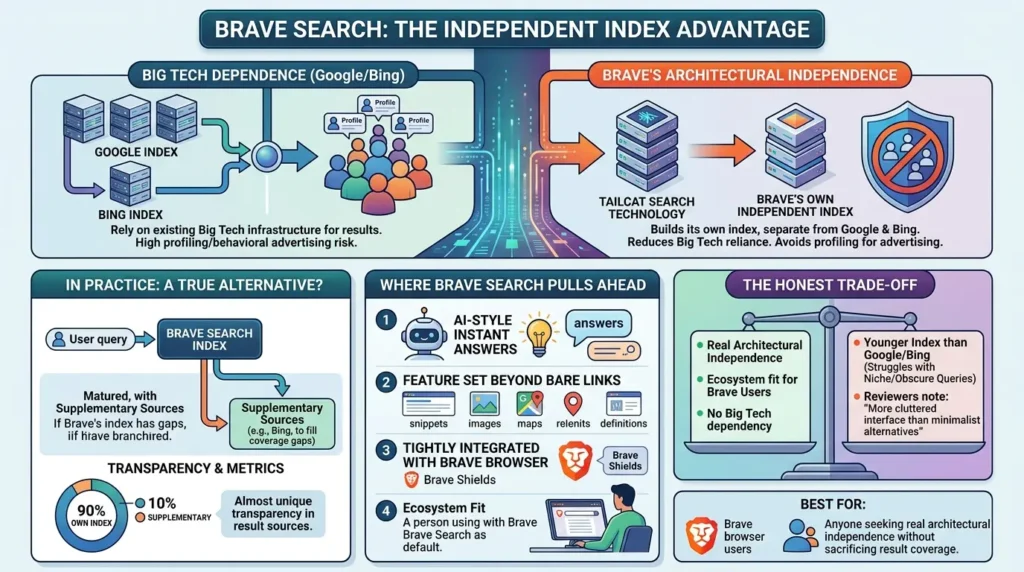
In practice, this means Brave is closer to a true alternative than Startpage, but it still leans on supplementary sources to fill coverage gaps, community reports note that Brave Search has matured substantially but sometimes blends in Bing results when its own index comes up short, which can affect how “independent” the experience really feels in edge cases. Brave also publishes independence metrics, showing what percentage of results come from its own index versus supplementary sources, a level of transparency almost no other engine on this list offers.
Where Brave Search Pulls Ahead
Brave Search ships with AI-style instant answers and a feature set that goes beyond bare result links, and it integrates tightly with the Brave browser for users who already use Brave Shields for tracker blocking. If you’re already inside that ecosystem, switching your default search engine costs you nothing, it’s already the default.
The honest trade-off: because Brave’s index is younger than Google’s by decades, it can struggle with deeply niche or obscure queries, and some reviewers describe its interface as more cluttered than the minimalist alternatives on this list.
| Engine | Index Source | Privacy Model | Best Trade-off |
|---|---|---|---|
| DuckDuckGo | Bing + partners | No-track policy | Easiest switch, widest tooling |
| Startpage | Google (proxied) | Legal/jurisdictional (GDPR) | Best result quality, anonymized |
| Brave Search | Own index (+ Bing fallback) | Architectural independence | Real alternative index, ecosystem fit |
| Mojeek | Own crawler (100%) | Architectural independence | Total independence, smaller index |
| SearXNG | Aggregates 70+ engines | Proxy + self-hostable | Max configurability, broadest coverage |
Best for: Brave browser users, and anyone who wants real architectural independence from Google/Bing without sacrificing too much in result coverage.
Mojeek: The No-Tracking Search Engine With Zero Dependency on Big Tech
If Brave Search is “mostly independent,” Mojeek is the engine that takes independence to its logical extreme. Founded in the UK in 2004, Mojeek runs its own web crawler, called MojeekBot, and its own ranking algorithm, with results that come from its own database of web pages rather than from licensing or supplementing with Google or Bing data. As Mojeek explains on its own site, its web search results are 100% independent, coming entirely from its own crawler and index rather than from any other engine.
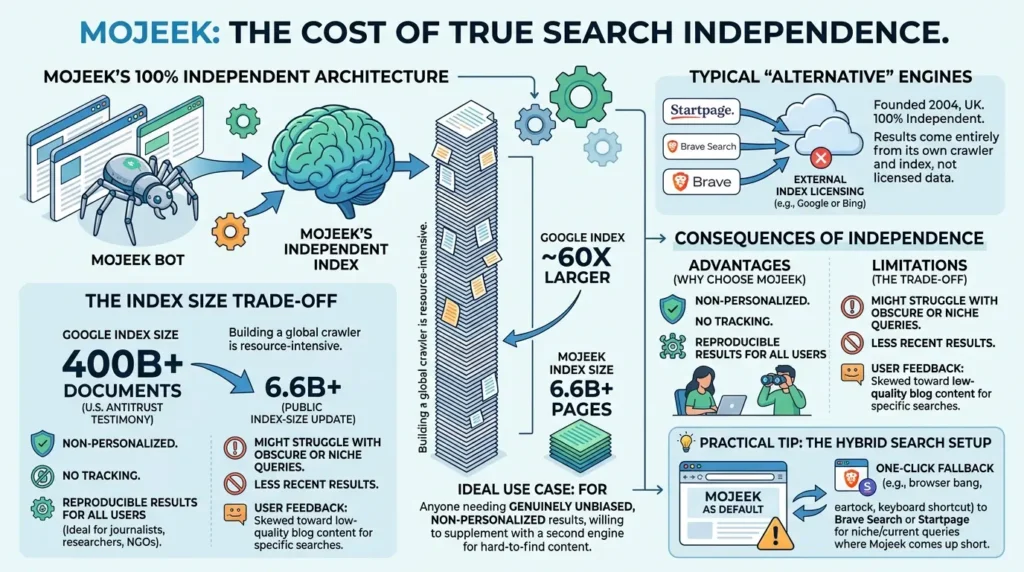
This isn’t a small technical detail, it’s the entire point. Building a web-scale crawler from the ground up is one of the most resource-intensive undertakings in software, which is exactly why almost every other “alternative” search engine on the market quietly licenses Bing or Google’s index instead of building their own. Mojeek’s persistence in doing it the hard way is the reason privacy researchers consistently rank it as a genuinely separate option rather than a repackaged one.
The Real Cost of True Independence
Here’s where Mojeek’s story gets honest in a way most coverage avoids: independence comes at a measurable cost in result coverage, and the numbers make that gap concrete. During U.S. antitrust testimony, Google’s VP of Search disclosed the company maintained a web index of roughly 400 billion documents. Mojeek, by contrast, crossed roughly 6.6 billion pages in its most recent public index-size update, meaning Google’s index is on the order of 60 times larger.
That isn’t a reason to dismiss Mojeek; it’s the honest scale of what “true independence” costs when you’re a small UK company competing with the most resourced infrastructure in tech history. Despite the gap, Mojeek’s index is still large enough to be described as the largest self-crawled, non-tracking index outside of Google, Bing, and Yandex, a genuinely rare achievement.
This shows up clearly in real user feedback. On Mojeek’s own app store reviews, one long-term user wrote that the engine performs well for most searches, but when searching something more obscure or in question form, results sometimes skew toward low-quality blog content that recycles the same information. That’s the honest trade-off: Mojeek’s purity is also its limitation. Because there’s no personalization and no tracking-based ranking, two people searching the same term get identical results, which is great for researchers and journalists who need reproducible, bias-free output, and frustrating for anyone chasing a very specific, very recent, or very niche result.
It’s worth noting Mojeek isn’t trying to be a Google replacement for every use case. The company’s own messaging is explicit that the goal is providing a genuine alternative, not optimizing rankings to imitate another engine, and that philosophy shows in results that can feel unfamiliar if you’re used to Google’s heavily personalized output.
Best for: Journalists, researchers, NGOs, and anyone who needs genuinely unbiased, non-personalized, reproducible search results, and is willing to occasionally supplement with a second engine for hard-to-find content.
SearXNG: The Self-Hosted Metasearch Engine Power Users Run That Nobody Talks About
Every privacy roundup mentions DuckDuckGo. Almost none of them mention SearXNG in any real depth, which is a gap, because it solves a problem none of the four engines above can: what happens when you don’t want to trust any single company with your search habits, including the privacy-focused ones?
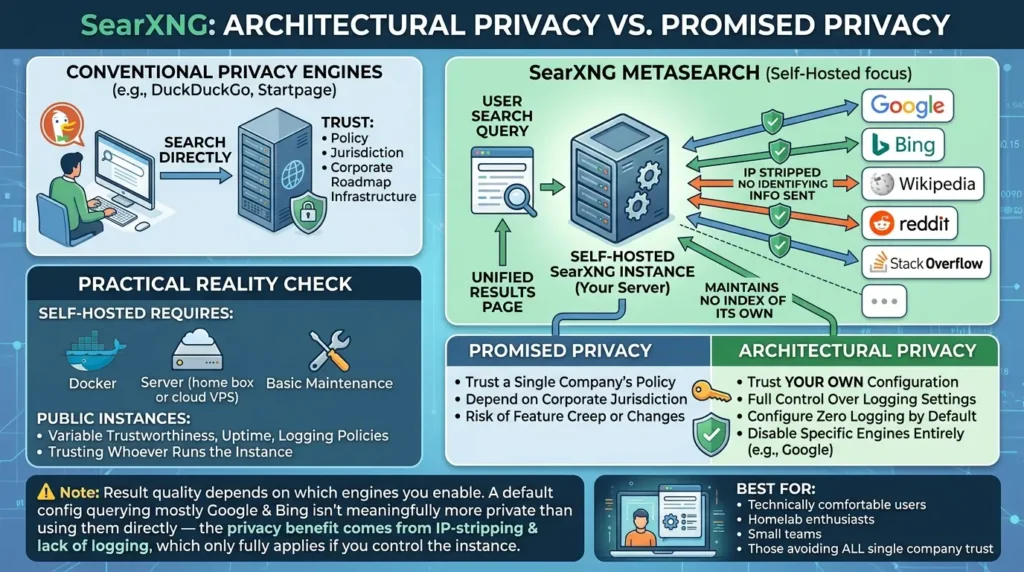
SearXNG is a free, open-source metasearch engine. It maintains no index of its own. Instead, when you search, it sends your query out to dozens of other engines simultaneously, Google, Bing, Wikipedia, Reddit, Stack Overflow, and many more, strips identifying information from each outgoing request, merges the responses, removes duplicates, and shows you one unified results page. According to SearXNG’s project documentation, the target engines never see your IP or link the query to you, and SearXNG itself stores little to no information about the request by default.
Why This Architecture Solves a Problem the Others Don’t
Think about what you’re trusting with every engine covered so far: DuckDuckGo’s policy, Startpage’s jurisdiction, Brave’s corporate roadmap, Mojeek’s infrastructure. With SearXNG, if you self-host it, the answer changes completely, you’re trusting your own server, configuration, and logging settings. Nobody else’s business model is involved at all.
That’s not a small distinction. It’s the difference between promised privacy and architectural privacy. A self-hosted SearXNG instance can be configured with zero logging, behind your own reverse proxy, with full control over which of the 70-plus supported engines are even queried. You can disable Google entirely from your stack and never send it a single character, while still pulling results from a dozen other sources.
The practical reality is more layered, and worth being upfront about. Public SearXNG instances, the ones you can use instantly without setting up a server, vary widely in trustworthiness, uptime, and logging policy, since you’re now trusting whoever runs that particular instance. For genuine privacy guarantees, self-hosting is the real answer, and that requires comfort with Docker, a server (even a cheap home box or a $5 VPS), and basic maintenance.
A Five-Minute Self-Hosting Reality Check
You don’t need to be a sysadmin to try this. A minimal SearXNG deployment runs as a single Docker container, with a settings file controlling which engines are active, what gets logged (ideally nothing), and how rate limiting works. Pair it with a privacy-respecting browser as your default search provider, and every search you make for the rest of your browsing life never touches a company’s ad infrastructure directly, it touches your own server first.
Best for: Technically comfortable users, homelab enthusiasts, small teams, or anyone whose threat model includes “I don’t want to trust any single company” rather than just “I want a nicer privacy policy.”
AI Search Privacy: The Question Nobody’s Asking
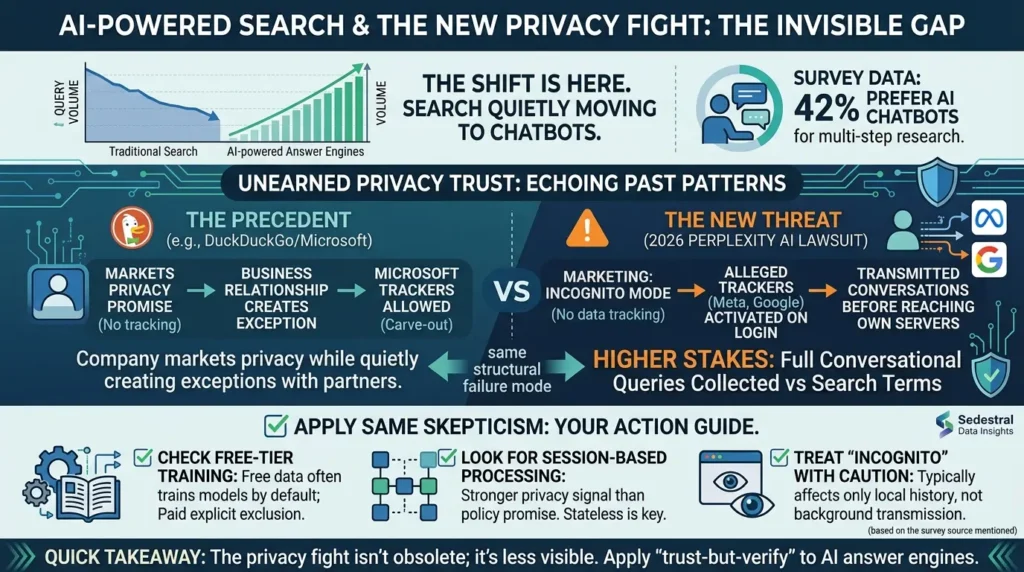
Here’s a gap in almost every privacy search engine article published in the last two years: none of them address the fact that a huge share of “search” has quietly moved to AI chatbots. Survey data cited by Sedestral shows 42% of people now prefer AI chatbots over a traditional search engine for multi-step research, and overall search engine query volume is projected to decline as answer engines gain ground. If you’re rebuilding your search habits around privacy in 2026, ignoring this shift means optimizing for half the problem.
The uncomfortable part is that AI search tools have not earned the privacy trust their marketing implies, often in ways that echo the exact same pattern as DuckDuckGo’s Microsoft episode, just with higher stakes. A federal class-action lawsuit filed in early 2026 accuses Perplexity AI of embedding tracking software that transmitted users’ private conversations to Meta and Google, even when users had specifically enabled the app’s Incognito mode, a feature explicitly marketed as not tracking data. According to the complaint, the alleged trackers activated the moment a user logged in, giving Meta and Google access to conversation content before it even reached Perplexity’s own servers.
If that detail sounds familiar, it should. It’s structurally the same failure mode as the DuckDuckGo-Microsoft tracker carve-out: a company markets a privacy promise (no tracking, no profiling), while a business relationship with a larger tech company quietly creates an exception to that promise. The difference is what’s being collected has gotten more sensitive, full conversational queries instead of search terms, often containing far more context than a three-word Google search ever did.
This doesn’t mean avoid AI search tools entirely. It means apply the same skepticism here that this guide has applied to every traditional engine above:
- Check whether free-tier conversations train the underlying model, many platforms use free-tier data for training by default, while paid tiers explicitly exclude it.
- Look for session-based or stateless processing as a stronger privacy signal than a policy promise alone, the same way architectural independence beats a no-log policy for traditional search engines.
- Treat “Incognito” or “private” modes in AI tools with the same caution as private browsing windows, they typically only affect local history, not what gets transmitted to third parties in the background.
Quick takeaway: The shift to AI-powered search hasn’t made the privacy fight obsolete, it’s made it less visible. The same trust-but-verify approach that applies to DuckDuckGo, Startpage, and Brave Search applies just as urgently to whatever AI answer engine you’ve started typing questions into instead.
Six Mistakes That Quietly Undo Your Privacy Gain
Switching search engines is the easy 5% of the work. Here’s where most people lose the other 95% without realizing it.
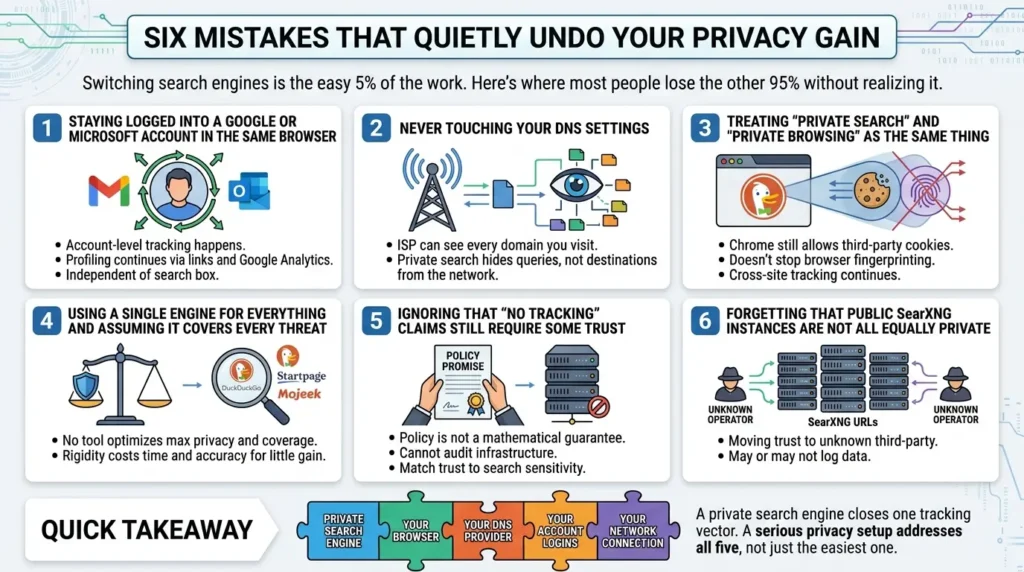
Staying logged into a Google or Microsoft account in the same browser
Your private search engine doesn’t matter if you’re still signed into Gmail or Outlook in the same browser session. Account-level tracking happens independent of which search box you typed into, the moment you click a Google-owned link or load a page with embedded Google Analytics while logged in, the profiling continues elsewhere.
Never touching your DNS settings
Your ISP, and by extension, anyone subpoenaing them, can see every domain you visit at the DNS level, regardless of which search engine sent you there. A private search engine hides your query from the search provider. It does nothing to hide your destination from your network.
Treating “private search” and “private browsing” as the same thing
Switching DuckDuckGo into your address bar while still using Chrome with third-party cookies enabled solves one problem and leaves a dozen others untouched, browser fingerprinting, ad-network cookies, and cross-site tracking don’t care what search engine sent you somewhere.
Using a single engine for everything and assuming it covers every threat
As shown across every engine above, no single tool optimizes for both maximum privacy and maximum result coverage. Pretending otherwise, sticking rigidly to Mojeek for a deep, time-sensitive investigative search, for instance, costs you time and accuracy for a privacy gain that a quick fallback search wouldn’t meaningfully compromise.
Ignoring that “no tracking” claims still require some trust
Every proxy and no-log claim, DuckDuckGo’s, Startpage’s, Brave’s, is a policy promise, not a mathematically provable guarantee, unless you can audit the infrastructure yourself. That’s not a reason to distrust all of them; it’s a reason to match the level of trust required to how sensitive your actual searches are.
Forgetting that public SearXNG instances are not all equally private
Treating any random public SearXNG URL as automatically more private than DuckDuckGo skips the fact that you’ve simply moved your trust to an unknown third-party operator, who may or may not log anything.
Quick takeaway: A private search engine closes one tracking vector. Your browser, your DNS provider, your account logins, and your network connection are four more, and a serious privacy setup addresses all five, not just the one that’s easiest to switch.
Which One Should You Actually Use? An Interactive Decision Guide
Instead of a generic “it depends,” here’s a structured way to match your situation to the right engine based on what actually matters to you.
Before and After: What Actually Changes
It helps to see the real shift in concrete terms rather than abstract privacy language.
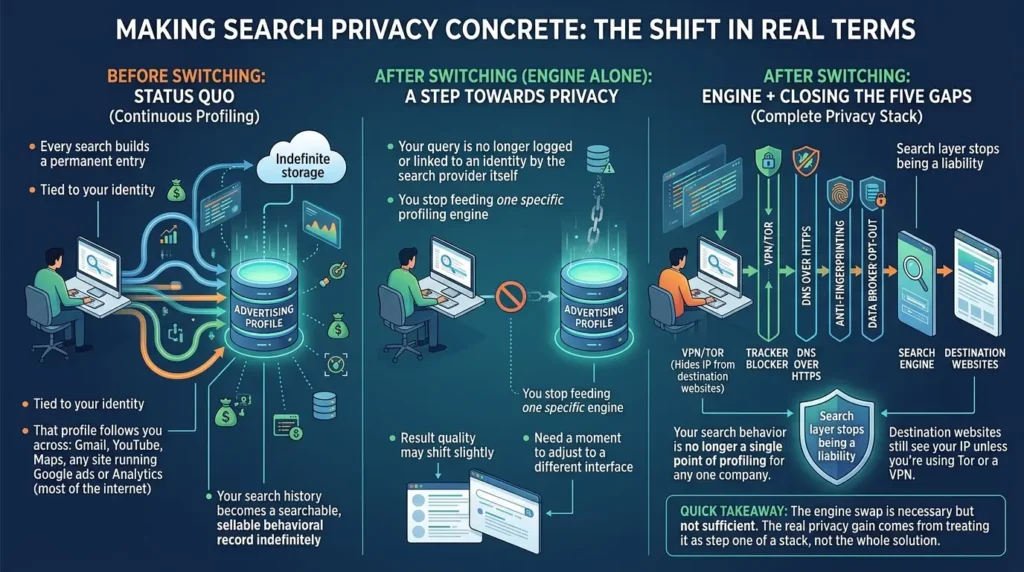
Before switching: Every search builds a permanent entry in an advertising profile tied to your identity. That profile follows you across Gmail, YouTube, Maps, and any site running Google ads or Analytics, which is most of the internet. Your search history becomes a searchable, sellable behavioral record indefinitely.
After switching (engine alone): Your query is no longer logged or linked to an identity by the search provider itself. You stop feeding one specific profiling engine. Result quality may shift slightly depending on which engine you picked, and you’ll need a moment to adjust to a different interface.
After switching (engine + the five gaps above closed): Your search behavior is no longer a single point of profiling for any one company. Your destination websites still see your IP unless you’re using Tor or a VPN, but the search layer itself, historically one of the richest sources of behavioral data about you, stops being a liability.
Quick takeaway: The engine swap is necessary but not sufficient. The real privacy gain comes from treating it as step one of a stack, not the whole solution.
The Bottom Line
There’s no single “best” private search engine, and anyone telling you otherwise is selling you something. DuckDuckGo wins on convenience. Startpage wins on result quality. Brave Search and Mojeek win on genuine independence, at different points on the coverage-versus-purity spectrum. SearXNG wins on control, if you’re willing to do the setup.
The contrarian insight worth carrying forward: picking any one of these and stopping there gives you a meaningful but partial privacy improvement, closing one tap while four others stay open. The people who actually reduce their exposure significantly are the ones who treat search engine choice as the first decision in a stack, not the only one.
Start with the engine that matches your priority from the guide above. Then come back to close the other gaps, your browser, your DNS, and your account logins are next.
Frequently Asked Questions
Is DuckDuckGo actually private in 2026?
Yes, with an important caveat. DuckDuckGo does not store search history or build advertising profiles, and the Microsoft tracker exception discovered in 2022 was closed after public disclosure. The remaining limitation is structural, not a tracking failure: it draws part of its results from Bing, so it isn’t a fully independent index the way Mojeek or Brave Search are.
Which private search engine has the best results, closest to Google?
Startpage, by a clear margin. Because it proxies Google’s actual index and ranking algorithm, the result quality feels nearly identical to Google itself — the difference is that Google never sees who made the request.
Is Startpage actually trustworthy if it’s owned by an advertising company?
Startpage’s no-log policy is backed by Dutch and EU jurisdiction under GDPR, which carries real legal enforcement weight. The honest framing is that its privacy guarantee is contractual and legal rather than architectural — unlike Mojeek or a self-hosted SearXNG instance, where the company structurally cannot access identifying data because the system was never built to collect it.
Why does Mojeek sometimes give worse results than Google?
Mojeek runs its own crawler and index from scratch, built without Google or Bing’s decades of infrastructure and resources behind it. That independence is the entire point of the product, but it means the index is smaller, which shows up most on niche, hyper-local, or very recent queries. Pairing Mojeek with a fallback engine for those specific searches solves this without giving up the independence benefit for everyday use.
What’s the actual difference between Brave Search and Mojeek?
Both run independent indexes, but Brave Search supplements gaps with Bing results when needed, while Mojeek’s results are 100% sourced from its own crawler with no fallback to any other engine. Brave trades a small amount of purity for better coverage; Mojeek trades coverage for total independence.
Do I need to self-host SearXNG, or are public instances safe?
Public instances are fine for casual use and trying the tool out, but you’re trusting whoever operates that particular instance not to log your queries. For genuine privacy guarantees rather than a policy promise, self-hosting on a basic Docker setup is the meaningful upgrade — and it’s more accessible than most people assume.
Will switching search engines alone stop companies from tracking me?
No. A private search engine closes one specific tracking vector — the search query itself. Your browser’s fingerprint, your ISP’s visibility into which domains you visit, third-party cookies, and any accounts you stay logged into all continue operating independently of which search engine you use. Treat it as the first step in a privacy stack, not the entire solution.
Can I use more than one private search engine at once?
Yes, and for power users this is genuinely the better setup. Most browsers let you assign keyboard shortcuts or “bangs” to multiple search engines, so you can default to Mojeek or Brave Search for everyday privacy and fall back to Startpage for the rare query where you need Google-level depth, without changing your default settings each time.
Are AI search tools like ChatGPT or Perplexity more or less private than traditional search engines?
Neither is automatically safer. AI search tools have already shown the same pattern as traditional engines — a privacy feature marketed as protective (like Perplexity’s Incognito mode) facing allegations of quietly transmitting data to third parties. Treat AI search privacy claims with the same scrutiny you’d apply to any traditional engine: check whether free-tier data trains the model, and don’t assume “private mode” means nothing leaves the app.





[…] Read the Full Article → […]