

Your VPN is running. Your search engine is DuckDuckGo. You’re feeling good about your privacy browsers setup.
Then you open Chrome, and hand Google everything it needs anyway.
This is the gap that most privacy guides either miss or mention in a single sentence: your browser is the single biggest data leak in your entire setup. It interacts with every website you visit, executes every script, handles every login, and if it’s Chrome, reports home to an advertising company whose entire business model depends on knowing what you do online.
The Google Chrome Incognito lawsuit that settled in 2024 exposed something that should have been obvious but rarely got said plainly: internal Google communications described Incognito mode as “effectively a lie” and “a problem of professional ethics and basic honesty.” Google agreed to delete billions of browsing records collected from over 136 million people who thought they were browsing privately. The settlement didn’t pay users a cent. But the revelation stuck: the most widely used browser in the world was designed by a company that profit from your attention, and that conflict never went away.
This guide is about the browsers that were designed differently. Not just marketed differently, actually built from the ground up with different incentives, different architectures, and different answers to a question most people never think to ask: what does your browser know about you, and who does it tell?
- How browser fingerprinting works, and why switching to a private search engine doesn’t stop it
- The full story behind Google’s Chrome Incognito settlement and what it revealed
- How Brave, Firefox, LibreWolf, and Mullvad Browser each approach fingerprinting differently
- The hidden vulnerability in LibreWolf that almost no one mentions
- Why Mullvad Browser exists, and when it beats both Brave and Tor for daily use
- A browser compartmentalization strategy used by security professionals
- The 5 browser privacy mistakes that undo everything else you’ve done
What Browser Fingerprinting Actually Is (And Why It Makes Cookies Look Primitive)
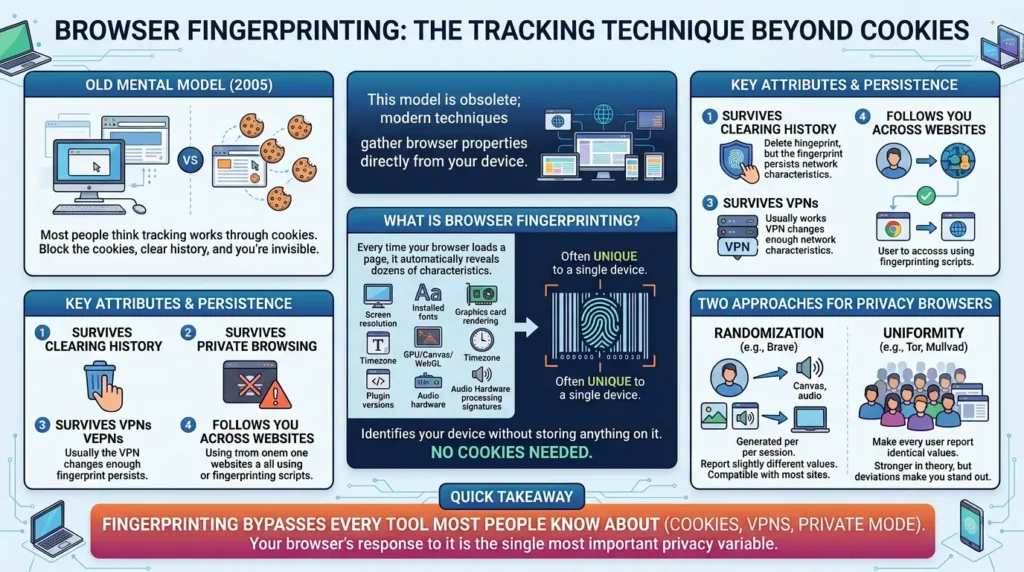
Most people think tracking works through cookies. Block the cookies, clear your history, and you’re invisible. That mental model was accurate in 2005. It hasn’t been accurate for a long time.
What Is Browser Fingerprinting?
Browser fingerprinting is a tracking technique that identifies your device without storing anything on it. Every time your browser loads a page, it automatically reveals dozens of characteristics: your screen resolution, installed fonts, graphics card rendering signatures, timezone, plugin versions, the way your audio hardware processes sound, and how your GPU draws canvas graphics. Individually, none of these are unique.
Together, as the Electronic Frontier Foundation’s Cover Your Tracks research has shown, they combine into an identifier that is often unique to a single device out of hundreds of thousands, without a single cookie ever being set.
The fingerprint persists across browsers on the same device. It survives clearing history. It survives private browsing. It survives VPNs, unless the VPN changes enough of your network characteristics. It follows you across every website that runs the same fingerprinting script, which is to say: most of the commercial internet.
There are two fundamentally different ways a privacy browser can respond to this:
- Randomization: Report slightly different values for canvas, WebGL, and audio context fingerprints with each new session and each site. You look like a different device every time. Brave uses this approach. It’s compatible with most websites because the values are plausible, just slightly different, rather than obviously blocked.
- Uniformity: Make every user of the browser report identical values, so even if the fingerprint is collected, it can’t distinguish one user from another. Tor Browser and Mullvad Browser use this approach. It’s stronger in theory, but it means every user must have the same window size, the same configuration, and the same extension set, any deviation makes you stand out from the crowd you’re hiding in.
Understanding this distinction is the foundation for everything else in this guide.
Quick takeaway: Fingerprinting is the tracking method that bypasses every tool most people know about, cookies, VPNs, private mode. Your browser’s response to it is the single most important privacy variable in your setup.
The Chrome Incognito Scandal: A Case Study in Why Browser Choice Matters
Is Google Chrome Safe to Use?
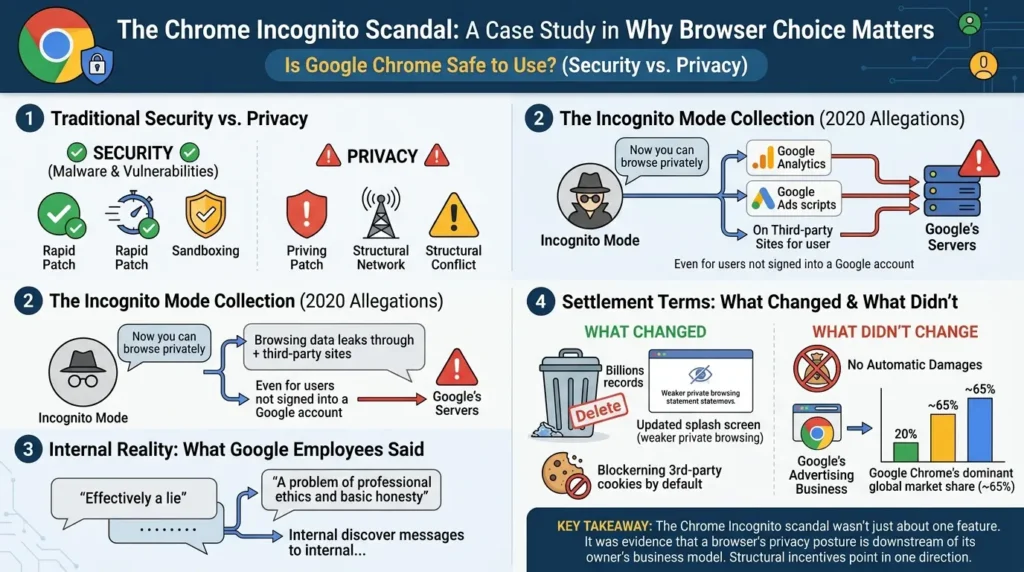
The short answer: Chrome is safe from malware and security vulnerabilities in the traditional sense, Google patches it rapidly and it has a strong sandboxing model. But “safe” from a privacy standpoint is a different question entirely. Chrome is built by a company whose primary revenue source is advertising based on user behavior. That structural conflict has produced documented outcomes, not just theoretical concerns.
In 2020, a class-action lawsuit alleged that Google was collecting user data through Chrome even when the browser was in Incognito mode. Not through Google Search. Not through Gmail. Through the browser itself, specifically through Google Analytics and Google Ads scripts that run on third-party websites.
The lawsuit alleged that even users who had never signed into a Google account, and who were using Incognito mode specifically to avoid being tracked, were still having their browsing behavior transmitted to Google’s servers through those embedded scripts.
Google fought the case for four years. When it finally settled, the terms that emerged were striking. As SecurityWeek reported, Google agreed to delete billions of personal records collected from over 136 million people. The browser was required to update Incognito mode’s splash screen, which had previously said “Now you can browse privately”, to a weaker statement acknowledging that websites can still track users even in Incognito mode.
The internal communications that surfaced during discovery were the part that got the least press coverage but deserved the most. According to reporting by Forrester Research, Google employees described Incognito mode in internal messages as “effectively a lie” and “a problem of professional ethics and basic honesty.” These weren’t external critics, they were people inside the company building the product.
What the Settlement Actually Changed (And What It Didn’t)
The settlement required Google to delete the collected records, block third-party cookies in Incognito mode by default, and stop capturing whether a user was in Incognito mode when a page loaded. It did not require Google to pay damages to the affected users. Individuals seeking damages still have to file separately in California state courts.
More structurally, it changed nothing about the fundamental relationship between Chrome and Google’s advertising business. Chrome’s market share, roughly 65% of global desktop browser usage, means that Google still has direct access to the browsing infrastructure of the majority of internet users. The business model that created the incentive for that data collection in the first place is still intact.
This is the case study that contextualizes everything else in this guide. The question isn’t whether Google is evil. The question is whether a browser built by a company whose revenue comes from targeting advertising can structurally prioritize your privacy over its own interests, regardless of what any individual team at that company intended.
Quick takeaway: The Chrome Incognito scandal wasn’t just about one feature. It was evidence that a browser’s privacy posture is downstream of its owner’s business model. When the owner’s business model is advertising, the structural incentives point in one direction.
Brave Browser: The Best Default Switch from Chrome
Brave is the most practical answer to the question “what should a Chrome user switch to?” It’s built on Chromium, the same open-source engine as Chrome, which means compatibility with Chrome extensions, near-identical rendering on most websites, and a familiar interface that costs almost nothing to adapt to.
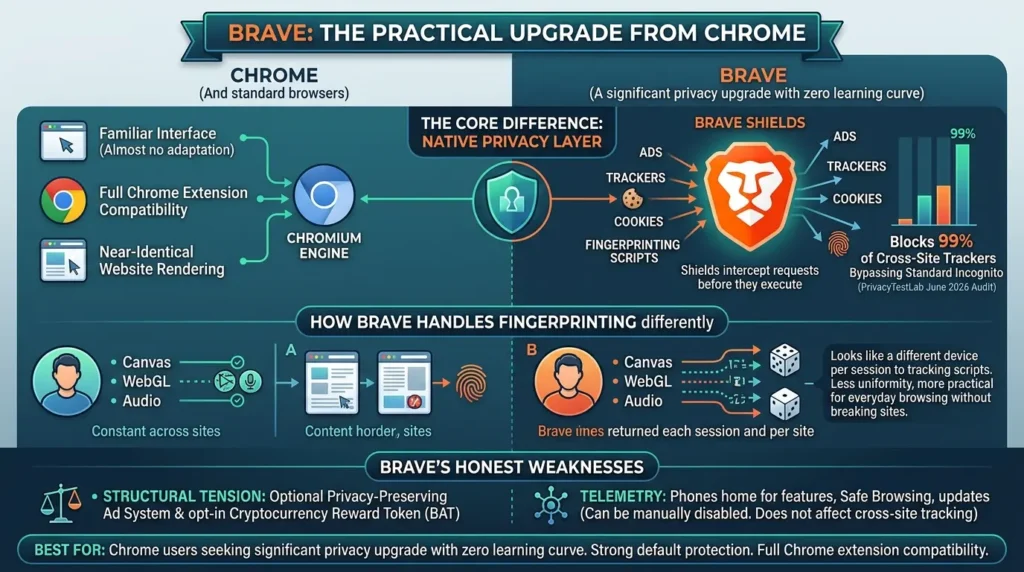
What Brave adds on top of Chromium is a privacy layer that’s aggressive enough to matter without requiring any configuration. Brave Shields, the browser’s built-in protection system, blocks ads, third-party trackers, cross-site cookies, and fingerprinting scripts at the network level, before they ever execute. Unlike browser extensions that run after page content loads, Shields intercepts requests before they leave the browser. The practical result: independent tests from PrivacyTestLab’s June 2026 audit show Brave successfully blocking 99% of cross-site trackers that bypass standard Incognito mode.
How Brave Handles Fingerprinting Differently
Brave’s approach to fingerprinting is randomization, returning slightly different canvas, WebGL, and audio context values each session and per site. As the EFF’s research into browser fingerprinting confirms, each session looks like a different device to tracking scripts. This is less theoretically pure than Tor’s uniformity approach, but it works substantially better in practice for everyday browsing: the randomized values are plausible enough that they don’t break site functionality, while still making cross-session correlation impossible for commercial tracking systems.
Brave’s Honest Weaknesses
Being honest about this matters: Brave’s business model includes a privacy-preserving ad system and an opt-in cryptocurrency reward token (BAT), which creates a structural tension that some privacy researchers flag. A browser that runs its own ad infrastructure, even a privacy-respecting one, has different incentives than a browser with no ad revenue at all.
Additionally, Brave “phones home” to its own servers for some features, Safe Browsing updates, automatic update checks, unless these are manually disabled. This doesn’t affect cross-site tracking, but it means Brave itself has some telemetry that a zero-telemetry alternative like LibreWolf does not.
Best for: Chrome users who want a significant privacy upgrade with zero learning curve. Strong default protection, full Chrome extension compatibility, and a user base large enough that Brave’s fingerprint isn’t immediately unusual.
Firefox: The Best Balance of Privacy and Control

Is Firefox Still Worth Using in 2026?
Yes, but the reason matters. Firefox isn’t the strongest privacy browser out of the box anymore; Brave and LibreWolf both beat it on default settings. What Firefox offers that nothing else does is the last major independent browser engine on the web. Every other browser on this list (Brave, Chrome, Edge, Opera, Vivaldi) runs on Google’s Chromium. LibreWolf and Mullvad Browser run on Firefox’s Gecko. Tor runs on a hardened Firefox base. If Firefox dies, Gecko dies, and Google controls every browser engine used by the majority of internet users. That’s a web-standards and privacy concern that goes beyond any individual feature comparison.
Firefox occupies a unique position in this comparison for exactly that reason: it’s not just a browser choice, it’s a vote on whether browser engine diversity survives.
What Firefox Actually Needs to Be Private
Stock Firefox in 2026 has improved substantially, Enhanced Tracking Protection now defaults to Strict mode, which blocks social media trackers, cross-site cookies, fingerprinters, and cryptominers. But “improved” and “private by default” are different things. To match Brave’s out-of-the-box protection, Firefox still needs:
- uBlock Origin installed (not just the built-in blocking, uBlock adds meaningful depth)
- DNS-over-HTTPS enabled manually
- Telemetry opt-out (Firefox still sends usage data by default)
- For fingerprinting resistance: privacy.resistFingerprinting enabled in about:config
None of this is technically difficult. But it requires knowing it needs to be done, which is a real barrier for non-technical users.
| Browser | Engine | Fingerprint Defense | Config Required? | Best For |
|---|---|---|---|---|
| Brave | Chromium | Randomization | None | Chrome switchers |
| Firefox | Gecko | Uniformity (manual) | Moderate | Power users |
| LibreWolf | Gecko (Firefox fork) | Uniformity (default) | None | Firefox users who want hardened defaults |
| Mullvad Browser | Gecko (Tor-derived) | Uniformity (strongest) | None (pair w/ VPN) | Serious daily privacy |
| Tor Browser | Gecko (Tor Project) | Uniformity (maximum) | None | Maximum anonymity |
Best for: Users who want granular, customizable privacy control, and who understand that Firefox’s real value includes its role as the last major independent browser engine on the web.
LibreWolf: What Firefox Would Be If Mozilla Prioritized Privacy Over Partnerships
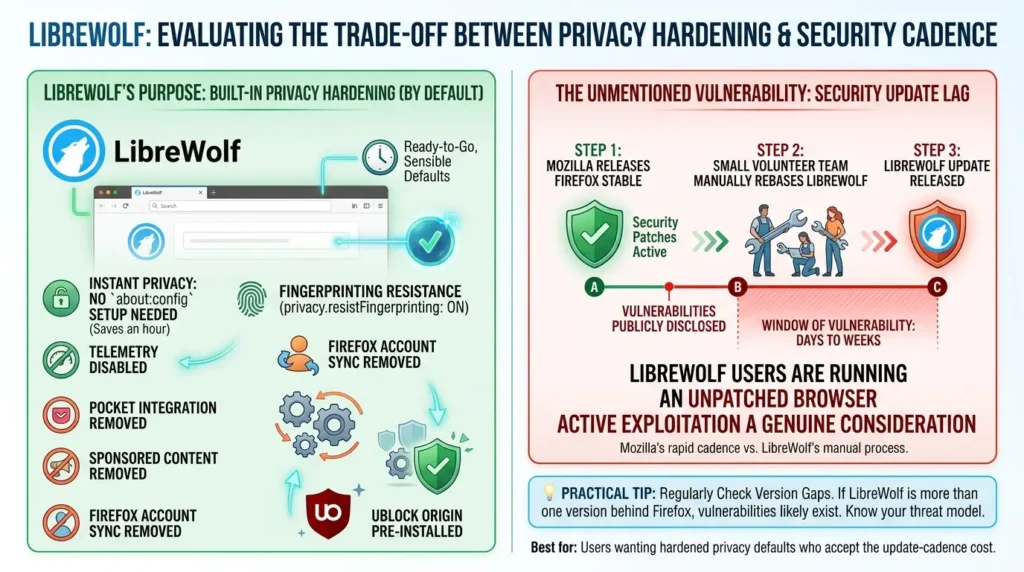
LibreWolf is a Firefox fork with a specific, narrow purpose: take everything Mozilla built, strip out everything that could compromise privacy, apply every hardening setting that privacy-conscious Firefox users normally have to configure manually, and ship it all as a single install with sensible defaults already in place.
The result is a browser where privacy.resistFingerprinting is on by default. Telemetry is disabled by default. Mozilla’s Pocket integration, sponsored content, and Firefox account sync are removed. uBlock Origin comes pre-installed. The configuration that would take a knowledgeable Firefox user an hour of about:config work is already done.
The LibreWolf Vulnerability Nobody Mentions
Here’s the information gap in almost every LibreWolf review: LibreWolf is maintained by a small volunteer team, and that team has to manually rebase the browser on each new Firefox upstream release before shipping updates.
This creates a window, typically days to weeks, during which LibreWolf users are running a browser with known, publicly disclosed security vulnerabilities that Firefox has already patched. Firefox publishes updates for actively exploited vulnerabilities on a rapid cadence. LibreWolf follows, but not immediately.
For a browser explicitly chosen for its security posture, this is a non-trivial trade-off that most review sites gloss over. The privacy hardening is real. The security update lag is also real. If your threat model includes active exploitation of browser vulnerabilities, as opposed to passive tracking, LibreWolf’s patching cadence is a genuine consideration, not a footnote.
Best for: Firefox users who want hardened privacy defaults without spending an hour in about:config, and who understand the update-cadence trade-off is a real cost, not just a minor footnote.
Mullvad Browser: The Tool That Fills the Gap Between Brave and Tor
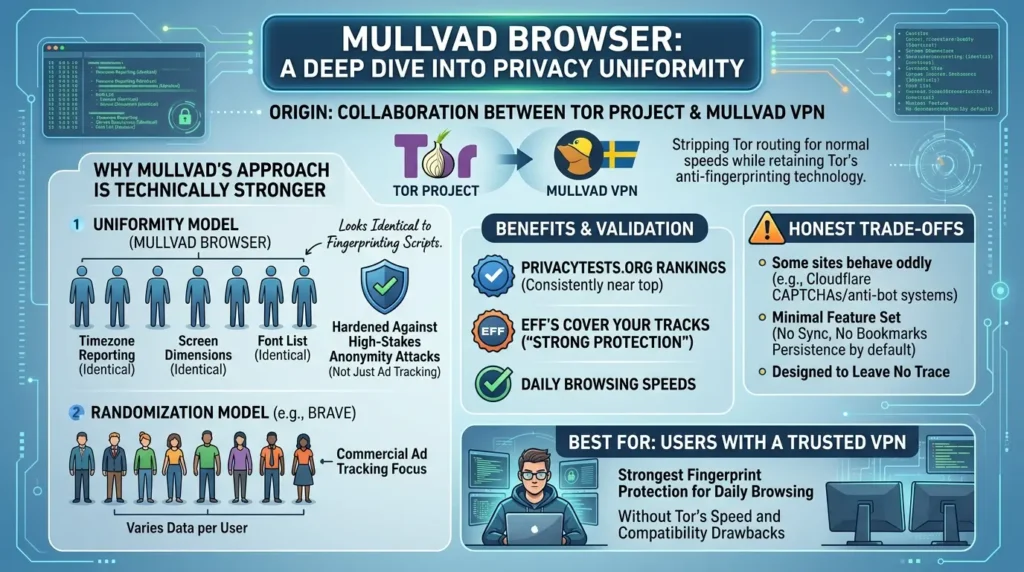
Mullvad Browser is the least known entry on this list and arguably the most interesting development in privacy browsing in the last few years. It’s a collaboration between the Tor Project, the organization that builds Tor Browser, and Mullvad, the Swedish VPN provider whose privacy model is widely respected in security research circles.
The concept is elegant: take the anti-fingerprinting technology inside Tor Browser, strip out the Tor network routing that makes Tor slow and incompatible with many websites, and ship a browser that gives you Tor-level fingerprint resistance at normal browsing speeds, paired with a VPN for network-level IP protection.
Why Mullvad’s Approach Is Technically Stronger Than Brave’s
Mullvad Browser uses the uniformity model rather than Brave’s randomization. Every Mullvad Browser user looks identical to fingerprinting scripts: same timezone reporting, same screen dimensions, same font list. Because the anti-fingerprinting technology comes directly from the Tor Project, it’s been hardened against tracking methods that have been studied in the context of high-stakes anonymity for years, not just commercial ad tracking.
Independent PrivacyTests.org benchmarks consistently rank Mullvad near the top of privacy-browser comparisons, and the EFF’s Cover Your Tracks tool reports “strong protection against web tracking” for Mullvad’s fingerprint profile.
The honest trade-off: Mullvad Browser’s uniformity approach means some sites behave oddly when every user looks completely identical. Cloudflare CAPTCHA challenges and anti-bot systems occasionally trip on Mullvad’s signals in ways they don’t on Brave. The browser also ships with no sync, no bookmarks persistence by default, and a deliberately minimal feature set, it’s designed to leave no trace, which means some conveniences need to be handled elsewhere.
Best for: Users who already use a trusted VPN and want the strongest available fingerprint protection for daily browsing, without the latency and site-compatibility issues of running Tor full-time.
Tor Browser: When Anonymity Is Non-Negotiable
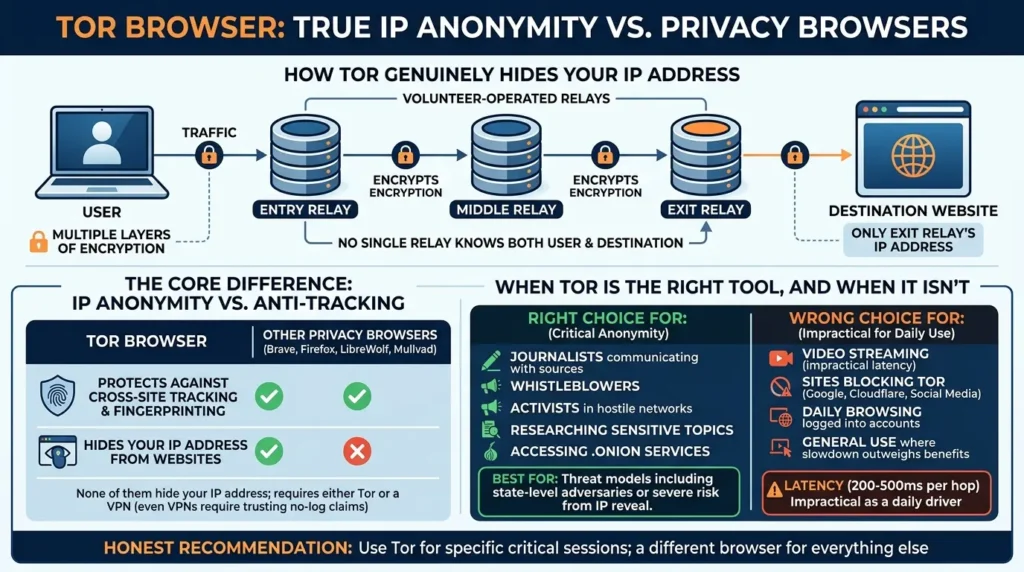
Tor Browser is the only browser on this list that makes your IP address genuinely invisible to the websites you visit. It routes your traffic through three volunteer-operated relays, each encrypting the previous hop’s data, so that no single relay knows both who you are and what you’re requesting. The destination website sees only the exit relay’s IP address.
This is qualitatively different from what every other browser on this list provides. Brave, Firefox, LibreWolf, and Mullvad Browser all protect against cross-site tracking and fingerprinting. None of them hide your IP address from the websites you visit, that requires either Tor or a VPN, and even a VPN requires trusting the VPN provider’s no-log claims.
When Tor Is the Right Tool, and When It Isn’t
Tor Browser is the right choice for: journalists communicating with sources, whistleblowers, activists operating in hostile network environments, people researching sensitive topics where search history represents personal risk, and accessing .onion services that only exist within the Tor network.
Tor Browser is the wrong choice for: video streaming (latency makes it impractical), sites that block Tor exit nodes (Google, Cloudflare-protected sites, most social platforms), any daily browsing where you need to stay logged into accounts (logging in ties the session to an identity), and general use where the slowdown outweighs the anonymity benefit.
The 200-500ms latency per hop is not a minor inconvenience, it makes Tor genuinely impractical as a daily driver for most people’s actual usage patterns. The honest recommendation from the security community is consistent: Tor for the specific sessions where anonymity is critical, a different browser for everything else.
Best for: Journalists, whistleblowers, activists, and anyone whose threat model includes state-level adversaries or situations where an IP address being linked to their identity represents a serious risk.
The Browser Compartmentalization Strategy Used by Security Professionals
Here’s the advanced framework that most privacy guides skip entirely because it complicates the “just use one browser” recommendation, but it’s how people who actually need privacy handle this in practice.
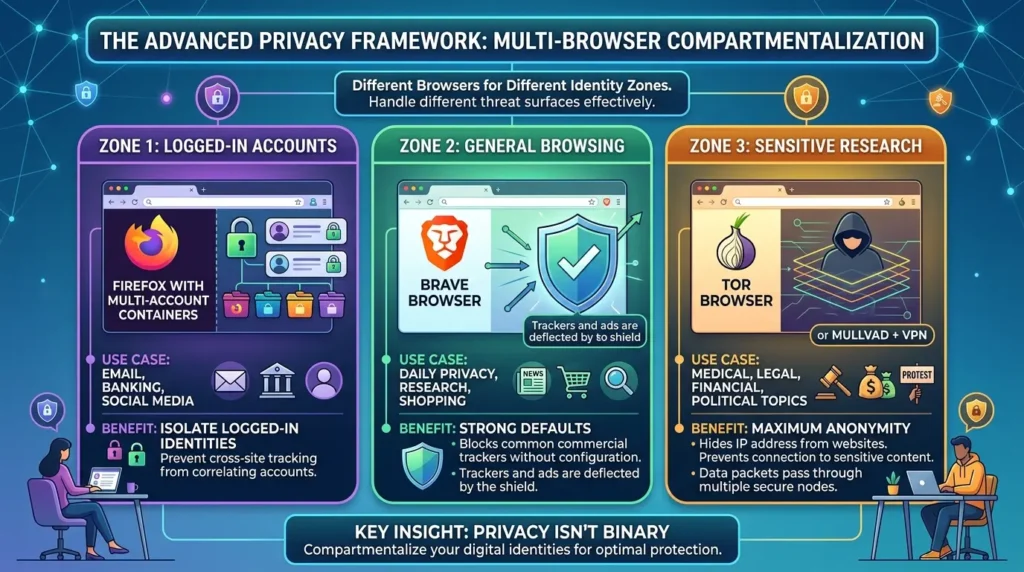
The concept is simple: different browsers for different identity zones. Your identity as “logged into your bank” and your identity as “doing research I don’t want linked to me” are different threat surfaces. Using a single browser for both means every piece of tracking infrastructure on the internet can potentially correlate them.
A practical three-browser stack:
- Zone 1 — Logged-in accounts (Firefox with Multi-Account Containers): Your email, banking, social media, sites where you’re unavoidably identified. Firefox’s Multi-Account Containers let you isolate different logged-in identities so cross-site tracking can’t correlate them with each other.
- Zone 2 — General browsing (Brave): Everything you want private but aren’t concerned about IP-level anonymity for. Brave’s defaults handle the vast majority of commercial tracking without configuration.
- Zone 3 — Sensitive research (Tor Browser or Mullvad + VPN): Anything where the content of the research itself is sensitive, medical, legal, financial, or political topics where being connected to that content represents risk.
The insight this framework produces: privacy isn’t binary. You don’t have one threat model, you have different contexts with different requirements, and a browser setup that acknowledges that is more effective than picking one “best” browser and using it for everything.
Five Browser Privacy Mistakes That Undo Everything Else
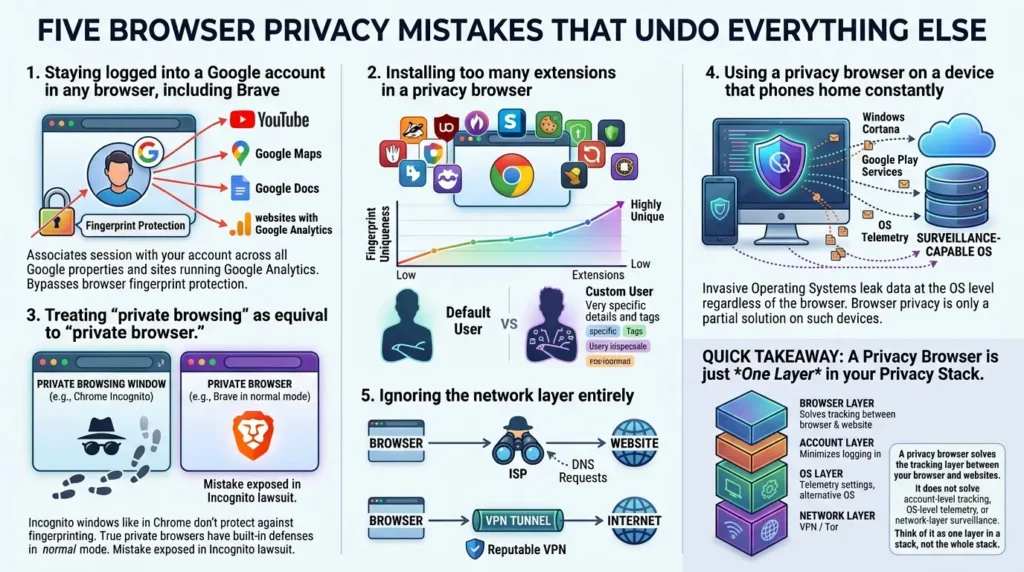
Staying logged into a Google account in any browser, including Brave
The moment you’re signed into Google anywhere, every Google-property you visit. YouTube, Google Maps, Google Docs, any website running Google Analytics, can associate that session with your account. Your browser’s fingerprint protection operates below the account layer. Logging into Google bypasses it.
Installing too many extensions in a privacy browser
Every extension modifies your browser’s fingerprint. A user with “Privacy Badger + uBlock Origin + HTTPS Everywhere + Cookie AutoDelete” has a significantly more unique fingerprint than a user with the browser’s defaults alone. For Tor Browser and Mullvad Browser specifically, installing any extension at all breaks the uniformity model that makes them effective.
Treating “private browsing” as equivalent to “private browser.”
A private browsing window in Chrome doesn’t protect against fingerprinting. A Brave window in normal mode does. These are not the same thing, and the confusion between them is exactly what the Google Incognito lawsuit exposed.
eUsing a privacy browser on a device that phones home constantly
Your privacy browser on a Windows device with Cortana enabled, or on a phone with Google Play Services running, operates in an environment that is leaking data at the OS level regardless of what the browser does. Browser-level privacy on a surveillance-capable OS is a partial solution.
Ignoring the network layer entirely
None of the browsers above, not even Tor, fully solves the IP-address problem without either Tor’s routing or a VPN. Your ISP can see every domain you visit at the DNS level. Combining a privacy browser with a reputable VPN closes a gap that browser-only setups leave open.
Quick takeaway: A privacy browser solves the tracking layer between your browser and websites. It does not solve account-level tracking, OS-level telemetry, or network-layer surveillance. Think of it as one layer in a stack, not the whole stack.
Before and After: What Actually Changes When You Switch
Before switching from Chrome
Every website you visit can place persistent tracking cookies. Your browsing fingerprint is collected by ad networks on most commercial sites. Google receives telemetry from Chrome itself. Your Incognito history was, until the settlement, still being aggregated somewhere on Google’s servers. Cross-site tracking means that the shoe you looked at on one retailer is following you to news sites, social media, and every other ad-supported property.
After switching to a configured privacy browsers
Third-party trackers are blocked at the network level before they execute. Your fingerprint either randomizes per session (Brave) or matches millions of identical users (Mullvad/Tor). Browser telemetry stops going anywhere. Cross-site tracking breaks because the correlation mechanism, consistent identifiers across sessions, no longer works.
What doesn’t change: websites you log into still know you. Your ISP still sees your DNS traffic unless you’ve set up DNS-over-HTTPS or a VPN. And your behavior on any site where you’re authenticated is visible to that site, regardless of which browser sent you there.
The Bottom Line
The Chrome Incognito settlement said something important: when a browser’s creator profits from knowing what you do online, “private mode” is a feature that costs the company money, and the internal communications showed what that tension looks like in practice. “Effectively a lie” wasn’t an external critic’s description. It was the product team’s own.
The five browsers in this guide were built without that tension. They weren’t designed by companies whose revenue depends on your attention. That doesn’t make them perfect, LibreWolf has a patching gap, Mullvad requires a VPN to be complete, Tor is genuinely slow, but they don’t have the structural problem Chrome does.
Start with Brave if you’re coming from Chrome. Move toward LibreWolf or Mullvad Browser as your privacy comfort level grows. Add Tor for the specific sessions where it matters most. And recognize that the browser is one layer, a critical one, in a stack that also includes your DNS settings, your VPN, and which accounts you stay logged into.
The browser can’t solve everything. But it’s the right place to start.
Frequently Asked Questions
Is Brave Browser actually private, or is it just Chrome with extra steps?
Brave is genuinely more private than Chrome out of the box. It’s built on Chromium (same engine) but strips Google’s tracking infrastructure and replaces it with Shields — a network-level blocker for ads, trackers, and fingerprinting scripts. The structural difference is that Brave’s revenue does not depend on profiling you, unlike Google’s. The honest caveat: Brave runs its own ad ecosystem and has some telemetry that can be disabled. It’s a significant privacy improvement over Chrome; it’s not a zero-telemetry, zero-ad-infrastructure tool the way LibreWolf is.
Does Incognito mode protect your privacy?
No, not meaningfully — and the Google Chrome Incognito lawsuit made this explicit. Incognito mode stops your device from storing local history. It does nothing about fingerprinting, third-party tracking scripts, your ISP seeing your DNS queries, or (until the settlement) Google’s own data collection through embedded Analytics and Ads scripts. The Chrome settlement required Google to update Incognito’s splash screen from “Now you can browse privately” to “you can browse more privately” — that weakened claim is more accurate.
Is Firefox better than Brave for privacy?
With manual configuration, hardened Firefox can match or exceed Brave’s privacy protection. Out of the box, Brave is significantly more private than stock Firefox without any configuration. The secondary reason to choose Firefox is its Gecko engine — it’s the only major privacy-capable browser not dependent on Google’s Chromium codebase, which matters for browser engine diversity and Google’s leverage over web standards.
What is LibreWolf and is it safe?
LibreWolf is a community-maintained Firefox fork with all privacy hardening pre-applied and Mozilla telemetry removed. It’s safe and well-regarded in the privacy community. The one genuine safety consideration: LibreWolf updates lag behind Firefox by days to weeks, meaning there can be a window where Firefox has patched a known vulnerability that LibreWolf hasn’t shipped yet. For most users this is an acceptable trade-off. For high-risk threat models where zero-day exploits are a real concern, the patching cadence matters.
What is Mullvad Browser and who should use it?
Mullvad Browser is a collaboration between the Tor Project and Mullvad VPN that applies Tor Browser’s anti-fingerprinting technology to normal, non-Tor browsing. It’s the best answer to the question “I want Tor-level fingerprint resistance without Tor’s speed penalty.” It’s best suited for users who already use a trusted VPN for network-layer protection and want the strongest available fingerprint defense for daily browsing. It’s not a Tor Browser replacement for high-anonymity use cases — it doesn’t route through the Tor network.
Should I use Tor Browser for everyday browsing?
For most people, no. Tor adds 200-500ms of latency per hop through its relay network, video streaming is impractical, and many major sites block Tor exit nodes. Tor is the right tool for specific sessions where anonymity is genuinely critical — sensitive research, communication with sources, accessing .onion services. For daily browsing with strong privacy, Brave or Mullvad Browser are more practical and nearly as effective against commercial tracking.
Does a privacy browser protect me from all tracking?
No. A privacy browser closes the tracking vectors between your browser and websites — cross-site trackers, fingerprinting scripts, cookie-based profiling. It does not protect against account-level tracking when you’re logged in, OS-level telemetry from your device, or your ISP seeing your DNS traffic. For comprehensive privacy, a browser is one layer in a stack that also includes DNS-over-HTTPS, a VPN, and thoughtful decisions about which accounts you stay logged into.
Can I use multiple privacy browsers at the same time?
Yes, and for serious privacy this is the recommended approach. Browser compartmentalization — using different browsers for different identity zones — is a genuine upgrade over any single-browser solution. A common setup: Brave for general daily browsing, Firefox with Multi-Account Containers for logged-in accounts that need isolation from each other, and Tor Browser for specific research sessions where IP-level anonymity matters. The browsers don’t interfere with each other, and each serves a different part of your threat model.







[…] Read the Full Article → […]