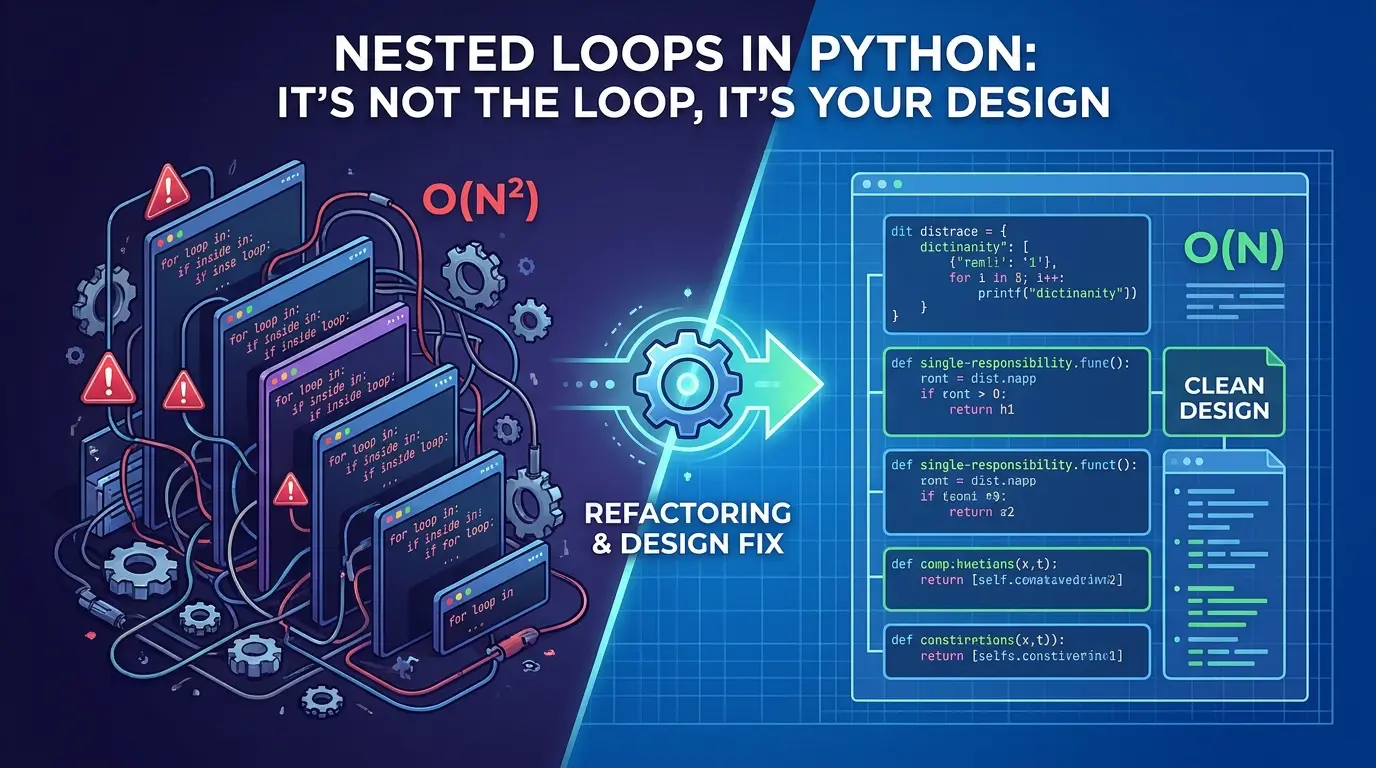

Open almost any codebase that’s been alive for more than a year, and you’ll find at least one function that looks like a staircase. A loop inside a loop, an if inside that, maybe another if tucked inside the if. It works. It produces the right numbers. And yet every time someone has to touch it, they read it three times, sigh, and add a comment that says // don’t touch this.
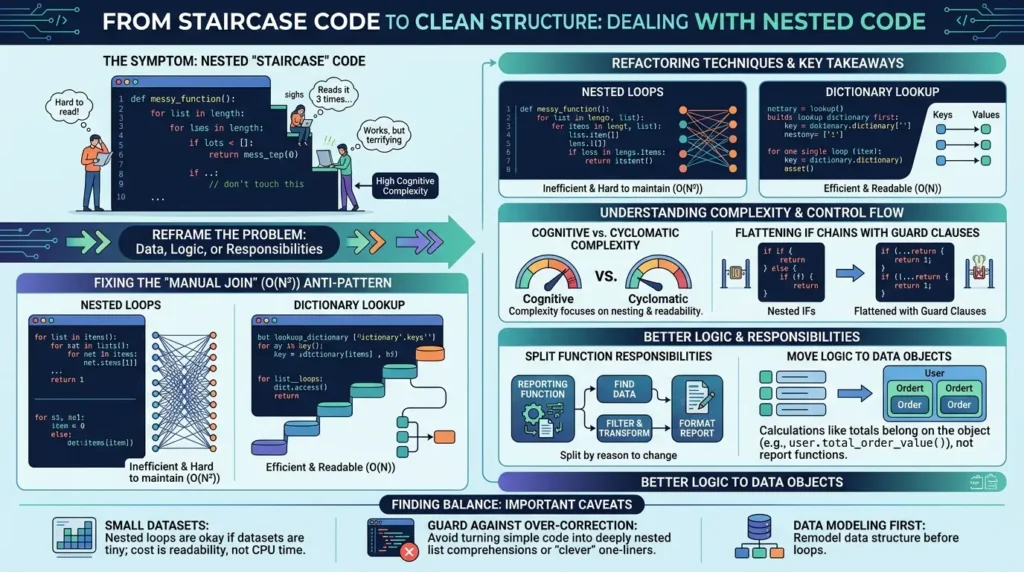
The instinct when you see this kind of code is to treat it as an algorithm problem. Surely there’s a smarter loop, a clever one-liner, a trick that collapses the whole thing into something tidy. Sometimes that’s true. But more often, the nesting isn’t the disease, it’s the rash. It’s a visible symptom of a deeper issue: the data isn’t modeled the way the problem actually works, the logic is sitting in the wrong place, or one function is quietly doing the job of four.
This guide walks through how to read that signal correctly. You’ll see the most common pattern that produces nested loops in Python (the “manual join”), how to fix it by remodeling your data instead of your loops, where logic should actually live, and how to tell the difference between code that’s mathematically complex and code that’s cognitively exhausting. Along the way, there’s a full before-and-after refactor you can follow step by step.
- Nested loops are usually a symptom of a data structure mismatch, not a sign you need a “smarter” algorithm.
- The “manual join” pattern (looping through one list to match items in another) is an O(N²) anti-pattern with a simple O(N) fix: build a dictionary lookup first.
- Low-level calculations (like totals) belong on the object they describe, not buried inside a reporting function.
- A function that finds data, filters it, transforms it, and formats it has too many responsibilities — split it by reason to change.
- Cognitive Complexity is a better guide than Cyclomatic Complexity for spotting code that’s hard to read because it penalizes nesting.
- Guard clauses (early returns) flatten nested
ifchains almost for free. - For small datasets, nested loops are harmless — the real cost is readability, not CPU time.
- Don’t over-correct into deeply nested comprehensions; “clever” one-liners can be just as hard to read as the loops they replace.
What Counts as a “Nested Loop,” and Why Do We End Up Writing Them?
A nested loop is exactly what it sounds like: one loop running entirely inside another, so that for every single item in the outer collection, you walk through some or all of the inner collection again. If the outer list has N items and the inner one has M, the body of that inner loop can run up to N × M times.
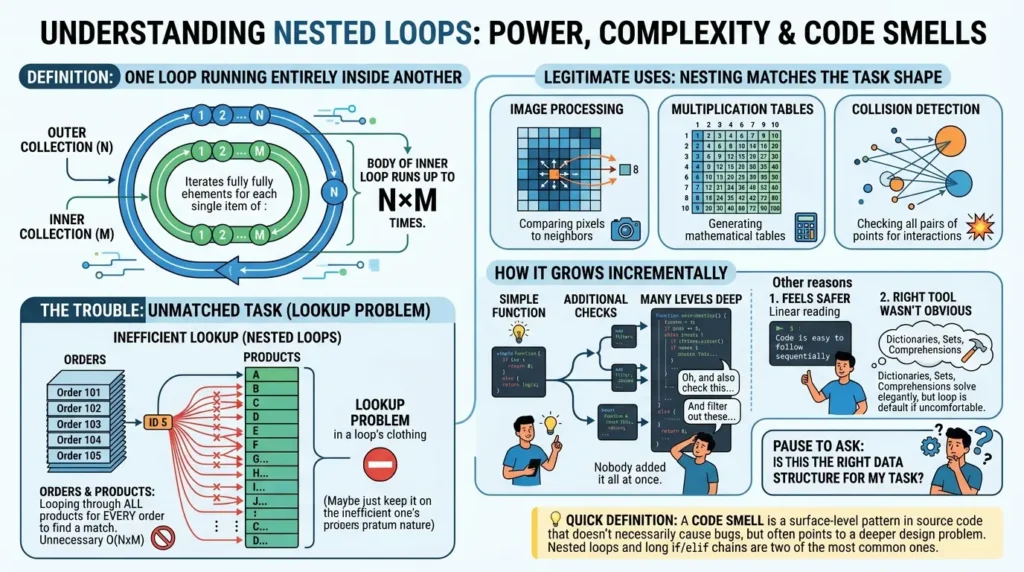
On its own, that’s not a crime. Plenty of legitimate problems, comparing every pixel in an image to its neighbors, generating a multiplication table, checking every pair of points for a collision, are naturally “for each X, for each Y” problems. The nesting matches the shape of the task.
The trouble starts when the nesting doesn’t match the task. A very common version looks like this: you have a list of orders and a list of products, and for every order you loop through every product to find the one whose ID matches. That’s not a problem that inherently requires comparing every order to every product, it’s a lookup problem wearing a loop’s clothing.
Most developers don’t write this on purpose. It tends to show up for a few practical reasons:
- It feels safer: A straightforward “for each, for each” reads linearly, even if it’s doing more work than necessary.
- It grows incrementally: A function starts simple, then someone adds “oh, and also check this,” then “and filter out these,” and a year later it’s five levels deep and nobody added it all at once.
- The right tool wasn’t obvious yet: Dictionaries, sets, and comprehensions solve these problems elegantly, but if you’re not yet comfortable reaching for them, a loop is the default.
None of these are character flaws, they’re just how code evolves when nobody pauses to ask “is this the right data structure for what I’m trying to do?”
In short: nested loops aren’t inherently bad, but unplanned, deeply nested loops almost always mean the data structure doesn’t match the problem.
The Manual Join Trap: When Your Loop Reinvents a Database
Here’s the pattern that shows up more than any other. You’ve got two collections, and you need to connect records from one to the other based on a shared ID.
total = 0
for order in orders:
    for product in products:
        if order.product_id == product.id:
            total += product.price * order.quantity
This code is correct. It will give you the right total. But look at what it’s actually doing: for every single order, it walks through the entire product catalog, comparing IDs one at a time until it finds a match. If you have 1,000 orders and 1,000 products, that’s up to a million comparisons just to answer a question a database would answer with a single JOIN.
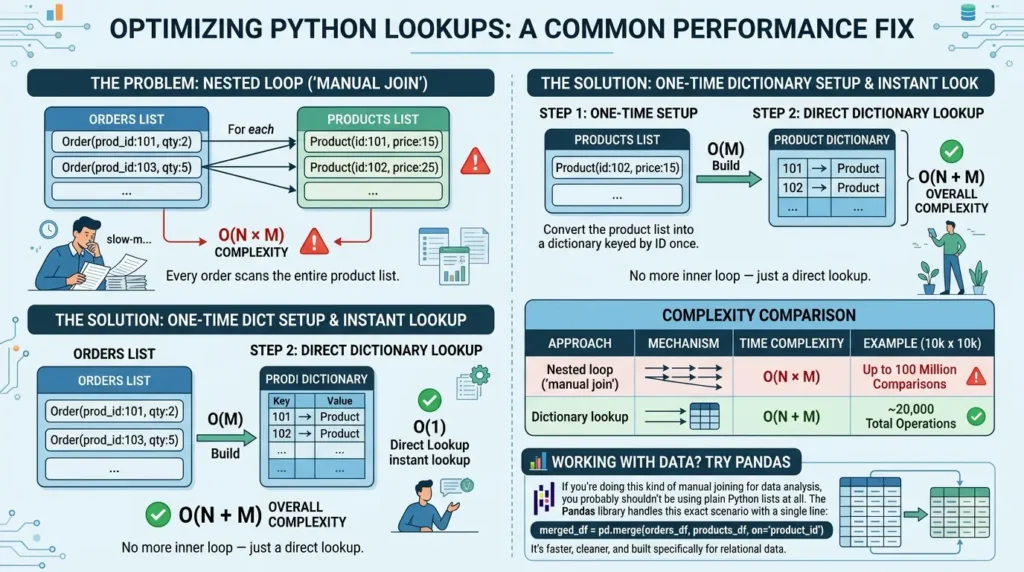
That’s exactly what this is, a manual, hand-rolled join, except slower and harder to read than the SQL equivalent. The fix isn’t to write the loop more cleverly. It’s to ask a different question: why am I searching at all?
If you convert the product list into a dictionary keyed by product ID once, every subsequent lookup becomes instant:
# One-time setup: build a lookup table
product_by_id = {product.id: product for product in products}

# No more inner loop — direct O(1) lookup
total = sum(
    product_by_id[order.product_id].price * order.quantity
    for order in orders
    if order.product_id in product_by_id
)
The nested loop is gone. There’s still iteration, you can’t process a list of orders without looking at each order, but the search inside the search has disappeared entirely.
| Approach | What happens | Complexity |
|---|---|---|
| Nested loop (“manual join”) | Every order scans the entire product list | O(N × M) |
| Dictionary lookup | Products are indexed once; each order does one direct lookup | O(N + M) |
To put that in perspective: with 10,000 orders and 10,000 products, the nested-loop version could perform up to 100 million comparisons. The dictionary version performs around 20,000 operations total. According to the Python wiki’s documentation on time complexity, dictionary lookups, insertions, and key checks are all average-case O(1), meaning the size of the dictionary barely affects how long a single lookup takes. The official Python documentation on dictionaries covers the same data structure if you want to go deeper on how they’re used.
merged_df = pd.merge(orders_df, products_df, on='product_id'). It’s faster, cleaner, and built specifically for relational data.
In short: if you’re looping through one collection to find matches in another, you’re probably reinventing a join, and a dictionary is almost always the fix.
Step-by-Step: Turning a Manual Join Into a Lookup Table
Here’s the general process for spotting and fixing this pattern, regardless of what your specific data looks like.
{item.key: item for item in collection}. dict.get() or an in check, so missing keys don’t raise errors. In short: this five-step process applies to almost any “search inside a search” pattern, not just orders and products.
Logic Belongs With the Data It Describes
Once the search problem is solved, there’s usually a second issue hiding nearby: calculations that don’t belong where they’re written.
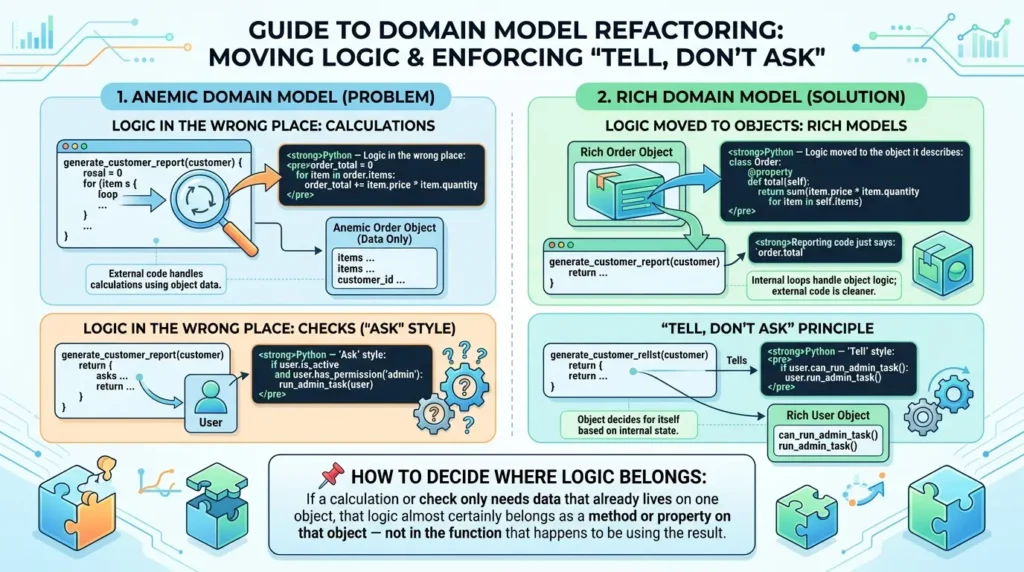
Picture a function called generate_customer_report. Its job is to summarize, for each customer, how much they’ve spent. Somewhere inside it, buried in a loop, is this:
order_total = 0
for item in order.items:
    order_total += item.price * item.quantity
Ask yourself: what does this calculation actually need? Just the order’s own items, their prices and quantities. It doesn’t need anything about the customer, the report, or any other order. That’s a strong signal this logic belongs on the order itself, not inside a function that’s supposed to be generating a report.
class Order:
    @property
    def total(self):
        return sum(
            item.price * item.quantity
            for item in self.items
        )
Now the reporting function just says order.total. The loop disappears from the report entirely, not because the iteration vanished, but because it moved to where it actually belongs.
This connects to a well-known anti-pattern: the Anemic Domain Model, where objects are little more than bags of fields (sometimes called DTOs, data transfer objects) with no behavior of their own. Every time you need to do something with that data, you write an external function that pulls the fields out and operates on them. Over time, those external functions accumulate, duplicate logic, and drift out of sync.
A closely related principle is Tell, Don’t Ask. Code that “asks” an object about its internal state and then branches on the answer.
if user.is_active and user.has_permission("admin"):
    run_admin_task(user)
can usually be rewritten so the object decides for itself:
if user.can_run_admin_task():
    user.run_admin_task()
The if statement doesn’t disappear, but it moves inside the object, where it has direct access to the fields it needs to evaluate. The outer code gets simpler with every method like this you add.
In short: when a calculation only touches one object’s own data, move it onto that object — the surrounding code gets simpler automatically.
One Job Per Function: Applying the Single Responsibility Principle to Loops
Even after fixing the data structure and relocating low-level logic, a function can still be doing too much. A classic offender looks like this, in plain English: “for each customer, find their orders, keep only the paid ones, apply a discount, total it up, and build a summary record.”
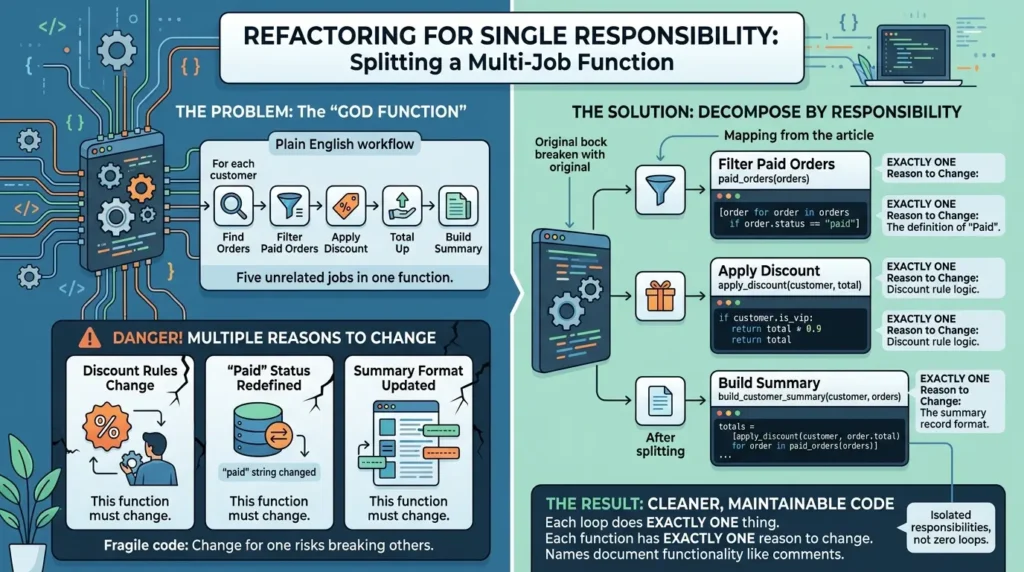
That’s five jobs in one function. The question worth asking is: what would force this function to change?
- If the discount rules change, this function changes.
- If “paid” gets stored differently, this function changes.
- If the summary format changes, this function changes.
A function with that many unrelated reasons to change is fragile, a change meant for one of those reasons risks breaking the others. The fix is to split by responsibility, giving each piece a name that documents what it does.
| Responsibility | Becomes |
|---|---|
| Filtering paid orders | paid_orders(orders) — a list comprehension |
| Applying a discount | apply_discount(customer, total) |
| Building the summary | build_customer_summary(customer, orders) |
| Generating the report | Loops over customers, calling the above for each |
Here’s what that looks like assembled:
def paid_orders(orders):
    return [order for order in orders if order.status == "paid"]

def apply_discount(customer, total):
    if customer.is_vip:
        return total * 0.9
    return total

def build_customer_summary(customer, orders):
    totals = [
        apply_discount(customer, order.total)
        for order in paid_orders(orders)
    ]

    return {
        "customer": customer.name,
        "order_count": len(totals),
        "total_spent": sum(totals) or 0,
    }
Notice that the loops haven’t disappeared, there’s still a comprehension inside paid_orders and another inside build_customer_summary. That’s fine. The goal was never “zero loops.” It was: each loop now does exactly one thing, and each function has exactly one reason to change. The names act almost like comments, telling you what’s happening without needing to read the implementation.
In short: splitting a function by “reasons to change” (not by line count) is what actually reduces complexity.
Cyclomatic Complexity vs. Cognitive Complexity: Why “Technically Simple” Code Can Still Be Hard to Read
Most discussions of code complexity reference Cyclomatic Complexity, a metric introduced by Thomas McCabe in 1976 that counts the number of independent paths through a function’s control flow.
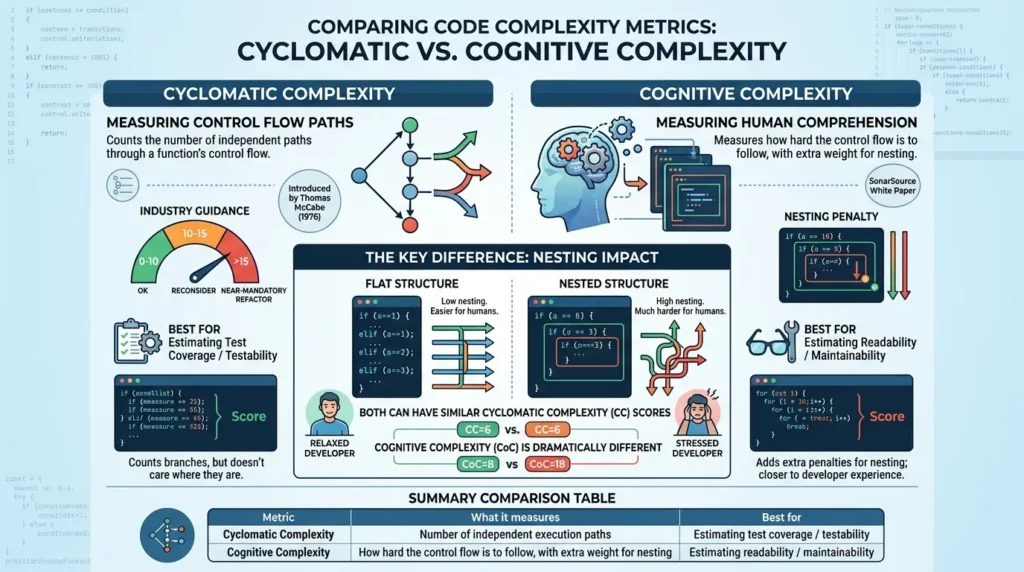
According to the background on cyclomatic complexity, a higher score means more branches to test, industry guidance commonly treats a score above 10 as the point where a function should be reconsidered, and scores above 15 as a near-mandatory refactor.
Here’s the catch: Cyclomatic Complexity counts branches, but it doesn’t care where they are. A function with ten if statements lined up one after another can score the same as a function with the same ten if statements nested four levels deep inside each other, even though the second one is dramatically harder for a human to hold in their head.
That’s the gap that Cognitive Complexity was designed to fill. As described in SonarSource’s white paper introducing the metric, Cognitive Complexity specifically adds extra penalties for nesting, a condition inside a loop inside another condition costs more than the same three structures placed side by side, because that’s how human comprehension actually works.
| Metric | What it measures | Best for |
|---|---|---|
| Cyclomatic Complexity | Number of independent execution paths in the code | Estimating test coverage and testability |
| Cognitive Complexity | How hard the control flow is to follow, with extra weight for nesting | Estimating readability and maintainability |
The practical takeaway: a flat if/elif/elif chain handling five cases and a triple-nested if handling three cases might post similar Cyclomatic Complexity scores, but the nested version will score noticeably worse on Cognitive Complexity, matching how most developers would describe their experience reading it.
In short: when choosing what to refactor first, prioritize nesting depth over raw branch count, that’s what Cognitive Complexity is measuring.
Guard Clauses: The Fastest Fix for Nested if Statements
Not every nesting problem involves loops. Long chains of if/else, sometimes nicknamed “arrow code” because of the shape the indentation makes, are just as common, and usually easier to fix.
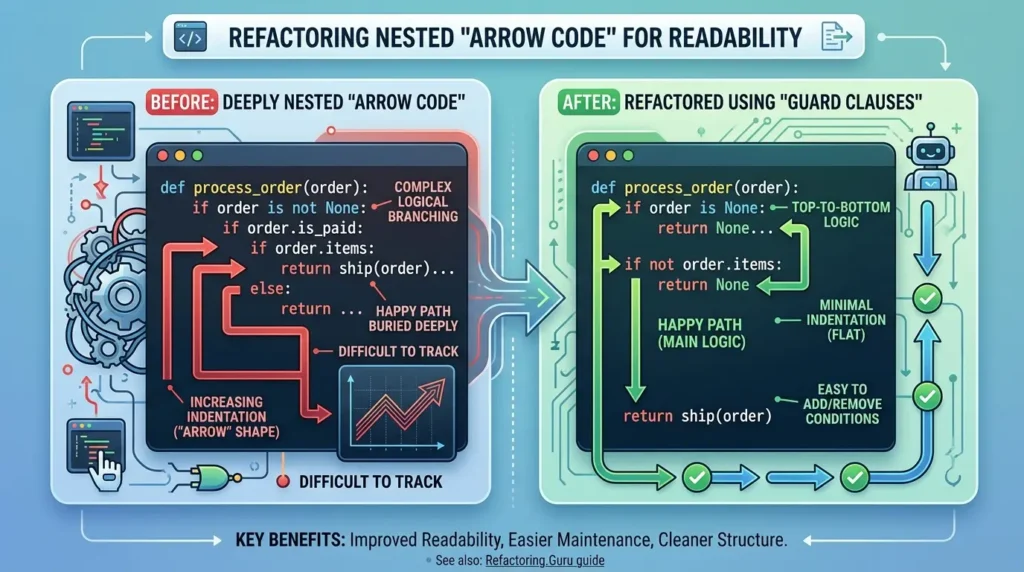
The technique is called a guard clause: instead of wrapping your “real” logic inside an if, check for the invalid or exceptional case first and exit immediately. The “happy path” then runs at the normal indentation level, with nothing wrapped around it.
See the before-and-after example
def process_order(order):
    if order is not None:
        if order.is_paid:
            if order.items:
                return ship(order)
            else:
                return None
        else:
            return None
    else:
return Nonedef process_order(order):
if order is None:
return None
if not order.is_paid:
return None
if not order.items:
return None
return ship(order)Both versions do exactly the same thing. But the second one reads top to bottom: rule out the cases you don’t care about, then handle the one you do. There’s nothing left to track across multiple levels of indentation.
For more on this specific technique, Refactoring.Guru’s guide to replacing nested conditionals with guard clauses walks through several variations of this pattern.
In short: when you see if wrapped in if wrapped in if, try inverting the conditions and returning early instead.
When Nested Loops Are Actually Fine (and When “Clever” Becomes a Problem)
Everything above might make it sound like nested loops are always wrong. They’re not, and treating every loop as an emergency leads to its own problems.
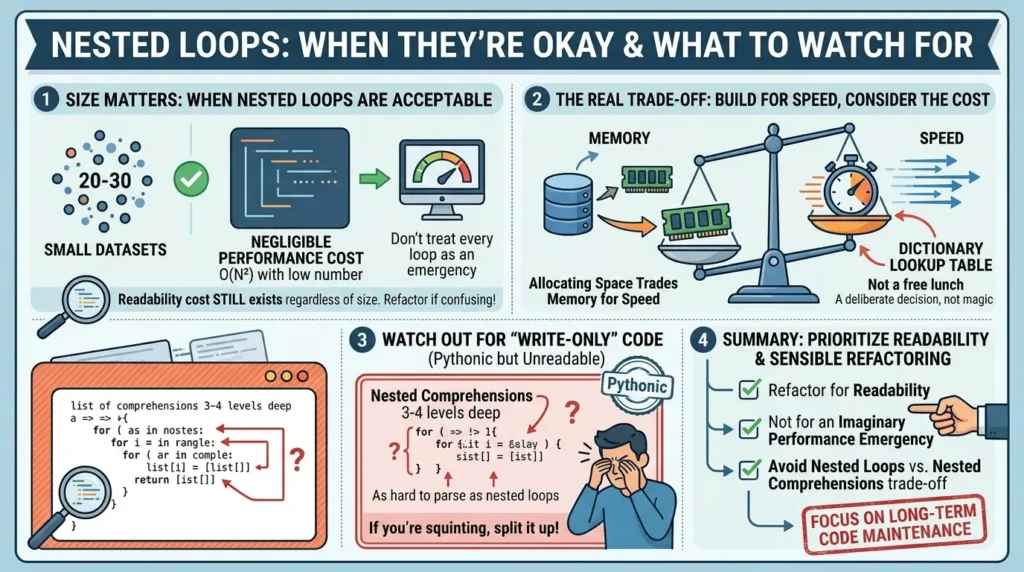
Size matters more than shape
If you’re iterating over 20 or 30 items, a nested loop that’s technically O(N²) is doing maybe 900 operations, a rounding error on any modern machine. The performance cost of leaving it alone is genuinely negligible.
The readability cost, on the other hand, doesn’t go away just because the dataset is small. That’s usually the better reason to refactor: not because it’s slow today, but because it’ll be confusing in six months regardless of size.
There’s a real trade-off, not a free lunch
Building a dictionary lookup table isn’t magic, it trades memory for speed. You’re allocating space to hold every item, indexed by key, so that future lookups skip the search. For the vast majority of applications this trade is obviously worth it. But “remodel the data” isn’t a costless instruction; it’s a deliberate trade-off, and it’s worth knowing you’re making it.
In short: refactor for readability, not for an imaginary performance emergency, and don’t trade nested loops for nested comprehensions.
Before vs. After: A Full Walkthrough
To see how these ideas compound, here’s a single function taken through all of the fixes above. The starting point generates a per-customer spending report, finding each customer’s orders, filtering paid ones, calculating totals, applying discounts, and building a summary, all in one place.
🔍 See the complete refactoring example
report = []

for customer in customers:
    customer_orders = []

    for order in orders:
        if order.customer_id == customer.id:
            customer_orders.append(order)

    total_spent = 0
    paid_count = 0

    for order in customer_orders:
        if order.status == "paid":
            order_total = 0

            for item in order.items:
                order_total += item.price * item.quantity

            if customer.is_vip:
                order_total *= 0.9

            total_spent += order_total
            paid_count += 1

    report.append({
        "customer": customer.name,
        "order_count": paid_count,
        "total_spent": total_spent,
})def group_orders_by_customer(
orders: list[Order]
) -> dict[int, list[Order]]:
grouped = {}
for order in orders:
grouped.setdefault(
order.customer_id,
[]
).append(order)
return grouped
def paid_orders(
orders: list[Order]
) -> list[Order]:
return [
order
for order in orders
if order.status == "paid"
]
def apply_discount(
customer: Customer,
total: float
) -> float:
return (
total * 0.9
if customer.is_vip
else total
)
class Order:
@property
def total(self) -> float:
return sum(
item.price * item.quantity
for item in self.items
)
def build_customer_summary(
customer: Customer,
orders: list[Order]
) -> dict:
totals = [
apply_discount(
customer,
order.total
)
for order in paid_orders(orders)
]
return {
"customer": customer.name,
"order_count": len(totals),
"total_spent": sum(totals) or 0,
}
orders_by_customer = (
group_orders_by_customer(orders)
)
report = [
build_customer_summary(
customer,
orders_by_customer.get(
customer.id,
[]
)
)
for customer in customers
]| Aspect | Before | After |
|---|---|---|
| Matching customers to orders | Nested loop, O(N × M) | Dictionary built once, O(N + M) |
| Order total calculation | Inline loop inside the report | order.total property |
| Responsibilities in one function | 4–5 (find, filter, total, discount, build) | 1 per function |
| Maximum nesting depth | 4 levels | 1–2 levels per function |
You can make group_orders_by_customer even cleaner using
collections.defaultdict. It automatically creates an empty
list for missing keys, eliminating the need for .setdefault().
from collections import defaultdict

grouped = defaultdict(list)

for order in orders:
    grouped[order.customer_id].append(order)
Notice the loops in the “After” version haven’t vanished, group_orders_by_customer still has one, the comprehensions still iterate. What’s gone is the nesting and the mixed responsibility. Each piece can now be tested, named, and changed independently.
In short: the goal of refactoring this kind of code is never “zero loops”, it’s loops that each do one understandable thing.
Quick Reference Checklist
- Am I searching for matches between two collections? → Build a dictionary first.
- Does this calculation only need data from one object? → Move it onto that object.
- Does this function find, filter, transform, and format data? → Split it by responsibility.
- Is the nesting deep, or just the branch count high? → Prioritize nesting (Cognitive Complexity) first.
- Is this a long if/else chain? → Try guard clauses or early returns.
- Is the dataset small and the loop rarely run? → It may be fine to leave alone.
- Did my “fix” turn into a 4-level-deep comprehension? → That’s the same problem in a new shape.
Conclusion: Writing Code for the Future
Refactoring nested loops is rarely just about chasing a performance boost or achieving an O(N) algorithmic ideal. While it is true that dictionary lookups are faster, in most modern applications, the hardware is fast enough that your original, nested code would likely have run without issue.
The real cost of nested loops is the tax they levy on your brain.
When you leave behind “staircase” indentation or manual “hand-rolled” joins, you aren’t just making the computer’s life easier, you are making the code hospitable for the next developer who has to touch it (including your future self). By modeling your data correctly, delegating behavior to the right objects, and flattening your logic with guard clauses, you transform code that feels like a cognitive burden into code that tells a clear, intentional story.
The next time you see a deep nest of loops in your Python codebase, don’t immediately reach for a “clever” one-liner or a complex list comprehension. Take a step back, look at the shape of your data, and ask yourself how you can make the logic as simple as the problem itself.
Good software design isn’t about writing code that works; it’s about writing code that is easy to understand, easy to test, and easy to change. Your team, and your future self, will thank you for it.